
Small business owners can now use AI for marketing operations. Once, those operations needed a dedicated team. Don’t confuse adoption with results, though.
It often comes down to how you use AI in marketing: the real gains start when you move beyond one-off prompts and build proper workflows.
We’ve got this AI marketing playbook to help small business owners get started with content, video, social, design, and email.
How to Use AI in Marketing as a Small Business
There are various applications of AI in business marketing for small businesses.
Given that 66% of small and medium-sized businesses already use AI for marketing in some form, you’re now thinking in terms of how you could use that’s specific to your business operations.
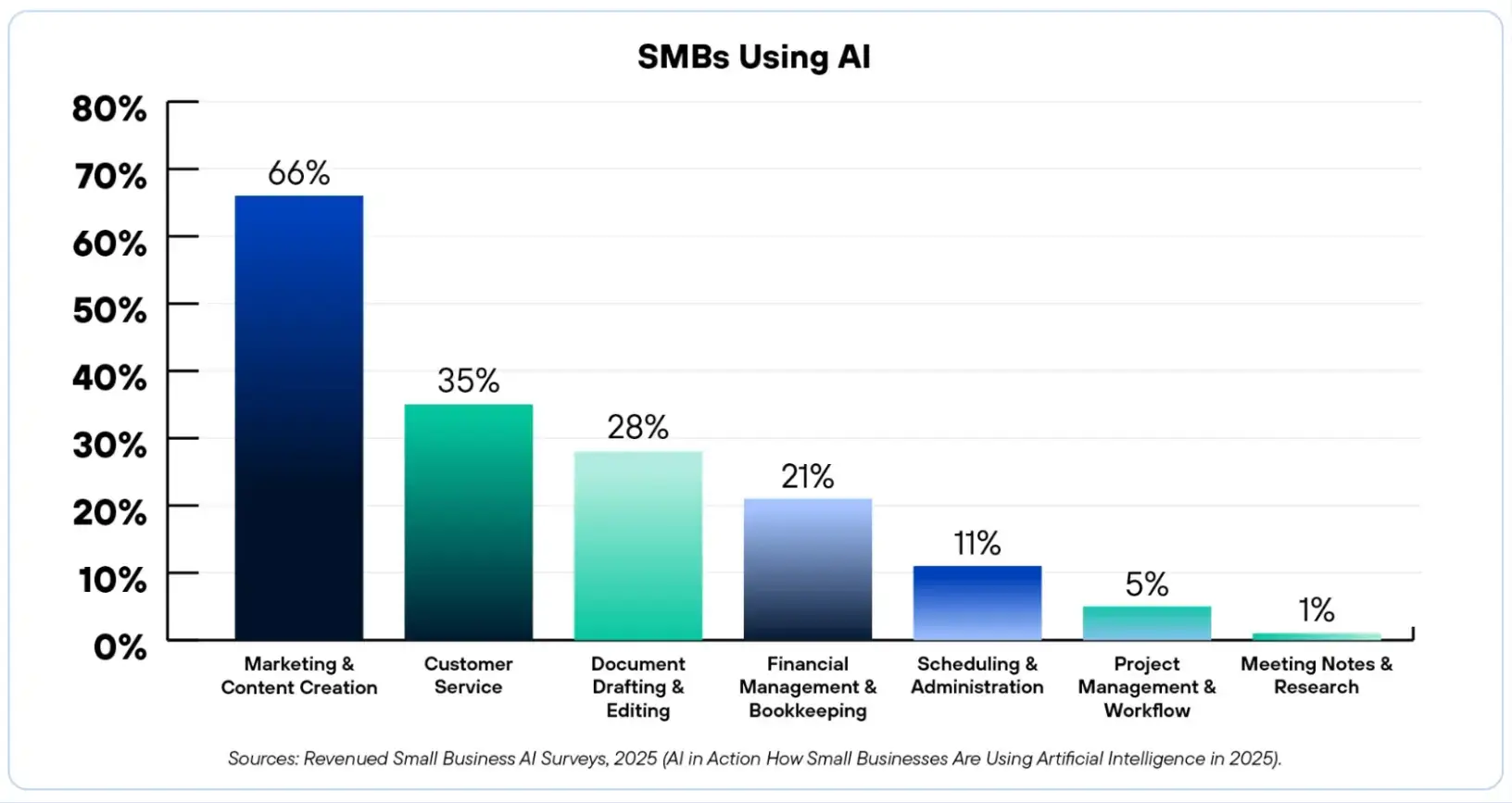
Source: Revenued
A simple rule is to pick the channel where you currently spend the most hours, and automate the most cluttered part of it first using the tech stack of your choice.
Using AI for Content Marketing
Creating written content is only the first step. Small businesses can also use AI-powered video tools to transform blog posts, articles, and marketing content into engaging videos for social media and websites.
Tools such as Clideo AI Video Editor help businesses quickly generate professional-looking videos, add captions, create visual storytelling, and repurpose existing content without requiring advanced editing skills.
A clear use case of AI in marketing creation includes turning what the business already knows into clearer, more useful marketing content.
This could be your customers’ questions, sales objections, product notes, reviews, onboarding emails, and even support conversations.
CoSchedule's State of AI in Marketing 2025 report revealed 84% of marketers agreed that AI improved the speed of their content delivery, saving an average of 5+ hours per week. If you’re looking to be a part of that group, start by using AI for content.
Turn Customer Questions into Marketing Content
Instead of simply asking AI to create content, feed the tool the necessary resources and information so that you can create original, useful content.
For example, a small accounting firm may use common client questions from discovery calls to create an article on things business owners should prepare before tax season.
You won’t be publishing the first output as-is, but AI at least helps get past the blank page and quickly create a working version that you can edit to make it sound more brand-specific.
Repurpose One Piece of Content Across Multiple Channels
AI integration for growth marketing is the first step, and it requires using tools like ChatGPT or Claude to extract impactful points from an article and format them as tailored variations for LinkedIn, Facebook, and Instagram.
Integrating such a workflow helps create content that serves as the source for a month-long content cycle. Make one version focused on a data-driven insight for LinkedIn, and the other in simple language for an email newsletter.
Such a multi-channel distribution ensures your small business thrives in terms of visibility without requiring the owner to log in to every platform daily.
But, here’s the catch you want to be aware of as shared by Brad Wolverton, Chronicle's Editor and HubSpot Alumni —
AI Video Marketing and Editing
Video is becoming a standard part of modern-day marketing assets as a 2026 WyzOwl report proves: 91% of businesses use video as a marketing tool.
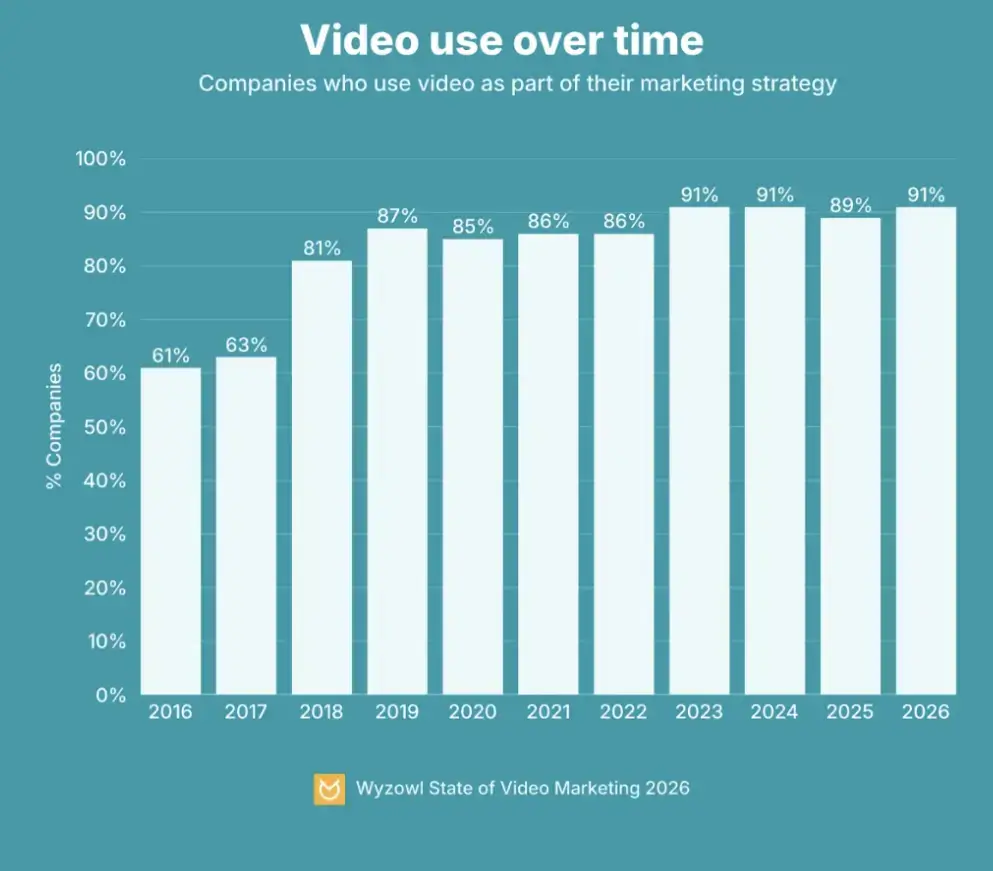
Source: Wyzowl
AI helps create videos without requiring traditional video production, which once required multiple cameras and an editing suite for a full-scale production.
Instead, AI tools let you create videos from existing material, such as a blog post or a customer FAQ.
AI-enabled Tools like Descript and HeyGen let you create professional video content from a script alone, without a camera and editor.
Here’s how you can shape it up.
Create Videos Without Filming
You could now create script-led content without arranging a full filming session.
As a small business owner, you’d benefit from videos to explain and clarify the business services or production. Think of a 60-second FAQ video or a short onboarding clip with a walkthrough that does not always require a camera crew.
Once the script is clear, AI video platforms can turn it into a narrated or avatar-led video. Tools such as HeyGen allow users to create avatar videos from text, scripts, or uploaded material, including lip-synced videos with generated speech.
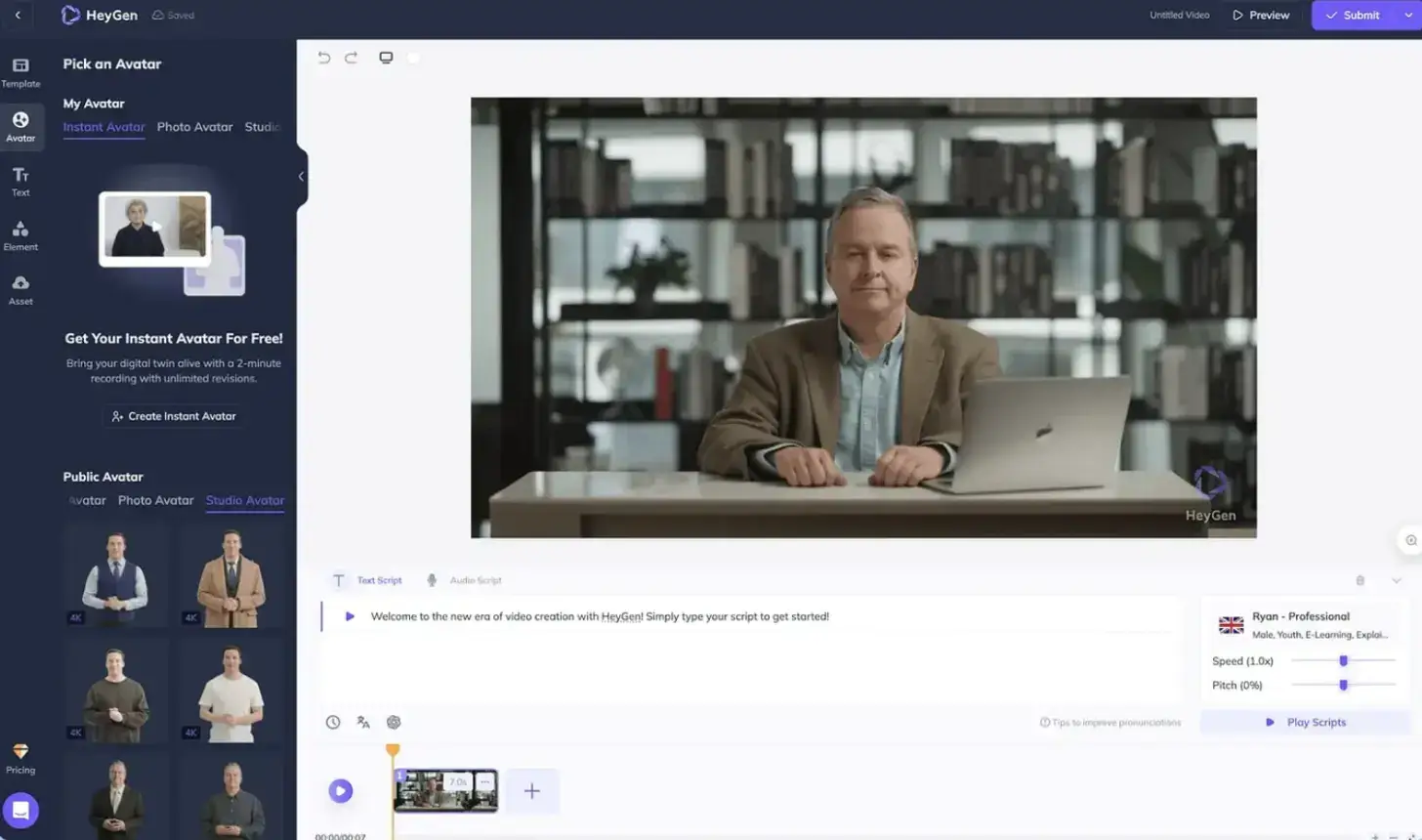
Source: GetApp
Pro tip: Drive engagement with personalized AI video marketing to make marketing efforts feel more tailored by having each video start with the viewer’s name.
Edit Videos Faster With Transcript-Based Editing
Another practical use case is transcript-based editing.
Instead of cutting video manually on a timeline, tools such as Descript let marketers edit audio and video by editing the transcript.
Descript makes editing video and audio just as simple as text, with features like transcription and captions.
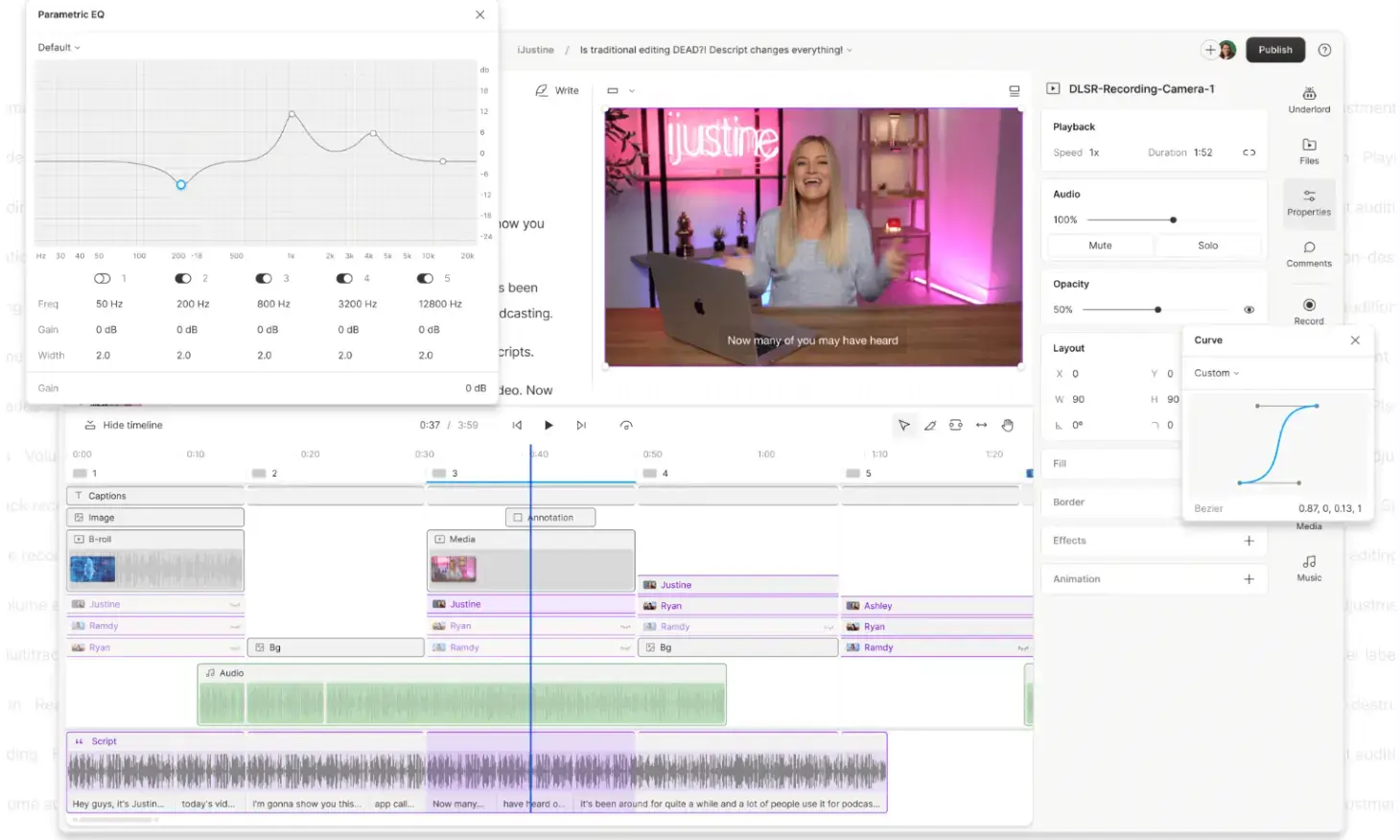
Source: descript
A simple workflow could look like this:
- Record a five-minute talking-head video answering one customer question.
- Transcribe the recording.
- Remove rambling sections or repeated points along with any unnecessary filler words.
- Add captions for social viewing.
- Create a strong 30–60 second highlight for short-form channels.
Here’s the use case: A family-run tamale shop in LA used ChatGPT to write a voiceover and free AI tools to edit a 46-second video in 10 minutes. The clip pulled 22 million views in three weeks and got featured in a ChatGPT Super Bowl 2026 ad.
Christian Ortega, the owner’s nephew, who used AI for this viral video, said this in a Business Insider interview —
AI for Social Media Monitoring and Brand Presence
A successful social media presence has two things: following a cadence for posting content and monitoring social media mentions (brand signaling).
For the latter, you’d want to be in the know about what is being said about your business by monitoring the content and context of comments on social platforms.
To get started, choose from the many available AI tools for social media that help handle the operational side of this at a scale one person can manage. And then:
Use AI to Monitor Brand Mentions
Another side of AI-powered marketing is having small businesses continuously monitor social media for mentions. Let the AI-backed social media monitoring tools track your brand name and products.
Here’s how it works: When a customer recommends the brand in a local Facebook group or complains about a delayed order on X, you get to learn what they think about your business. You may then even use AI tools to group those mentioned by intent to have sentiment analysis.
Build a Social Media Response Workflow
Once you have social media monitoring in place, plan how you’d respond to that information.
Here’s a simple response framework:
- Respond quickly when someone asks a direct question or reports a problem by tagging your brand.
- Escalate carefully if there’s any serious complaint or safety issue.
- Save for content ideas when the same question or objection comes up time and again.
AI in Graphic Design and Visual Marketing
AI is becoming a regular part of visual marketing, especially for small businesses that need more graphics.
A 2026 Clutch survey found that 88% of businesses use AI design tools in some capacity, but only 18% say those tools have reduced their need for designers.
As a small business owner, keeping output consistent across different assets requires adopting AI editing tools. You are not replacing visual strategy but using AI to help teams move faster on production and basic creative tasks.
The goal of using AI is to have a more consistent visual presence wherever the brand appears.
Build a Consistent Brand System First
To create a brand identity, build a brand theme in which colors repeat and visual consistency is maintained across platforms.
Platforms such as Venngage, Canva Magic Studio, Adobe Firefly, and Midjourney support visual consistency across social media graphics.
What you’ll have with this is visual consistency, where each social creative or banner uses the same colors and fonts. It frees you to reach out to a freelance designer whenever you need to, while still avoiding one of the most common visual marketing problems: posts that look like they came from a different company.
Expand Product Photography With AI
Small e-commerce brands can use AI to create more visual variety from a limited set of product images. A clean product image is perfect for a starter.
You don’t need to plan a full photo shoot for every campaign, but simply start with a clean product image and use AI to explore different lifestyle contexts.
For example, a candle shown on the bedside table or a water bottle on a hiking trail. These variations support product pages and even email campaigns to run seasonal promotions.
But AI-generated product visuals need careful review. Product shots still struggle with exact details such as logos, packaging text, labels, proportions, textures, and shadows.
AI in Email Marketing
In email marketing, AI helps small businesses connect customer behavior with more relevant messages.
Essentially, you are sending promotions, but AI helps filter the audience and drive personalization at scale so that the same message does not reach everyone.
Instead, tools help with personalization at scale as you look to build and nurture email lists. The value of AI is that it helps turn customer data into usable segments for developing different messaging variations or triggering automated follow-ups.
Use it to support cold outreach by pairing it with the right cold email software, keeping the prospecting list separate from warm subscriber communication. Still, personalization remains intact.
Use AI to Segment Customers by Behavior
AI can help with segmentation and even the prediction and timing, while you, as a small business owner, decide on the strategy and offer.
The same campaign won’t reach every subscriber, but the customer behavior creates a segment based on the stage of the funnel they are in.
Some common categories include first-time buyers, repeat purchasers, inactive subscribers, recent browsers, and so on.
Different behavior should lead to different messages. A VIP offer may make sense for high spenders, while a lapsed buyer may need a “we miss you” message with a clear reason to return.
Both HubSpot and Mailchimp generate and test subject line variants against your past sent data. They learn what your specific audience responds to, which is more useful than generic best practice advice.
Where to Go from Here
It all starts with auditing your week and finding the marketing task you spend the most hours on, but produce the least output from. The task varies widely depending on the space you operate in and the industry you serve.
While the core remains in content production, the platform changes, for e-commerce, it's email and ad creative, but service businesses need to ramp up their social posting and lead follow-up.
Start with one workflow and build it properly with AI so it runs without you. Then move to the next. A few of the examples above also show how the owners who get results with AI are those who built two or three systems that quietly handle the work while they focus on what only they can do.
FAQs
What is AI marketing for small businesses?
AI marketing for small businesses involves a strategic shift in how a business handles the repetitive parts of marketing activities.
What are the best AI marketing tools for small businesses?
There are plenty of options when you’re looking for the best AI marketing tool, but the right tool is the one that cost-effectively solves your problem. If content creation and design are the challenge, then you’d benefit from using Claude and Canva.
Can small businesses use AI marketing on a limited budget?
Absolutely! Almost every major platform has a free tier that's enough to get started. You may then add paid features only when you reach a real limit or are confident enough to extract real value from them.
How can AI improve social media marketing for small businesses?
AI improves your social media marketing game by automating different aspects of operations and reducing the need for manual efforts. Some examples include writing captions, creating designs, and monitoring brand mentions.
Which marketing tasks should small businesses automate first with AI?
Start with whatever consumes your week. For most owners, that's writing social posts and following up on emails. Get those running on autopilot first, then move on to ad creative and content repurposing.
