

A one-second delay in page load time can lead to 11% fewer page views, making site speed optimization essential from a website performance perspective.
Front-end performance should be a priority when launching a website, as it creates a user’s first impression. If they encounter a clunky page load, it can quickly lead them to question the quality of the business's offering.
In this article:
- The Importance of Front-End Performance
- 7 Front-End Changes to Optimize Performance
- Making Small Changes That Create Big Wins

Contrary to what many may think, improving the speed of a website doesn’t have to mean creating a new one from scratch. There is a range of strategies that can be implemented to avoid delays and keep users engaged from the outset.
In this article, we’ll discuss seven techniques that can be implemented to improve front-end performance without undergoing a complete rewrite.
The Importance of Front-End Performance
Website speed is among the top 20 ranking factors on Google. This means that a fast-loading website isn’t just a luxury for users, but a necessity for businesses that want to increase their search visibility.
Ranking well can be the difference between attracting more traffic from being visible at the top of search results and becoming practically invisible against competitors.
As well as improving SEO efforts, page load speed is a huge part of the user experience.
If a user arrives at a website and it feels slow to load or doesn’t immediately display all of the page elements, it can leave them clicking straight off and heading to a competitor's site.
By creating a seamless user experience that helps a website visitor achieve exactly what they set out to do, they are much more likely to return in the future and view the business as a reputable one.
Since people use different devices to browse the web, whether that be a desktop computer, laptop, mobile phone, or tablet, it is essential not to neglect any of these when testing out the performance of a website, ensuring that everyone gets a positive experience.
7 Front-End Changes To Optimize Performance

To improve site speeds and create a more efficient user experience, here are seven changes that can be made without undergoing a full rewrite:
1. Lazy loading
Lazy loading is a technique used by developers to load only the part of a webpage that is immediately visible to the user. It will then only load images and videos when they are needed, speeding up page load times since it doesn’t have to load everything up front.
This strategy is particularly useful on long web pages that contain a large number of media elements. As the user scrolls down the page, the browser will load each element as it is reached.
To implement lazy loading, a simple loading="lazy" HTML tag can be added which tells the browser the element does not need to be loaded until the user is about to scroll far enough down the page.
2. Remove unused CSS
CSS (cascading style sheets) is the language developers use to control the appearance of HTML elements.
Unnecessary CSS is one of the most common contributors to a slow-loading web page. If a stylesheet has been applied to a website but contains unused styles, it can have a knock-on effect on the way a page loads.
To identify unused CSS on a page, Chrome DevTools can be used to show how much CSS is used in each file that a browser needs to load.
The Coverage tab provides a line-by-line breakdown, and any unused code is highlighted in red.
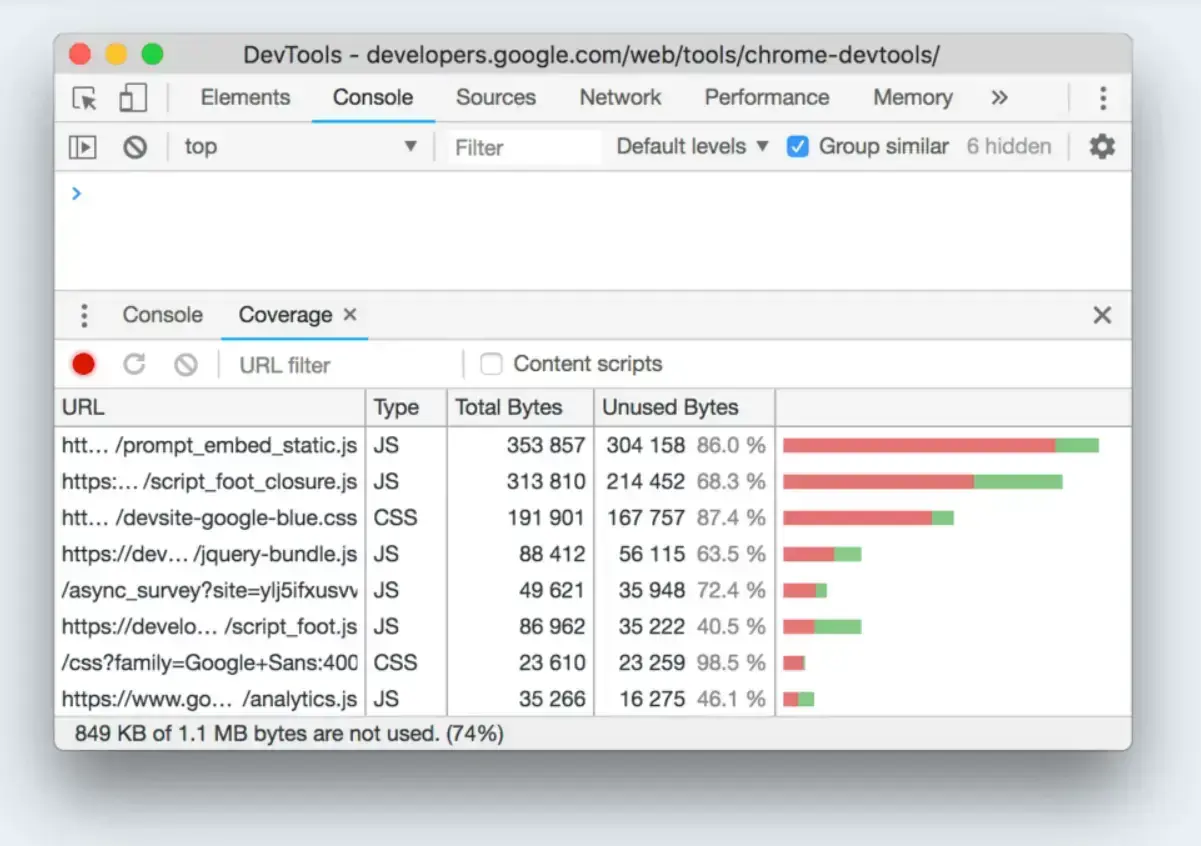
Source: Chrome DevTools
3. Use AI tools to improve layout
Having the option to build a web app with AI has completely changed the development landscape. In fact, 77% of developers feel good about using AI tools in their workflow.
Being able to produce fully responsive websites and apps in a fraction of the time, and without having as much development knowledge, means smaller businesses with fewer resources and budget can produce more advanced interfaces.
In addition to making it easier to produce quality websites, the use of AI tools can also help improve site speed. Since the web pages are built off existing templates, they will have already been optimized.
4. Code splitting
Code splitting is a technique that turns JavaScript bundles into smaller ones, so that instead of loading all of the code at once, only the necessary parts are loaded. This means that page load times are improved.
An example of code splitting would be separating the admin panel. Since it does not need to be loaded every time a user accesses the website, keeping it separate will mean it is only loaded when needed by those who can access it.
5. Switch to system fonts
When it comes to the design of a website, many businesses are drawn to the opportunity to create custom fonts. Although they may look great, these can hinder the page load speeds.
Instead, using system fonts will help a web page load faster. Since they are likely to be already built into a user’s device as a standard font, they don’t need to download and will therefore appear faster.

Source: Google Fonts
Typically, a desktop will have around 100 system fonts, but more advanced operating systems, such as macOS, can have up to 1,000.
6. Enable browser caching
For users revisiting a site, having browser caching enabled will mean that the website files have already been downloaded, so they don’t need to be downloaded again.
To activate this, a website needs to set up its web hosting in a way that defines how long a browser should store each file after it has been downloaded.
7. Compress images
Image-heavy web pages can be some of the slowest to load. Optimizing image sizes before uploading them can increase page load time by 1.54 seconds.
Using tools like TinyPNG can compress an image without visibly making it lose quality, providing the same visual experience without the delays.
Making Small Changes that Create Big Wins
Improving performance doesn’t have to require rebuilding an entire website. Small changes can make a big difference.
Since the front-end of a website is the part that users arrive at and engage with, ensuring it is fast to load is an instant win that can help people access what they need without frustrating delays.
From implementing lazy loading on image-heavy web pages to removing unused CSS, there are various ways to improve page load speed and provide a more efficient user experience.
These strategies are straightforward to implement and can be executed in stages, minimizing disruptions to everyday workflows and the web team's workload.
FAQ: Front-End Performance
Can I improve my website's front-end performance without a complete rebuild?
Absolutely! This article highlights seven effective front-end changes, such as lazy loading, removing unused CSS, and image compression, that can significantly boost your website's speed and user experience without requiring a complete rewrite.
What is lazy loading, and how does it help front-end performance?
Lazy loading defers the loading of non-critical resources (like images and videos) until they are actually needed by the user. This speeds up initial page load times by only loading visible content.
How does unused CSS affect website speed?
Unused CSS refers to styling rules that are loaded with your website but are not actively applied to any elements. These unnecessary files increase the amount of data a browser needs to download, slowing down your website.
How can I optimize images for better front-end performance?
Compressing images before uploading them is a key optimization. Tools like TinyPNG can reduce file sizes without noticeable quality loss, leading to faster page load times.
What role do system fonts play in front-end performance?
Using system fonts instead of custom fonts significantly improves performance. System fonts are already built into users' devices, meaning they don't need to be downloaded.