Small businesses rarely grow in perfect conditions. Budgets stay tight, teams stay small, and every new idea has to fight for time, money, and attention.
A company may need a booking page, product catalog, customer portal, event form, internal dashboard, or simple online store, but traditional development can feel too slow or too expensive.
No-code website apps have become useful because small businesses can build, test, and improve digital tools without waiting months for a full technical project.
This shift matters even more when data and daily operations are connected.
A business exploring Snowflake Implementation may also need simple website apps that collect customer requests, organize leads, display reports, or connect basic workflows to a larger data strategy.
No-code tools can help turn that heavy technical direction into practical front-end experiences. Instead of keeping digital plans locked inside spreadsheets and meetings, a small company can make them visible, usable, and easier to test.
Why Small Businesses Are Turning to No-Code Apps
No-code website apps are not magic buttons. Some online ads make them sound like a toaster that prints profit. Real business is not that kind.
What No-Code Website Apps Actually Are
Still, no-code platforms solve a real problem: small teams need speed.
This expert definition supports the main point clearly: no-code matters because it gives non-technical teams a practical way to build useful digital tools faster, without waiting for every small change to become a full development task.
For businesses still choosing the right setup, our guide on what to expect from a website builder explains why visual tools help non-technical users create websites faster and manage updates with less friction.
Why Speed Matters for Small Teams
A local service provider may need online appointment scheduling. A small retailer may need a landing page for seasonal offers. A consultant may need a client intake form. A fitness studio may need a membership page.
In the past, each of these ideas could require designers, developers, hosting setup, testing, and several rounds of edits. Now, a basic version can often be built and launched much faster.
Google Cloud describes no-code tools as platforms that let users create software and apps without coding experience through visual tools, drag-and-drop interfaces, forms, and menus.
This supports the article’s point that no-code is useful when small teams need practical digital tools without a full development cycle.

Source: Unsplash
The biggest advantage is control. Business owners and managers can adjust content, change images, update offers, and test new pages without sending every small task to a developer.
That does not make professional developers unnecessary. It simply means routine digital changes no longer have to move at the speed of a sleepy snail wearing office shoes.
How No-Code Apps Accelerate Business Growth
Faster Launches and Faster Learning
Growth usually depends on learning what customers actually want. A business can spend weeks discussing the perfect page, but real visitors will show the truth quickly.
No-code apps allow small businesses to launch earlier, collect feedback, and adjust. This matters because small businesses cannot afford endless guessing.
A landing page can test demand before a full-service launch. A simple product page can reveal which offer gets clicks. A booking form can show whether customers understand pricing, timing, and service details.
No-Code Website Apps Help Small Businesses Grow Through:
- Quicker Market Testing: New offers, pages, and service ideas can be tested before large budgets are committed.
- Lower Development Costs: Basic apps and pages can be created without hiring a full technical team for every update.
- Easier Updates and Content Changes: Text, images, forms, and calls to action can be edited when customer behavior changes.
- Shorter Customer Feedback Loops: Visitor actions, form responses, and page performance can guide the next improvement.
This approach does not remove risk, but it makes risk smaller. A weak idea can be corrected early. A strong idea can receive more attention before the market moves on.
The Best No-Code Use Cases for Small Businesses
No-code website apps work best when the goal is clear and the process is not too complex. A small business should start with practical use cases rather than trying to rebuild an entire company system overnight.
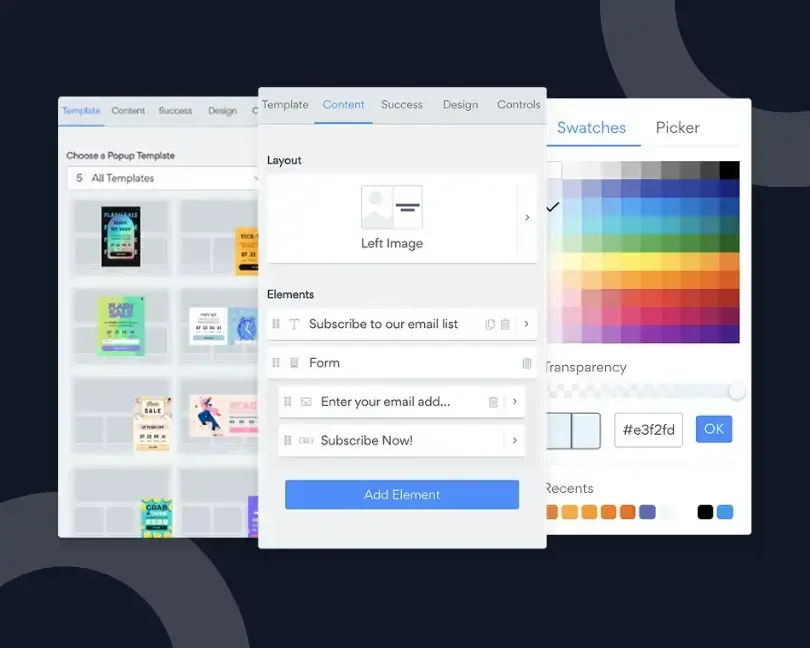
This article is also a useful example of how custom forms can collect visitor details, project requests, feedback, or signups without requiring code.
Useful No-Code Projects Often Include:
- Lead Capture and Contact Forms: Simple forms can collect inquiries, project details, or newsletter signups.
- Appointment Booking and Scheduling: Customers can choose time slots without long email chains.
- Product and Service Catalogs: Clear pages can show offers, pricing ranges, photos, and basic details.
- Customer Support and Self-Service Hubs: FAQ pages, request forms, and help sections can reduce repeated questions.
These projects are realistic because they solve visible problems. A business can measure whether inquiries increase, support requests become clearer, or bookings take less manual effort.
Real-World Examples of No-Code in Action
Real examples make the value of no-code website apps much easier to understand.
A small bakery can create an online order form for holiday cakes without building a full e-commerce store. A local repair service can add a booking page so customers can choose a time instead of calling during business hours.
For small online stores, our Shopify guide shows how e-commerce tools can support discounts, order tracking, inventory control, and simple selling workflows.
A fitness coach can launch a simple membership page with training plans, payment links, and client forms. Even a small B2B company can use no-code tools to collect leads, show service packages, or build a basic customer dashboard.
These examples prove that no-code works best when it solves one clear problem first, then grows step by step with the business.
Popular No-Code Platforms and What They Do Best
Several no-code tools have become popular because each one solves a slightly different business task.
Webflow is often used for polished marketing websites and landing pages. Wix and Squarespace work well for simple business sites, portfolios, and service pages.

Source: Unsplash
Shopify is a common choice for small online stores, while Bubble can help create more complex web apps with user accounts and workflows.
Softr and Glide are useful when a business wants to turn spreadsheet-style data into client portals, directories, or internal apps.
The best tool depends on the goal: a booking page, catalog, dashboard, store, or customer portal should not all be built with the same mindset.
When No-Code Is the Right Choice (And When It Isn't)
No-code tools are powerful, but not every project should stay no-code forever.
A growing business may eventually need custom integrations, stronger security, advanced performance, complex databases, or unique user permissions. At that stage, professional development becomes more important.
The smarter path is not “no-code versus code.” It is choosing the right tool for the current stage.
For small businesses, this means no-code should not live in chaos. It works best when quick experiments still follow basic rules for security, ownership, and long-term maintenance.
No-code can help validate ideas and support early growth. Custom development can take over when the business model, customer base, and technical needs become more demanding.
McKinsey also notes that low-code and no-code work best when business and IT teams cooperate, because this approach can turn informal “shadow IT” into a more controlled source of innovation and speed.
Security also deserves attention. Any website app collecting customer information must be set up responsibly. Forms, payment tools, user accounts, and data storage should be checked carefully. Fast does not mean careless.
Security Considerations for No-Code Apps
Security should not be treated as a boring checkbox at the end of a no-code project.
Before launching any no-code website app, a business should ask where customer data is stored, who can access it, and whether the platform supports secure logins, backups, and permission settings.
For security, NIST’s Small Business Cybersecurity Corner is a strong reference because it gathers cybersecurity resources designed specifically for small businesses and practical risk reduction.
Forms that collect names, emails, payments, or private requests need extra care. It is also important to check whether third-party integrations are reliable, because one weak connection can create problems for the whole workflow.
No-code makes building faster, but safe growth still needs clear rules, regular checks, and careful platform choices.
Common No-Code Mistakes to Avoid
Small businesses should not treat no-code website apps as a shortcut for skipping planning. One common mistake is building too many pages or features at once, which turns a simple tool into a messy digital drawer.
Another issue is ignoring mobile users, even though many customers open booking forms, catalogs, and support pages from phones.
Weak security settings can also create problems when forms collect names, emails, payments, or customer requests.
Businesses should also avoid launching an app and never checking the results. No-code works best when each page has a clear goal, a clean structure, and regular updates based on real customer behavior.
Conclusion: Growth Comes From Moving Earlier
No-code website apps help small businesses grow faster because they reduce waiting.
A useful idea can become a working page. A customer question can become a form. A manual task can become a simple workflow. That movement gives small businesses a better chance to compete with larger companies.

Source: Unsplash
The real value is not only speed. It is confidence built through action.
Instead of guessing for months, a small business can publish, observe, adjust, and improve. Growth often comes from that rhythm.
No-code does not replace strategy, but it gives strategy a place to breathe, test itself, and become real before the opportunity gets cold.
Frequently Asked Questions
What are no-code website apps?
No-code website apps are digital tools that can be built without traditional coding. They help small businesses create forms, booking pages, catalogs, dashboards, and simple online stores faster.
Are no-code apps good for small businesses?
Yes, no-code apps are useful for small businesses because they reduce launch time, lower basic development costs, and make it easier to test new ideas before investing more money.
Can no-code tools replace developers?
Not completely. No-code tools work well for simple and mid-level projects, but complex systems, advanced integrations, and stronger security often require professional development.
What can a small business build with no-code tools?
A small business can build lead capture pages, customer forms, appointment booking systems, product catalogs, FAQ hubs, and basic workflow tools.
Is no-code safe for customer data?
No-code tools can be safe when configured properly. Any app that collects personal data, payments, or user accounts should use trusted platforms, secure settings, and careful access control.

Author Bio
Alexander Matveev is a coding expert with a strong background in software development and digital solutions. Known for turning complex technical concepts into practical, reliable, and user-friendly tools for modern businesses.