Website visitors expect fast answers.
If they can’t quickly find pricing information, product details, or support, there’s a high chance they’ll leave your website and move to a competitor. Modern customers value convenience, speed, and real-time communication more than ever.
That’s where live chat becomes a powerful conversion optimization tool.
A well-implemented live chat system helps businesses engage visitors instantly, reduce bounce rates, qualify leads, recover abandoned carts, and improve customer experience.
Whether you run an e-commerce store, SaaS platform, agency, or local business website, live chat can directly impact your sales funnel and customer retention strategy.
Unlike traditional email support, live chat creates immediate interaction during the customer decision-making process. This allows businesses to solve objections faster and guide users toward conversions in real time.
In this guide, you’ll learn:
- How live chat works
- Different types of live chat solutions
- How to install live chat on any website
- The best live chat software tools
- Conversion-focused live chat best practices
- Common mistakes to avoid
What Is Live Chat?
Live chat is a real-time messaging feature that allows website visitors to communicate directly with a business through a chat widget placed on the website.
How Live Chat Works
The widget usually appears in the bottom corner of a webpage and enables users to:
- Ask questions instantly
- Get product recommendations
- Contact support teams
- Resolve purchase concerns
- Request demos or consultations
Key Features of Modern Live Chat Platforms
Today’s live chat platforms often include:
- AI chatbots
- Automated workflows
- CRM integration
- Visitor tracking
- Lead capture forms
- Sales automation
This makes live chat valuable not only for customer support, but also for lead generation and conversion rate optimization.
Why Your Website Needs Live Chat
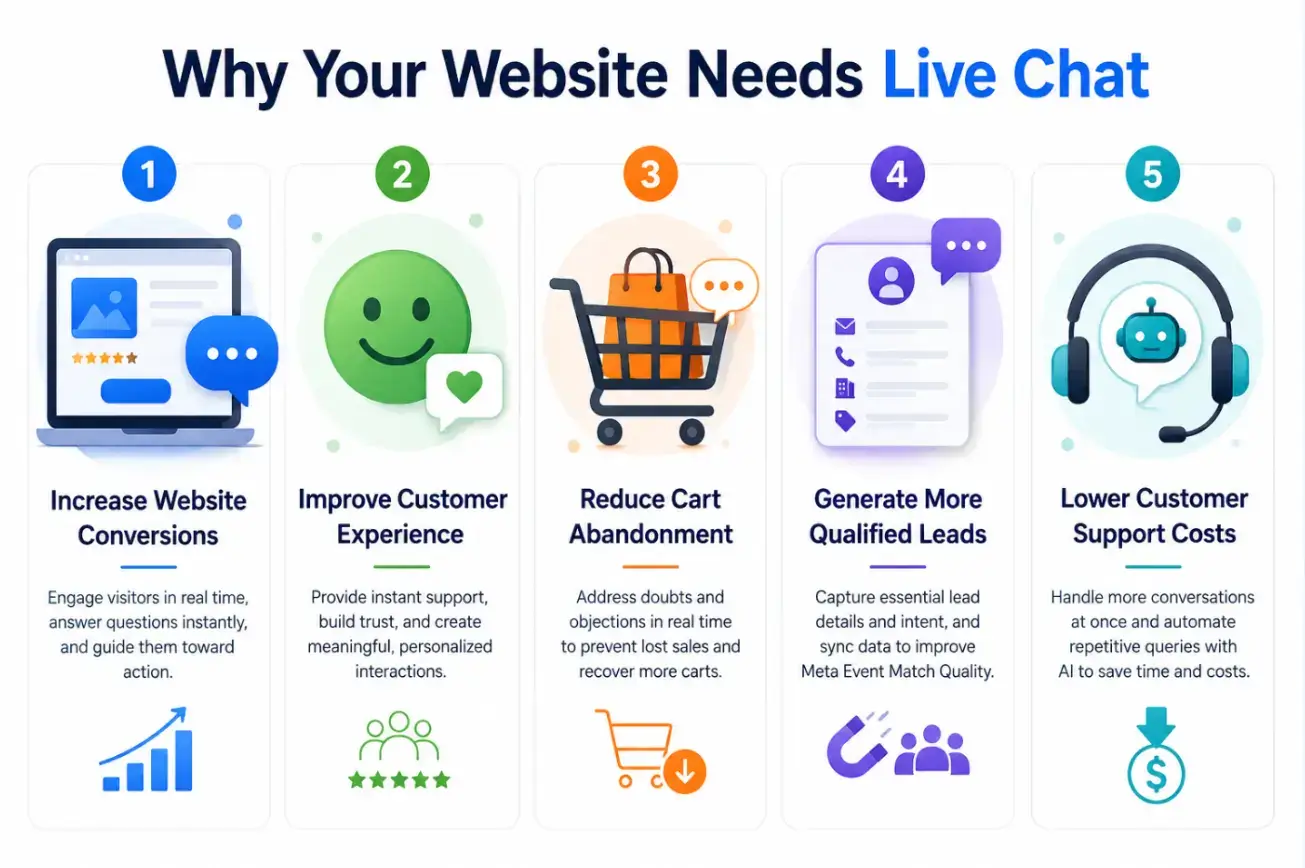
1. Increase Website Conversions
A well-designed website is only effective if visitors can easily find the information they need. When users encounter unanswered questions or obstacles, they often leave before taking action.
Live chat enhances your website marketing efforts by delivering real-time assistance at critical moments, reducing friction in the customer journey, increasing engagement, and guiding visitors toward conversions.
For example:
- A customer has questions about pricing
- They open the live chat widget
- Your team responds instantly
- The visitor completes the purchase
This real-time engagement can significantly improve:
- Conversion rates
- Demo bookings
- Sales inquiries
- Checkout completion rates
2. Improve Customer Experience
Fast responses create trust. Customers feel more confident when they know help is immediately available. For online stores, maintaining a consistent customer journey is especially important.
An e-commerce website builder can help businesses create branded product pages, landing pages, and support experiences that work seamlessly alongside live chat and other conversion-focused tools.
Live chat improves:
- Customer satisfaction
- Brand credibility
- User engagement
- Customer retention
It also creates a more personalized experience compared to static contact forms.
3. Reduce Cart Abandonment
For e-commerce websites, live chat can help recover potential lost sales.
Visitors commonly abandon carts because of:
- Shipping concerns
- Pricing confusion
- Return policy questions
- Payment trust issues
A proactive chat message can solve these objections before users leave the site.
4. Generate More Qualified Leads
Modern live chat software can do much more than answer customer questions. It can automatically collect valuable lead information, including:
• Email addresses• Phone numbers• Company names and business details• Customer interests and purchase intent
This data can be synced with your marketing platforms to improve Meta Event Match Quality, helping Meta better attribute conversions and optimize ad performance.
As a result, your website becomes an active lead generation engine that captures, qualifies, and nurtures prospects instead of serving as a passive information resource.
5. Lower Customer Support Costs
Unlike phone support, one support agent can manage multiple conversations simultaneously. This improves efficiency while reducing operational costs.
AI chatbots can also automate repetitive support questions, allowing teams to focus on high-value customer interactions.
Types of Live Chat Solutions
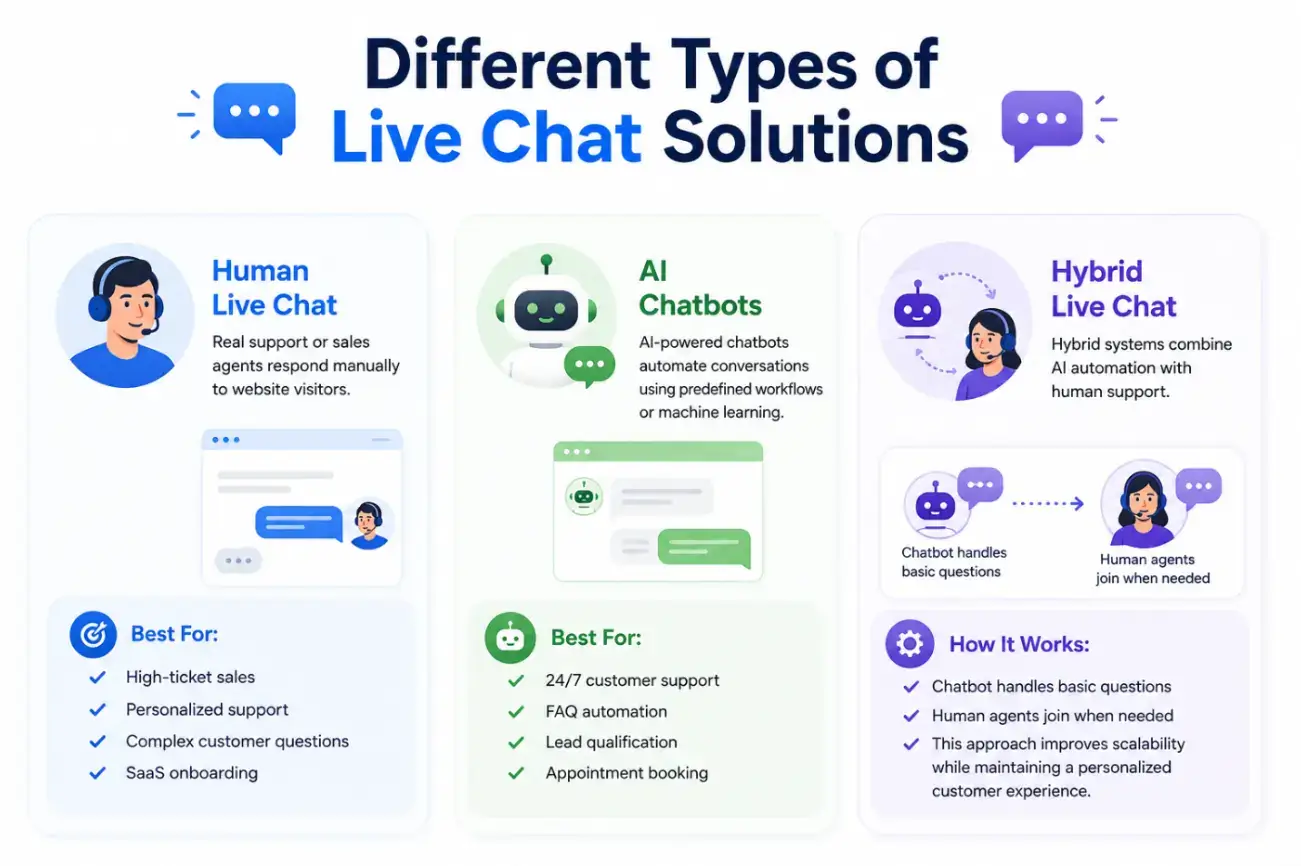
Human Live Chat
Real support or sales agents respond manually to website visitors.
Best For:
- High-ticket sales
- Personalized support
- Complex customer questions
- SaaS onboarding
AI Chatbots
AI-powered chatbots automate conversations using predefined workflows or machine learning.
Best For:
- 24/7 customer support
- FAQ automation
- Lead qualification
- Appointment booking
Hybrid Live Chat Systems
Hybrid systems combine AI automation with human support.
How It Works:
- Chatbot handles basic questions
- Human agents join when needed
This approach improves scalability while maintaining a personalized customer experience.
How to Add Live Chat to Your Website
Step 1: Choose the Right Live Chat Software
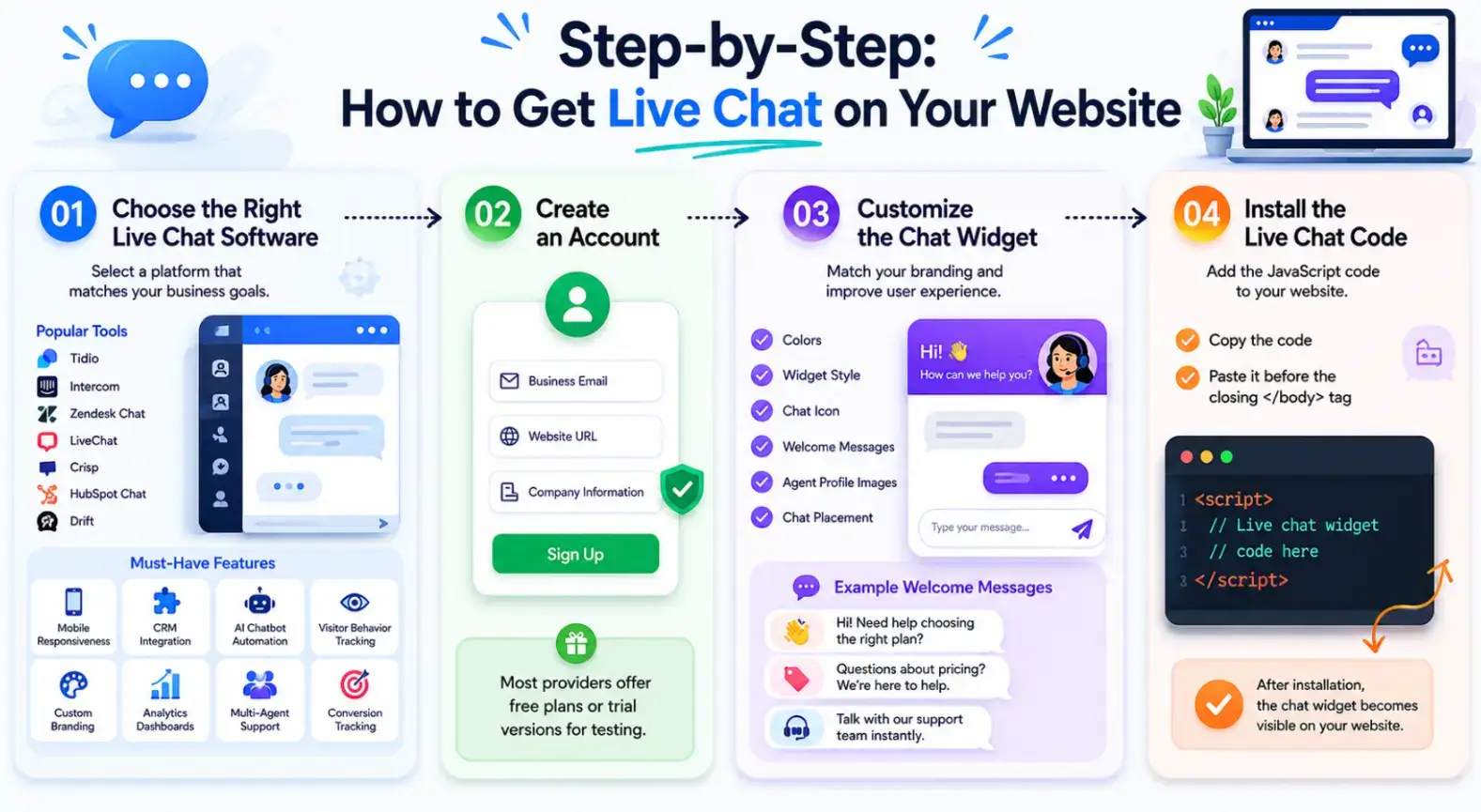
The first step is selecting a platform that matches your business goals.
Popular live chat tools include:
- Tidio
- SendPulse
- Intercom
- Zendesk Chat
- LiveChat
- Crisp
- HubSpot Chat
- Drift
When evaluating live chat software, prioritize features such as:
- Mobile responsiveness
- CRM integration
- AI chatbot automation
- Visitor behavior tracking
- Custom branding
- Analytics dashboards
- Multi-agent support
- Conversion tracking
Step 2: Create Your Account
Sign up using:
- Business email
- Website URL
- Company information
Most live chat providers offer free plans or trial versions for testing.
Step 3: Customize Your Chat Widget
Your live chat widget should match your website branding and user experience.
Customize:
- Colors
- Widget style
- Chat icon
- Welcome messages
- Agent profile images
- Chat placement
Recommended Welcome Message Examples
- “Hi! Need help choosing the right plan?”
- “Questions about pricing? We’re here to help.”
- “Talk with our support team instantly.”
Strategic welcome messages can improve customer engagement and increase chat initiation rates.
Step 4: Install the Live Chat Code
Most providers offer a JavaScript code snippet.
Simply:
- Copy the code
- Paste it before the closing </body> tag
Example:
<script>
// Live chat widget code here
</script>
After installation, the chat widget becomes visible on your website.
How to Add Live Chat on Popular Website Platforms
WordPress
For WordPress websites:
- Install a live chat plugin
- Activate the plugin
- Connect your account
- Configure settings
Popular plugins:
- Tidio Live Chat
- HubSpot
- LiveChat
Shopify
For Shopify stores:
- Open Shopify Admin
- Go to Apps
- Install a live chat application
- Complete setup
Wix
Wix users can:
- Open Wix Dashboard
- Visit App Market
- Add a live chat app
- Customize the widget
Custom HTML Websites
Paste the live chat script directly into your website’s HTML before the closing body tag.
Essential Features to Look for in a Live Chat Tool
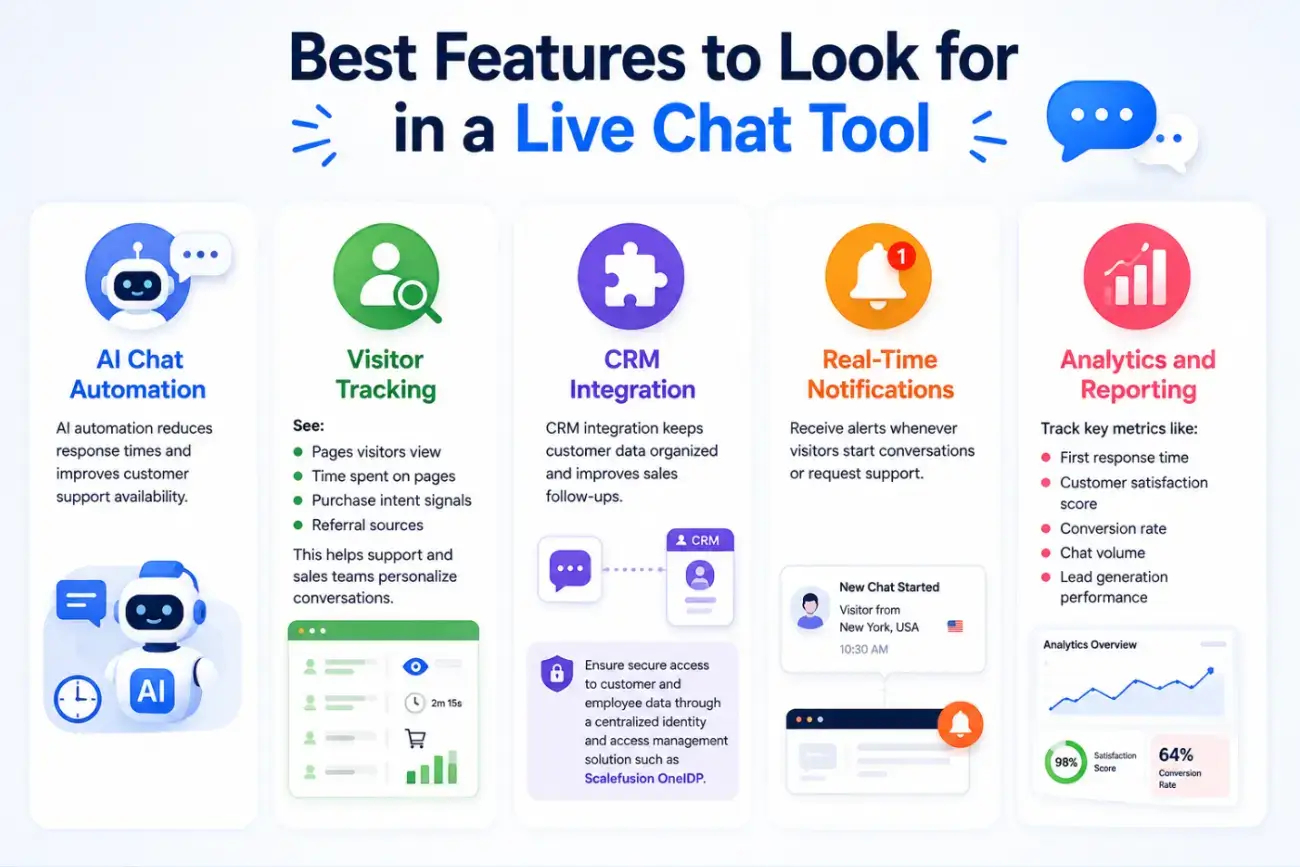
AI Chat Automation
AI automation reduces response times and improves customer support availability.
Visitor Tracking
See:
- Pages visitors view
- Time spent on pages
- Purchase intent signals
- Referral sources
This helps support and sales teams personalize conversations.
CRM Integration
CRM integration keeps customer data organized and improves sales follow-ups. Businesses should also ensure secure access to customer and employee data through a centralized identity and access management solution, such as Scalefusion OneIDP.
Real-Time Notifications
Receive alerts whenever visitors start conversations or request support.
Analytics and Reporting
Track key metrics like:
- First response time
- Customer satisfaction score
- Conversion rate
- Chat volume
- Lead generation performance
Best Live Chat Software for Websites
Choosing the right live chat software can significantly improve customer engagement, lead generation, and conversion rates.
SendPulse
SendPulse is a multi-channel marketing platform that includes a live chat widget alongside a chatbot tool and other marketing channels like email and SMS campaigns.
It is a strong choice for businesses that want to consolidate customer communication and lead capture in a single platform, without paying for a dedicated live chat tool separately.
Pros:
- Good fit for small businesses and solopreneurs
- Free plan available with generous limits
- Live chat and social media chatbots in one dashboard
- Built-in chatbot builder
Cons:
- Less advanced chat-specific features compared to dedicated tools like Intercom or Zendesk
- Live chat is a secondary feature, not the core product
Tidio
Tidio is a popular live chat platform designed for small businesses and growing websites. It combines live chat, AI-powered chatbots, and email marketing tools in a single dashboard, making it easy to engage visitors, automate support, and capture leads without requiring technical expertise.
Pros:
- Easy setup
- AI chatbot features
- Beginner-friendly dashboard
- Free plan available
Cons:
- Limited advanced automation in the free version
Intercom
Intercom is a premium customer communication platform that helps businesses deliver personalized support and customer engagement at scale.
Its advanced automation, targeted messaging, and customer journey tools make it particularly well-suited for SaaS companies and fast-growing organizations.
Pros:
- Powerful automation
- Advanced customer messaging
- Excellent user experience
Cons:
- Higher pricing for small businesses
Zendesk Chat
Zendesk Chat is part of the broader Zendesk customer service ecosystem, offering real-time website support alongside robust ticketing and customer management capabilities. It is an excellent choice for businesses looking to unify live chat with their existing customer support workflows.
Pros:
- Strong customer support features
- CRM integrations
- Detailed analytics
Cons:
- Slight learning curve
Crisp
Crisp is an affordable and user-friendly live chat solution that provides messaging, team collaboration, and customer support features in one platform.
Its shared inbox, unlimited chat history, and straightforward interface make it a strong option for startups, small businesses, and customer-focused teams.
Pros:
- Affordable pricing
- Shared inbox
- Unlimited chat history
Cons:
- Fewer enterprise-level automation features
Live Chat Best Practices for Higher Conversions
Adding live chat to your website is only the first step. To maximize its impact on lead generation, customer satisfaction, and sales, businesses need a thoughtful strategy.
The most successful live chat implementations focus on delivering timely assistance, creating a seamless user experience, and engaging visitors at the right moments in their buying journey. By following these best practices, you can turn more website visitors into qualified leads and paying customers.
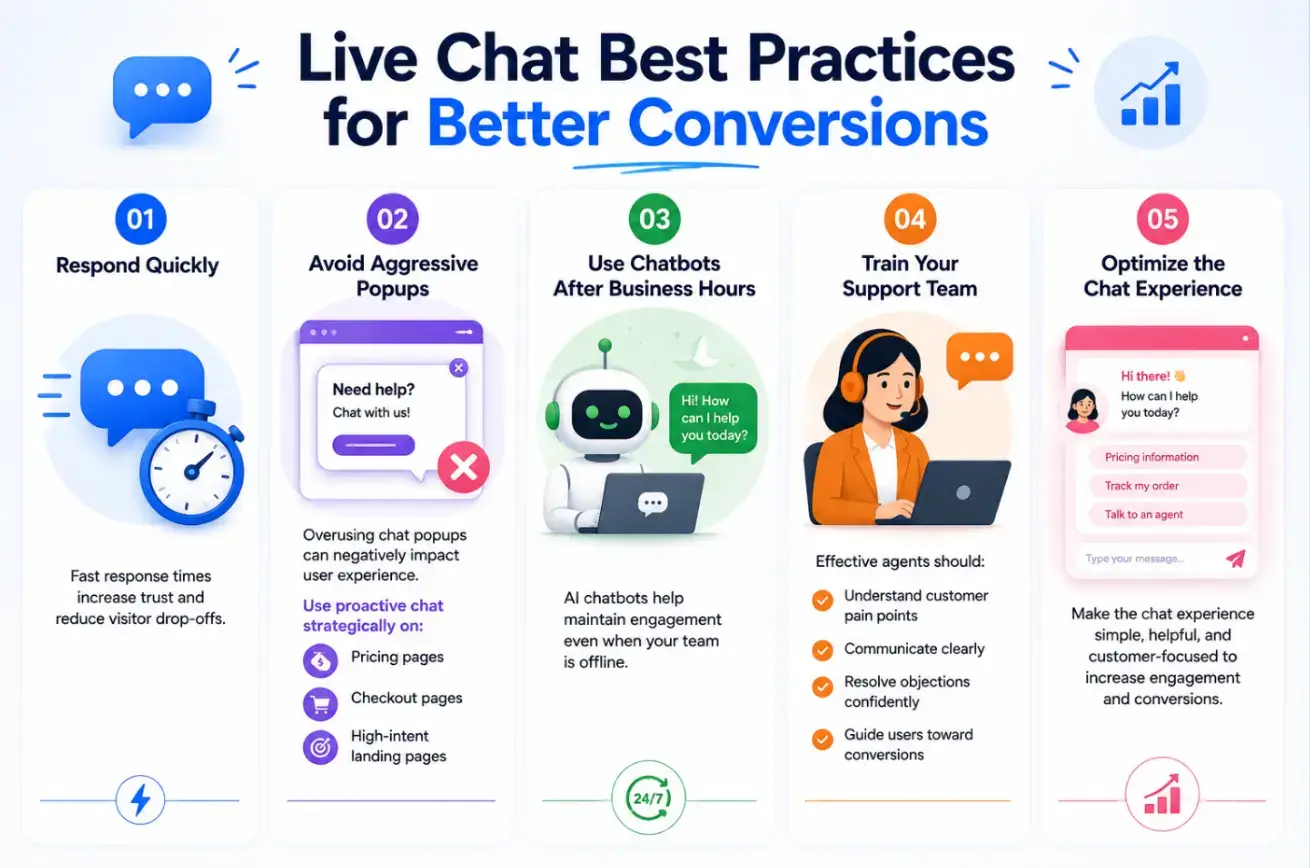
Respond Quickly
Speed is one of the biggest advantages of live chat. Visitors often reach out when they are actively considering a purchase, and delayed responses can cause them to leave your website.
Fast response times help:
- Build customer trust
- Reduce visitor drop-offs
- Improve customer satisfaction
- Increase conversion opportunities
Whenever possible, aim to respond within a few minutes to keep visitors engaged and moving through the sales funnel.
Avoid Aggressive Popups
While proactive chat invitations can boost engagement, excessive or poorly timed pop-ups may frustrate visitors and interrupt their browsing experience.
Instead, use chat prompts strategically on:
- Pricing pages
- Checkout pages
- Product comparison pages
- High-intent landing pages
The goal is to offer assistance when visitors are most likely to have questions, not to overwhelm them with constant interruptions.
Use Chatbots After Business Hours
Website visitors don't always arrive during business hours. AI-powered chatbots ensure that every visitor receives immediate assistance, even when your support team is unavailable.
Chatbots can:
- Answer common questions
- Collect lead information
- Schedule appointments or demos
- Route inquiries to the appropriate department
This helps maintain engagement around the clock while preventing missed opportunities.
Train Your Support Team
Even the best live chat software depends on the quality of the conversations it enables. Well-trained agents can turn simple inquiries into meaningful customer relationships and sales opportunities.
Effective support representatives should:
- Understand customer pain points
- Communicate clearly and professionally
- Resolve objections confidently
- Recommend appropriate solutions
- Guide users toward conversions without being overly sales-focused
Regular training and performance reviews can significantly improve chat outcomes and customer satisfaction.
Common Live Chat Mistakes to Avoid
Live chat can improve conversions and customer satisfaction, but a poor setup can frustrate visitors and reduce its impact. Avoiding common mistakes helps create a smoother and more effective customer experience.
- Delayed responses
- Overly robotic conversations
- Too many automated popups
- Poor mobile chat experience
- No chatbot fallback after office hours
- Asking for excessive customer information upfront
A poor live chat experience can hurt trust instead of improving it.
Conclusion: Turn Website Visitors Into Customers With Live Chat
Adding live chat to your website is no longer just a customer support feature — it’s a powerful sales and conversion optimization tool.
Businesses that provide instant communication often build stronger customer relationships, generate more qualified leads, and close sales faster.
Whether you choose a simple support chat widget, an AI chatbot, or a fully automated customer engagement platform, the key is creating fast, helpful, and personalized interactions.
Start with a solution that fits your business size, monitor customer behavior, and continuously optimize your chat strategy based on analytics and user feedback.
Over time, live chat can become one of the most valuable channels for improving customer experience and increasing revenue.
Frequently Asked Questions
Is live chat better than email support?
Live chat is faster and more interactive than email support. It helps businesses resolve customer issues in real time, improving engagement and conversion rates.
Can I add live chat to my website for free?
Yes. Many live chat providers like Tidio, Crisp, and HubSpot offer free plans with basic chat functionality.
Does live chat help SEO and conversions?
While live chat does not directly improve search rankings, it can improve user engagement metrics such as time on site, lower bounce rates, and higher conversions, which positively support overall website performance.

Author Bio
Anisha is a Digital Marketing enthusiast who loves creating content and exploring SEO trends. She also writes about sales, marketing, and CX.