In the busy online market of 2026, launching an online store is easier than ever, thanks to platforms like Shopify.
Shopify is popular because it's easy to use, can grow with your business, and has strong built-in features. However, as many Shopify SEO experts note, store owners often make SEO mistakes that quietly hurt their results.
The good news is that these problems can be fixed. With the right steps and regular checks, you can turn a Shopify store that struggles in search into one that gets steady traffic from Google.
In this article:
- Ignoring Keyword Research and Search Intent
- Poor Optimization of Product and Collection Pages
- Duplicate Content and Canonicalization Issues
- Weak Internal Linking Structure
- Unoptimized Images and Missing Alt Text
- Installing Too Many Apps and Creating Code Bloat
- Slow Store Speed and Poor Core Web Vitals
- Overlooking Technical SEO Fundamentals
- Missing Structured Data and Schema Markup
- Neglecting SEO Monitoring and Analytics
1. Ignoring Keyword Research and Search Intent
Why Search Intent Matters More Than Search Volume
One of the biggest Shopify SEO mistakes is skipping keyword research.
Many store owners assume they already know what customers search for and rely on guesswork instead of data. This usually leads to choosing keywords that are too broad and too competitive, or missing the exact phrases buyers actually use.
Without real keyword research, your product titles, product descriptions, and blog posts may not match how people search. That means your content may not connect with customers or search engines.
You end up spending time creating pages that don't rank and don't bring in buyers.
The Cost of Missing Long-Tail Keywords
If you miss the right keywords, you miss the right customers.
For example, if you sell handmade coffee mugs but only target "mugs," you compete with huge websites, and you miss searches like "handmade ceramic coffee mug." Those specific searches often come from people who are ready to buy.
Skipping targeted keywords also means you miss long-tail keywords (longer, more specific searches). They may have less search volume, but they often convert better because the shopper knows what they want.
Missing these keywords can reduce traffic, reduce engagement, and lower sales, while competitors capture those ready-to-buy customers.
2. Poor Optimization of Product and Collection Pages
Why Product and Collection Pages Drive SEO Revenue
Your product and collection pages are your main sales pages, but many Shopify store owners don't optimize them for SEO.
That's like setting up a nice shop window and then turning off the lights. These pages can bring in a lot of organic traffic if they are built well.
Common Meta Title and Meta Description Mistakes
Common issues include missing meta titles and descriptions, thin content, duplicated descriptions, and weak signals that tell Google what the page is about.
Shopify gives you the structure, but it won't write unique content for you. If you don't improve these pages, you miss customers who are searching for the exact products you sell.
How to Write Better Product Descriptions
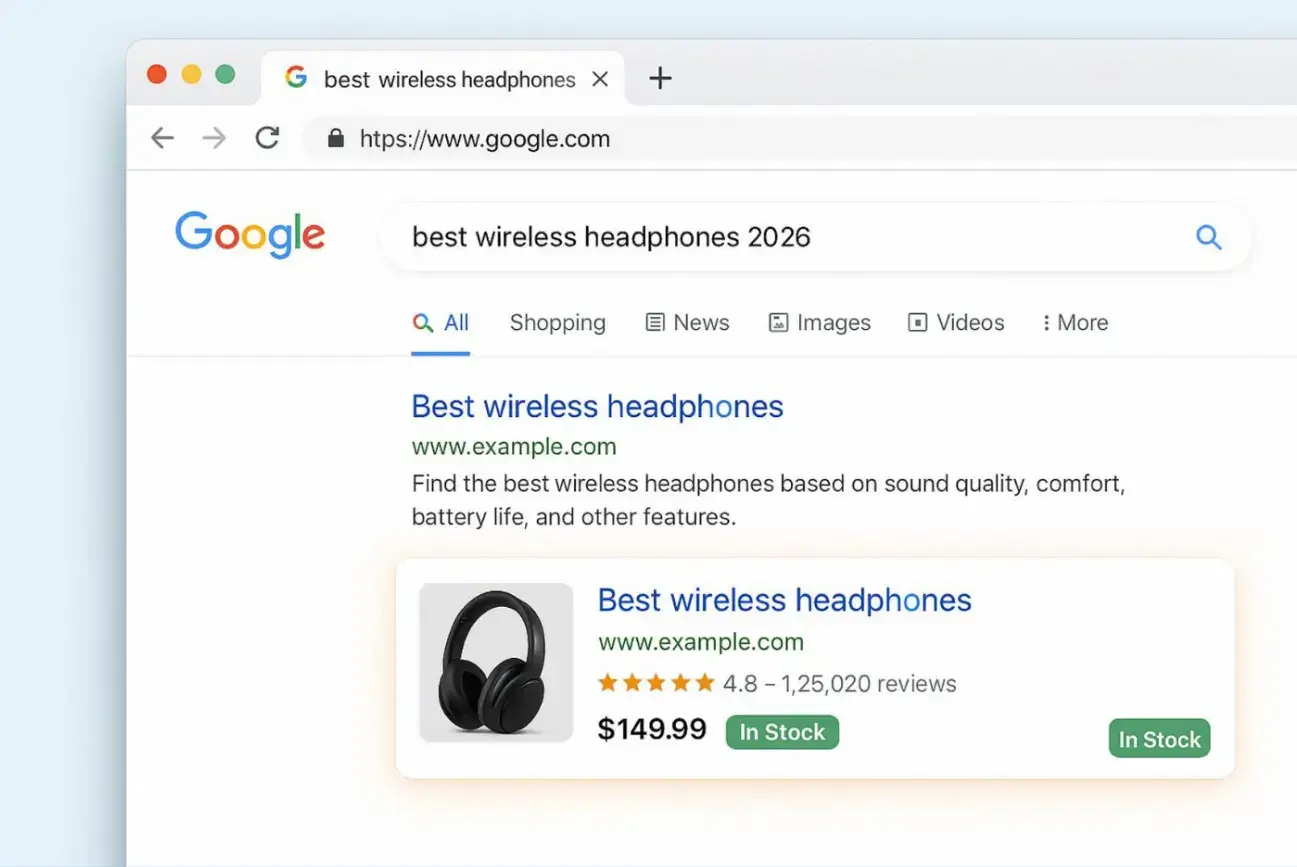
Meta titles and descriptions show up in Google results. They work like a small ad for your page. If they are missing or too generic, fewer people will click.
A title like "Gold Necklace" is too vague. A clearer title like "Rose Gold Diamond Necklace | Shop Store Name & Save" gives more detail and can get more clicks.
Also, duplicate meta titles across many pages or keyword-stuffed descriptions can confuse search engines and look spammy.
Try to keep:
Check your store often for missing or duplicate meta tags and fix them.
Using Headers to Improve Product Page SEO
A common problem is copying manufacturer descriptions. That creates duplicate content across many websites, and search engines prefer original text. Pages with little unique content are harder to rank.
This doesn't mean duplicate descriptions trigger a penalty, but they can hold your pages back. Google's Search Advocate John Mueller has explained that duplicate product text isn't a negative signal on its own, yet writing original copy still helps Google rank near-identical products.
Good product descriptions should be unique, helpful, and usually at least 150 words long. Use your main keyword in the H1 and early in the text.
Explain benefits, key features, and answers to common questions. Also use headers (H1, H2, H3) to break up text and show structure. Without this, your product pages can feel thin and won't stand out in search results.
3. Duplicate Content and Canonicalization Issues
Duplicate content is a common Shopify problem, often caused by Shopify’s default URL structure. When search engines find multiple pages with the same (or nearly the same) content, they may not know which page they should rank.
This can split ranking value across several URLs and lower overall visibility.
Duplicate content can happen with product variants, products shown in multiple collections, and auto-created tag and filter pages.
Stores with lots of duplicates often see organic traffic drop because Google spreads attention across too many similar pages.
How Shopify Creates Duplicate URLs
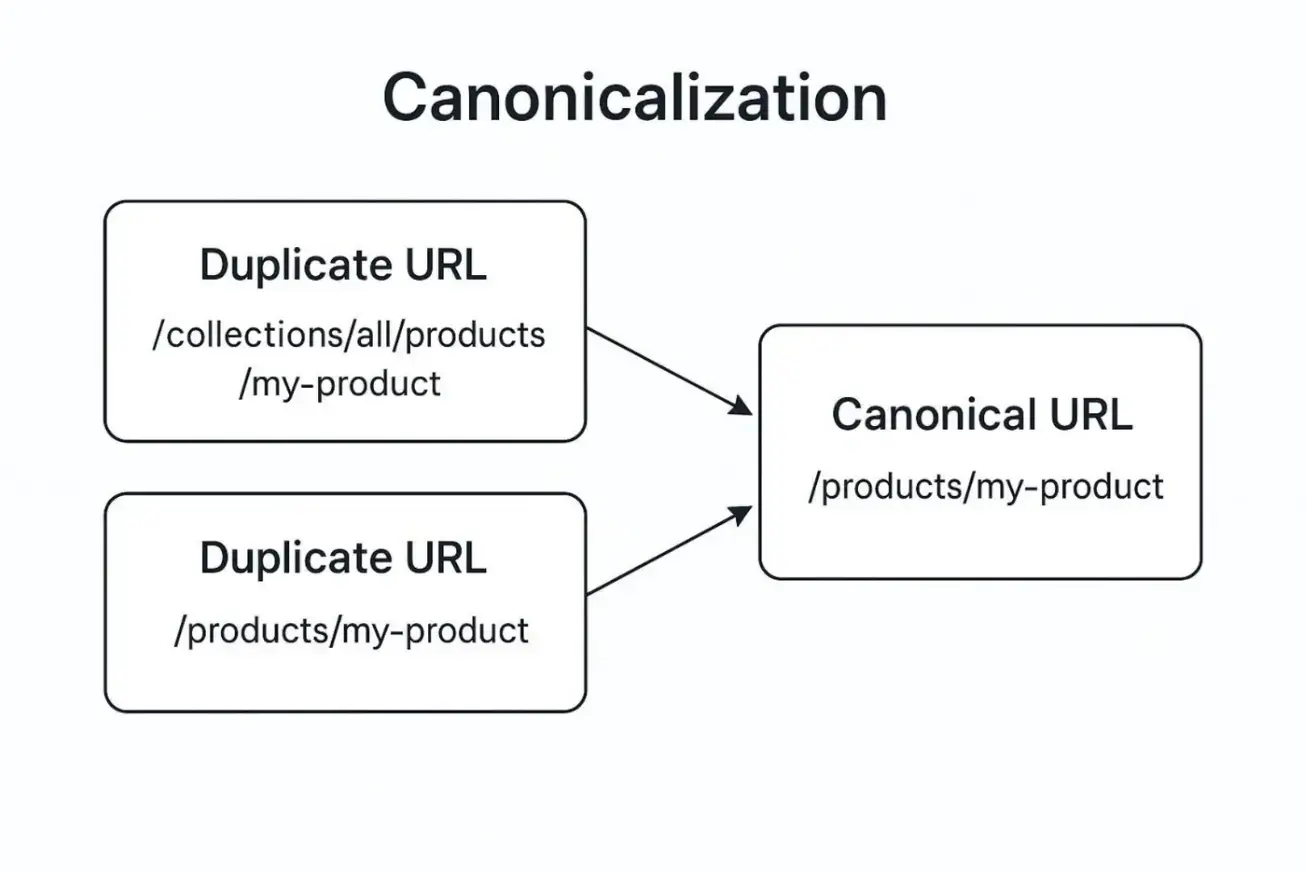
Shopify can create more than one URL for the same product. For example, you might have:
- yourstore.com/products/product-name
- yourstore.com/collections/category/products/product-name
This is one of the most overlooked issues on the platform. We break down exactly how it happens and how to fix it in The Hidden Shopify SEO Issue That Could Be Costing You Thousands.
Common Sources of Duplicate Content
Shopify also creates tag pages automatically (like "red" or "cotton"), which can look very similar to collection pages. These pages often reuse the same metadata and have little unique text. Pagination (page 1, page 2, etc.) can also create similar pages that search engines may struggle to understand.
How Canonical Tags Fix Duplicate Content Problems
The fix is canonicalization — telling Google which version is the "real" one. As Google's own canonicalization documentation explains, a canonical URL is the version Google treats as most representative of a set of duplicate pages, which lets it consolidate ranking signals onto a single page instead of splitting them.
4. Weak Internal Linking Structure
Why Internal Links Matter for Shopify SEO
Weak internal linking is a common Shopify SEO issue that many store owners miss. Internal links connect pages inside your website.
They help search engines find pages, help spread ranking value across your site, and help shoppers move from one page to another.
Common Internal Linking Mistakes
Many store owners chase external backlinks but ignore internal links. Without a clear internal linking plan, important pages can become "orphan pages," meaning they have few or no internal links. That makes them harder for search engines and users to find.
The reminder he adds is just as important — don't only link forward from old posts to new ones; go back to older pages and link them to fresh, related content too.
Shopify Internal Linking Best Practices
A good internal linking setup should feel natural and simple. Focus on these actions:
- Build a clear site structure so most products are within three clicks from the homepage
- Link blog posts to related collections and products
- Link product pages to related items or accessories
- Use clear anchor text (avoid “click here”)
- Add breadcrumbs to help users and search engines understand the structure
You can review internal linking issues using Ahrefs or Google Search Console.
5. Unoptimized Images and Missing Alt Text
How Large Images Hurt SEO and User Experience
Images are a big part of e-commerce. Great product photos can help customers feel confident and buy.
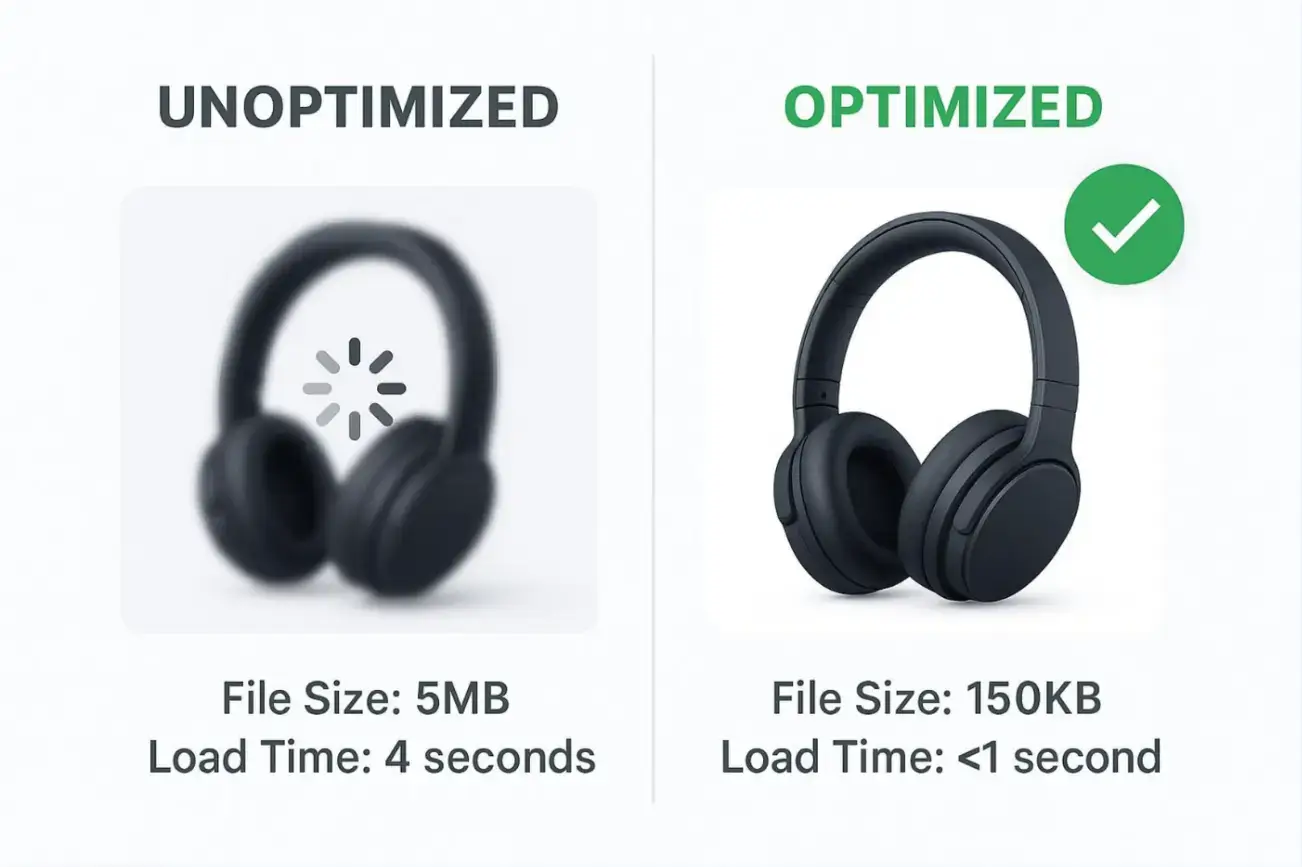
But many Shopify stores hurt SEO by uploading large image files and skipping alt text. This can reduce rankings and also reduce traffic from Google Images.
Large images slow down your store, which can hurt rankings and cause shoppers to leave. Missing alt text also removes an important clue for search engines, since Google can’t “see” images the way humans do.
Best Practices for Shopify Image Optimization
Large, uncompressed images are a common reason Shopify stores load slowly. Slow pages can rank worse and convert worse.
Users often leave if a page takes more than three seconds to load, and even small speed improvements can lift conversions.
To improve image performance:
- Resize images to the size you actually need (example: product images around 2048x2048; banners around 1920x1080)
- Use JPEG for most product photos and PNG for logos or simple graphics
- Compress images with TinyPNG, Optimizilla, or apps like Crush.pics
This reduces load time and improves user experience.
Writing Effective Alt Text for Products
Alt text tells search engines what an image is about. Without it, Google has less context for the image and the page. Good alt text can also help you show up in image search.
For example, alt text like “rose-gold-diamond-engagement-ring-india” gives a clear description and adds keyword context. Alt text is also important for accessibility, since screen readers use it to describe images to visually impaired users.
6. Installing Too Many Apps and Creating Code Bloat
How Shopify Apps Impact Site Performance
Shopify has many apps that add useful features. But installing too many apps can hurt SEO by slowing down your store.
Many apps add extra JavaScript and CSS to your pages. Over time, this “code bloat” can make the store heavy and slower to load.
This gets worse when you install apps that do similar jobs. Scripts may conflict, schema markup may be duplicated, and your theme becomes harder to manage.
Some apps may claim to solve SEO issues while creating speed problems that lower rankings.
Types of Apps That Commonly Slow Stores Down
Any app can add load time, but these types often cause the biggest slowdowns:
- Review apps: can load large widgets, especially with photo/video reviews
- Page builders: may add lots of extra layout code
- Pop-up and notification apps: often load scripts on every page
- Currency converters & geo-locators: add scripts and requests based on location
- Extra analytics and tracking apps: too many pixels can slow pages
- Multiple SEO apps: can conflict or create duplicate structured data
Often, the main problem is having too many apps at once and how they interact.
7. Slow Store Speed and Poor Core Web Vitals
Why Speed Affects Rankings and Conversions
Speed matters. If your Shopify store loads slowly, many shoppers will leave and buy elsewhere. Google also uses speed and Core Web Vitals in rankings, so slow sites often get less organic traffic.
Understanding Core Web Vitals
If you ignore Core Web Vitals — Largest Contentful Paint (LCP), Interaction to Next Paint (INP), and Cumulative Layout Shift (CLS) — your store can lose both rankings and sales.
(Note: INP replaced First Input Delay (FID) as an official Core Web Vital in March 2024, so older guides that mention FID are out of date. See Google's Core Web Vitals documentation for current thresholds.)
Use these steps to improve speed:
- Optimize images: compress, resize, use proper formats, and add lazy loading.
- Pick a lightweight theme: choose a fast, mobile-friendly theme (Online Store 2.0 if possible).
- Reduce apps: remove apps you don’t need; aim to keep the list small (often 20 or fewer).
- Reduce extra code: limit heavy animations and unnecessary scripts.
- Use caching where possible: Shopify helps here, but themes/apps should also behave well.
- Cut down redirects: too many redirects slow down loading.
- Test often: use Google PageSpeed Insights, GTmetrix, Pingdom, or Shopify Web Performance Report.
For a higher, step-by-step walkthrough of theme choices, caching, minification, and lazy loading, see our guide on optimizing Shopify stores for speed. Working on these areas over time can improve rankings and conversions.

Source: Unsplash
8. Overlooking Technical SEO Fundamentals
Why Technical SEO Matters for Shopify Stores
Technical SEO is the behind-the-scenes work that helps search engines crawl and index your store correctly.
Many Shopify store owners focus on product pages and forget technical basics. But issues like broken links, indexing errors, or bad redirects can block your SEO progress, even if your content looks great.
Shopify does give a decent technical base (SSL, sitemaps, canonicals), but you still need to manage the details.
Shopify also has limits that can create problems as your store grows. If you don’t monitor technical SEO, you may lose SEO value without realizing it.
Managing Robots.txt and XML Sitemaps
Shopify limits control over some key files, especially robots.txt. This file tells search engines what to crawl and what to avoid. Shopify keeps it mostly locked, though some themes allow edits through a special template, with limits.
Shopify also creates XML sitemaps automatically, but you still need to submit your sitemap in Google Search Console and watch for errors.
Check Search Console often to confirm important pages are crawled and indexed. If crawling is blocked or important pages aren’t discovered, your organic traffic can suffer.
Fixing Redirects, Broken Links, and 404 Errors
Broken links and 404 pages create dead ends for shoppers and signal poor maintenance to search engines. Too many redirects, especially redirect chains, also slow down crawling and page loading.
Fix this by auditing your store using Google Search Console or Screaming Frog. Add 301 redirects from deleted or changed URLs to the closest relevant page.
Apps like Easy Redirects or Tapita SEO & Speed Optimizer can help manage redirects, but you should still review things regularly.
Preventing Index Bloat From Tags and Filters,
Shopify tags and filters can create many extra URLs. If those pages get indexed, they may compete with your main collection pages and create “index bloat,” where Google spends time crawling low-value pages.
Filtering (size, color, price) can also create many parameter URLs, like:
yourstore.com/collections/shoes?color=red&size=large
To control this, use canonical tags to point back to the main collection, and apply noindex to filter pages that don’t need to rank. This keeps your index cleaner and focuses ranking strength on your best pages.
9. Missing Structured Data and Schema Markup
What Schema Markup Does for Ecommerce SEO
Structured data (Schema Markup) is a big SEO opportunity for Shopify stores, but many stores don’t use it well. Schema is a code that helps search engines understand details like price, reviews, and availability.
When set up correctly, it can help you get rich results in Google (like star ratings, pricing, stock info, and FAQs).
In the competitive e-commerce space of 2026, rich results can make your listing stand out. Without a schema, your result may look plain next to competitors, even if you rank in a similar position.
Common Shopify Schema Mistakes
Many Shopify themes include basic schema, but common problems include missing fields (like ratings or breadcrumbs), incorrect values, or outdated formats.
Another issue is duplicate schema. If you use multiple apps that add schema (like more than one review app), you might end up with repeated structured data on the same page. That can cause Google to ignore it.
To fix this, make sure your theme or a trusted Shopify SEO app adds a clean JSON-LD schema for products, reviews, FAQs, breadcrumbs, and organization info, and test it often using Google’s Rich Results Test.
10. Neglecting SEO Monitoring and Analytics
Why SEO Requires Ongoing Maintenance
SEO is not something you do once and forget. A major Shopify SEO mistake is failing to keep checking performance.
Many store owners make early improvements, but don’t track results or catch new issues before they cause damage. Without tracking, you can’t know what is working, what is failing, or where to focus next.
Search changes over time: Google updates, competitors improve, and customer behavior shifts. If you don’t measure results, you miss useful data and new growth chances. Tracking helps you steer your store with facts instead of guesses.
How Often Should You Run an SEO Audit?
Regular SEO audits are important because Shopify stores change often with new products, theme updates, app changes, and content updates. Problems can appear quietly.
An audit can reveal issues like crawl waste, speed drops after an app is installed, pagination errors, duplicate content, or broken links.
Doing audits quarterly or twice a year helps you fix problems early, keep your store technically healthy, and keep up with search changes.
Conclusion: Small Shopify SEO Mistakes Add Up
Most Shopify SEO problems aren't caused by one big failure — they build up quietly from small, fixable habits.
Skipping keyword research, leaving product pages thin, letting duplicate URLs pile up, ignoring internal links, uploading heavy images, overloading on apps, and never auditing your store all chip away at the same thing: your visibility in search.
The encouraging part is that almost everything on this list is within your control.
The stores that win in search aren't the ones that get everything perfect on day one — they're the ones that keep checking, fixing, and improving over time.
Treat SEO as a steady routine rather than a project with an end date, and your Shopify store can keep earning organic traffic and sales well into the future.
Frequently Asked Questions
How long does it take to see results from Shopify SEO?
SEO is a long-term effort, not an instant fix. After making improvements, many stores start to see changes in indexing and rankings within a few weeks, but meaningful gains in organic traffic often take a few months. Results depend on your site's authority, competition, how often Google crawls your store, and how consistently you keep optimizing.
Does Shopify handle SEO automatically?
Shopify gives you a solid technical starting point — SSL, automatic XML sitemaps, canonical tags, and a clean URL framework — but it does not do SEO for you. You still need to handle keyword research, unique product and collection content, meta titles and descriptions, image optimization, internal linking, and ongoing monitoring. The platform builds the foundation; the optimization is up to you.
Why does Shopify create duplicate URLs?
Shopify can generate more than one URL for the same product, especially when products appear inside multiple collections. This can split ranking signals across several URLs and make it harder for Google to know which page to rank. It usually isn't a penalty, but it can weaken visibility. Using canonical tags and cleaning up product link structure helps consolidate that ranking value onto one page.
How many Shopify apps are too many?
There's no single magic number, but every app can add JavaScript, CSS, and extra requests that slow your store down. A common rule of thumb is to keep your active apps lean — often around 20 or fewer — and to remove anything you no longer use. More important than the count is auditing how each app affects load time and whether multiple apps are duplicating jobs (like two review apps both adding schema).
How often should I run an SEO audit?
For most stores, a full SEO audit quarterly or twice a year is a good rhythm, with lighter checks after any major change — a theme update, a new app, a big product launch, or a redesign. Regular audits catch quiet problems like crawl waste, speed drops, broken links, and duplicate content before they have time to hurt your rankings.

Author Bio
With 15+ years building and scaling digital agencies across the UK and Poland, Rafał Moszkowcow founded non.agency to break the "resource barrier" that slows down ambitious brands. Instead of hiring more people, he builds AI-native infrastructure that cuts international market entry from six months to a few weeks. He's been working on AI-powered SEO since the GPT-2 era, hosts the Globalne Horyzonty podcast, and is completing an Executive MBA at Copenhagen Business School.