

Organic traffic still runs the internet. It shows real human interest, builds long-term authority, and drives sustainable growth.
To give you an idea, search engines send over 53% of all website traffic, which means if your site ranks where people actually see it, you’re already ahead.
But getting there takes more than keywords and backlinked blogs.
From interactive forms to dynamic content blocks, they make your site smarter and stickier without a line of code.
In this article, we’ll show how smart plugin choices can boost your site’s SEO and keep your visitors engaged.
In this article:
- Why Website Plugins Matter for SEO
- Core SEO Foundations to Strengthen Before Adding Plugins
- How Website Plugins Improve SEO Performance
- How to Integrate Plugins Into a Strategic SEO Workflow
- Best Practices for Plugin-Driven SEO Success
Keep scrolling to see how functionality meets performance.
P.S. If you’re serious about ranking higher, don’t stop here. Read our Essential SEO and Content Optimization Tools guide for the tools that power high-performing sites.
What Are Website Plugins?
Website plugins are like add-on blocks you can drop into your site to instantly unlock new features, with zero code required.
One day, you add a pop-up to capture emails; the next, you launch a form with payments, a FAQ section for quick answers, or run countdown timers for promos.

All the functionality is ready to plug in and customize.
So, where does all of this connect to SEO? Let’s break it down.
Why Website Plugins Matter for SEO
Good tools on your site benefit visitors and send positive signals to search engines.
When people stay longer, explore more, and interact with your content, it signals to search engines that your site has value.
Here’s how the right plugins help:
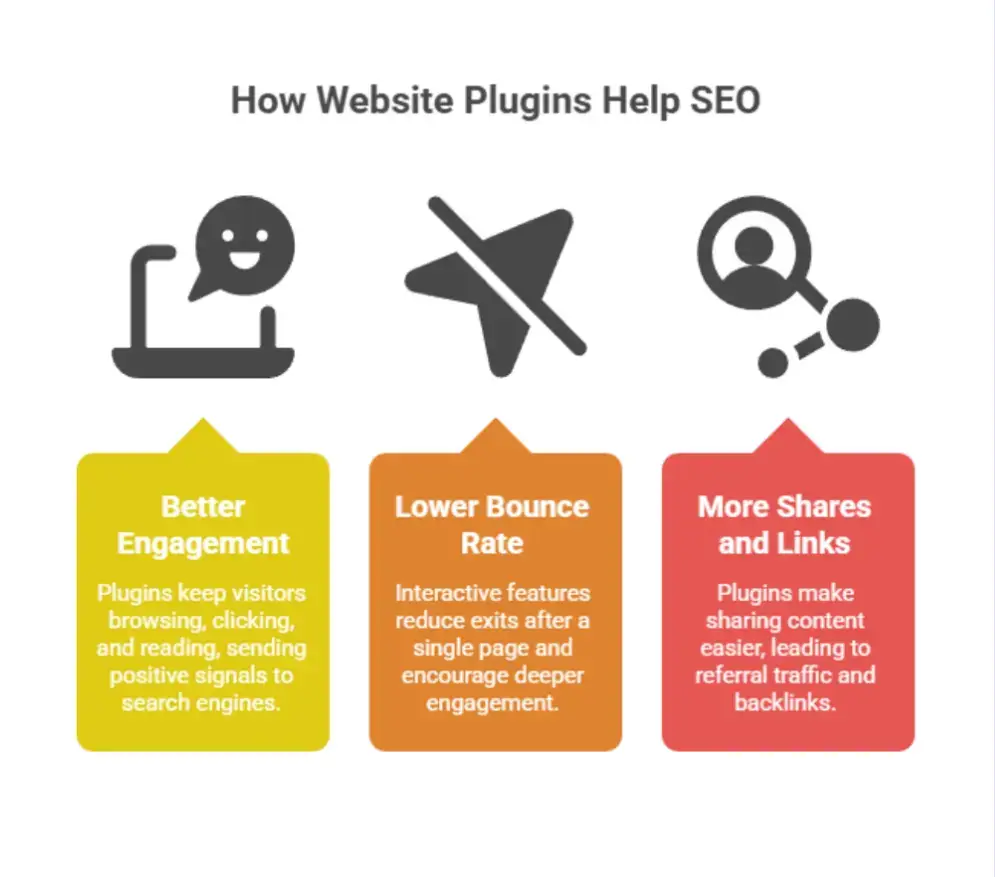
Improved Engagement Sends Positive Ranking Signals
Search engines watch how people behave once they land on your pages.
Pages that keep users browsing, clicking, and reading have higher average session duration and more page views.
In turn, search engines see these signals as signs of relevance and quality.
This is reflected in performance data: high-conversion websites typically maintain an average session duration of around 3 minutes and 36 seconds.
Lower Bounce Rates Improve Perceived Relevance
Adding interactive features helps retain attention. By doing so, you reduce exits after a single page and encourage deeper engagement.
If people leave right after arriving, that suggests your site missed the mark.
Increased Shares and Backlinks Strengthen Authority
After all, plugins can make sharing, embedding, and showcasing social proof way easier.
When content travels, it can drive referral traffic, mentions, and backlinks over time, strengthening SEO from the outside in.
This is exactly the kind of compounding authority-building that a white label SEO agency can help orchestrate, especially for businesses that want results without managing every moving part in-house.
What’s more, referral marketing converts 3-5 times better than paid ads, making shared traffic more valuable overall.
Before adding anything new, it helps to first lock in the core SEO principles.
Core SEO Foundations to Strengthen Before Adding Plugins
Before you start layering on plugins and fancy features, the base needs to be solid. Good SEO starts with structure. Here’s what you lock in first:
Technical SEO (Crawlability and Site Performance)
This is about how easily search engines can read and index your site.
Make sure you’ve got a clean sitemap, solid internal linking, fast load times, and mobile responsiveness.
That kind of technical cleanup is foundational website optimization.
In fact, recent SEO data indicate that approximately 35% of websites have critical technical issues that prevent proper crawling or indexing of important pages.
If search engines can’t crawl your pages or your site lags, rankings will slip, no matter how good the content is.
Pro tip: This kind of technical optimization can be difficult to manage internally, which is why many companies outsource it to specialized agencies like Web Tonic.
On-Page SEO (Structure, Keywords, and Intent)
Your content needs to be clear, structured, and purposeful. Use headers properly, weave in relevant keywords naturally, and keep each page focused on a single primary intent.
Meta titles and descriptions should encourage clicks, while images should include alt text that provides clear context.
Remember, pages should guide visitors toward an action: a sign-up, a read, a scroll.
This often comes down to weak structure, unclear intent, and missing optimization basics.
Engagement Metrics That Influence Rankings
We touched on this earlier, but it's important enough to revisit.
Time on site, scroll depth, clicks, and interaction rates all help search engines understand whether your content delivers.
These aren’t just metrics; they’re proof that your site’s worth showing to more people.
For example, Google Analytics 4 classifies a session as “engaged” only if it shows meaningful interaction.
That includes at least 10 seconds on the site, two or more pageviews, or a key event trigger.
Now let’s look at how plugins can strengthen these SEO pillars in practice.
How Website Plugins Improve SEO Performance
If your site feels more dynamic and user-friendly, SEO usually follows.
Improve On-Page Engagement Signals
Use targeted popups to catch visitors before they leave, offer a discount, or collect emails at the right moment.
It keeps them in your workflow rather than bouncing. Try something scroll-triggered or exit-intent.

Want to keep people engaged on key pages? Add movement.
A visual banner slider lets you guide attention, tell stories, or highlight offers. All while making your page feel more alive.

Add SEO-Friendly Content Blocks (FAQs, Testimonials, Schema)
To match what people are actually searching for, your pages need conversion-focused content that answers questions, builds trust, and keeps the experience human.
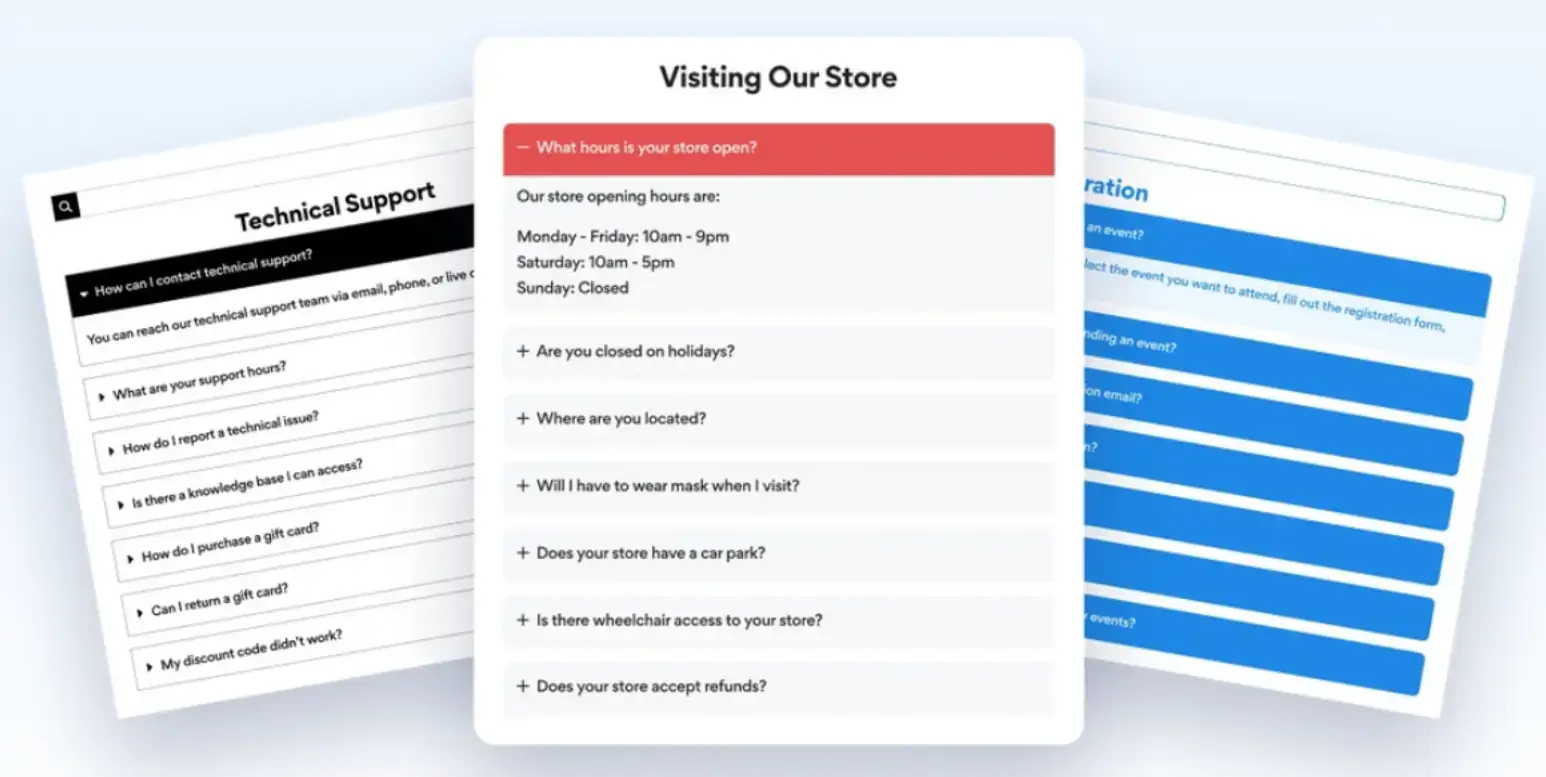
Publishing FAQs helps you rank for long-tail queries and even unlock rich snippets.
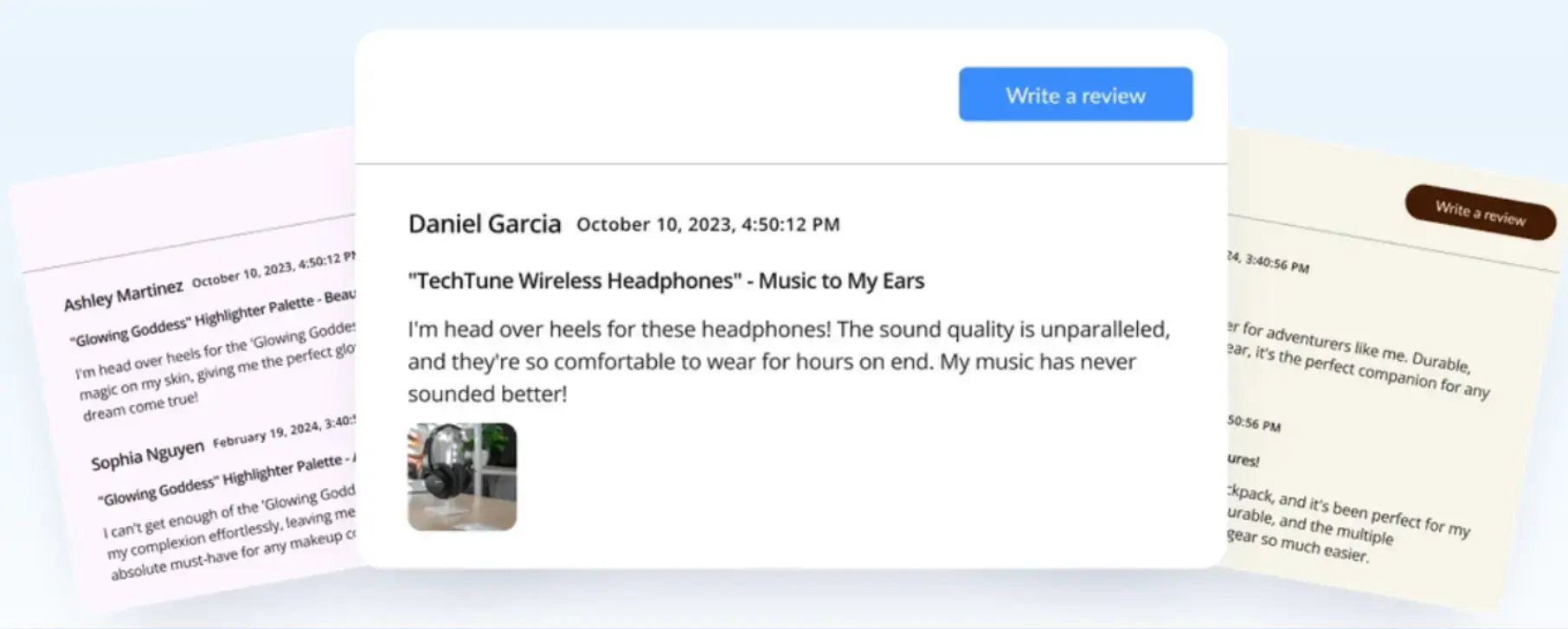
Need social proof? Drop in testimonials to show real feedback right where it matters.
And if visitors have questions in real time, live chat provides instant support that reduces drop-off and keeps the journey going, which also feeds your engagement metrics.

Capture and Convert Organic Traffic with Forms
Traffic is great, but conversions are what drive results. That’s why adding a flexible form builder can help turn interest into action.
Whether it’s lead magnets, demo requests, quote forms, or waitlists, forms provide visitors with a clear next step.
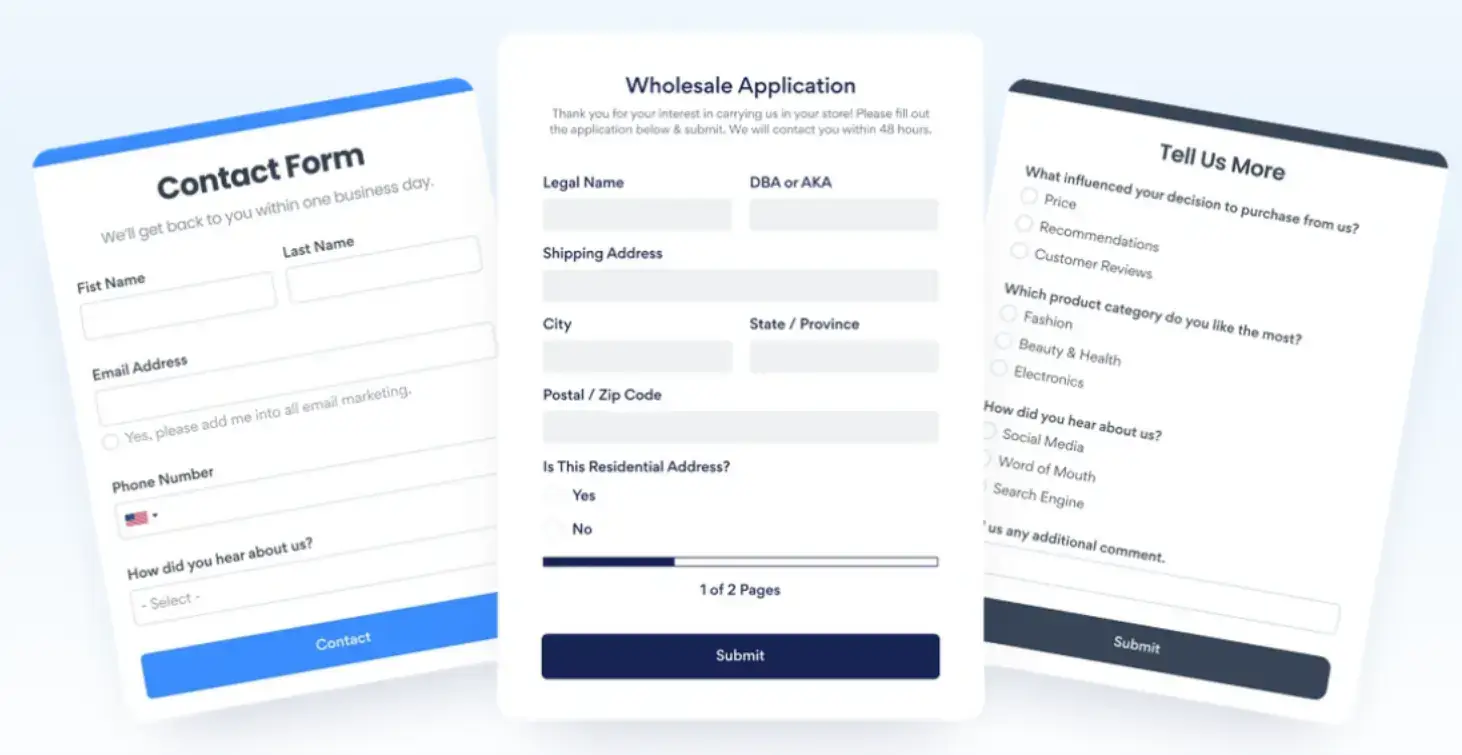
Once you’ve got the lead, make it count. Plug that form into your email platform or CRM so you can keep nurturing visitors who aren’t ready to act right away.
That way, even casual clicks can turn into customers down the line, and your organic traffic keeps working behind the scenes.
To make these gains stick, you need a smart workflow behind them.
And that leads us to the next point:
How to Integrate Website Plugins into a Strategic SEO Workflow
To get real results, plugins need a plan. Let’s walk through it.
Choose Plugins That Align With Business Goals
Before installing anything, ask what each plugin helps you do: more leads, better UX, stronger engagement?
Only then stick to tools that directly support those objectives.
Otherwise, sites with a heavy plugin load can be up to 50% slower, which can do more harm than good.
Remember: Quality over quantity every time.
Configure Plugins for Maximum SEO Benefit
Once a plugin is live, ensure it’s working for your SEO. Add alt text to images, write clear, descriptive titles, and enable any built-in schema options if available.
These small tweaks help search engines better understand your content and improve its visibility in search results.
Monitor Performance and Optimize Continuously
After you activate a plugin, track what actually changes. Use analytics to measure shifts in engagement and spot quick wins.
To ensure your data reflects real user behavior rather than automated traffic, implementing bot detection tools can help filter out spam traffic and maintain the accuracy of your SEO performance metrics.
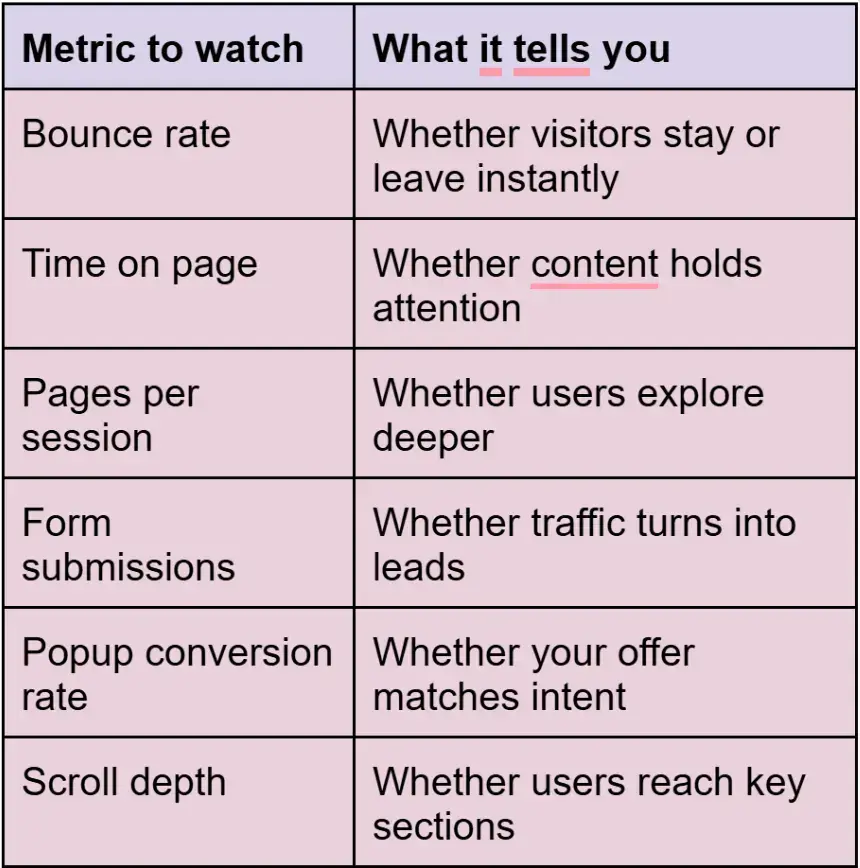
When the numbers move in the right direction, SEO usually follows.
Now let’s talk about how to keep everything running smoothly.
Best Practices for Plugin-Driven SEO Success
Here’s how to keep plugins working for SEO long after installation, without overthinking the process.
Prioritize Mobile-First Performance
More than half of web traffic comes from mobile.
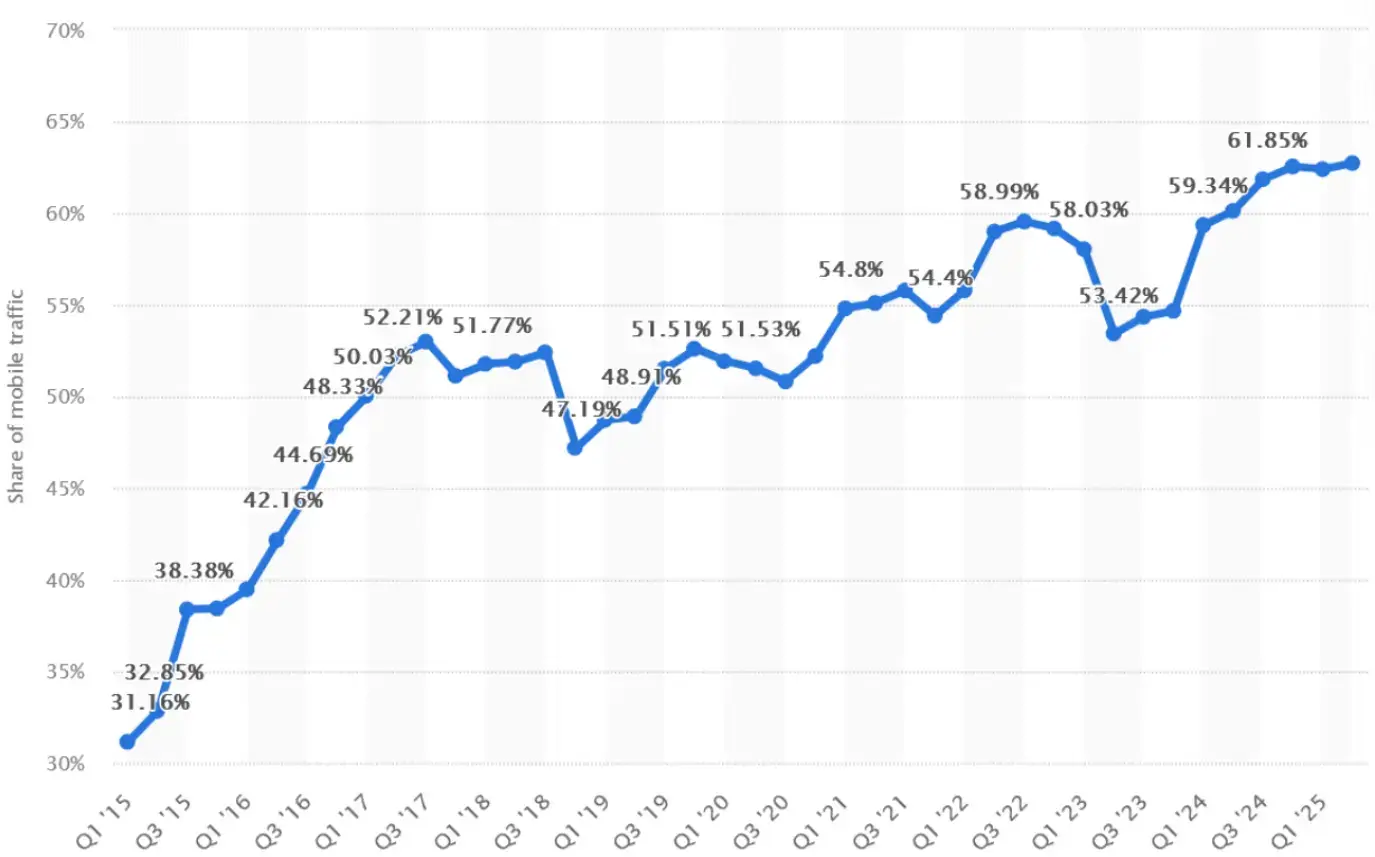
Source: Statista
Every plugin you use needs to look and work well on smaller screens. Check spacing, click targets, load speed - the full experience.
A great feature on a desktop means nothing if it’s clunky on a phone.
Keep Plugins Updated and Secure
An outdated plugin slows things down, breaks stuff, or opens security risks.
Updates often fix bugs, improve performance, or add SEO-focused features like schema support.
To stay on top of this, set reminders to check your stack regularly and keep everything up to date.
Test and refine
Think of every plugin as a mini A B test. Try different triggers, layouts, copy, and placements to see what people actually respond to.
For example, a pop-up may perform better after 30 seconds than on page load, and a form can convert more with fewer fields.
According to research from De Castroverde Law Group, the top 10% of pop-up campaigns convert at ~57.7%, demonstrating what’s possible with optimization.
The goal here is simple: remove friction, keep the experience smooth, and turn more organic visitors into real actions.
Build a Website Search Engines and Users Love
Ultimately, strong SEO comes from two things working together: solid fundamentals and a website that feels genuinely useful when people land on it.
- Technical SEO helps search engines crawl and rank your pages.
- On-page SEO helps your content match intent and earn clicks.
Then plugins take it further by improving what happens after the click, from engagement to trust to conversions.
When you combine smart plugin choices with a clean SEO workflow, organic traffic becomes predictable.
And once your site starts holding attention, guiding visitors, and capturing leads, your rankings and results tend to follow naturally.
You’ve got the tools and the roadmap. All that’s left is to launch, test, and start pulling in results.
P.S. Plugins help a lot, and strategy makes them work even better. Read our Best SEO Strategies and How to Apply Them guide to tighten your approach and get more out of every page.
Frequently Asked Questions About Website Plugins and SEO
Do website plugins help SEO directly?
Indirectly. Plugins improve engagement, structure, and usability, which supports stronger organic performance over time.
How many plugins should a website use?
Selectively. Focus on plugins that support clear goals, as too many tools can slow pages and hurt results.
Which plugins improve engagement the most?
Interactive. Popups, sliders, FAQs, forms, testimonials, and live chat keep users active and reduce early exits.
Can plugins improve rankings without new content?
Sometimes. Plugins enhance existing pages by making them more useful, though quality content still matters.
What metrics should I track after installing plugins?
Monitor bounce rate, time on page, scroll depth, submissions, and conversion rates.
