You can run a clean email campaign and still land in spam, or get rejected outright. The usual cause is weak domain authentication.
Phishing today runs on impersonation; attackers send messages from infrastructure they control while putting your domain in the visible “From” field.
If your domain isn’t properly authenticated and aligned, mailbox providers treat the message as unverified. It gets filtered, throttled, or blocked.
Deliverability now depends on server-level identity checks and trust signals in the inbox. When either layer fails, legitimate email suffers.
This post explains how to prevent phishing and improve email deliverability by tightening domain authentication and reinforcing visible trust in the inbox.
How Phishing Exploits Unauthenticated Email Infrastructure
Modern email architecture often lacks native authentication. This allows the attackers to exploit data sent by the sender. Especially while the data is in transition.
Phishing campaigns leverage this vulnerability by:
- Sending emails from unauthorized mail servers
- Mimicking trusted brands without owning the domain
- Exploiting gaps between the visible sender identity and the backend infrastructure
Another major cyberattack approach used by attackers is the use of lookalike domains and social engineering.
Attackers use typosquatting variations to deceive email recipients. Many attackers execute sophisticated attacks exploiting misaligned user identities.

These attackers can pass checks using their own backend infrastructure. This happens because standard filters often validate messages based on how they pass the technical signals.
And due to this limitation, the system often fails to flag the deception. Without enforced alignment, authentication can be technically valid while still being deceptive.
A small accounting firm uses Google Workspace but never enforces domain checks. An attacker registers a lookalike domain and sends fake invoice emails to clients.
The messages pass basic checks because the attacker controls their own sending infrastructure. Clients see the firm’s name in the “From” field and pay the invoice. The real firm only finds out when customers call support.
When identity ambiguity exists, content-based filtering becomes reactive instead of preventative. This is why understanding what email authentication is and its role in stopping such cyberattacks becomes important.
What Is Email Authentication and Why It Matters
Email authentication helps you establish domain-level authenticity and legitimacy. It transforms inherently riskier Simple Mail Transfer Protocol (SMTP) into a verified communication channel.
At its core, authentication enables organizations to:
- Authorize which systems are allowed to send email.
- Prove message integrity during transit.
- Enforce consequences when impersonation occurs.
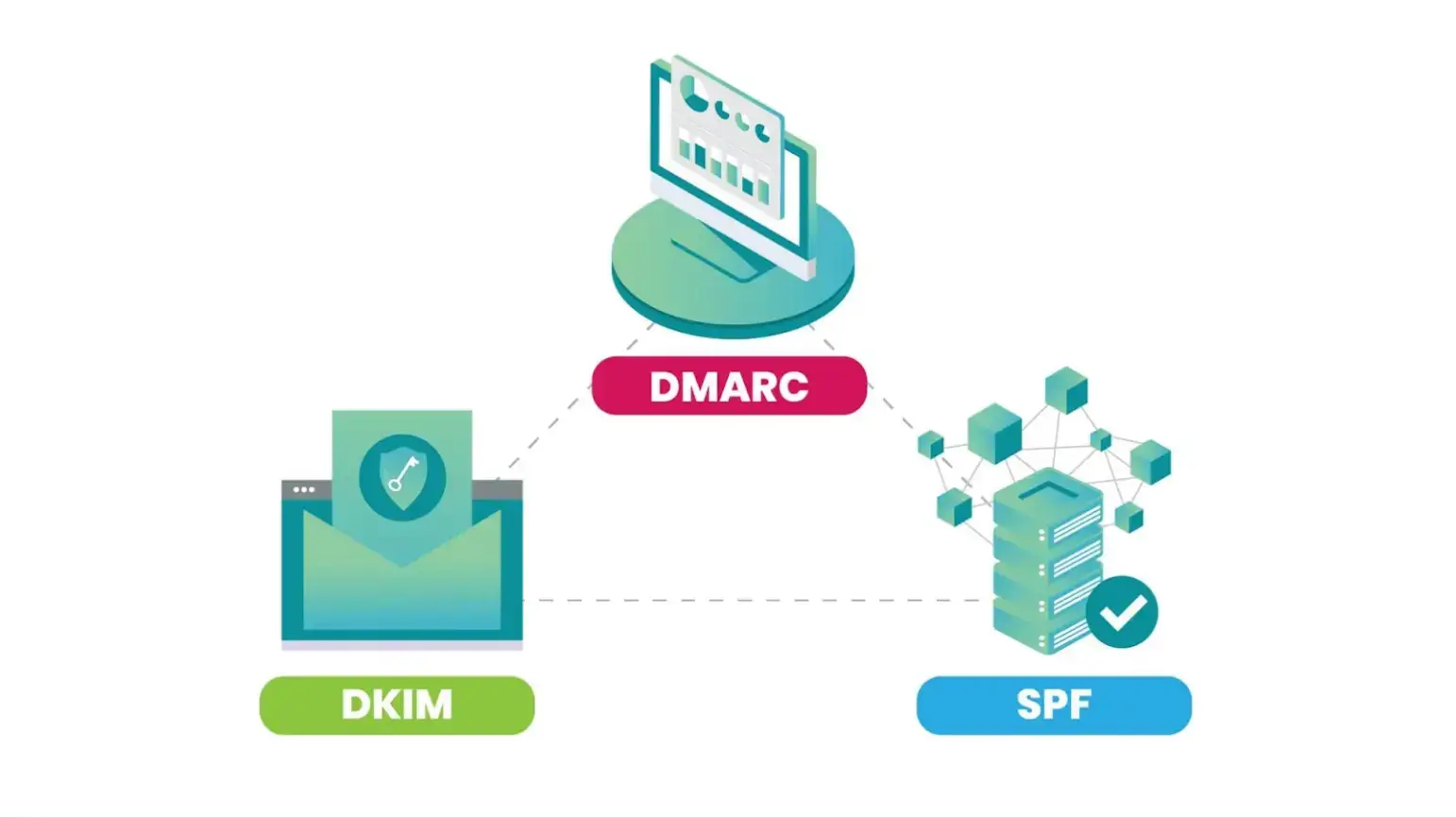
The authentication framework relies on three protocols that help you validate the recipient's identity and enforce control.
Source: Medium
These protocols are,
- Sender Policy Framework (SPF), which initiates authorization of the email by publishing a list of IP addresses that can send the mail for a domain. This means that if your email is sent from an IP address not listed, it will be flagged.
- DomainKeys Identified Mail (DKIM) is a protocol that secures email integrity using cryptographic signatures. It signifies the digital signatures and determines whether the message content has been modified.
- Domain-based Message Authentication, Reporting, and Conformance (DMARC) aligns authentication with the visible “From” address and enforces policy outcomes.
It should, however, be noted that SPF and DKIM alone only signal authenticity. They do not instruct receiving servers on how to act when authentication fails.
Why DMARC Enforcement Is the Turning Point
You really should have Domain-based Message Authentication, Reporting, and Conformance (DMARC), especially when you consider all the failures the recipient encounters.
DMARC enables enforcement through:
- Monitoring (p=none)
- Suspicious message handling (p=quarantine)
- Full rejection of impersonation attempts (p=reject)
A Shopify store sends marketing emails from one platform and order confirmations from another. SPF includes one sender; DKIM is enabled but not aligned with the visible domain. DMARC is set to p=none.
In result, Gmail flags part of the traffic as suspicious. The owner thinks deliverability is random, but the domain isn’t consistently authenticated.
This transition from visibility to enforcement makes DMARC the turning point in phishing prevention.
Despite its effectiveness, only 14% of domains worldwide are truly protected from spoofing with DMARC enforcement. It provides an essential governance layer by validating visible “From” identities.
DMARC enforcement makes passive observation to active defense.
Why Authenticated Email Reaches the Inbox More Reliably
Mailbox providers often rely on authentication protocols to assess trust. This happens before they ever evaluate the message content.
EasyDMARC SPF checker simplifies this process by helping senders quickly verify that their SPF records are properly configured.
By validating identity through SPF and DKIM, providers distinguish legitimate senders from malicious actors. Consistent authentication allows providers to:
- Establish sender trust early.
- Build long-term domain reputation.
- Reduce dependency on aggressive spam heuristics.
This consistency builds domain reputation. A history of aligned emails builds credibility that bypasses spam filters.
However, partially authenticated emails struggle to provide proof. This allows receiving servers to default to the spam folder, especially when full DMARC alignment is not in place.
Providers like Google now enforce strict mandates. This means incomplete setups are treated as security risks. And because of this strictness, messages are rejected immediately regardless of quality.
Authentication Alone Isn’t Enough: The Human Trust Layer
Even with strict domain enforcement, the final line of defense often relies on the recipient. Users scan their inboxes looking for familiar visual cues like logos, rather than analyzing complex technical headers.
When these markers are absent, recipients are likely to second-guess the message. This creates an opening for lookalike attacks to succeed, especially despite backend filtering.
Inbox decision-making is fast and instinctive. Users trust what they recognize, not what they can technically verify. This dynamic underscores the need for front-end visibility.
Protocols like DMARC prevent unauthorized use of domains. However, they do not provide visual confirmation of identity.
To bridge this gap, you need Brand Indicators for Message Identification (BIMI). This builds upon enforcement by surfacing verified indicators.
Real-World Use Cases of Strong Email Authentication
- E-Commerce: Higher inbox placement, fewer support calls, faster customer trust.
- Accounting & Invoices: Stops lookalike scams, prevents fake payments.
- Marketing Across Tools: Consolidates SPF/DKIM, enforces DMARC, and keeps emails out of spam.
- Internal Corporate Communications: Fixes bouncing, reduces internal phishing, and ensures delivery.
From Authentication to Visible Brand Trust
Visual indicators transform inbox security. This happens by providing a recognizable signal of trust.
When brands implement strict enforcement requirements, mailbox providers can display verified logos. And it helps users distinguish authentic communications from impostors.
This creates a trust boundary where only compliant senders gain visibility. The presence of a verified logo helps users quickly distinguish authentic communications from impersonation attempts, reducing reliance on guesswork.
The unbranded message is ignored or delayed, even if technically legitimate. Visual verification drives real user behavior in the inbox, directly affecting open rates and trust.
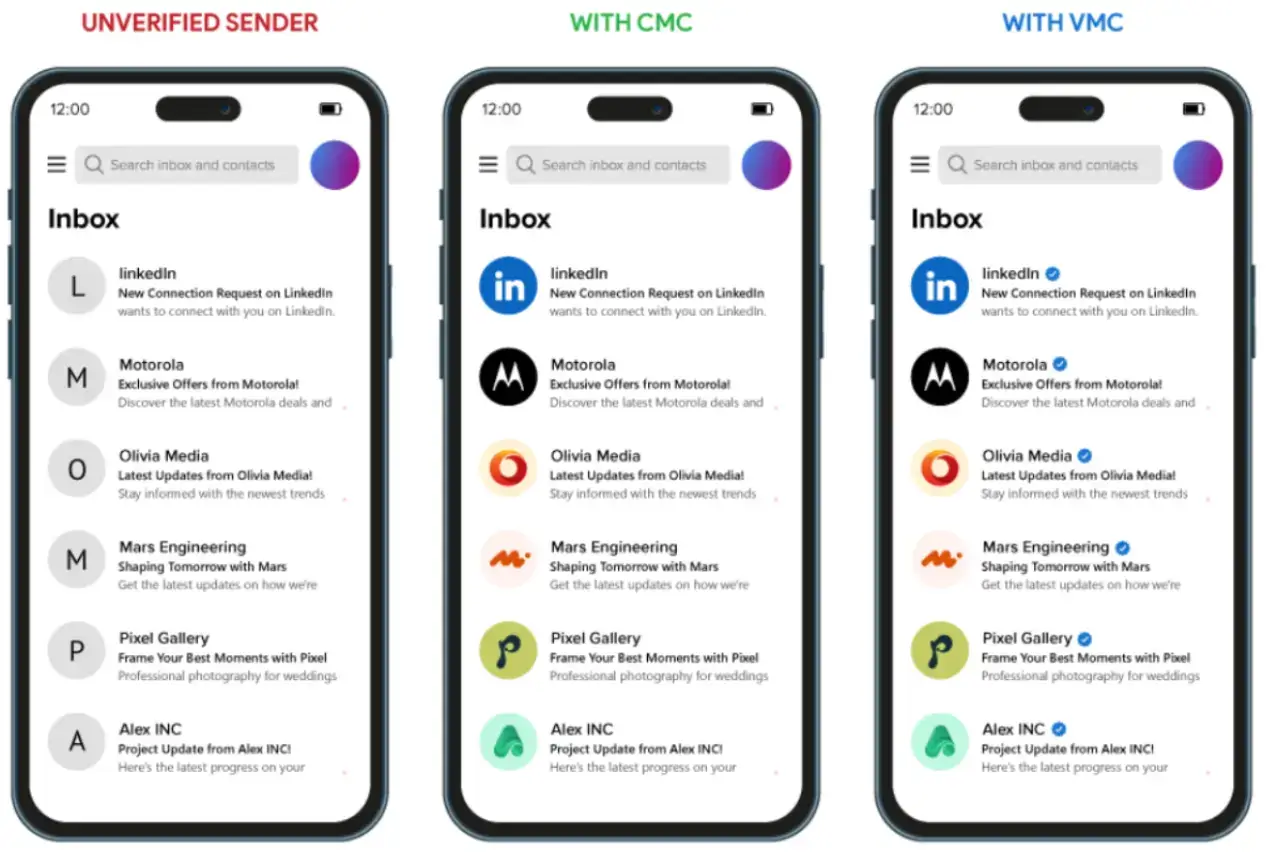
To secure this status, organizations utilize digital credentials. These are Verified Mark Certificates (VMC) for trademarked and Common Mark Certificates (CMC) for non-trademarked logos.
As you can see in the image with the CMC certificate, you can display your logo. With the VMC certificate, you can display your logo and a verified blue check mark in the inbox.
VMC and CMC certificates function as identity verification layers. What this means is they cryptographically link the logo to the domain. This ensures visual presence is reserved for trustworthy communications.
Identity Enforcement Checklist for Phishing Prevention
- Inventory every system that sends email for your domain. Marketing tools, CRM, support desk, invoicing apps. If it can send mail, it must be SPF-protected and signed with DKIM.
- Build and actively maintain nurture email list, remove inactive contacts, suppress bounces immediately, and stop sending to people who never engage.
- Lock SPF down, remove old vendors, and keep it under lookup limits. If you don’t know why an IP is there, it shouldn’t be there.
- Enable DKIM everywhere and align it with your visible “From” domain. Signing from a subdomain while sending as the root domain breaks alignment.
- Move DMARC from p=none to enforcement. Monitor reports, fix failures, then go to p=quarantine, then p=reject.
- Check alignment after every change. New tool? Recheck SPF, DKIM, DMARC. Don’t assume vendors configured it correctly.
- If you want to display logos, enforce DMARC and obtain a Verified Mark Certificate or CMC.
Conclusion: Security and Deliverability Share the Same Root
Phishing prevention shares a root cause with deliverability struggles. This is the historical lack of verifiable sender identity.
Authentication enables enforcement at the server level. But visual indicators are required to reinforce trust at the human level.
As the landscape evolves, security will rely on visual verification. Technologies like BIMI, supported by VMC and CMC, exemplify this shift. And this makes authenticated identity a visible component of communication.
Frequently Asked Questions
1. Will SPF, DKIM, and DMARC Stop Phishing Completely?
They will stop direct domain spoofing when configured correctly and set to enforcement. Attackers won’t be able to send emails that pass authentication using your exact domain.
2. Why Do Authenticated Emails Still Go to Spam?
Authentication is only one layer. Mailbox providers also score sending reputation, historical complaint rates, spam trap hits, bounce rates, and user engagement. If recipients ignore, delete, or mark messages as spam, reputation drops.
3. Do Verified Logos Improve Open Rates?
Visual signals, such as brand logos in the inbox, provide instant recognition. Recipients can open messages from trusted senders at a glance.
4. Can Small Businesses Handle Authentication Alone?
Yes, if they understand DNS and follow operational steps such as aligning SPF, DKIM, and DMARC for each sending service.
5. How Do Mailbox Providers Prioritize Delivery?
They evaluate technical proof first: SPF/DKIM/DMARC alignment, sending IP reputation, and domain history. Then they factor in engagement signals like open rates, clicks, and visible trust markers. Emails failing either layer can be filtered or delayed.

Author Bio
Ann-Anica Christian is an accomplished content strategist and creator with more than seven years of expertise in SaaS, digital eCommerce, and cybersecurity. Her work has been featured on SSL2BUY Cybersecurity sections, serving as a trusted resource for developers, IT professionals, and business owners. Since beginning her career in technical content development, she has built a reputation for translating complex concepts in website security, IoT, SSL/TLS encryption, and public key infrastructure (PKI) into clear, actionable insights for diverse audiences.
In her current role, Ann-Anica leads content strategies that combine technical depth with business objectives, delivering clarity, accuracy, and engagement across publications. She also authors journals highlighting advancements in technology sectors, reflecting her deep understanding of evolving security threats and best practices, and enabling readers to navigate the fast-changing cybersecurity landscape with confidence.
Connect with Ann-Anica at ann.christian@ssl2buy.com or visit www.ssl2buy.com to learn more about her work.