

Here’s what’s wrong with a lot of websites.
People land on the site. They look around. Maybe they even spend a minute or two on the page. Then nothing happens.
No form fill. No booking. No reply. No clear CTA.
A weak funnel can start with a site that never gives interested people a clear, low-friction way to move forward.
A lead generation funnel is just that path. The sequence that takes someone from mild interest to a concrete action. It might be a form, a demo request, a guide download, or a trial signup.
And in 2026, you do not need custom code to add a lead generation funnel to your website, just a clear promise and a follow-up that happens fast. This guide will walk you through that.
Step 1: Define Clear Goals for Your Lead Generation Funnel
Before you build anything, decide what the funnel is meant to do.
Capturing 300 newsletter signups a month is specific. So is generating 50 demo requests from mid-market visitors this quarter. Or increasing trial starts by 20% before the next release.
Getting more leads is not.
This matters because the funnel changes depending on the outcome:
- If the real goal is demo requests, you should not build the page around a soft educational offer unless that is the only realistic first conversion.
- If the sales team needs qualified conversations, the form and CTA need to reflect that.
- If you are launching something new and people need context first, then yes, a guide, waitlist, or webinar may make more sense.
Most funnel problems start when the business has not decided what kind of conversion it actually wants.
Jeffrey Zhou, CEO and Founder of Fig Loans, oversees a business where conversion flows need to separate casual interest from genuine application intent, so the funnel's goal must be clear from the start.
Step 2: Choose the Right No-Code Tools for Your Funnel
You need the right tools in the right order.
Mostly this would be:
- A page builder.
- A form or pop-up tool.
- An email platform or CRM.
- A way to cleanly pass data between them.
When choosing tools, go with what you can work with easily, or with something that has a small learning curve if you plan to train someone to do it.
Tools like Webflow, Wix, Squarespace, and WordPress are popular choices for building pages. There are newer alternatives in the market that you can also explore.
Most platforms come with built-in form builders and provide easy instructions for tracking fields and conversions.
Choose what is quick to launch and easy to embed, but note that you will want to track metrics too, or integrate with another platform for detailed insights.
Choose a tool that helps you make changes without friction.
Sixin Zhou, Marketing Manager at LDShop, works closely on digital storefront experience and conversion flow, where small delays in updates can quickly turn into lost buying intent.
If every small update turns into a delayed task, the funnel goes stale. Forms stay too long. Offers stop matching campaigns. Follow-up breaks, and nobody notices.
That is the real value of no-code tools. They let you fix things while momentum is still there.
Step 3: Design a High-Converting Funnel Page
Start with the page. If the page is unclear, nothing underneath it saves you.
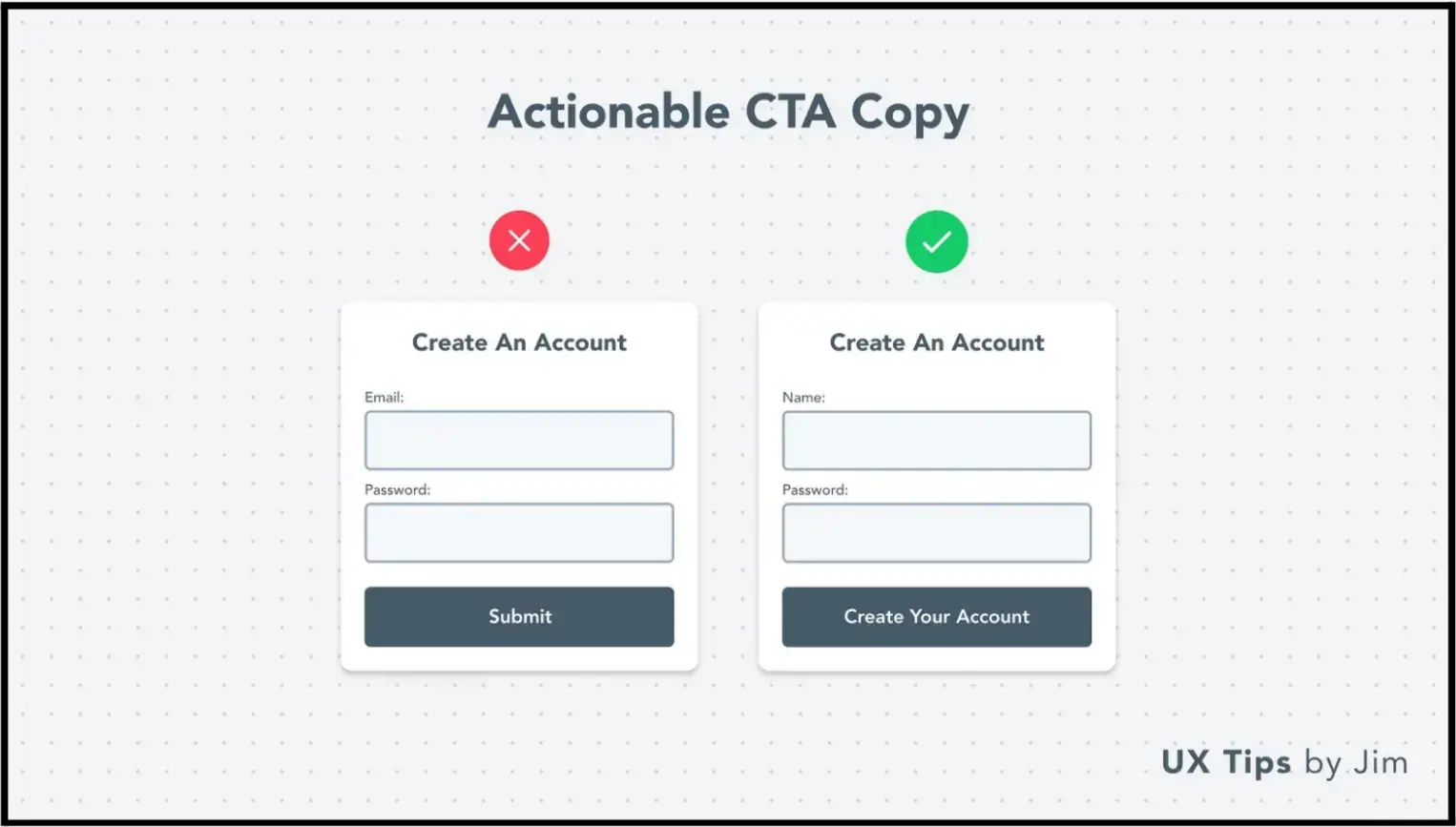
You need a clear headline, a clear offer, and a CTA that tells people what happens next. Something with context. Book the walkthrough. Get the checklist. Start the free trial.
Source: UI Tips
The value exchange has to be obvious for your lead generation funnel to work. Get the template. Book the 15-minute walkthrough. Download the checklist.
Do not just fill out this form.
Clarity does more work than cleverness here. A visitor should not have to decode what you do or why the offer matters. If it takes too long to understand, people leave.
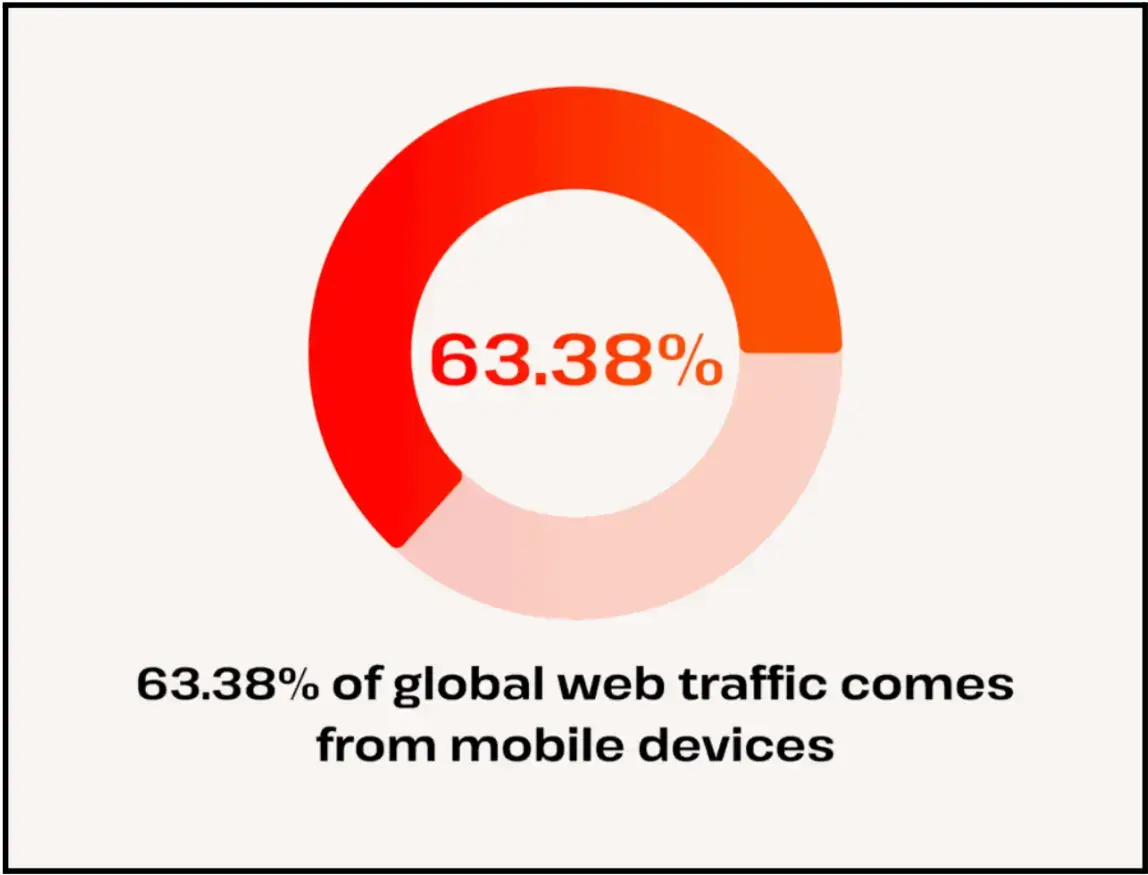
This gets worse on mobile. And mobile traffic is no longer secondary.
Statista’s reporting has shown mobile accounts for the majority of web traffic, which means your funnel needs to hold up on smaller screens, with less patience and less room for error. Here’s another stat that supports that.
Source: Genius
That means short sections. Buttons that are easy to tap. Forms that don't feel tedious and copy that gets to the point quickly.
Step 4: Create and Optimize Your Lead Capture Forms
This is where most of the damage happens.
Teams build a decent page, then ruin the conversion point with a form that asks for too much, appears too early, or gives people no real reason to complete it.
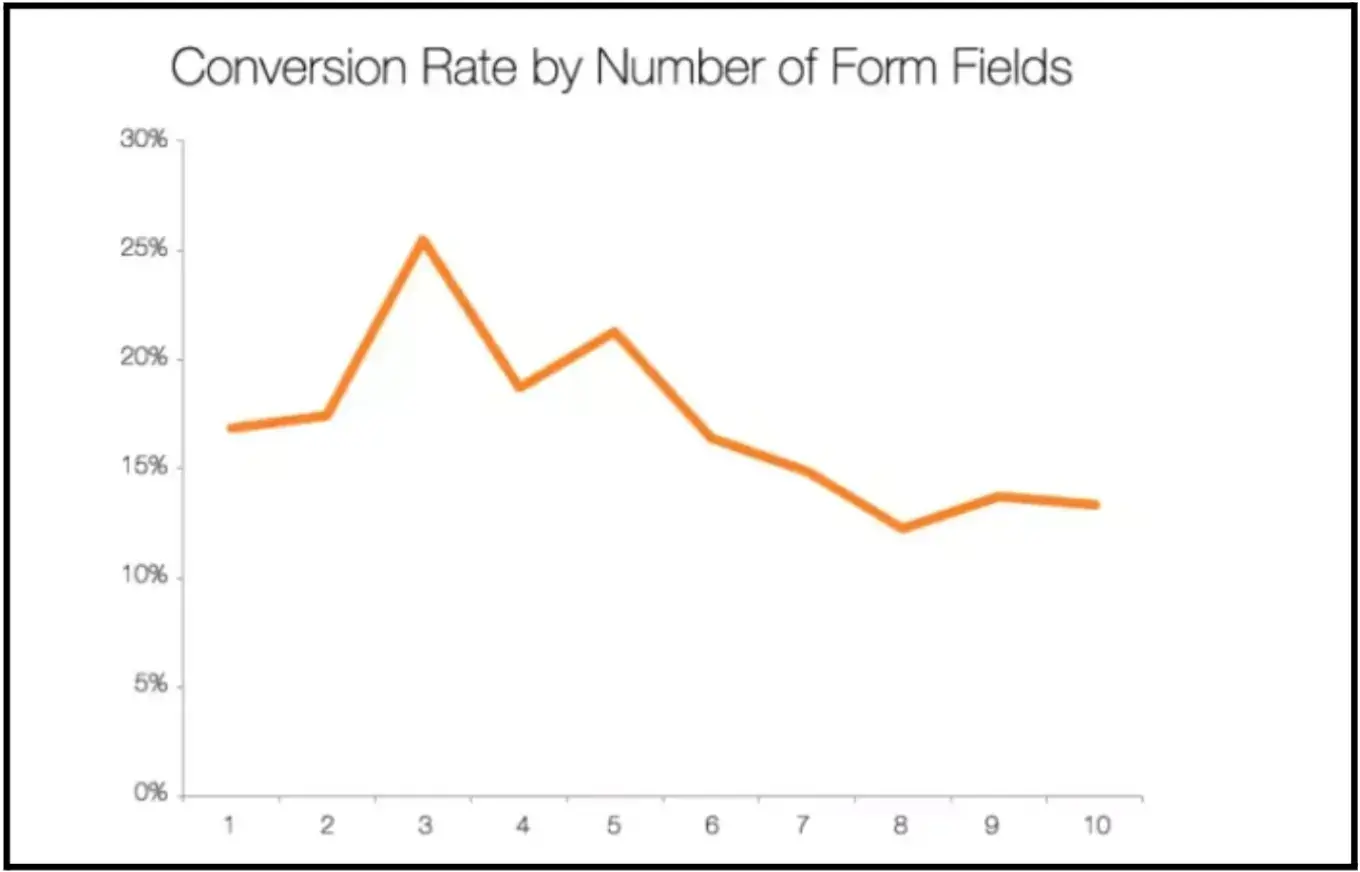
A form should collect only what you need, nothing extra.
Bryan Henry, President of PeterMD, leads a health-focused brand where lead capture has to balance conversion intent with trust, clarity, and readiness to take the next step.
Usually, that means a name and an email address. Maybe one qualifying field if it genuinely affects follow-up. Beyond that, every extra field needs to justify itself.
Source: fibr.ai
Placement matters too. A form at the end of useful content can work well because the visitor has enough context by then.
A slide-in on a high-intent page can also work if the timing is right. A dedicated landing page can work well for paid traffic because it removes distractions.
The most successful lead capture forms balance information gathering with user experience. Keep forms concise, place them where engagement is highest, and always clearly communicate the value exchange.
When visitors understand what they’ll receive, conversion rates naturally improve.
And once the form is live, test the whole path. Submit it yourself.
Check the notification. Check where the lead lands, what email they receive next. A lot of forms look finished and still break on the backend.
If you are serving users in the EU, consent requirements matter too under GDPR.
Step 5: Create Lead Magnets That Drive Conversions
A lead magnet only works if it solves a real problem fast.
That is why broad, padded assets often underperform. They sound useful, but they do not feel immediately necessary.
Short checklists work because they are easy to use. Templates work because they save time. Calculators work because they answer a question on the spot.
Guides, webinars, and benchmark reports can work too, but only if they are tied to a clear outcome.
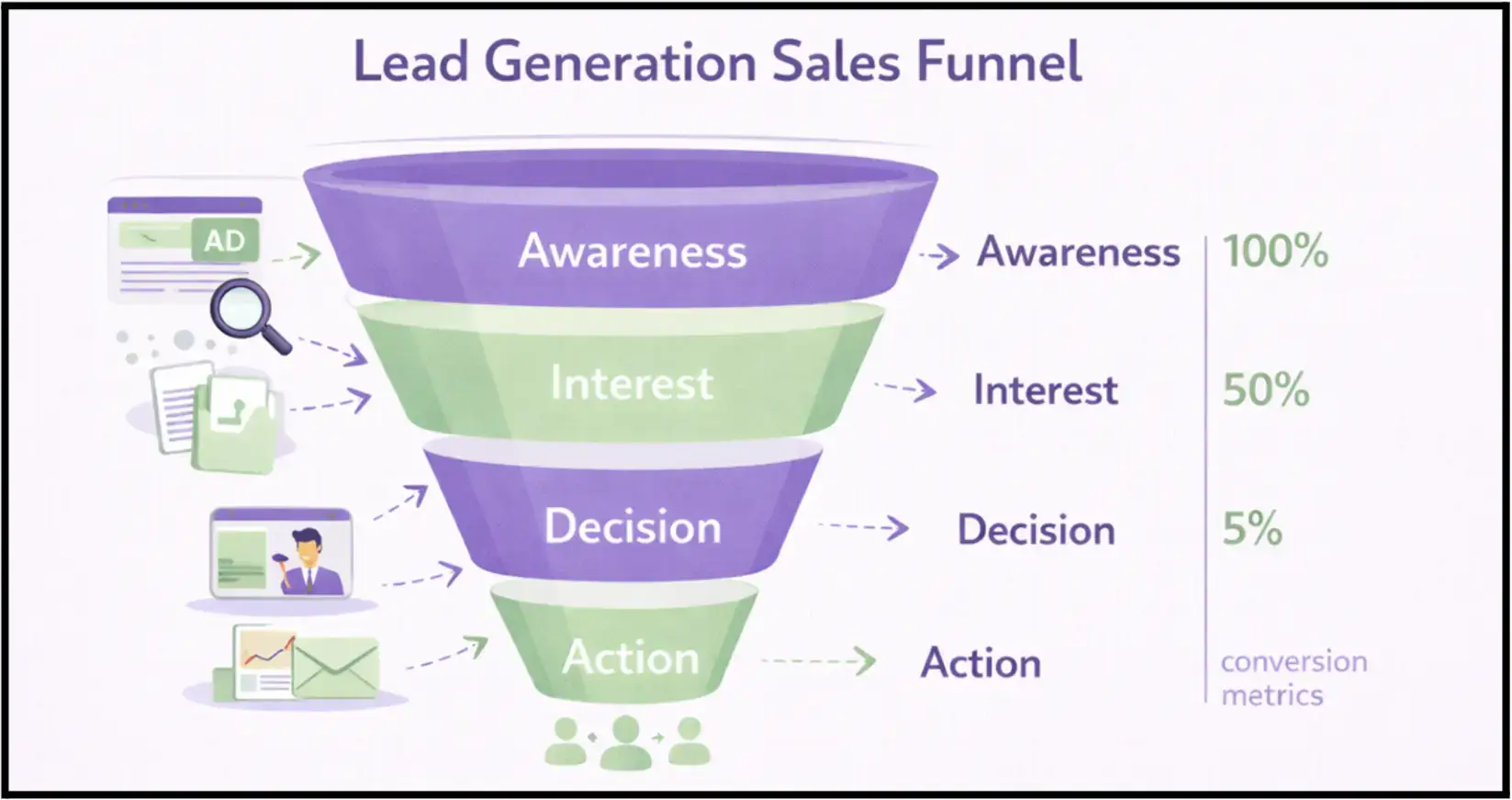
The stage matters here. Top-of-funnel visitors are more likely to exchange an email for something light and practical.
Source: LEAD GENERA
People closer to a decision respond better to demos, free trials, or walkthroughs because those offers reduce uncertainty directly.
Litmus has long reported strong ROI from email marketing, often cited at around $36 for every $1 spent. So getting the subscriber is not a small win. It is often the asset that makes the rest of the funnel worthwhile.
Step 6: Optimize Your Funnel for Higher Conversion Rates
Not every weak result needs a redesign. Sometimes the issue is one bad headline. One unnecessary field. One vague offer.
So start there.
Test one variable at a time. Headline. CTA. Form length. Hero section. Do not change half the page and call it optimization. You will not know what moved the number.
Benchmarks are useful for context. Figure out what the benchmark is for your industry. There are plenty of reports on this published every year; for example, the average e-commerce conversion rate is 1.4%.
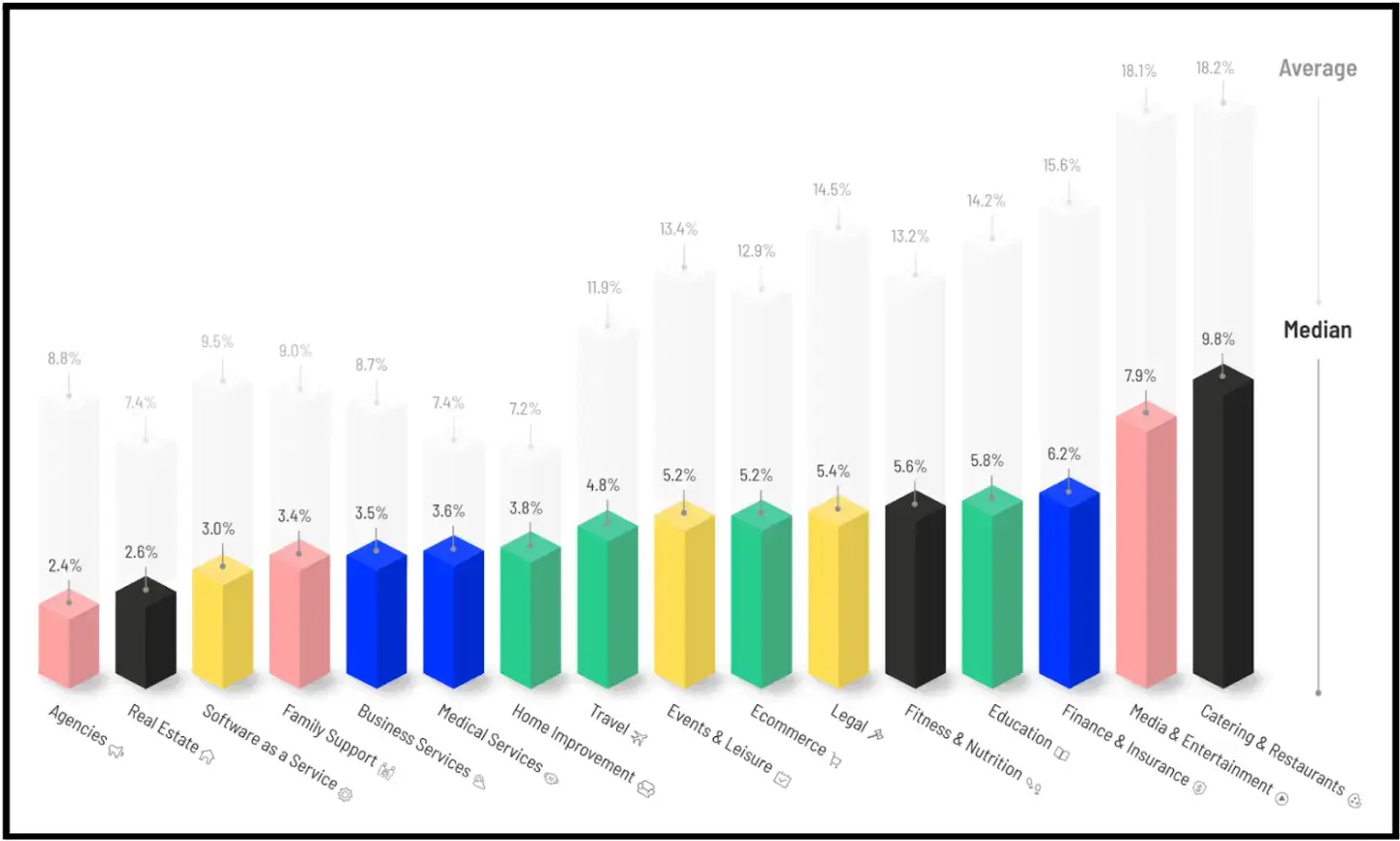
Source: Smart Insights
But your baseline matters more than the internet’s average.
If your form page moves from 2% to 3.5%, that is a meaningful gain (in fact, 3.2% is pretty high).
If people are bouncing before they scroll, the top of the page probably is not carrying enough weight.
If they reach the form and stop, either the ask is too big, or the value is too weak.
This is where heatmaps and session recordings help. They show hesitation more clearly than a clean dashboard ever will.
And yes, you need proper tracking.
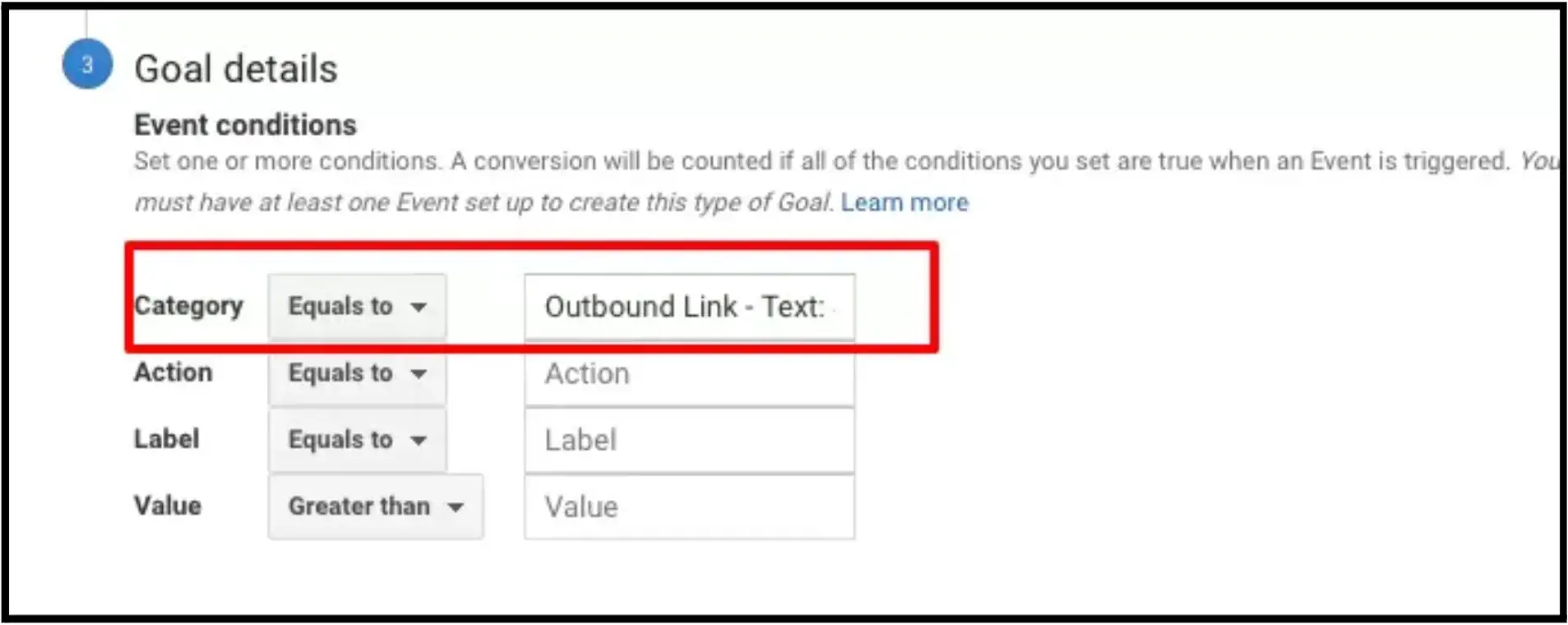
Source: Search Engine Journal
Google Analytics 4 lets you set up events and conversions so you can see where action is actually happening.
Step 7: Automate and Scale Your Lead Generation Funnel
Once the funnel works, remove the manual gaps. That is the first real scaling step.
Connect the form to your email platform. Automatically push demo requests into the CRM. Notify the right rep.
Use tags or fields so someone asking for a product walkthrough does not get the same follow-up as someone downloading a basic checklist.
Smart automation turns your funnel into a 24/7 lead generation machine. By connecting your forms to email sequences and CRM systems, you create consistent follow-up that nurtures leads at scale.
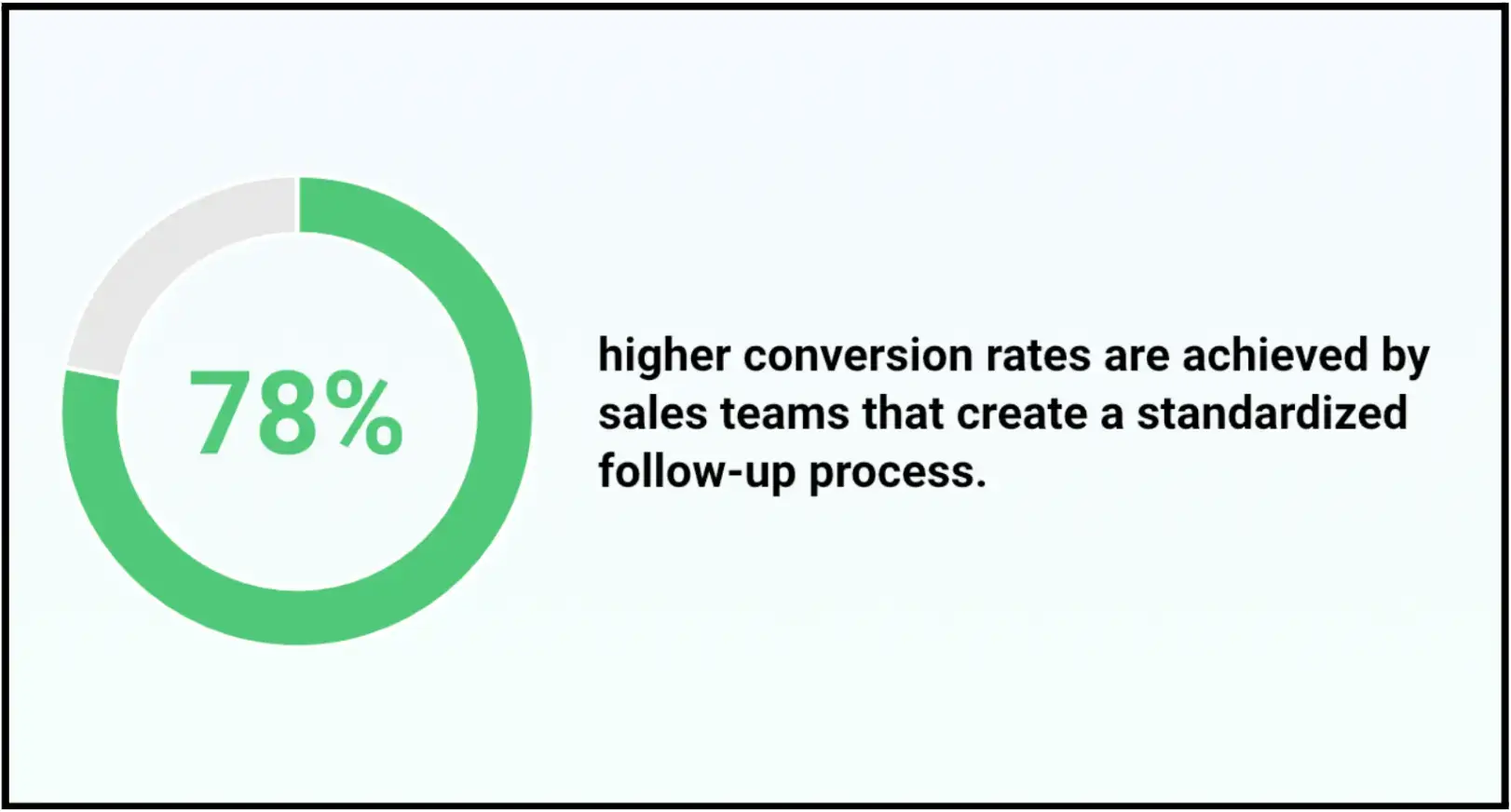
Source: ProfitOutreach
And speed matters here more than most teams expect.
That alone is enough reason to tighten the workflow.
As traffic grows, you can build separate funnels for different audiences, channels, or offers.
At that point, the work around the funnel starts getting more operational, too.
You are not just managing forms and follow-up anymore. You are also dealing with approvals, vendors, tools, and internal workflows that can easily become messy as the stack grows.
For teams trying to keep that side organized, contract management software can help reduce admin drag and make it easier to keep supporting systems across the funnel from becoming bottlenecks.
But keep the stack clean. More tools do not automatically mean a better funnel. Usually, they just create more places for handoffs to fail.
How to Get Started (Simple Funnel Setup for Beginners)
You don’t need a complex system to start generating leads—you need a working one.
Begin with a single, focused funnel: one page, one clear offer, one form, and one immediate follow-up. That alone is enough to turn passive traffic into real opportunities. The biggest mistake is waiting until everything feels “complete.”
Funnels improve through use, not planning.
Launch quickly, then pay attention to what people actually do. Where do they drop off? What do they click? What do they ignore? Those signals will tell you exactly what to fix next—whether it’s your headline, your offer, or your form.
A strong lead generation funnel is not built overnight. It’s built by removing friction, one step at a time.
And if your site already has traffic, you’re closer than you think. The opportunity isn’t getting more visitors—it’s capturing the ones you already have.
FAQs About Lead Generation Funnels
1. What is a lead generation funnel?
A lead generation funnel is the path that guides a website visitor from initial interest to a clear action, such as filling out a form, booking a demo, starting a trial, or downloading a resource. It helps turn passive traffic into real leads by giving people a clear next step.
2. How do I build one without coding?
You can build a lead generation funnel without coding by using a website builder, a form or pop-up tool, an email platform, and simple integrations to connect them. In most cases, one landing page, one clear offer, one form, and one follow-up sequence are enough to get started.
3. What should a lead generation funnel include?
A lead generation funnel should include a clear landing page, a compelling offer, a simple lead-capture form, and a follow-up process that begins immediately after submission. Depending on the goal, it may also include a lead magnet, a scheduling tool, or an email nurture sequence.
4. Why is my lead generation funnel not converting?
A lead generation funnel usually underperforms when the offer is unclear, the form asks for too much, the CTA is weak, or the next step does not feel worth taking. In some cases, the page gets traffic but does not closely align with visitor intent, hindering progress.
5. How can I improve my website's lead generation funnel?
To improve a lead generation funnel, start by testing the biggest friction points first: the headline, CTA, form length, offer, and follow-up speed. Small changes, like making the value exchange clearer or reducing extra form fields, often have a bigger impact than redesigning the whole page.

Author Bio
Jesse is a professional writer whose aim is to make complex concepts easy to understand. He strives to provide quality content that assists people in everyday life.