
Small marketing teams burn out because they keep increasing workloads without changing the processes behind them. Every task starts from scratch, so there’s an effort attached to it, but no direct impact on the output.
You can scale marketing without adding headcount by leveraging automated processes and streamlining everyday functions.
Campaigns repeat the same steps each time. But without automation, there’s significant wasted time coordinating, even as team size remains the same.
In this article:
- Control How Marketing Work Enters the System
- Set Work-In-Progress Limits to Protect Focus
- Define Content Structure Before You Scale Output
- Use Content Extraction to Multiply Output Without Extra Work
- Standardize Output Formats to Reduce Review Load
- Leverage User-Generated Content to Reduce Messaging Effort
- Build an Automated System for Collecting Customer Content
What can help is a system that moves work based on clear triggers and conditions, rather than requiring fresh thinking and approval for every asset.
For example, when someone fills out a form on your site, the software should instantly update their status and place them in a pre-written series of messages.
It's also why those implementing marketing automation see an 80% increase in leads. But how do you get started with it as a small team? Let’s find out.
Start With a Centralized Marketing Information Hub
You cannot scale if customer data is siloed in individual email inboxes or separate spreadsheets. This creates a bottleneck where one person must ask another for information before they can take action.
A single, centralized database is easy to automate and scale marketing efforts. You can have it log every interaction so that anyone in the team can see the full history of a lead without needing a meeting.
How to implement this:
- Select a database tool: Choose a system like HubSpot, Pipedrive, or a similar contact management platform that allows for shared access and automatic data logging.
- Connect communication channels: Link your company email and phone systems to this hub to record every message you send or scheduled call under the specific contact's profile.
- Audit data entry points: Identify every place a customer enters their information. It could be a custom website form or a social media ad.
Next, use an integration tool like Zapier’s Zap to push that data directly into your hub.
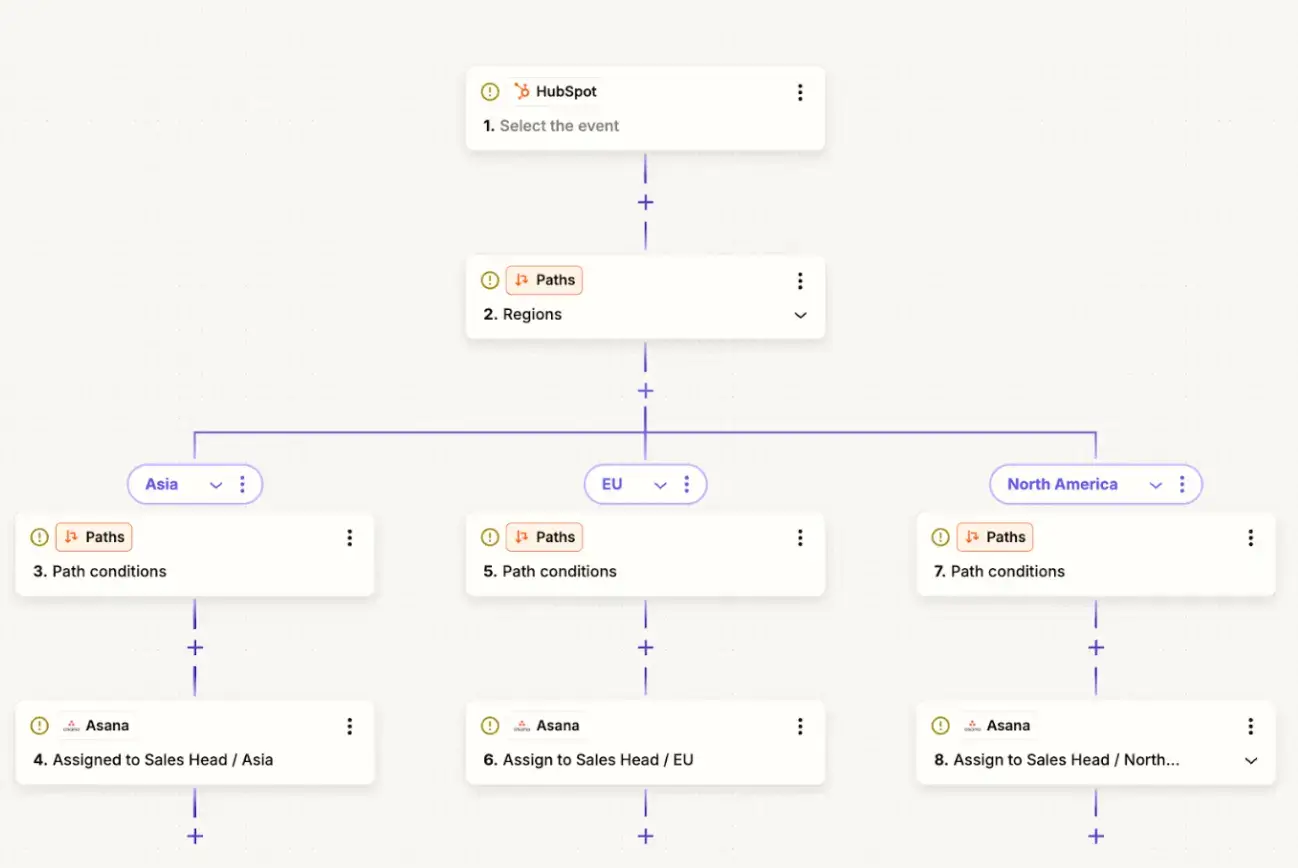
Zap’s automation workflow with integrations
- Set mandatory fields: Configure the database to require specific information, such as a budget range or a geographic location, before a lead can be assigned to a team member.
Pro tip: Delete local spreadsheets and shared documents that track the same information to keep the central hub the only source of truth.
Control How Marketing Work Enters the System
Don’t let the marketing team lose its creative spark just because it receives task requests from all over. If work enters through five paths, the review load multiplies even when the output remains the same.
That’s why, as you scale marketing, begin by controlling the entry point of activities.
Here’s how it works.
Create a Single Task Intake Channel
A single intake channel works when requests are routed through a single controlled path and converted into structured tasks without human mediation.
You can try this system:
- POWR for intake
- Zapier for transfer
- Asana for execution
Zap connecting POWR Form to Asana
This setup helps standardize before they reach the marketing team and automatically routes them once inside the system.
How POWR Acts as the Request Gatekeeper
POWR form can act as a gatekeeper to capture requests in a structured format and block incomplete or vague work from entering the system.
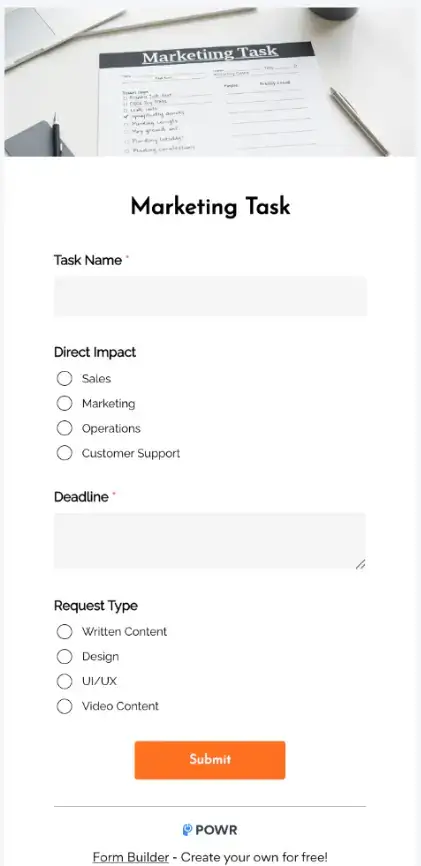
POWR Form Setup Checklist
- Create one POWR form with mandatory fields for request type, priority, deadline, and business context.
- Use dropdowns and conditional fields to prevent open-ended or unclear requests.
- Require requester identity and approvals (if applicable) before submission.
- Publish a single form link and treat it as the only accepted intake path.
Automatically Route Requests Into Asana
Zapier’s Zaps can forward each validated request into Asana as a task, without manual copying or interpretation.
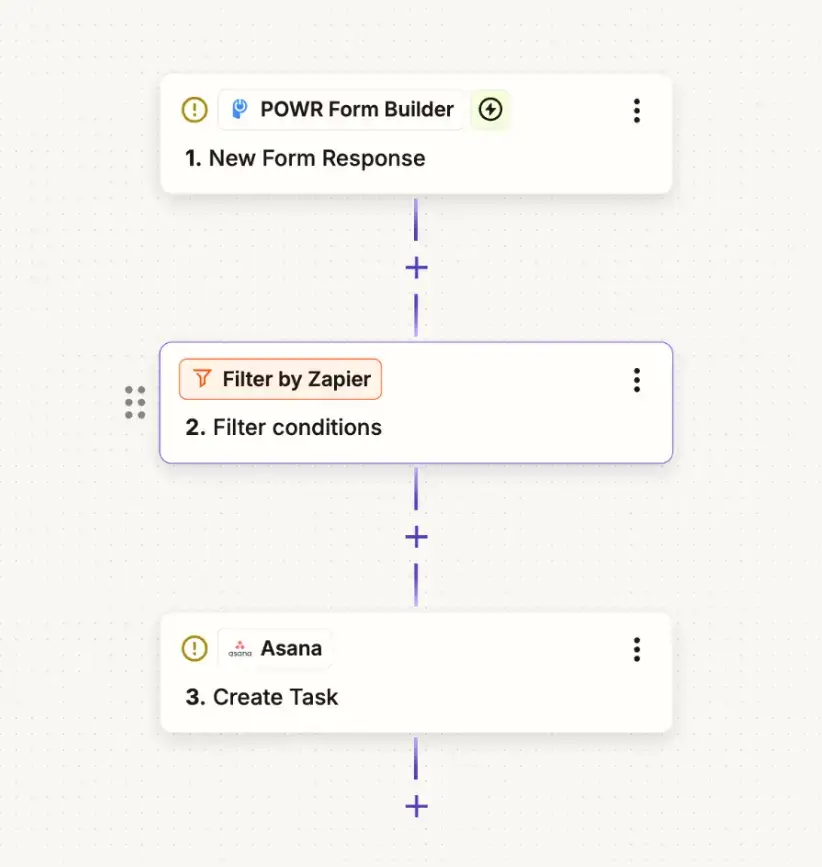
POWR Form in a Zap integrates with Asana
Zapier → Asana Setup Steps:
- Set POWR form submission as the Zap trigger
- Create a task in a dedicated Asana intake project
- Tag form fields directly to Asana custom fields (priority, request type, effort)
- Add structured context to the task description and lock further edits if needed
Check Asana pricing, which is available in four tiers; you may need to move past the free version to leverage its integration capabilities.
The Starter plan is the minimum requirement to make this system work, as it enables Forms, Rules, and Custom Fields for routing and enforcement.
An advanced plan becomes necessary when you need approvals, workload visibility, or cross-team reporting as request volume and governance needs increase.
Set Work-In-Progress Limits to Protect Focus
To scale marketing activities, you first need to track what is already in place.
When a team member hits the capacity, nothing new starts unless they complete the task(s) in hand.
To implement this in Asana:
- Use a board with columns like In Progress and Review
- Rename columns to show limits, for example, In progress (Max 5)
- Avoid hour-based automation, as Asana cannot reliably gate work based on remaining hours
- Enforce a single rule that only one owner can move tasks into capped columns
Here, the constraint is human review capacity, measured by task count or by percent allocation (time dedicated to specific tasks or projects).
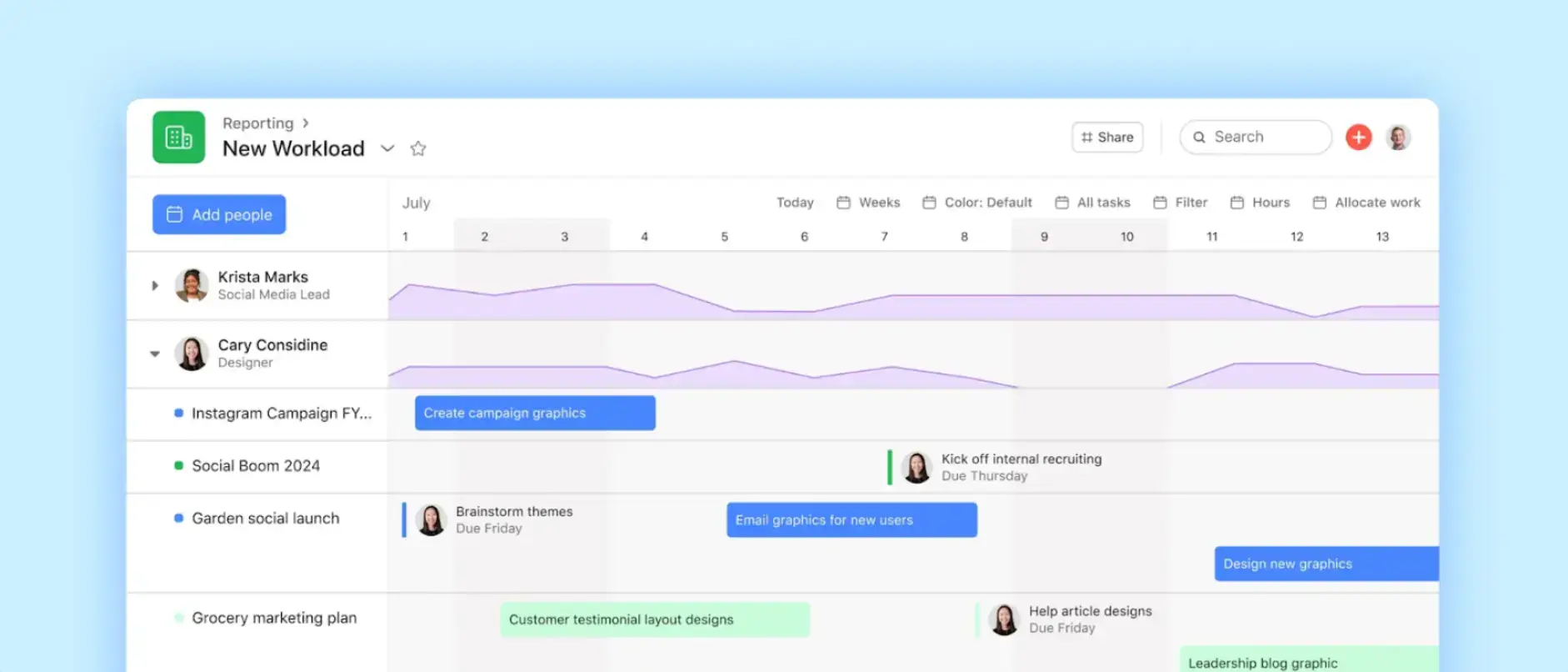
Source: Asana
You can see task backlogs build when multiple items wait for approval simultaneously. It ultimately delays decision-making and extends work into the after-hours.
Define Content Structure Before You Scale Output
Remove the need to review and collaborate for every new piece of content by defining the content structure and review criteria. What changes is the content format, while the central idea remains intact.
It becomes easy to scale marketing when teams spend less time deciding what to make and how to approve it.
Robert Rose of the Content Marketing Institute identifies the biggest barrier to scaling as a lack of connection between assets. He suggests that 2026 is the year of orchestration rather than just production.
What you can do here:
- Decide only 3–4 allowed content types
- Define length, structure, CTA, and approval checklist for each
- Reject custom formats by default
Use Content Extraction to Multiply Output Without Extra Work
Part of the marketing automation strategy also includes managing content through a clear content extraction process. It helps turn a single large asset, such as a recorded video or a detailed guide, into a month’s worth of smaller updates.
This way, even a team of two people can maintain a daily presence across multiple platforms without the mental drain of generating new ideas every morning.
The Pillar Content Workflow
- Produce one pillar content: Record a thirty-minute video interview, host a webinar, or write a 2,000-word deep-dive article on a topic that solves a major customer problem.
- Transcribe the audio: Use an automated transcribing tool to turn the recording into text, which serves as the raw material for your written updates.
- Extract short clips: Identify three to five segments under 60 seconds each that present a single clear point, and export them for social media use.
- Convert points into text posts: Take three to five key sentences from the transcript and turn them into standalone updates for LinkedIn or your email newsletter.
- Create a visual summary: Pull the most important statistics or quotes from the pillar piece and put them into a pre-made graphic template.
- Schedule the rollout: Add these pieces to a calendar so they go live over the next 4 weeks, ensuring the original high-effort work continues to reach new people well beyond its creation.
Standardize Output Formats to Reduce Review Load
Each content variation adds review effort and decision load.
To scale marketing effectively, you need to standardize outputs early enough that creation becomes repeatable and review becomes predictable. That’s how you’d trade creative freedom for speed.
To put this into practice:
- Pick your top 3 recurring assets only. Example: blog post, email, LinkedIn post
- For each, define a fixed structure in terms of length range, sections, CTA type, approval checklist, etc
- Store the structure as a template inside Asana tasks or project descriptions
- Enforce one rule: no custom formats without explicit approval
Leverage User-Generated Content to Reduce Messaging Effort
The main benefit of using customer ideas is that your team no longer has to decide how to explain value. Customers already explain why something matters to them, so the team can reuse those explanations rather than writing from scratch.
This approach also works because people trust customer explanations more than brand-written ones. PowerReviews reports that visitors who interact with user-generated content convert at 102.4% higher than average. When trust is higher, teams spend less time polishing language or defending messaging choices.
You do not need constant customer content or high social media activity, but a few clear explanations from customers at moments when they are obviously satisfied.
How to implement this:
Where to Source High-Quality Customer Explanations
Look for written customer responses where they explain what changed for them. It could be a reply to a delivery confirmation or for a support ticket marked resolved.
Getting the user-generated content involves several steps.
- Ask one focused question: Request a single question that invites reasoning. For example, what changed for them after using your product or service?
- Keep the customer’s explanation intact: Use their response mostly as it is. Correct obvious errors as needed, but do not reshape the idea; the goal is to avoid imposing your own interpretation.
- Decide placement before reuse: Choose one place where this narrative will stay, such as a website section or an email paragraph. Avoid spreading it everywhere at once, as this creates additional coordination work.
Here’s an example of using customer words in email marketing (in a B2C space).

Source: yespo
- Assign one person to publish: One person checks accuracy and consent, then publishes without needing any group discussion. The value comes from speed and clarity, not perfection.
Build an Automated System for Collecting Customer Content
To include user-generated content in your marketing output, you need a system that automatically gathers and displays reviews and photos.
- Set a post-purchase trigger: Configure your email marketing tool to send a message exactly 14 days after delivery, asking for a specific review or a photo of the product in use.
- Use a dedicated collection tool: Deploy a service such as Bazaarvoice or Yotpo that offers a simple interface for customers to upload photos or videos directly from their phones.
- Embed a social proof gallery: Install a dynamic gallery on your product pages that pulls in any social media post where your brand is tagged, ensuring fresh content appears without manual updates.
- Automate rights management: When a customer submits a review or testimonial through your form or platform, the permission is included as a short line that they agree to by submitting.
- Filter for quality: Set a rule in your software to display only reviews with 4 stars or higher and an image, keeping the most helpful content at the top.
The Real Meaning of Marketing Scale
Adding a headcount could be a quick decision, but there’s always a way to scale marketing activities. Small teams burn out when marketing keeps forcing them to think and decide from scratch every time.
Marketing scale comes from removing repeated thinking and preemptive coordination that add effort without increasing output.
What works is treating marketing as a system. Control how work enters and set review rules for consistency.
Frequently Asked Questions
Does scaling mean producing more content?
No. Scaling means removing repeated decisions. You can scale marketing activities only if the output follows a consistent structure and there are clear review rules for the level of thought applied to each asset.
Is using customer input about words or ideas?
Ideas. Customers explain why something mattered. What you want is to reuse that explanation and remove internal debate about messaging to cut short the writing and review cycles.
What happens if the automation breaks?
This is a known risk, called a silent failure. To navigate this, set up a weekly 15-minute audit to check your integration dashboard for any error flags. Most tools, such as Zapier, will send you an alert if a connection stops working.
How can I prevent negative reviews from being posted automatically?
Use the Automated Moderation feature in your review software to create a blocklist of keywords such as 'refund,' 'broken,' 'disappointed,' etc. That way, if a review contains these words, the system will hold it in a private folder for you to review manually.
Does automation make marketing feel less personal?
Automation handles only repetitive deliveries, not messaging. By using tools to manage timing and data entry, you actually gain more time to write high-quality, personalized messages for leads who are ready to buy.

Author Bio
Tasbih Amin is the Marketing Manager at Cirface and a practical Marketing Ops specialist. She designs content and workflows that help teams use Asana more effectively, from intake to approvals to follow-through.