
When visitors land on your website, they often have questions before making a purchase, booking a service, or contacting your team. If they can't get answers quickly, many will leave and look elsewhere.
In fact, 82% of consumers expect an immediate response when they contact a business, and nearly 60% define "immediate" as 10 minutes or less.
Additionally, 78% of customers are more likely to buy from the first company that responds to their inquiry.
This growing demand for instant support is why live chat has become one of the most effective customer communication channels.
Live chat enables website visitors to connect with businesses in real time through a chat widget embedded directly on web pages, eliminating the delays associated with email and traditional support methods.
Whether you're running an eCommerce store, SaaS platform, healthcare website, or service-based business, understanding how live chat works can help you improve customer satisfaction, capture more leads, reduce abandonment, and increase conversions by delivering support exactly when customers need it.
What Is Live Chat on a Website?
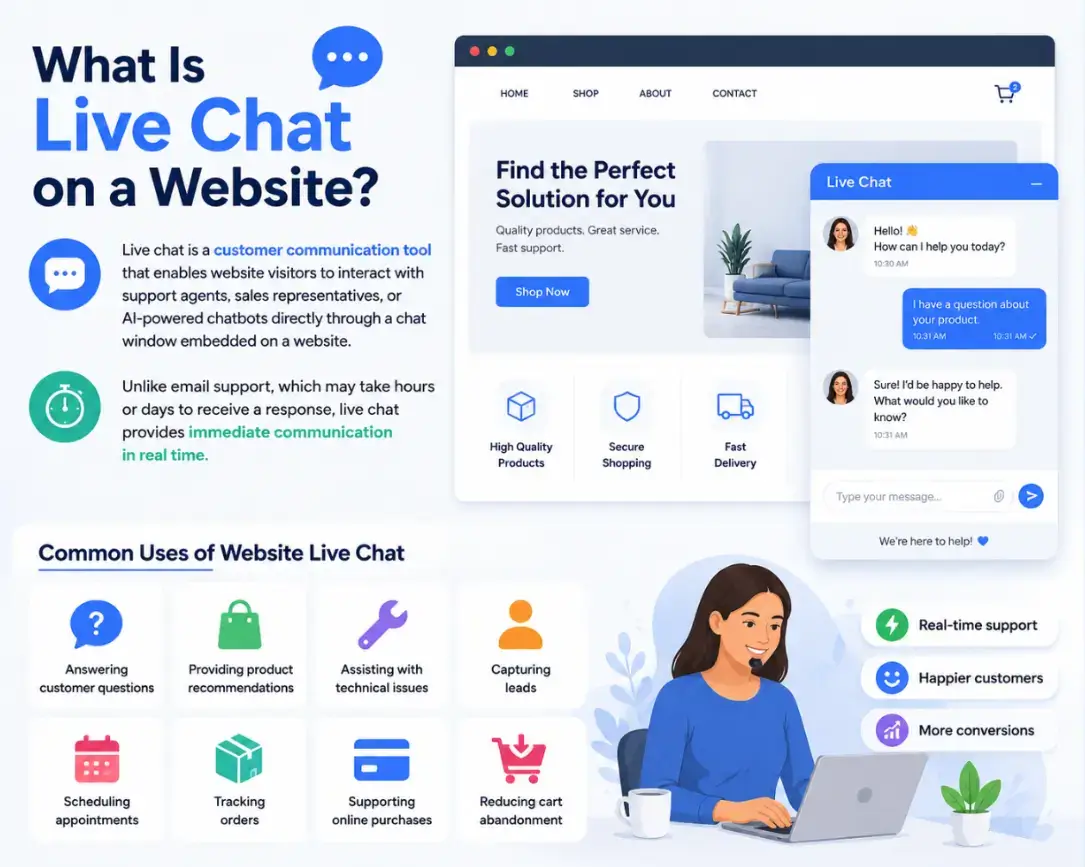
Live chat is a customer communication tool that enables website visitors to interact with support agents, sales representatives, or AI-powered chatbots directly through a chat window embedded on a website.
Unlike email support, which may take hours or days to receive a response, live chat provides immediate communication in real time.
Common Uses of Website Live Chat
- Answering customer questions
- Providing product recommendations
- Assisting with technical issues
- Capturing leads
- Scheduling appointments
- Tracking orders
- Supporting online purchases
- Reducing cart abandonment
Expert Advice:
This highlights why live chat should not simply be viewed as a support tool. Every chat interaction influences how customers perceive your brand.
What Does Live Chat Look Like?
Most websites display a small chat icon or chat bubble in the bottom-right corner of the screen. When clicked, it opens a conversation window where visitors can start chatting instantly.
A live chat widget typically includes:
- Welcome message
- Agent or chatbot introduction
- Message input field
- File sharing option
- Knowledge base suggestions
- Chat history
What Happens Between the Visitor's Click and the Agent's Reply
The process is surprisingly simple.
Step 1: Visitor Opens the Website
A user visits your website and browses products, services, or content.
Step 2: Chat Widget Appears
The live chat software displays a chat button. Depending on settings, it may proactively invite the visitor to start a conversation.
Example:
"Hi there! Need help finding the right plan?"
Step 3: Visitor Sends a Message
The visitor types a question into the chat box.
Example:
"Do you offer monthly subscriptions?"
Step 4: Message Reaches the Chat Platform
The message is instantly sent to the business's live chat platform.
The platform can route the conversation to:
- A live support agent
- A sales representative
- An AI chatbot
- A specific department
Step 5: Response Is Delivered
The assigned agent or chatbot responds in real time.
Visitors can continue the conversation without leaving the website.
Step 6: Chat Data Is Stored
The conversation is saved within the system and may be integrated with:
- CRM software
- Help desk software
- Marketing automation tools
- Customer support platforms
Live Chat Architecture Explained
A typical live chat system contains four key components:
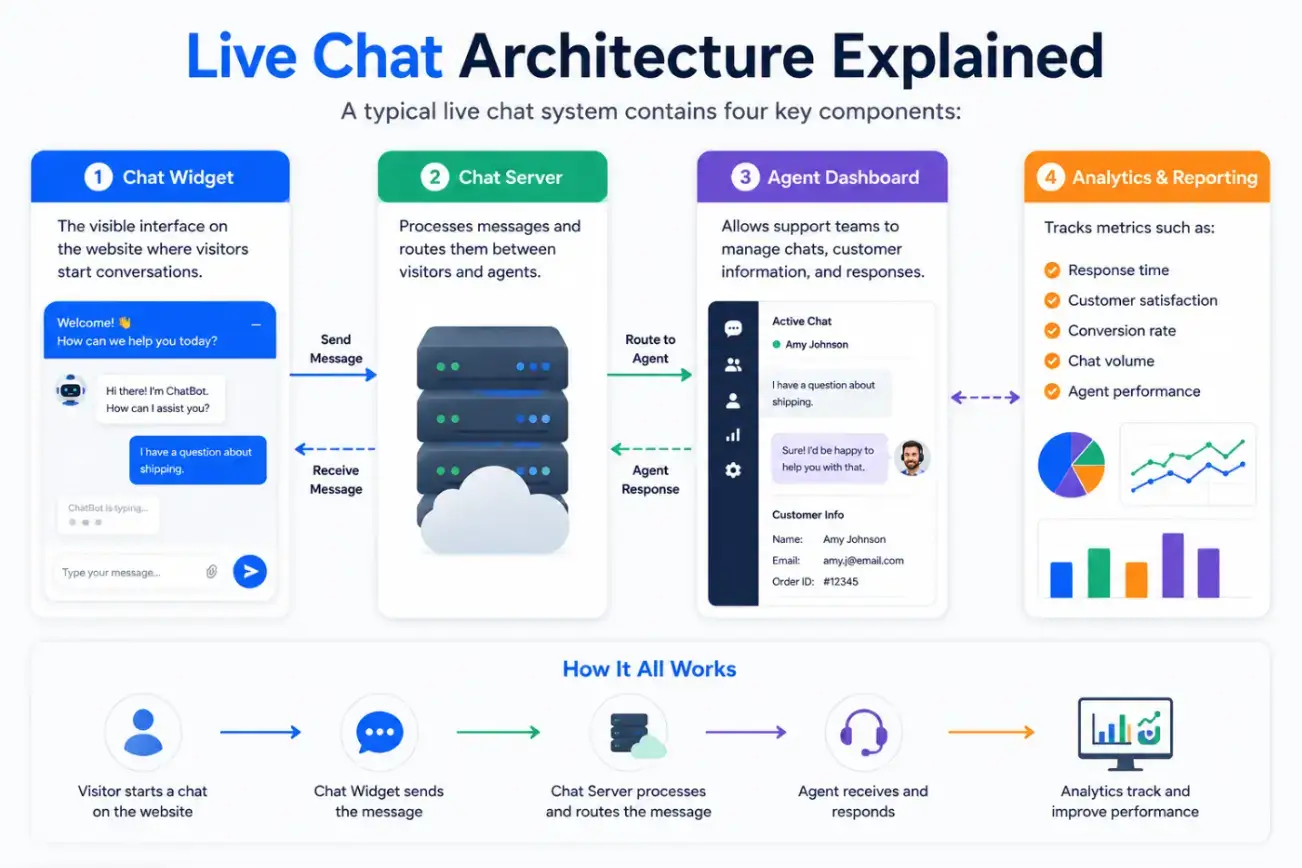
1. Chat Widget
The visible interface on the website where visitors start conversations.
2. Chat Server
Processes messages and routes them between visitors and agents.
3. Agent Dashboard
Allows support teams to manage chats, customer information, and responses.
4. Analytics & Reporting
Tracks metrics such as:
- Response time
- Customer satisfaction
- Conversion rate
- Chat volume
- Agent performance
Human, AI, or Hybrid: Pick Based on Volume
Human Agents: Complex Inquiries and High-Value Sales
Conversations are handled by real support or sales representatives.
Best for:
- Complex inquiries
- High-value sales
- Technical support
AI Chatbots: FAQs and 24/7 Coverage
Artificial intelligence automatically responds to common questions.
Best for:
- 24/7 support
- FAQs
- Lead qualification
Hybrid: Chatbot Triage, Human Handoff
Combines AI chatbots with human agents. The chatbot handles basic questions and transfers complex issues to a live representative.
Best for:
- Growing businesses
- SaaS companies
- eCommerce stores
Benefits of Live Chat for Businesses
Faster Customer Support
Customers increasingly prefer quick and convenient communication channels. Live chat helps businesses resolve questions instantly without requiring customers to wait for email replies or phone support.
Higher Conversion Rates
When visitors receive immediate answers during the buying process, they are more likely to complete purchases.
Better Customer Satisfaction
Studies consistently show that customers appreciate real-time support because it reduces frustration and helps them solve issues quickly.
Increased Lead Generation
Businesses can collect:
- Names
- Email addresses
- Phone numbers
- Company information
before or during conversations.
Reduced Support Costs
Agents can manage multiple chats simultaneously, making live chat more efficient than phone support.
24/7 Availability
AI-powered chatbots ensure customer assistance remains available even outside business hours.
Setting Up Live Chat in Six Steps
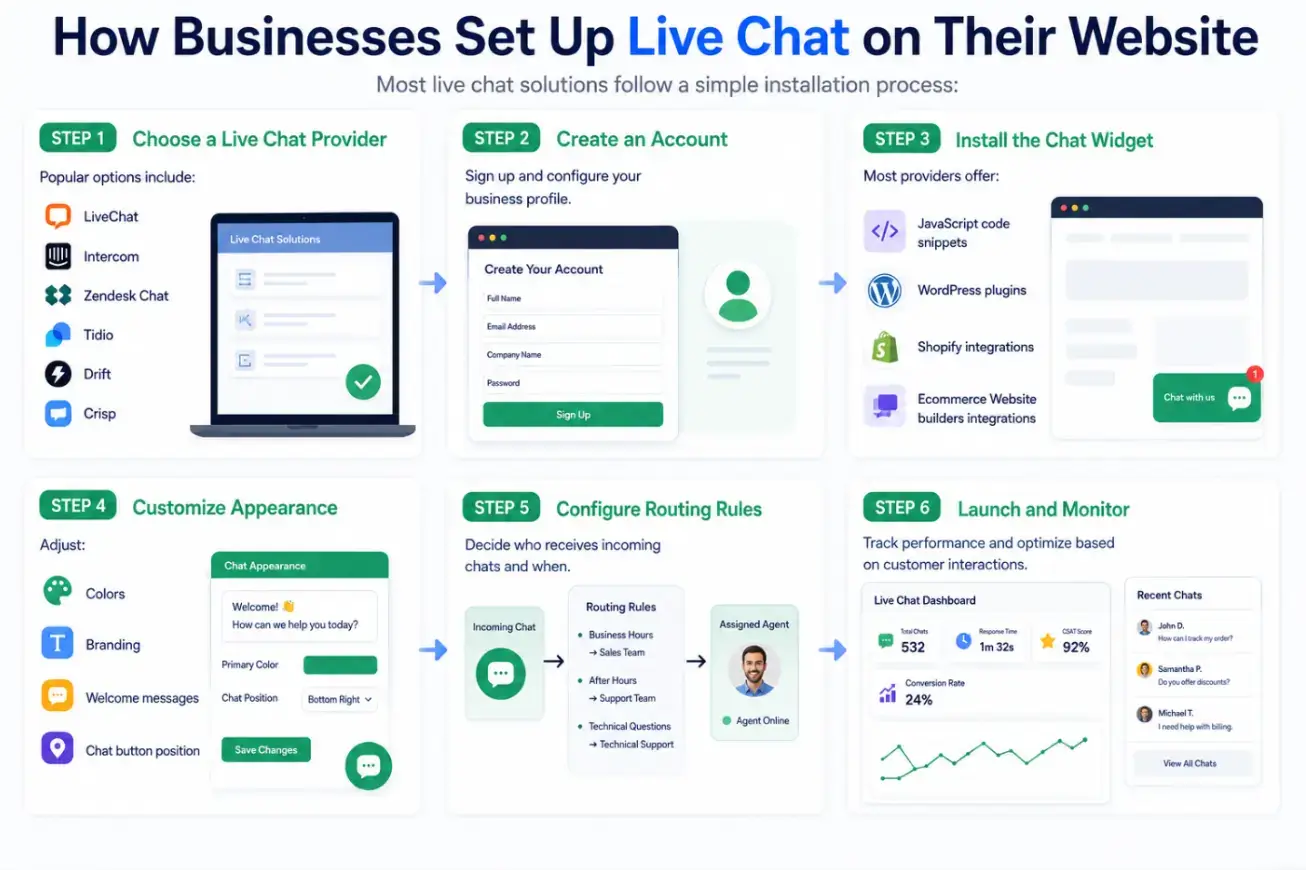
Most live chat solutions follow a simple installation process:
Step 1: Choose a Live Chat Provider
Popular options include:
- LiveChat
- Intercom
- Zendesk Chat
- Tidio
- Drift
- Crisp
Step 2: Create an Account
Sign up and configure your business profile.
Step 3: Install the Chat Widget
Most providers offer:
- JavaScript code snippets
- WordPress plugins
- Shopify integrations
- E-commerce website builders integrations
Step 4: Customize Appearance
Adjust:
- Colors
- Branding
- Welcome messages
- Chat button position
Step 5: Configure Routing Rules
Decide who receives incoming chats and when.
Step 6: Launch and Monitor
Track performance and optimize based on customer interactions.
Key Features of Modern Live Chat Software
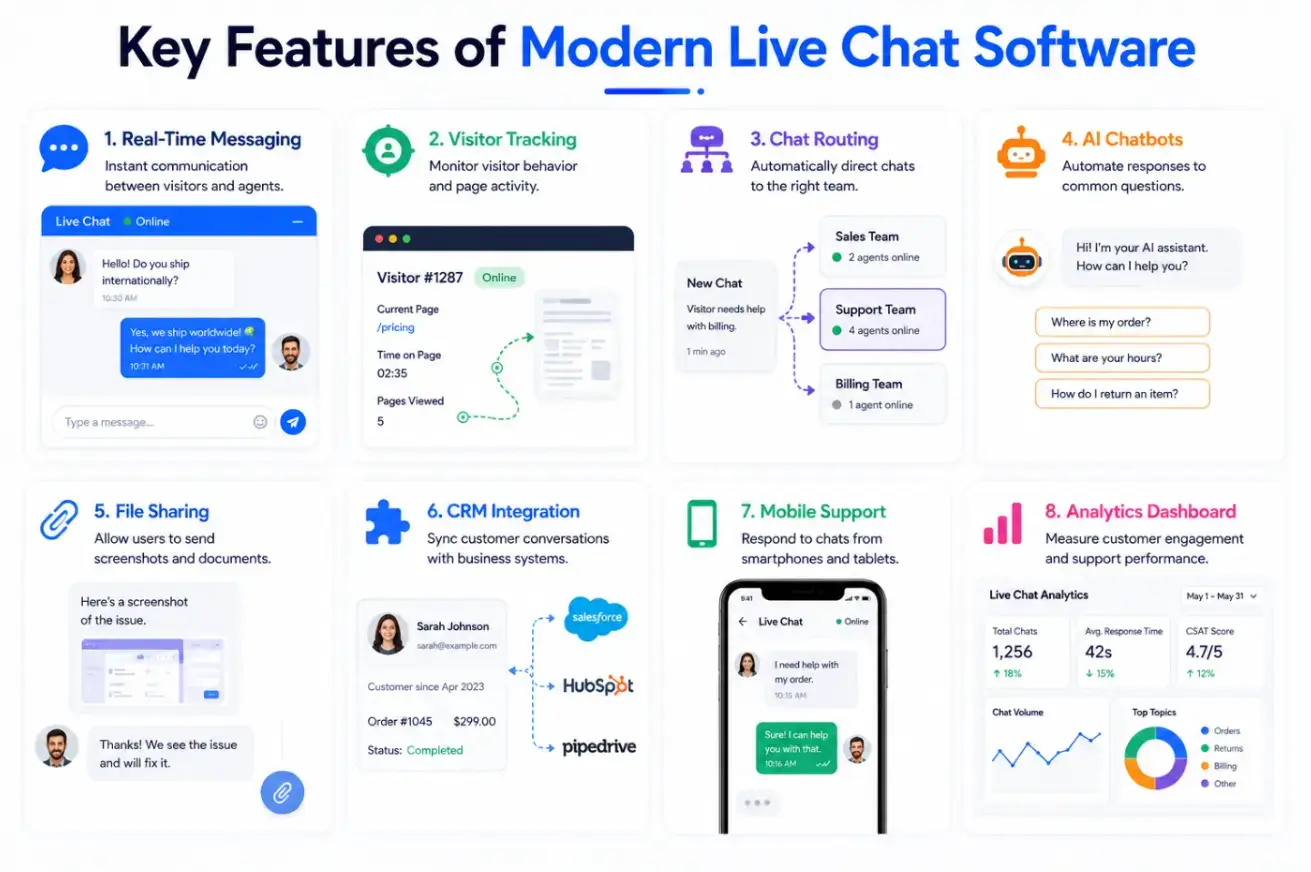
Real-Time Messaging
Instant communication between visitors and agents.
Visitor Tracking
Monitor visitor behavior and page activity.
Chat Routing
Automatically direct chats to the right team.
AI Chatbots
Automate responses to common questions.
File Sharing
Allow users to send screenshots and documents.
CRM Integration
Sync customer conversations with business systems.
Mobile Support
Respond to chats from smartphones and tablets.
Analytics Dashboard
Measure customer engagement and support performance.
Expert Advice:
Businesses that provide faster and more convenient support channels often create stronger customer experiences. For website owners, this means reducing friction through instant communication channels like live chat.
Where Most Live Chat Implementations Go Wrong
Respond Quickly
Fast responses keep visitors engaged and reduce abandonment rates.
Use Proactive Chat Invitations
Trigger messages when visitors:
- Stay on a page too long
- Reach pricing pages
- Show exit intent
Personalize Conversations
Use customer names and browsing history whenever possible.
Combine AI and Human Support
Automation improves efficiency while human agents handle complex issues.
Monitor Chat Performance
Track:
- First response time
- Resolution rate
- Customer satisfaction score (CSAT)
- Conversion rate
Common Mistakes to Avoid
- Slow response times
- Overusing chat popups
- Using robotic language
- Ignoring mobile users
- Failing to train support agents
- Not tracking analytics
- Leaving chats unattended
Live chat has become one of the most effective ways for businesses to communicate with website visitors in real time.
By providing instant assistance, answering questions quickly, and guiding users through the customer journey, live chat improves customer satisfaction, increases lead generation, and boosts conversions.
Whether powered by human agents, AI chatbots, or a combination of both, a well-implemented live chat system can transform your website into a proactive customer engagement channel.
As customer expectations continue to rise, businesses that offer fast, convenient, and personalized support through live chat will gain a significant competitive advantage.
Frequently Asked Questions
1. How does live chat work on a website?
Live chat works through a chat widget embedded on a website. Visitors send messages through the widget, and the messages are routed to support agents or chatbots who respond in real time.
2. Is live chat better than email support?
For immediate assistance, live chat is generally faster than email because customers receive responses in real time rather than waiting hours or days.
3. Can live chat be automated?
Yes. Many businesses use AI-powered chatbots to answer common questions, qualify leads, and provide 24/7 support.
4. Does live chat improve conversions?
Yes. By addressing customer concerns instantly, live chat can reduce purchase hesitation and increase conversion rates.
5. What industries benefit most from live chat?
eCommerce, SaaS, healthcare, finance, education, travel, and professional service businesses commonly use live chat to improve customer engagement and support.

Author Bio
Anisha is a Digital Marketing enthusiast who loves creating content and exploring SEO trends. She also writes about sales, marketing, and CX.