
Breadcrumbs in web design are crucial for enhancing user experience by providing a clear path back to the starting point of navigation. Site visitors must understand how and where to find valuable information on your website.
Breadcrumb navigation helps users understand their location within a website’s structure while also improving search engine crawlability and site organization.
Their role in modern web design cannot be overstated: they aid navigation, improve user engagement, and are essential to a strong SEO strategy.
In this article:
- Understanding Breadcrumbs: A Basic Overview
- The Importance of Breadcrumbs
- The Role of Breadcrumbs in SEO and UX
- Types of Breadcrumb Navigation
- How to Implement Breadcrumbs on Your Website
- For Websites Built with a CMS
- For Custom-Built Websites
- Best Practices in Breadcrumb Design
- Benefits and Challenges of Using Breadcrumbs

Understanding Breadcrumbs: A Basic Overview
What Are Breadcrumbs in Web Design?
Breadcrumbs are a secondary navigation feature that allows users to track their location within programs, documents, or websites.
They usually appear as a row of clickable links at the top of a page and include the path from the home page to the current page.
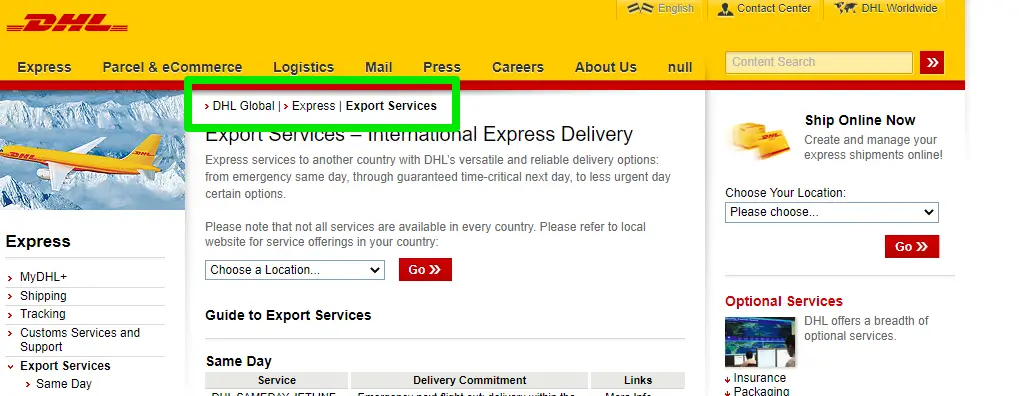
Source: Search Engine Journal
Breadcrumb navigation is commonly used on:
- ecommerce websites
- large content websites
- knowledge bases
- documentation portals
Breadcrumbs help users quickly understand where they are within a site and allow them to navigate back to higher-level pages.
Explain Breadcrumbs Meaning Like I’m 5
Imagine you're reading a storybook. Each chapter is like a different section of a website.
Now, you have a magical trail of crumbs that shows you how you got to the current chapter from the beginning of the book. That's what breadcrumbs on a website are like!
When you're on a website, you might click through different pages to find what you're looking for. Breadcrumbs are a small line of text at the top of a webpage that helps you see your path to get there.
Breadcrumbs Example
Home > Articles > 2023 > Technology
This indicates that you started on the "Home" page, then went to the "Articles" section, selected the "2023" year, and finally arrived at the "Technology" category.
It's like a map of your journey on the website, helping you understand where you are and how to easily return to previous pages.
It's called "breadcrumbs" because it's like the story of Hansel and Gretel, where they drop breadcrumbs to find their way back home. These breadcrumbs help you navigate websites and not get lost on different pages.
The Importance of Breadcrumbs
Why Implement Breadcrumbs?
The primary reason for including breadcrumbs on a website is to enhance the user experience and search engine optimization.
They offer a straightforward way to navigate a site without using the back button or the main navigation menu.
This simplicity and efficiency in navigation are especially crucial for e-commerce sites, where ease of navigation can directly impact sales.
The Role of Breadcrumbs in SEO and UX
Enhancing Website Usability with Breadcrumbs
Breadcrumbs significantly improve a website's usability. By providing a clear path back to the home page, they help users understand your website's layout.
This understanding is essential for a positive user experience, which, in turn, can lead to higher retention rates and more time spent on the site.
Breadcrumbs and Search Engine Optimization
Breadcrumbs are for more than just navigation. They also play a significant role in Search Engine Optimization (SEO).
By using breadcrumbs, you can add additional relevant keywords to your pages. They also create structured data markup that search engines like Google favor.
Breadcrumbs help search engines understand the hierarchy of a website’s content.
A list of SEO benefits of breadcrumbs:
- Improved user engagement metrics
- Lower bounce rates
- Enhanced page visibility in search engine results
- Better website indexing by search engines
Types of Breadcrumb Navigation
There are several types of breadcrumb navigation commonly used on websites.
Hierarchy-based breadcrumbs
These show the position of a page within the website’s structure.
Example:
Home > Category > Subcategory > Page
Attribute-based breadcrumbs
These are commonly used in ecommerce websites and show product attributes.
Example:
Home > Clothing > Men's > Jackets
History-based breadcrumbs
These reflect the user's browsing path rather than the site hierarchy.
Example:
Home > Previous Page > Current Page
Hierarchy-based breadcrumbs are the most commonly used type because they clearly represent the website’s structure.
How to Implement Breadcrumbs on Your Website
Adding a breadcrumbs feature to your website involves a few steps.
The process can vary depending on your website type, such as a WordPress site, a custom-built site, or a site built on another platform.
Video: https://www.youtube.com/watch?v=WAUTr3RV9A4
Here are general guides for using either a CMS or a custom-built website:
For Websites Built with a CMS (Content Management System) like WordPress:
- Use plugins or built-in features: For WordPress, plugins such as "Breadcrumb NavXT" or "Yoast SEO" easily add breadcrumbs. Breadcrumbs plugins are also readily available on Wix and Shopify. Check if your theme or CMS has built-in support for breadcrumbs as well.
- Configure the settings: Configure the plugin or theme settings to match your website's structure and style after installation.
- Place the breadcrumbs: Most plugins automatically add them, but you may need to insert a shortcode or template tag in your theme files where you want them to appear.
For Custom-Built Websites:
- Understand your website’s structure: Map it out. Understand how pages are related and hierarchically organized.
- Coding the breadcrumbs: Use HTML, CSS, and a programming language like PHP or JavaScript to code the breadcrumb functionality. Create a function that dynamically generates the breadcrumb trail for the user’s current page.
- Style the Breadcrumbs: Use CSS to style the breadcrumb links to match your website’s design.
- Insert breadcrumb code in your template: Place it in your website’s template files so it appears on every page.
- Test and refine: Ensure the breadcrumbs work correctly across all pages, and make any necessary adjustments.
Video tutorial: Here is a helpful video tutorial using React Router to make a breadcrumbs component from NetNinja, which you may want to check out.
Best Practices in Breadcrumb Design

Leading web design experts emphasize the importance of breadcrumbs.
Designing Effective Breadcrumbs
While implementing breadcrumbs, it’s essential to create an interesting and useful design, while also following these best practices to ensure they serve their intended purpose:
- Keep the design simple and intuitive.
- Use '>' to denote the hierarchy.
- Ensure the text is clickable and user-friendly.
- Make the current page non-clickable to avoid confusion.
- Implement schema markup for SEO benefits.
Benefits and Challenges of Using Breadcrumbs
Implementing breadcrumbs on a website offers several benefits, enhancing the user experience and search engine performance. Here are some of the key advantages:
In this section:
- Breadcrumbs in Web Design
- Breadcrumb Navigation Challenges

- Improved navigation: Breadcrumbs provide a clear, straightforward path for users, making it easier to understand your website's structure and navigate it.
- Enhanced user experience: Users can quickly return to previous pages or higher-level categories without using the back button or the main menu, resulting in a smoother, more efficient browsing experience.
- Reduced bounce rate: Breadcrumbs can encourage users to explore your site further, reducing bounce rate.
- Better for mobile users: With screen space at a premium, breadcrumbs offer a compact way to navigate without taking up much space.
- Contextual awareness for users: Breadcrumbs help users stay aware of their location within your site, particularly useful on e-commerce sites or sites with a large amount of content.
- Accessibility: For users who rely on assistive technologies, breadcrumbs enhance a site's navigability, making it easier to use.
- Helps keep the interface clean: By providing a minimalist, effective navigation option, breadcrumbs can reduce clutter.
Advantages of Breadcrumbs in Web Design
There are many benefits of using breadcrumbs in web design, but the most significant are:
- They enhance user navigation.
- Breadcrumbs improve site usability.
- They contribute positively to SEO.
- Breadcrumbs aid in content discoverability.
- They reduce bounce rates and increase user engagement.
Addressing Breadcrumb Navigation Challenges
While breadcrumbs offer numerous benefits, there are also some potential challenges or considerations to keep in mind when implementing them:
- Complex navigation structures: Implementing effective breadcrumb navigation can be challenging if your website has a very complex or non-linear structure. Breadcrumbs work best with hierarchical site structures.
- Overreliance on breadcrumbs: Some users might need help understanding or noticing breadcrumbs, so they shouldn't be the only navigation option. Your website should still have clear main menus and other navigational aids.
- Consistency across pages: Ensuring breadcrumbs are presented and function consistently across all pages can be challenging, especially for large or complex websites.
- Maintenance: If you update your website’s structure, you must also update the breadcrumb pathways. This can require ongoing maintenance.
- Accessibility concerns: If not implemented with accessibility in mind, breadcrumbs can pose challenges for users with disabilities. It’s vital to ensure they are accessible via keyboard navigation and readable by screen readers.
To implement breadcrumbs effectively, plan carefully, consider your website's structure, ensure they're implemented in an accessible and SEO-friendly way, and keep your user base's diversity in mind.
Conclusion: Embracing Breadcrumbs for Enhanced Web Navigation
In summary, implementing breadcrumbs is essential in web design, as they enhance the user experience and significantly improve SEO.
By understanding their importance and implementing them effectively, you can ensure a more navigable and enjoyable website experience.
Remember, breadcrumbs are more than just a navigation tool; they are a bridge that connects your content to your audience, fostering a more engaged, satisfied user base.
Frequently Asked Questions
1. What are breadcrumbs in website navigation?
Breadcrumbs are navigation links that show the path from the homepage to the current page.
2. Do breadcrumbs help SEO?
Yes. Breadcrumb navigation improves internal linking, clarifies site hierarchy, and can appear in search results when structured data is used.
3. Where should breadcrumbs appear on a webpage?
Breadcrumbs typically appear near the top of a page, below the main navigation menu.
4. Are breadcrumbs necessary for small websites?
Breadcrumbs are most useful for larger websites with multiple categories, but they can still improve navigation on smaller sites.

Author Bio
Mick Essex is the Growth Marketing Manager at POWR. He is HubSpot- and Google-certified in SEO. His career spans two decades, primarily in healthcare growth marketing, with stints in broadcast television, advertising, and copyediting. Mick attended the College of Journalism at the University of Louisiana - Monroe with a minor in Public Relations. His wife, Elizabeth, his son, Gavin, and his pup, Jolene, currently call Lafayette, Louisiana, home.
Follow him on LinkedIn.