You have tried everything to improve tracking results for your digital marketing or e-commerce company, but ad blockers keep getting in the way, affecting the data quality.
In addition, privacy policies are tightening almost every day, and you must monitor all changes.
Sounds like a nightmare, right? If you have already gone through such problems yourself, we feel for you. And we are here to help and give some hints on how you can improve data tracking if you operate with Facebook and Meta.
A slight hint - we will talk about Facebook CAPI. Even if you already know what it is and how to use it, we recommend not closing this page, as you may still find something new. Enough chatter, let’s get to the matter.
Facebook CAPI: The Basics
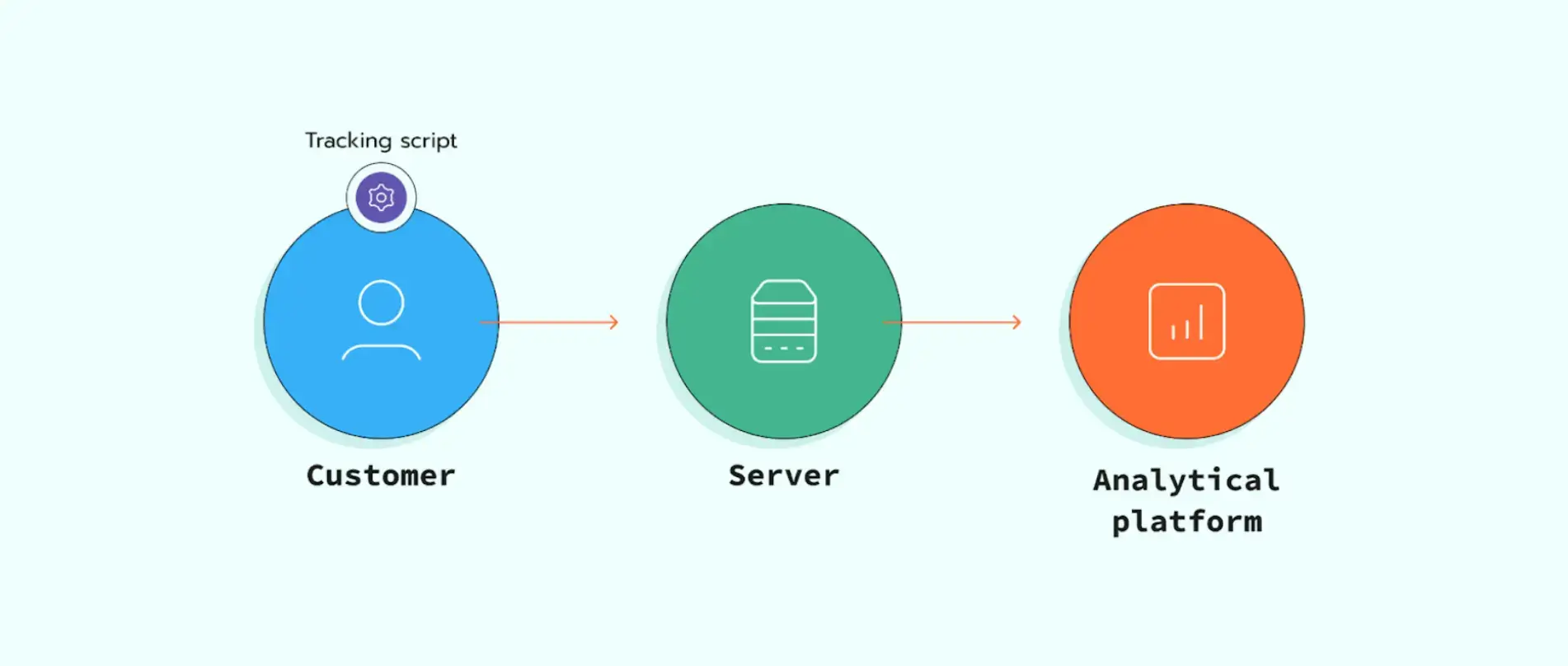
Before moving on to the CAPI itself, you need to implement the server-side tracking model for your business. For those of you who are not familiar with it, a short explanation.
|
With server-side tracking, all data is sent from the client’s browser to a server. There, it is enriched (to minimize the ad blockers’ effect), and the client’s private data is removed or hidden. When the data package is ready, it is sent to the analytics platform. In such a way, the overall quality of the analyzed data is increased, and privacy policies are preserved more carefully. |
Data is delivered to the server in a fairly standard way, using the Facebook Pixel. However, a question arises about how to send it to the analytical platform.
Facebook CAPI can be configured on the server in 2 different ways: via an sGTM container and a gateway.
The first option is preferable for larger companies, as it provides greater flexibility; the second is a great choice for smaller businesses, as it is cheaper and easier to use.
Now, when the technical aspect is more or less clarified, let’s get to the actual improvements Facebook CAPI can provide you with.
Why Use Facebook CAPI Over Pixel Alone?
“If you’re still only using the Facebook Pixel for tracking… you’re already behind. … I added CAPI using Google Tag Manager (server-side), and suddenly, conversions reappeared. ROAS improved. Optimization got easier.” — Masudur Rony, CEO @ TrackingSolve

Before we go any further, let’s make one thing clear: we are not trying to sell the Facebook Conversions API or advertise it. Everything we say here is dry facts any server-side tracking expert can confirm.
Still, your business can operate without CAPI and even show great results (which could have been even better with it). Now, let’s finally get to it!
- Since all requests are sent from the server, not the client’s browser, the impact of ad blockers and browser restrictions is minimized. Moreover, thanks to the parameters attached to the CAPI events, Facebook can match them with actual users in its database. This drastically improves the quality of tracked data, considering that over 1,000,000,000 users purchase something via the FB marketplace.
- Using the Facebook CAPI extends the cookie lifetime to 6 months. As cookies provide more accurate information about people's behaviour, the longer you can access them, the better you can analyze them.
- Obviously, not all the conversions may take place online. You can add all the “via-the-phone” or personal sales to the main data package and consider this data in the analytics. Needless to say, it will only improve your understanding of the general picture.
Let’s now see exactly how it all works together and what practical decisions you can make based on the “better analytics” we keep talking about.
Applied benefits
“Set up the Conversions API — The Conversions API creates a simple, reliable, and privacy-safe connection between your marketing data, such as website events and offline conversions, and Facebook.” — from Facebook’s Advice for Improving Ad Performance in the Privacy-Era article

Picture this: you have commercials running on Facebook and need to know how successful they are, their conversion rate, how often people open them but don't complete the purchase, etc.
This information is crucial for you, as it will inform budgeting and further commercial strategy. The CR does not actually correspond to the actual profits, and you cannot understand why.
After you switch to server-side tracking and install the FB Conversions API via a gateway (since your business is quite small), the CR becomes much more realistic, and the overall number of interactions increases as they are tracked correctly.
Now, you can realistically evaluate all the launched campaigns. There are several things you need to consider:
- which campaigns have large potential and can become more effective if managed properly;
- which campaigns are hopeless and their budgets should be redirected to something else;
- which groups of people are each of the campaigns popular with.
Obviously, you close the campaigns that don't bring in much profit. Their budgets are redirected to the more successful ones, which, in turn, are now targeting specific groups of people.
A result: your business becomes more successful, as reflected in the profits you get. And it all started with switching to server-side and installing FB CAPI.
Conclusion: Future-Proof Your Tracking Strategy
In our view, it is only a matter of time before all data tracking will operate via APIs, and those who switch now will have a huge advantage over the yet-to-come newbies.
There is nothing CAPI can do to harm or damage your business. The worst result is that nothing changes, but it is highly unlikely, as the conversions API will almost certainly track the conversions that you missed before because of ad blockers.
In any case, if you do not like it for some reason, you can always uninstall the API from Meta and forget about it. If you are one of those who have done so, please share your story with us. We would like to know what happened.
FAQ
1. I have a small business; should I use sGTM or the gateway to set up CAPI?
We recommend using a gateway for small businesses, as it is easier to use and cheaper. Small businesses usually do not need all the flexibility sGTM offers.
2. Is there any sense in switching to server-side tracking?
Definitely! It will guarantee that you get more complete data, not affected by ad blockers, and compliant with privacy policies. We would say there is no sense in not switching to it.
3. Can I add offline conversions to the data package if I use CAPI?
Yes, one of the main advantages of CAPI above other methods is that it allows you to include the information about offline conversions.

Author Bio
Ivanna Holubovska is a Lead Content Manager at Stape and a certified author on Clutch and KyivPost. She writes high-quality content on server-side tracking to help businesses optimize strategies and analytics.