Cloud storage is crucial for streamlining digital asset management (DAM) because it turns a company’s scattered media files into one central, reliable library that is easy to access, search, and protect from anywhere.
By using cloud technology, organizations can eliminate information silos that cause version mismatches and brand inconsistencies. Instead, they gain a high-performance setup that grows with their asset collections.
This solid base automates repetitive tasks, such as metadata tagging and file delivery, and keeps important assets safe with strong security and disaster recovery, boosting productivity and improving the return on investment from digital content.
In this article:
- What is Digital Asset Management (DAM)?
- Common Digital Asset Management Challenges
- How Cloud Storage Powers Modern DAM Systems
- Cloud Storage vs On-Premises Storage: Key Differences
- Cloud-Based DAM vs Standard Cloud Storage (Google Drive, Dropbox, OneDrive)
- Benefits of Using Cloud Storage for Digital Asset Management
- Key Features to Look for in a Cloud-Based DAM Solution
- How to Choose the Best Cloud Storage Solution for DAM
In today’s fast-paced business environment, where 91% of companies run some kind of digital initiative, the amount of media created is huge.
From high-resolution marketing videos to detailed logos and internal presentations, these assets power modern business. But without a strong way to manage them, they can become a burden instead of a benefit.
This is why many organizations now rely on specialized cloud storage for business solutions to bridge the gap between simple file storage and advanced management.
Looking ahead to the rest of 2026, with about 40 million Americans expected to work remotely, the need for a cloud-based hub that supports smooth collaboration across time zones and regions is more pressing than ever.
The move from traditional, on-premises servers to the cloud is more than a passing trend; it is a strategic change. Older systems required large up-front investments and dedicated IT teams to manage physical hardware.
Cloud-based DAM platforms instead use a flexible Software-as-a-Service (SaaS) model. This lets businesses of all sizes-from small startups to global brands-spend their time and money on creating and using content instead of running servers.
By combining DAM with cloud infrastructure, companies can respond quickly to market shifts and maintain consistent branding across all channels, including social media, print, and digital ads.
What is Digital Asset Management (DAM)?
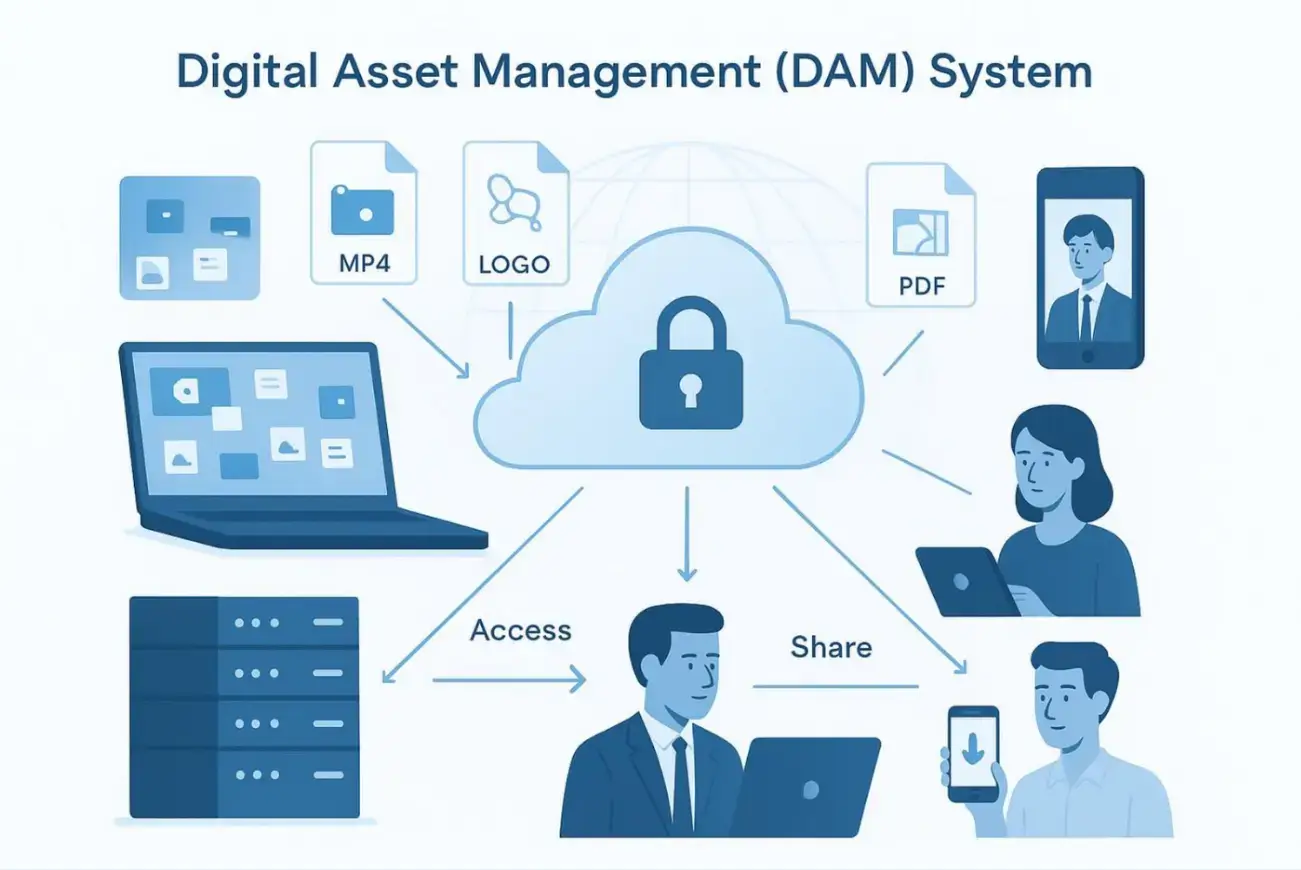
Digital Asset Management, or DAM, is both a business practice and a technology solution that helps store, organize, manage, find, and share a company’s digital files effectively.
At its core, a DAM system is a central library for multimedia and marketing assets. These assets include any important digital files a company owns or licenses, such as photos, illustrations, videos, audio files, logos, brand guidelines, and packaging designs.
The main goal is to make each digital asset truly useful by making it easy for the right people to find and use it exactly when they need it.
DAM is more than a simple online box for files. It includes rules and workflows that guide how assets are used. It covers the entire life of an asset, from creation and review through approval, publishing, and later archiving or retirement.
By tagging assets with rich metadata (such as tags, keywords, and usage rights), a DAM lets users find files by their attributes, not just their filenames.
This discipline is key in omnichannel marketing, where brands must offer a consistent experience across websites, mobile apps, and social platforms.
Common Digital Asset Management Challenges
Without a central system, teams often feel buried under endless file versions like "Finalv2REVISED.png". One major problem is the time wasted searching for assets across personal drives, email threads, and different cloud folders.
Brand inconsistency becomes a serious issue when different departments use old logos or retired campaign images, weakening the company’s market presence.

Security and rights management create more problems. Controlling who can view sensitive, pre-release content or making sure a licensed image is not used after its contract ends is nearly impossible with manual tracking.
On top of that, modern media, especially 4K or 8K video, puts heavy pressure on traditional storage, causing slowdowns in production and delivery.
These bottlenecks stop businesses from reacting quickly and can cause them to miss key opportunities because they cannot find or approve a file in time.
How Cloud Storage Powers Modern DAM Systems
Cloud storage is the engine behind modern DAM systems. By using cloud computing, DAM vendors can provide an online service in which software, storage, and infrastructure run off-site. Users simply log in through a secure web portal to manage their assets.
The cloud handles the heavy work of processing large files, creating automatic previews, and moving files quickly around the world.
The cloud setup also supports features that are hard to run on local servers. Many cloud-based DAM platforms now include AI tools that auto-tag images using computer vision or automatically transcribe audio and video.
Vendors update these advanced tools in the background, so businesses always have the latest features without running manual upgrades or replacing hardware.
This mix of storage and smart technology is what makes cloud-based DAM so valuable today.
Cloud Storage vs On-Premises Storage: Key Differences
Traditional storage, often called on-premises storage, means a company owns and manages its own servers and networking gear.
While this offers strong control over where data lives, it requires big up-front spending, ongoing maintenance, and a skilled IT team to handle security updates and hardware failures.
Cloud storage differs because it can expand or shrink quickly and is designed for reliability. Organizations can add or reduce storage as needed and pay only for what they use. Reliability is another key benefit; instead of a single local server that can fail, cloud providers keep assets in multiple, redundant data centers.
If one site goes down, the data remains safe and reachable. For companies that care about staying online after problems or disasters, the cloud offers a level of recovery that most in-house setups cannot match.
Cloud-Based DAM vs Standard Cloud Storage (Google Drive, Dropbox, OneDrive)
Many people assume that simple cloud storage tools, such as Google Drive, Microsoft OneDrive, or Dropbox, are the same as a DAM.
While these services work well for basic file storage and simple document sharing, they are not built to handle complex media libraries.
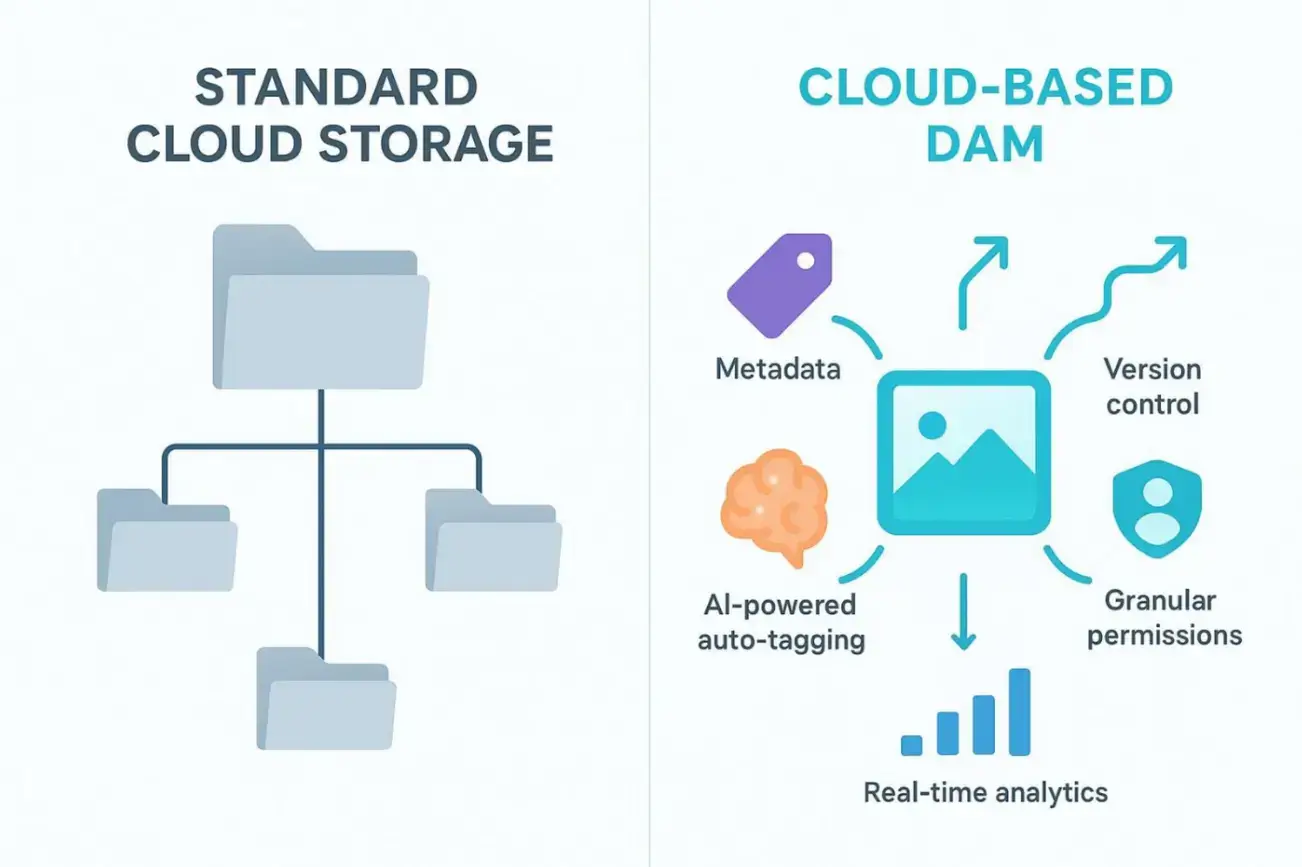
Standard cloud storage usually relies on basic folder trees and filenames. If you do not know exactly where a file is stored or what it is called, it can be very hard to locate.
A cloud-based DAM, on the other hand, is built for advanced workflows. It is built on metadata, enabling deep tagging, version history, and rights control.
DAM platforms also include asset “transformation” tools, such as automatically resizing a high-res image for social media when you download it, which standard storage systems do not offer. Put simply, cloud storage is about where you keep a file; DAM is about how you use that file to create business value.
Benefits of Using Cloud Storage for Digital Asset Management
Combining DAM with cloud technology isn't just for global corporations; it’s a game-changer for solopreneurs and small teams.
Beyond the technical gains, it helps you build a professional workflow that saves hours of frustration. When you know exactly where to find your "final_v2" logo or client headshot, daily friction drops.
Campaigns launch faster, you feel less overwhelmed by your desktop clutter, and your brand stays consistent across every social platform and website.
Centralized Access and Faster Search
The main benefit of a cloud DAM for a small business is ending the "file hunt."
It gathers all your assets into a single library accessible from your laptop, tablet, or phone. This removes the "silo effect" where files are trapped on an old external drive or buried in a random Dropbox folder.
With rich metadata tagging, searching becomes intuitive. You can type “newsletter header” or “transparent PNG” and see results instantly, regardless of the file's name. Cutting this search time lets you spend more energy on high-value creative work and less on digital archaeology.
Improved Collaboration for Remote Teams
As remote collaboration becomes the norm for small businesses in 2026, cloud DAMs act as your virtual HQ. They provide a shared space for you to work smoothly with freelance designers, virtual assistants, or external agencies.
Instead of messy email chains, use automated workflows to send assets for review.
Clients or partners can leave comments directly on images or videos, speeding up the feedback loop and ensuring you never send the wrong version to a printer.
Scalability for Growing Asset Libraries
As you create more video content and high-res brand photography, your storage needs will surge. Cloud platforms are built to handle this growth without you needing to buy expensive hardware.
Top-tier cloud DAMs use Content Delivery Networks (CDNs), meaning your large 4K files or portfolio images load quickly for viewers anywhere.
This performance is vital when you’re sharing a large project link with a potential client who doesn't have time to wait for a download.
Lower IT Costs and Predictable Pricing
Moving to the cloud eliminates the need for a dedicated IT person. You avoid the high costs of buying and maintaining physical servers or complex backup systems.
A predictable subscription makes budgeting easy, turning a massive capital investment into a manageable monthly expense.
Since the vendor handles security patches and software updates, you can focus entirely on growing your business instead of troubleshooting server errors.
Automatic Backup and Version Control
Losing a week’s worth of design work can be a nightmare for a small business.
Cloud DAMs prevent this by automatically backing up across multiple data centers. Your assets are protected even if your laptop spills coffee or a local hard drive fails.
Version control lets you track how a graphic evolved, see what changes were made, and roll back to a previous version if a design experiment doesn't pan out. This keeps your brand history safe and organized.
Advanced Security and Permissions
Security is vital even for one-person shops, especially since over 80% of organizations have faced more than one data breach.
Cloud DAM platforms offer professional-grade protection, including encryption and Multi-Factor Authentication (MFA).
You can set specific permissions so a freelance editor can only see the "Raw Footage" folder, while a client can only view the "Final Deliverables."
This level of control ensures your sensitive pre-release designs or internal business documents remain private.
Seamless Integration With Everyday Tools
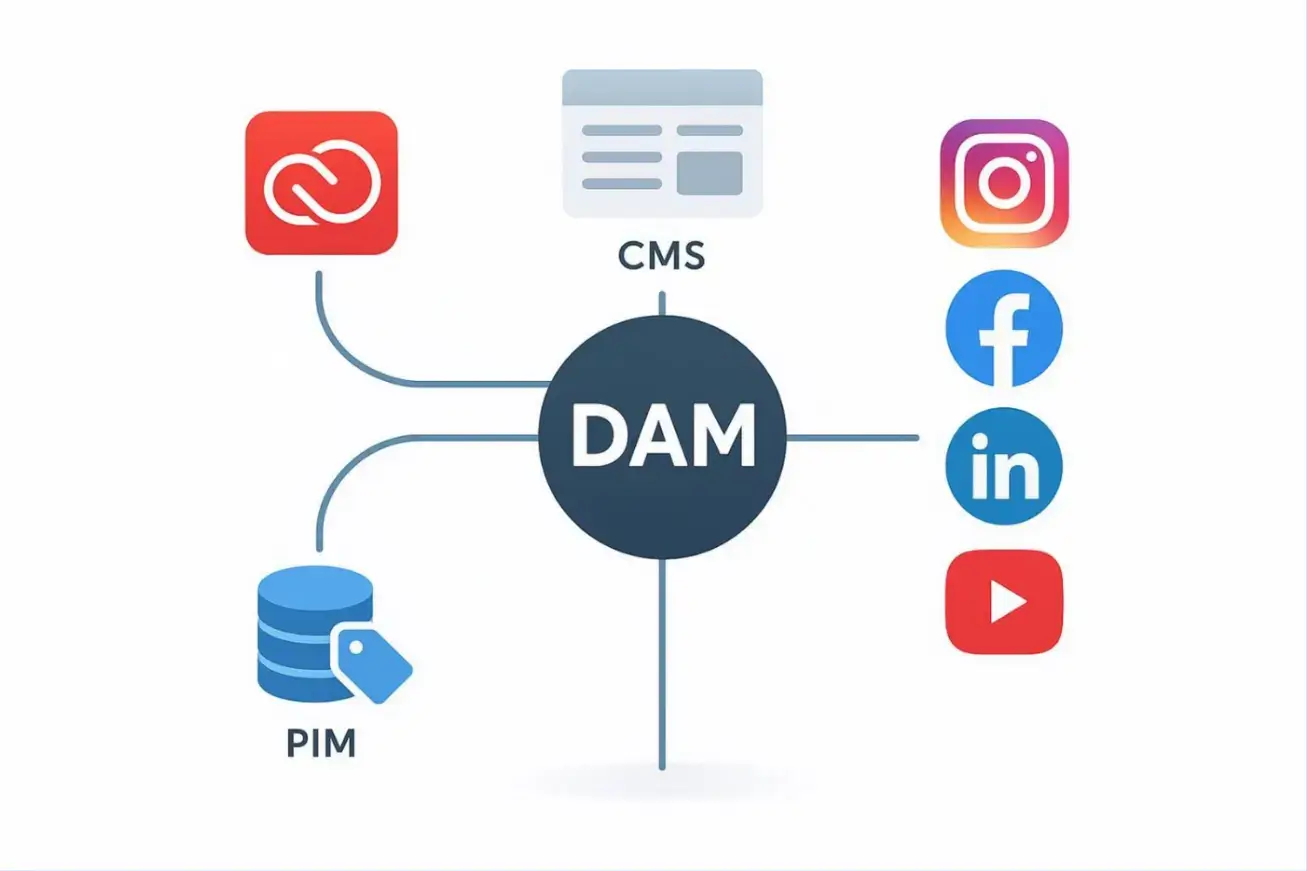
A DAM should fit into your existing workflow. Modern cloud systems offer "connectors" for the tools small businesses actually use.
You can pull assets directly into Canva or Adobe Creative Cloud for editing, or sync them with your Shopify store or WordPress site.
These links reduce manual uploads, prevent "wrong file" errors, and ensure that the version you just approved goes live on your site.
Key Features to Look for in a Cloud-Based DAM Solution
When choosing a DAM, look past the surface design and focus on the features that truly support your work.
Modern digital asset management (DAM) systems differ widely; some work best for small creative teams, while others fit the strict control needs of large global businesses.
The right choice should fit naturally into your existing processes and handle routine tasks, so your team can focus on high-impact work.
Metadata Management and AI Tagging
Metadata is the "secret sauce" of an organization. Look for tools with AI-based auto-tagging that suggest keywords for your images as you upload them.
For a solo founder, this saves hours of manual data entry.
Powerful Search and Filtering
A DAM is only useful if it’s faster than a standard folder search. Look for "faceted search" that lets you filter by file type, project, or even color.
Advanced features like visual search (finding "more like this") can be a lifesaver when you're trying to match the vibe of a previous campaign.
Workflow Automation and Content Distribution
Automation separates a pro DAM from basic storage like Google Drive. Look for features that create web-ready versions of a file automatically upon upload.
Branded Portals are also key; they let you share a professional-looking gallery with a client or partner, keeping your brand top-tier without giving them access to your entire library.
Reporting and Asset Usage Insights
To grow, you need to know what’s working. Simple dashboards can show you which of your brand assets are most often downloaded or shared.
These insights help you decide whether to invest more in video content or if that new set of icons was actually worth the cost.
Mobile and Remote Access
Small business owners are rarely tied to a desk. You need a responsive mobile app or web interface to approve a social media graphic or send a logo to a collaborator while you're on the move. Always-on access ensures your business doesn't stall just because you're away from your computer.
How to Choose the Best Cloud Storage Solution for DAM
Choosing a DAM is a big decision that will shape your workflows for years. It calls for a close look at how you work today and a clear view of where you want to go.
The best system solves current problems and also supports future growth.
1. Assess Business Needs and Future Growth
Begin by writing down your current pain points.
Think about your growth plans for the next three to five years. A platform that works for a 10-person team may struggle with 100 users and a large 8K video library. Make sure the solution scales easily as your business expands.
2. Review Integration Capabilities
Your DAM must connect cleanly with your existing tools. Does it work with the software you already pay for (Canva, Shopify, Slack)?
3. Evaluate Security and Compliance Standards
Given how sensitive many digital assets are, security should sit at the top of your checklist. Ask vendors about their encryption practices, compliance with standards such as GDPR, and whether they have SOC 2 reports.
Does the vendor offer easy-to-follow tutorials or a helpful chat for when you're stuck?
Confirm that the provider can meet these needs and that it provides detailed audit logs to track user activity on the platform.
4. Compare Pricing and Total Cost of Ownership
DAM pricing often includes setup costs, monthly or yearly subscriptions, and fees based on storage or user counts. When comparing options, look at the total cost over time.
Look beyond the monthly fee. Factor in the time you'll save and the professional image you'll project to clients.
Final Takeaways: Why Cloud-Based DAM Is a Strategic Investment
Adopting a cloud-based DAM is more than just a software switch; it’s a move toward professional digital maturity.
For a small business owner, the message is clear: in an era where your content is the primary way you reach customers, the ability to manage that content efficiently is a major competitive advantage.
By moving assets into a central cloud library, you are doing more than just storing files-you are freeing up your own time to be more creative and flexible.
The real gains of a DAM for a small team include:
- Massive time savings on administrative tasks.
- Reduced risk of losing expensive creative work.
- Consistent, high-quality experiences for your audience across every touchpoint.
Beyond daily efficiency, think about the strategic value of "asset intelligence."
With built-in AI and simple analytics, a cloud DAM moves beyond basic storage. It gives you insight into which photos or videos you actually use most and where your creative budget (or time) is delivering the best returns.
This shift from reactive storage to active management allows you to make data-driven decisions about your visual identity.
In a digital-first economy, your assets are a huge part of your business legacy. Managing them in the cloud keeps that legacy safe, professional, and ready to share with the world at a moment's notice.
Frequently Asked Questions About Cloud Storage and DAM
As companies review these technologies, many of the same questions come up.
Understanding the differences between basic cloud storage and a full DAM system helps leaders choose the right approach for their situation. Below are answers to several common questions.
1. What’s the Difference Between DAM and Basic Cloud Storage?
The main difference is purpose and capability. Basic cloud storage is designed for simple file saving and syncing in folders. It works well for personal use or small teams sharing documents. DAM, in contrast, is a professional system for rich media. It uses metadata so assets can be found based on their content, not just their filenames. It also brings in version control, rights and license tracking, and automated workflows that help protect brand quality and keep operations running smoothly at scale.
2. Is Cloud-Based DAM Right for Small Businesses?
Yes. In many cases, cloud-based DAM is even more helpful for small and midsize businesses because it eliminates the need for expensive on-premises hardware and in-house IT specialists. Many providers offer pricing tiers so smaller teams can start small and add features over time. For these organizations, a DAM can act as a force multiplier, enabling a lean marketing team to manage a large volume of content with the same level of control and consistency as a much larger company.
3. Can Cloud DAM Be Customized for Unique Workflows?
Yes, leading cloud DAM platforms offer a high level of customization. Beyond setting your own metadata fields and tagging rules, many systems let you build custom approval and publishing workflows that match how you already work.
Using APIs, your developers can also build custom connections between the DAM and internal tools. This flexibility means the DAM can adapt to your processes instead of forcing your teams to change how they work.

Author Bio
Przemysław Puternicki is a content writer passionate about new technologies and innovative ways to use them. He has experience writing about Artificial Intelligence and its impact on various industries.
Throughout the years, Przemysław has authored numerous articles featured on websites concerned with Cybersecurity, Business Growth, and Search Marketing. When he is not writing another article, he spends his time watching documentaries and playing video games.