

Businesses of all sizes benefit from artificial intelligence (AI) tools, whether they’re automating tasks, helping customers, or analyzing sales data.
But to take full advantage of the technology’s capabilities, you need to get your AI apps working together.
That’s where AI orchestration comes in. It simplifies the management of AI systems by leveraging workflow automation and dynamic resource allocation for maximum efficiency. Let’s find out how.
In this article:
- Why is AI Orchestration Important?
- 8 Business Benefits of AI Orchestration
- Key Steps and Best Practices for Implementing AI Orchestration
- What is the Future of AI Orchestration?
What is AI Orchestration?
AI orchestration is the process of getting various AI tools and workflows to work together seamlessly.
It involves managing the deployment, integration, and interaction of individual components, such as data pipelines, algorithms, machine learning models, and APIs.
This technique is called orchestration because it’s similar to how an orchestra’s conductor coordinates the different instruments and musicians to achieve a harmonious sound.

Source: Pixabay
AI orchestration ensures that separate AI tools and components can communicate and share data. They can function as a single, interconnected system rather than in silos, streamlining your processes and improving efficiency.
Here’s an example of orchestration in practice:
You also have an AI tool for inventory management, which monitors demand. If these tools worked in isolation, the first might recommend items that aren’t in stock because it wouldn’t have the second tool's data.
How Does AI Orchestration Work?
The AI orchestration process is made up of three core components:
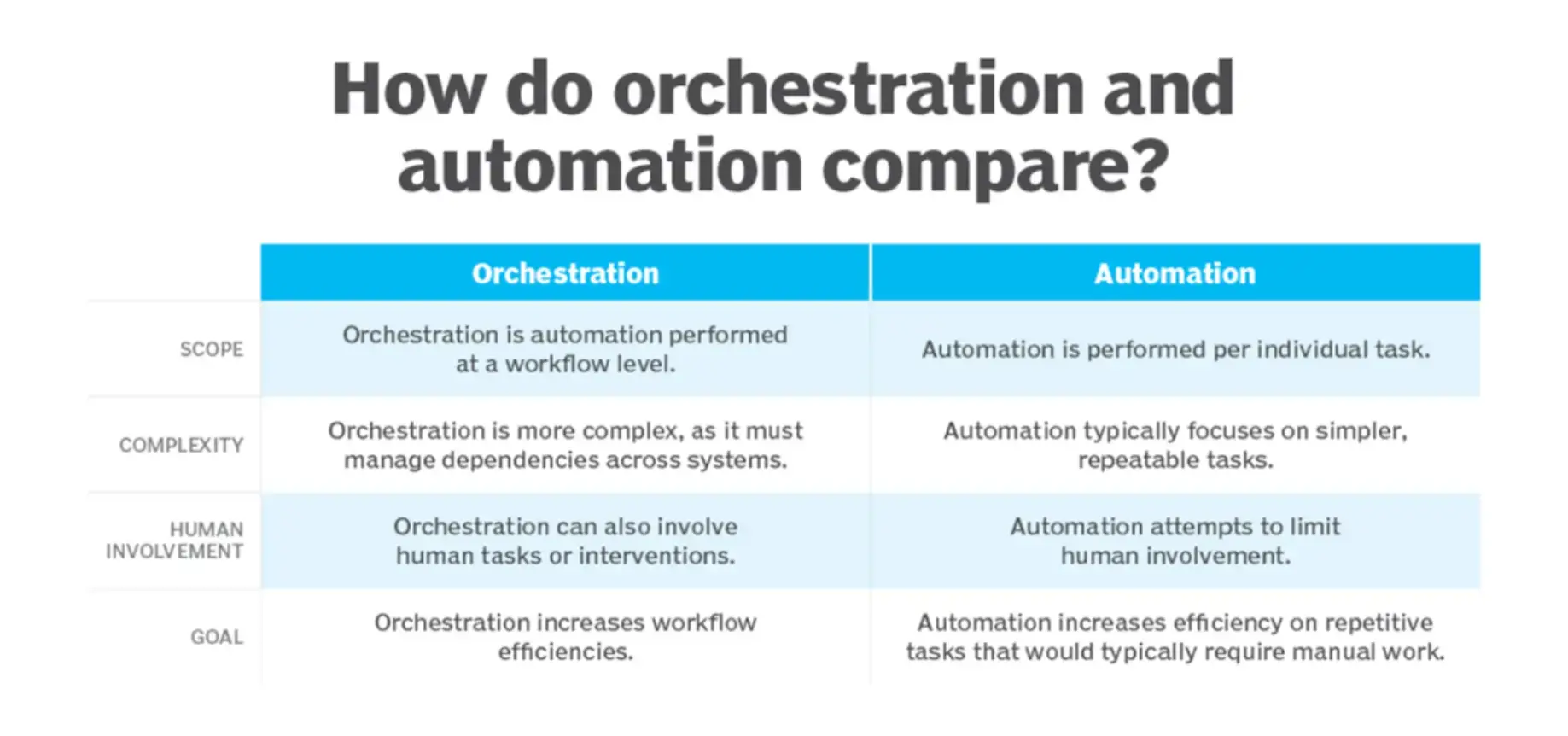
- Integration: AI tools and apps are standalone systems that carry out tasks in isolation. AI orchestration connects them to each other and to other company systems, enabling seamless data flow between them. This way, they always have the data they need to work effectively and can perform more complex tasks.
- Automation: AI orchestration enables automated interactions between AI components, allowing them to work together without human intervention. For instance, autonomous systems can identify and correct problems without your IT person (or team) needing to get involved.
- Management: Orchestration also involves managing the lifecycles of your AI tools—monitoring their performance throughout development, testing, deployment, and updates. This helps you optimize effectiveness, compliance, and security.
Source: TechTarget
We should also mention APIs (Application Programming Interfaces), as they’re important for AI orchestration. Don’t worry if these sound complicated — their role is actually pretty simple.
APIs act as a link between separate apps, meaning that even if they don’t use the same programming languages, they can talk to each other.
Finally, cloud computing plays a part. Rather than storing all of this and running it on your local servers, orchestration in cloud environments provides scalable infrastructure and robust computational power.
Plus, if you have teams in multiple locations or employ remote staff, they can use AI applications no matter where they are.
Why is AI Orchestration Important?
According to a Gartner report, “heightened use of AI and automation to perform business processes is driving demand for orchestration of data, systems, and human and machine tasks.”
As AI tools become more affordable and widely available, even small businesses are adding multiple AI apps to their tech stacks.
While the use of AI in business offers many benefits, a complex ecosystem often leads to siloed data sources and workflows.
This, in turn, causes performance bottlenecks and makes it harder to collect the right data for decision-making.
With AI orchestration, you’ll not only get these tools playing nicely together but also integrate them with your other systems and processes.
That means you can automate complex processes across multiple tools and IT environments and ensure everything has the right information at the right time.
AI orchestration together with a workload automation system also helps you allocate resources efficiently so your business can react fast as demands change and workloads increase.
Orchestrated AI systems are more responsive and deliver better overall performance. Plus, they help you reduce costs through resource optimization and operational efficiency.

Source: Pixabay
8 Business Benefits of AI Orchestration
Now, let’s look a little more closely at the specific benefits in terms of streamlining your operations.
1. Offers Low and No-Code Solutions
We’re starting with this one because AI orchestration can sound quite daunting. Luckily, it doesn’t have to be super-technical.
These platforms simplify AI development with easy-to-use interfaces and smart actions, enabling you to design AI workflows that match your business needs and manage them efficiently.
2. Boosts Efficiency
AI orchestration enables moving away from manual or semi-automated processes.
Instead, you can automate complex end-to-end workflows. This means less time spent on repetitive tasks such as performance monitoring and software updates. It also reduces human errors and frees up resources.
When your workflows are well-coordinated, you can identify and eliminate any redundant processes, decreasing operational costs.
And with data flowing easily between various tools, employees won’t have to enter data manually or toggle from one app to another to complete tasks.
3. Optimizes Resources
Another key advantage of AI orchestration is that it automatically allocates computational resources where they’re needed most. By analyzing usage patterns in real time, it can scale resources up or down according to demand.
This dynamic allocation means that your IT team won’t have to predict resource needs. It minimizes downtime because you won’t have a single process using excessive resources at the expense of others.
With no wasted computing power, your budget will stretch farther.
4. Provides Flexibility and Scalability
AI orchestration makes it easier to scale your AI capabilities across the company, with plenty of room to adapt and innovate as the business grows.
It lets you incorporate new models, algorithms, or data sources into existing workflows to adapt to an ever-changing world.
Plus, as well as the ability to add new components, you can also ensure they work well with existing ones.
5. Improves Collaboration
Because AI orchestration is all about smooth interactions between tools, it makes life easier for teams and departments that need to collaborate.
It creates a centralized workspace where everyone involved in a project can work in the same environment.
That way, your communications solution works alongside your customer success platform, and they both play nicely with your data analytics tools.
You don’t have to spend time manually syncing tools, and everything is well-organized so that everyone can access what they need.
6. Ensures Compliance and Security
As well as coordinating data sources and workflows, AI orchestration also orchestrates your organization’s compliance and security processes.
When you create a new workflow, you can add rules to ensure every step checks all the regulatory boxes.
Let’s say you’re building an automated workflow to send out invoices and process incoming payments.
This helps to foster transparency and accountability, which is essential. Plus, AI-driven systems can also monitor your systems for any unusual activity that could lead to a security breach.

Source: Pixabay
7. Enables Continuous Improvement
Continuous learning and improvement of AI models is another major benefit
Coordinated workflows enable you to collect data and user feedback, then use them to refine individual elements, such as the large language models (LLMs) powering your AI voice agents, or the recommendation engine your online storefront uses.
8. Enhances User Experiences
Finally, AI orchestration helps you to delight customers by providing improved experiences with your business.
With all your AI tools and systems talking to each other and operating as one, you can use the synced data to gain deeper insights into user preferences and needs.
You can also personalize your customer interactions and respond faster to queries and problems.
Key Steps and Best Practices for Implementing AI Orchestration
If these benefits sound interesting, you might be wondering how you can get started. In this section, we’ll guide you through the implementation and throw in a few top tips.
1. Evaluate and Define Goals
The first step is to assess your existing AI environment and set clear objectives for the implementation. Where are you experiencing bottlenecks currently? Which tools and processes should you orchestrate first?
If you’re worried that you don’t have the internal expertise for this, consider starting with a digital maturity scan or bringing in a consultant to help with the initial setup.
2. Prepare the Data
If your data isn’t cleaned or properly organized, no amount of AI orchestration will streamline your processes. You’ll also need to ensure the relevant data is accessible across all your AI systems.
On the same subject, it’s good practice to standardize your data formats and use open architectures that enable different systems to operate together. Again, if you don’t have staff with the know-how, you can bring in a third-party to help.
3. Select the Right Tools
It’s time to choose an orchestration platform.
Your chosen tool should integrate smoothly with your existing systems, such as your AI marketing tools or CRM, so conduct some research to find the one that best meets your needs.
There are many orchestration solutions available—here are three open-source platforms:
- Kubernetes: This is a well-known tool for managing and orchestrating AI workloads in cloud environments. Businesses use it to deploy and manage AI apps at scale and automate rolling updates for AI applications.
- Flyte: This is a highly scalable tool for building complex data, machine learning (ML), and analytics workflows. Designed to handle large-scale data processing, it’s often used in distributed environments, connecting teams and technologies across a business.
- Apache Airflow: Ideal for pipeline orchestration, this tool helps you prepare data and feed it into AI models to keep them up to date. It’s also used for managing complex end-to-end workflows.
4. Provide Training
Even with low-code automation, you can still expect there to be a learning curve for those who have never used AI orchestration before.
Before proceeding with implementation, ask your chosen provider whether they can provide training on elements such as orchestration layers.
5. Design the Architecture
You’ll need to set up an architecture that supports efficient data flow between AI models. It can be tricky to integrate AI tools with varying formats and standards, as well as legacy systems.
If you’re doing this step yourself, consider using Kanban project management and having a clear strategy in advance. However, if that seems too complex, many providers can help with this setup, making it much easier than you’d think.

Source: Pixabay
6. Integrate and Test
Now you can go ahead and use the orchestration platform to integrate your AI tools, running tests as you go along to spot any potential problems.
Remember that security is a key concern when you’re bringing multiple AI systems together, so include robust security protocols and compliance checks.
Regular security audits will help to keep your data safe.
7. Deploy and Monitor
You’re ready to deploy! But that’s not the end of the process—you need continuous optimization to ensure the orchestration project delivers the expected results.
Monitor performance, make any necessary tweaks, and provide ongoing training as AI technologies evolve.
What is the Future of AI Orchestration?
Not only should we expect AI-powered business processes to become ever more complex, with enterprises handling huge volumes of data, but we’ll also start seeing AI used by small businesses, too.
Whether it’s a niche company providing swim school software or a five-person finance startup, AI will be relevant.
Self-managing and self-healing AI systems will continue to develop, learning to operate without human intervention and further improving efficiency.
The rise of edge computing will enhance AI orchestration, enabling devices and apps to communicate and analyze data in real time.
That’s because the data is processed at the network “edge” (on a local server or within a smart device) instead of traveling to a faraway central server.
Blockchain technology is another evolving technology that could integrate with AI orchestration. Businesses could use it to reduce security vulnerabilities as data flows between AI systems.
Final Thoughts
Many businesses — even small ones! — have a fast-growing technology stack with a wide range of AI tools.
AI orchestration enables seamless integrations among those tools, improving efficiency through optimized resource use and enhanced automation.
If you follow our tips—such as standardizing data, choosing the right platform, and using robust security measures—you’ll create a strong foundation for orchestration.
And, with AI orchestration in place, you’ll be in a better place to meet your business goals, improve customer service, and gain a competitive advantage.
FAQs
1. What is AI orchestration, and why is it important?
AI orchestration is the coordination of AI tools, data pipelines, and workflows into a unified system. It ensures seamless data sharing, automates tasks, and optimizes performance, helping businesses improve efficiency, scalability, and decision-making.
2. How can AI orchestration improve business operations?
AI orchestration streamlines operations by automating complex workflows, eliminating data silos, and reducing manual effort. This leads to faster processes, fewer errors, better resource allocation, and lower operational costs.
3. Do I need coding skills to use AI orchestration platforms?
Not necessarily. Many AI orchestration tools offer low-code or no-code interfaces, enabling users to design workflows with drag-and-drop functionality. This makes them accessible to non-technical teams and small businesses.
4. What tools can I use for AI orchestration?
Popular AI orchestration tools include Kubernetes for managing cloud workloads, Flyte for machine learning workflows, and Apache Airflow for data pipeline orchestration. The right tool depends on your business size, technical needs, and existing infrastructure.
