

Small business owners will be glad to learn that it’s never been easier or cheaper to build a business website. Not just any website, but one that connects your brand with existing and potential customers while building brand awareness.
With intuitive website builders that offer drag-and-drop functionality, pretty much anyone can build a website for a small business. But, of course, there are some items to keep in mind if you want to create an engaging and high-converting website.
Read on for six tips on how to build a winning website for a small business:
1. Set Clear Goals for Your Website
First up, there’s no one-size-fits-all solution when creating a website for your business. Each business has its unique needs. Hence, effective website development starts by defining your business goals.
Your sales strategy will also influence your goals. Do you want to drive online traffic to your physical stores, or are you only a digital store?

Source: GuppyFish
With your business goals defined, you need to consider website-centric goals to help your developer build your website.
Start by ranking the following web elements in order of their importance to your overall website goals:
- Visuals, animation, and effects — How will your website’s appearance impact sales?
- Marketing calls to action — Introductory offers, time-bound offers, etc.
- Search engine optimized (SEO) — Is your content optimized for search engines?
- Payment modes on site - Will you accept payment from a single channel like PayPal? Or will you accept payment by credit card? PayPal? Or will you accept payment by credit card?
- Ease of use for your team — Are pages easy to edit, or will your team require coding skills?
- Ease of use for your customers — Easy to navigate, web-friendly, and intuitive website.
In the realm of web design services, prioritizing function over style becomes crucial.
For example, if your priority is achieving optimal page load time and improving SEO for superior search engine ranking, a skilled web designer will align their focus accordingly.
That could result in a slower page load speed.
Your goals and priorities will also determine whether you need a fully custom website or can simplify the process with a popular website builder like Wix or Squarespace.
Every choice has its pros and cons, and it eventually comes down to your priorities, especially in the context of how effectively and quickly you want to launch a small business website.
2. Get a Relevant Domain Name
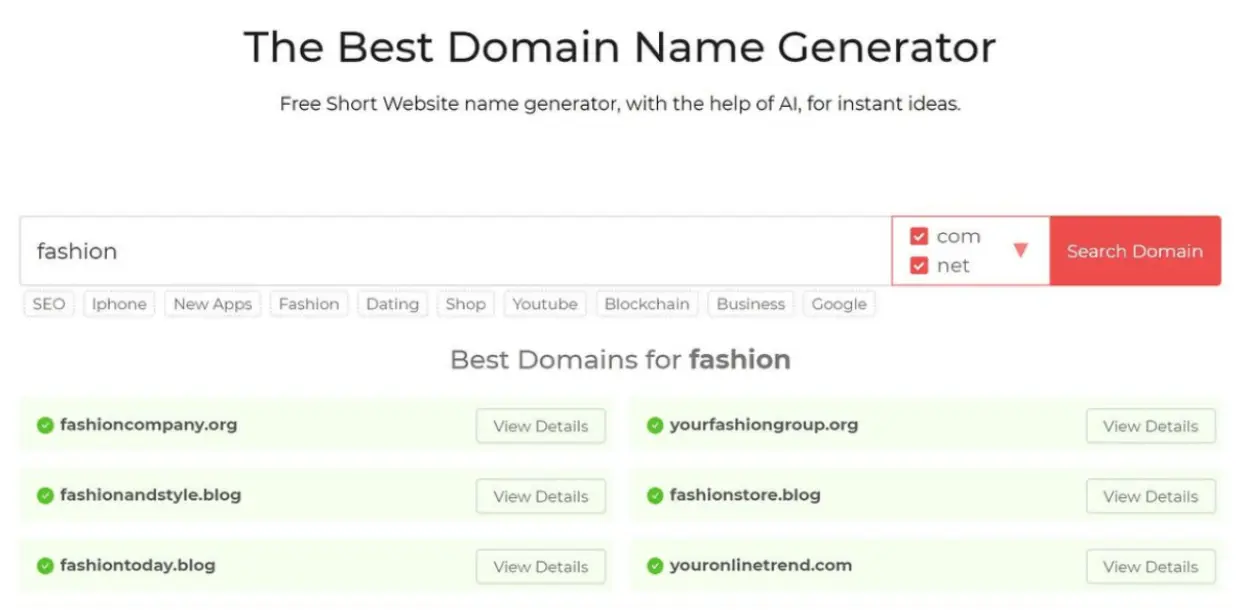
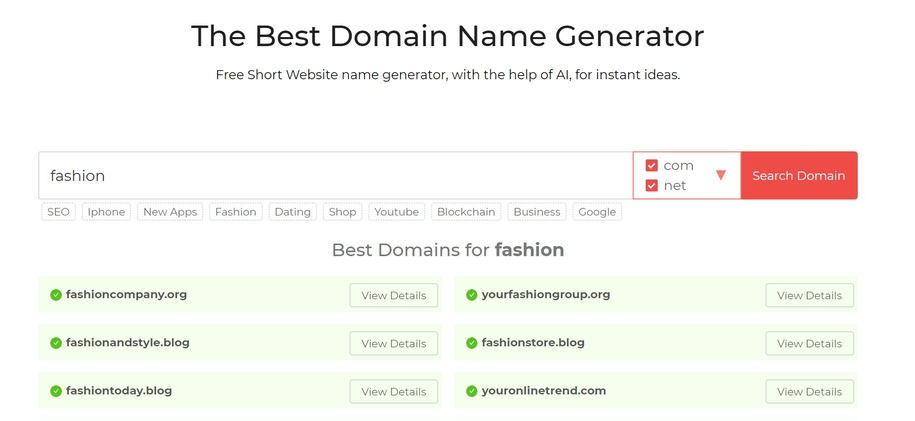
Ideally, your domain name should include your business name. You can use online company name generators to get ideas based on your specific business.
Domain Wheel is one such online generator.
Ensure that your domain name is easy to remember and choose a domain extension that suits your business.
For example, if you’re an industry expert or a serious hobbyist, you can showcase that with a .pro domain extension.
You may also want to consider adding a keyword in your domain to make it easier for prospects to know what your business is about.
For example, “www.celticwebdesigners.com” makes it pretty obvious what the website and the business are about. Remember, the domain name will form part of your branding. So choose wisely.
Free domain names can be obtained from certain providers, which can save money in some cases.
However, they may not be as professional or reliable as paid domain names and often come with limitations and hidden costs, such as ads on your website or fees for additional features.
3. Choose a Good Hosting Provider
Once you have built your website, you need a reliable hosting provider.
The hosting company should offer good customer service. It’s also good to check the hosting provider's customer reviews on platforms like G2.
Here are more pointers to follow when choosing a provider:
- Understand your site needs. Let’s say you have a photography business. Chances are, your web pages will be dominated by hi-res and large images. You’d do well to choose a hosting provider that offers a CDN (content delivery network).
- Check for server uptime and response time guarantees. A server uptime close to 100% is good, while server response times should be in the 100–200 ms range.
- Check the host’s refund policy and guarantees.
When it comes to reliable hosting providers, the factors mentioned above are what you should look at and compare across your web hosting options.
Especially, by choosing a hosting provider that offers fast server hosting, you can ensure your website operates smoothly and efficiently, resulting in satisfied visitors and better online success.
4. Focus on Creating a Smooth User Interface
User flow describes the specific set of actions a user takes when browsing a website.
To ensure the user flow aligns with your overall site structure, coordinate closely with the website developing team, as they can optimize navigation pathways for better engagement.
The amount of friction they experience in their user flow determines how good or poor their experience will be. Focus on delivering a smooth interface when you build a website for a small business.
Page Flows provides extensive design inspiration, showing how leading products guide users through tasks efficiently.
Having a well-thought-out user flow not only supports usability but also encourages users to engage more with your content, potentially increasing conversion rates.
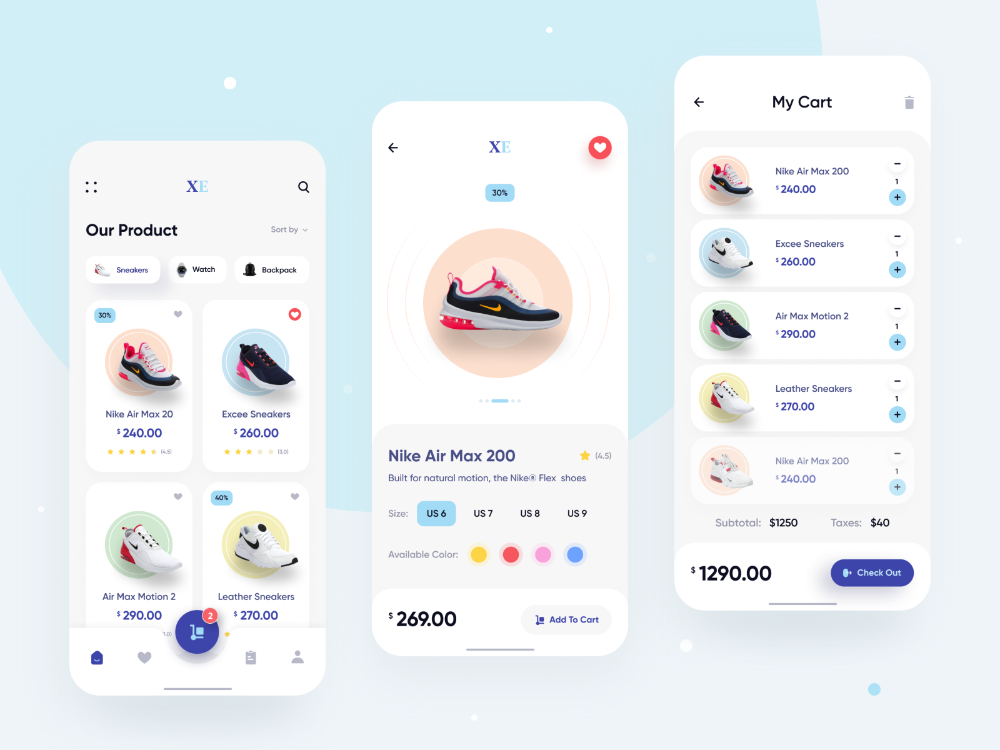

The image above shows the layout of a well-designed online store.
The first screen lets you choose the product category, and the products in that category appear on a carousel. From there, it’s just two taps to select the product and add it to your cart.
Five critical elements of your UI merit close attention and planning:
- Provide feedback to reduce uncertainty friction: When a user takes an action, they expect feedback to confirm they have taken the right action. For instance, when a user fills in a contact form, a confirmation message provides reassurance and positive feedback.
- Completion bar: Show users how much of the task is complete.
- Focus on accessible designs: Accessible designs cater to individual needs. For instance, adding contrast to your design makes it more vivid and the content easier to read.
- Make your UI a good user experience. Keep the language simple and easy to understand while crafting your content management strategy.
- Shorten the number of steps: Users can visit a website for different reasons. Some come to look for a specific product. Others may come to sign up for membership. In any end-use case, the user should be able to accomplish the task in 3 clicks or fewer.
- Keep it simple: Excessive pop-ups, polls, images, and other flashy UI elements distract users and may increase your bounce rate. Each web page should only have content relevant to that page.
By creating frictionless interactions and designing smooth user flows, your product’s users can achieve their goals quickly and easily.
For professional help with branding and website design, you may consider contacting digital8, a leading digital agency based in Australia.
5. Create Engaging Content
One favorite phrase from most content marketing strategists is “content is king,” and it is critical for SEO. But what exactly qualifies as high-quality content?
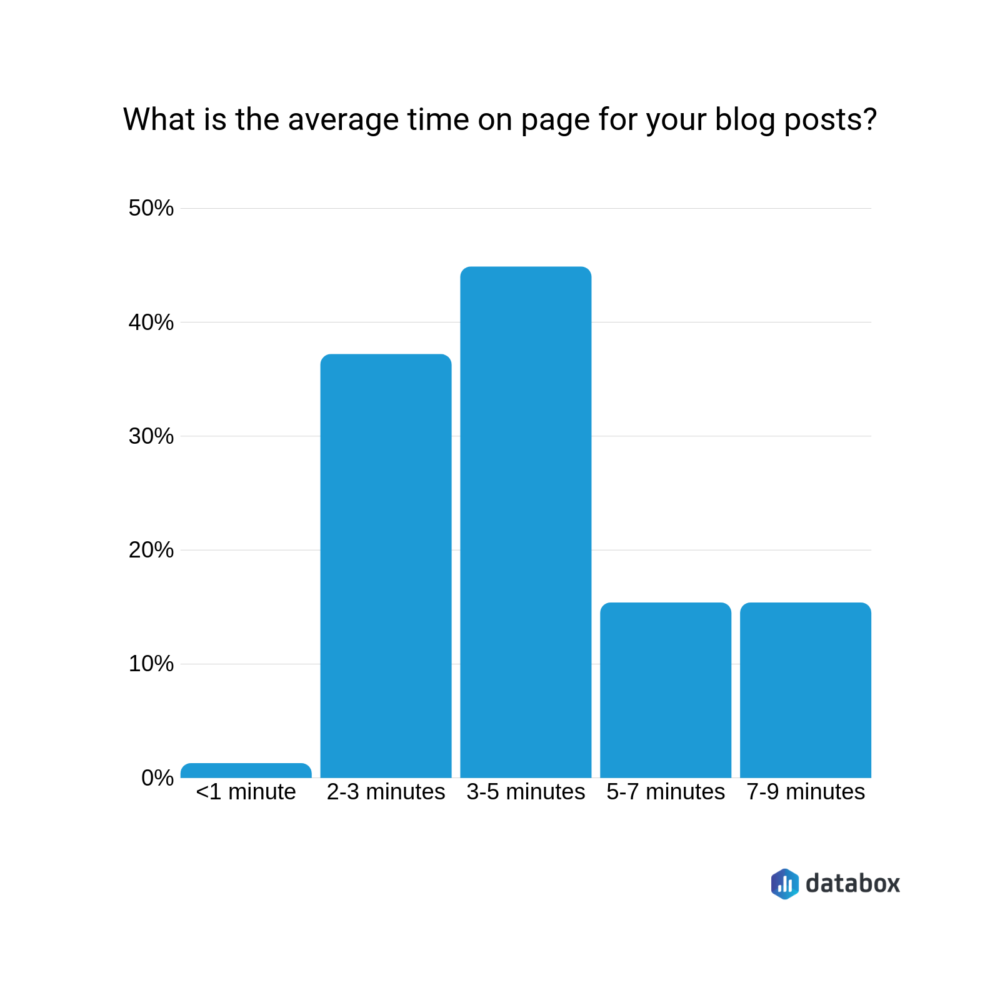
However, as the infographic below shows, there is also a niche for content with a higher word count and, hence, higher on-page time.
The catch is knowing which part of your web content should be a 2–3-minute elevator pitch (say, the product page) and which should be a lengthier piece, like a blog post.

When it comes to your content and copy, focus on the following:
- Ensure that the content on each page aligns with the EAT principles — Expertise, Authority, and Trustworthiness.
- Define the unique selling point (USP) of products and services.
- Use visuals, H1s, H2s, H3s, and H4s to break your content into sections.
- Review the content you have written and its length.
The content should be easy to understand and process, and visually engaging. So add relevant images throughout your piece.
6. Optimize Your Website
When you optimize a blog for SEO, you increase its rankings on the search engine results pages. That, in turn, helps you drive more traffic to your website.
Pay attention to the following critical practices:
- Identify and use primary and secondary keywords for your product pages and blog posts.
- Optimize your website for speed. A slow site has a high bounce rate and poor ranking.
- Pick a responsive design that works well on mobile devices since over half the online traffic comes from mobile devices.
- Include internal links that lead to other relevant pages on your website and external links to sites with high domain authority. That builds the authority and trustworthiness of your site.
- Use post names in their permalinks.
With WordPress, you can install SEO plugins like Yoast SEO to scan your content both for SEO and readability. Yoast analyzes your content and provides suggestions and tips for improvement:
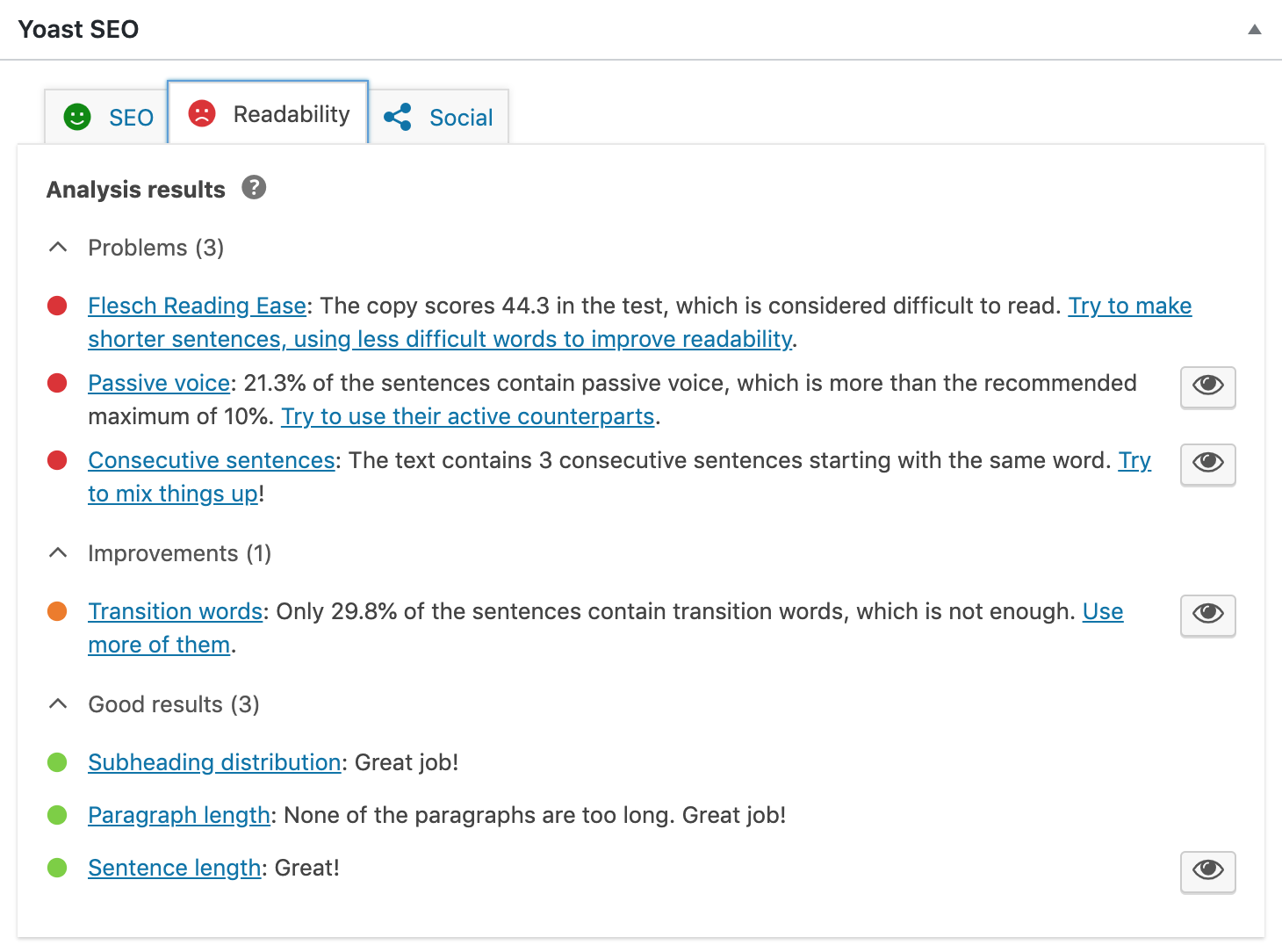
Try to follow this SEO checklist when optimizing your website.
Making your website SEO-friendly starts at the design stage and includes factors such as the number of pages, organization, structure, and connectivity.
Using a reliable website builder can also help ensure your site is structured for better SEO performance.
The key elements that Google and Bing use to rank content should be present on your website. That includes high-quality, keyword-optimized content, sitemaps, SEO-friendly URLs, and other SEO features.
Most website designers will keep both users' and search engines' needs in mind when building your website.
In Closing
Every business, both big and small, needs to be online. Most of your customers are probably there.
To build a website for a small business, try focusing on making the site easy and intuitive to use. You also need to get a relevant domain name and a good web host, create engaging content, and optimize the site for search engines.
We hope you find these six tips insightful and helpful as you develop your website. As a rule of thumb, the more time and effort you invest in creating and testing your website, the better the return on investment.

Author Bio
Ian Loew is a web entrepreneur and inbound marketing expert, and the Owner & Head of Business Development of Lform Design. After four years of helping Fortune 500 companies with MGT Design, Ian embarked on his freelance career before establishing Lform Design in 2005. He leads a team of creative professionals to deliver inspired online experiences via modern, responsive websites that reflect his clients' core values. When not at the helm, Ian can be found mountain biking with friends or spending time with his family.