
![6 Best SEO Tools for Small Business [Free & Premium]](https://assets.powrcdn.com/blog-images/featured/seo-tools-blog-banner-1.webp)
Did you know that 95% of search traffic goes to the first page? As a small business owner, reaching the top position can feel impossible. That’s where the best SEO tools for small businesses come in.
However, with so many options available, choosing the right one becomes difficult. We've tested and compared over 32 SEO tools and selected the top 6 best SEO tools to help your small business grow.
In this article:
- Top 6 SEO Tools for Small Businesses to Grow Your Business
- Agency Handy
- Ahrefs
- Google Search Console
- Moz Pro
- SEMrush
- Yoast SEO
- Key Features to Look for in SEO Tools for Small Businesses
Quick List of Top SEO Tools for Small Business
- Agency Handy — Best for managing small to large SEO businesses, from client onboarding to receiving payments.
- Ahrefs — Ideal for improving rankings with keyword and backlink insights.
- Google Search Console — Perfect for identifying indexing issues and growing visibility.
- Moz Pro — Great for tracking rankings and building a strong SEO strategy.
- SEMrush — Excellent for keyword research and competitor analysis in one tool.
- Yoast SEO — Ideal for optimizing WordPress content for better rankings.
If you've shortlisted two tools and want a side-by-side comparison, try the
AI-powered comparison tool Gralio for quick, detailed comparisons.

Best SEO Tools for Small Business: Quick Comparison Table
Let’s compare the top SEO tools to help you manage your website and grow visibility.
| SEO Tools | Top 3 Features | Best For | Starting Cost (Annual) |
|---|---|---|---|
| Agency Handy | CRM (Leads + Clients), Multipackage service catalog, Invoicing and billing | SEO agency management | $49/month |
| Ahrefs | Keyword research, Site audit, Backlink checker | Advanced SEO insights | $108/month |
| Google Search Console | Performance tracking, Index coverage, Mobile usability | Site performance tracking | Free |
| Moz Pro | Keyword research, Rank tracking, Site audits | Comprehensive SEO optimization | $39/month |
| SEMrush | Keyword research, Backlink analysis, Technical audits | Competitive SEO strategy | $117.33/month |
| Yoast SEO | Content optimization, Redirects, Linking suggestions | Quick SEO optimization | $99/year |
Top 6 SEO Tools for Small Businesses to Grow Your Business
Though you now have an overview of each tool, it’s time to dive deeper. We selected these tools based on how well they help you manage SEO services, audit websites, and rank your business effectively.
1. Agency Handy

Agency Handy is an all-in-one SEO client management tool designed for agencies and small businesses. It helps you onboard clients, manage SEO tasks, communicate efficiently, and get paid — all from a single platform.
The platform allows you to create and categorize your SEO services, set trial periods, bundle multiple services, and even hide specific pricing. Once your catalog is ready, you can share it on social media or embed it on your website.
For onboarding, you can customize forms to collect client details upfront. Plus, you can upsell more services — either as one-time add-ons or recurring subscriptions.
Invoicing is automated for each order, and you can also generate white-label invoices.
Key SEO Features of Agency Handy
Agency Handy helps you manage SEO projects more efficiently and collaborate more effectively. Here’s what stands out:
White-Label Customization
You can fully white-label the portal — custom logo, sign-in page, domain, and dashboard appearance.
Leads & Client Management
Centralize your leads and clients in one place. Track progress, relationships, and communication effortlessly.
Multi-Package Service Catalog
List unlimited services with up to 3 packages each, customize deliverables, pricing, and descriptions.
Customizable Forms
Gather client information using intake and order forms. Upsell extra services easily.
Order & Task Management
Set default tasks per service or create new ones. Use a Kanban board to track progress with clarity.
Client & Team Collaboration
Collaboration features allow seamless communication between clients and your team.
File Feedback & Version Control
Clients can annotate files directly (PDFs, images, videos, webpages). Upload revised versions easily.
Invoicing & Subscription Management
Automate one-time and recurring billing. Accept Stripe, PayPal, Wise, and manual payments.
Pros of Agency Handy
- Manage SEO tasks, projects, and client chats all in one place.
- Fully customizable branding.
- Simple client feedback workflows.
- Helps ensure timely delivery of SEO tasks.
- Flexible pricing suitable for small businesses.
Cons of Agency Handy
- No reseller program available.
Agency Handy Pricing
2. Ahrefs
Ahrefs is one of the most powerful SEO tools available. It offers keyword research, competitor analysis, technical site audits, backlink insights, and more — all in one place.
Over 50,000+ companies use Ahrefs regularly.
One standout feature:
Site Audit Tool
It identifies technical issues impacting SEO performance and provides solutions.
Key SEO Features of Ahrefs
Ahrefs provides a full suite of tools that help small businesses grow their search visibility. Here’s how:
- Site Explorer Dashboard 2.0
Get an in-depth view of your traffic, backlinks, and top-performing pages. Instantly spot strengths and weaknesses. - Data Comparison Mode
Compare your SEO metrics with competitors—traffic, backlinks, keyword rankings, and more. - Website Structure Analysis Report
Identify broken links, missing pages, and architecture issues that may affect visibility. - Advanced Backlink Filtering
Analyze backlinks based on relevance and authority. Remove low-quality links harming your rankings. - Instant Keyword Grouping
Quickly group keywords into topics to create more targeted content. - Comprehensive Technical SEO Audit Tool
Fix crawl errors, speed issues, and technical SEO problems that block rankings.
Pros of Ahrefs
- Massive backlink index
- Powerful keyword research
- Excellent competitor analysis
- Intuitive and user-friendly
- Fresh, frequently updated data
Cons of Ahrefs
- No free trial
- Fewer reporting features on lower-tier plans
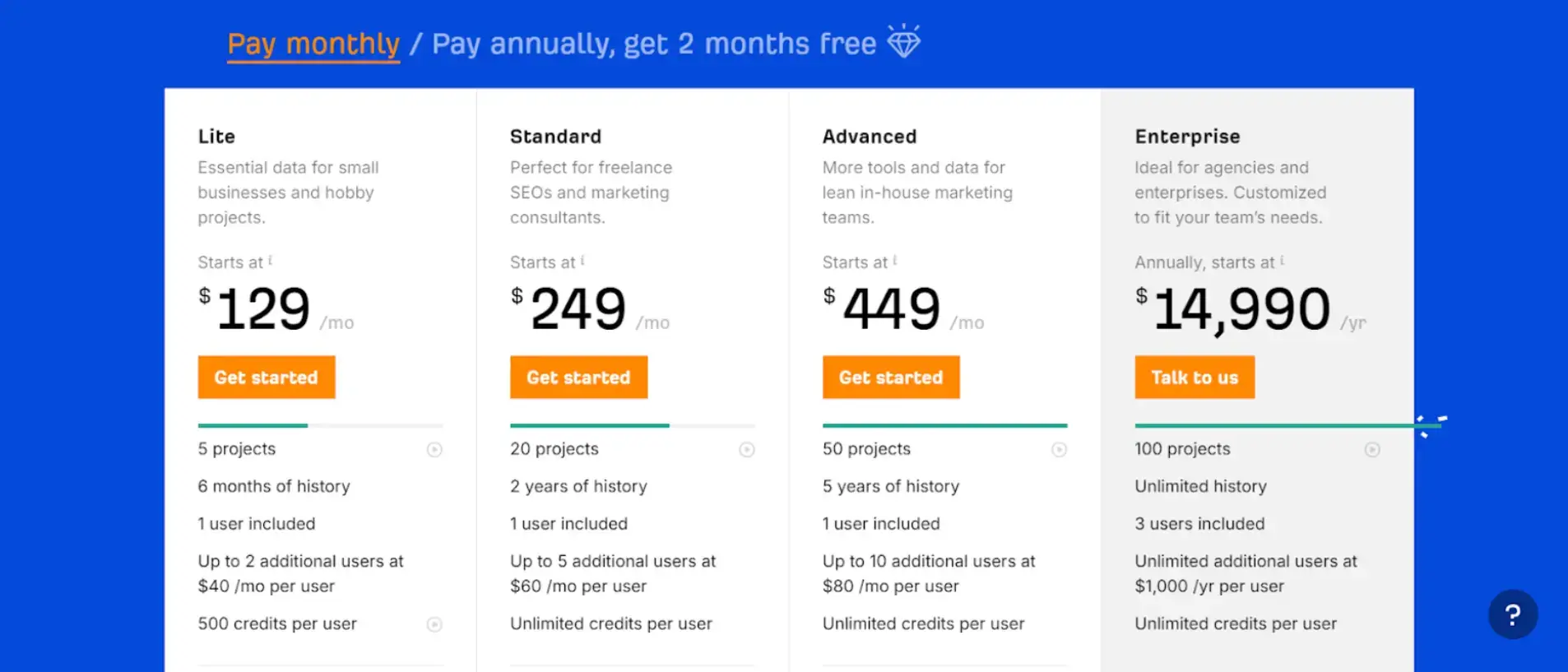
Arefs Pricing
3. Google Search Console
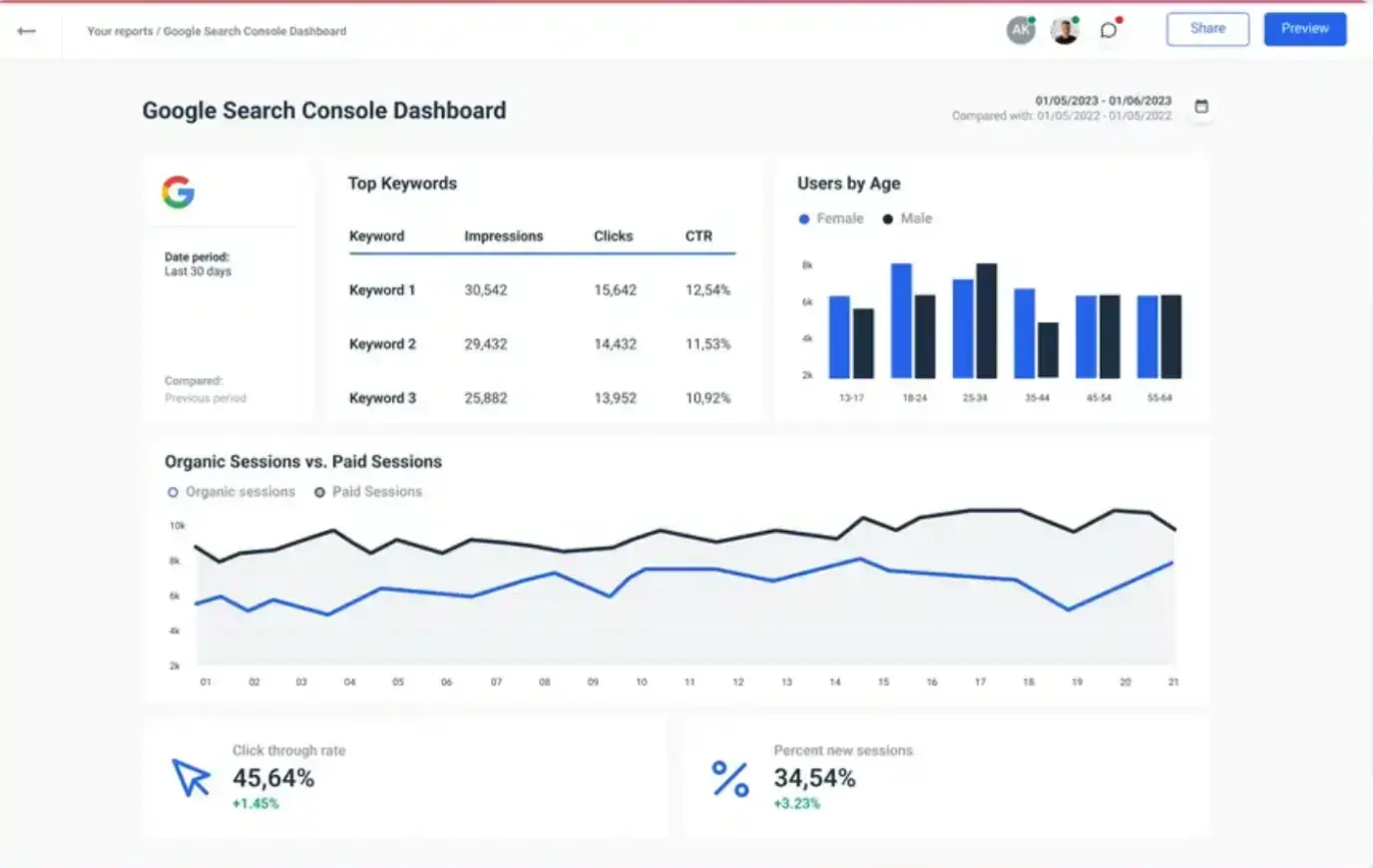
Google Search Console (GSC) helps you analyze how your website performs in Google Search. It tracks:
- Clicks
- Impressions
- CTR
- Average ranking positions (over the last 16 months)
One of its most important features is the Index Coverage Report, which shows which pages are indexed and highlights errors preventing crawling.
While GSC is essential for monitoring performance and fixing issues, it does not include advanced keyword or backlink tools.
Still, it is indispensable for SEO.
Key SEO Features of Google Search Console
- Search Analytics
Track clicks, impressions, CTR, and rankings. - HTML Improvements
Spot duplicate titles, missing descriptions, and other content issues. - Sitemaps
Submit XML sitemaps and detect indexing errors. - Backlink Insights
Understand which websites link to you and your top-linked pages. - Crawlability Check
Identify issues like broken links, blocked resources, and server errors. - Indexing Fixes
Get explanations for non-indexed pages and resolve the causes (noindex tags, robots.txt blocks, etc.)
Pros of Google Search Console
- Tracks essential search performance metrics
- Alerts you to crawl issues instantly
- Supports sitemap submission
- Identifies mobile usability issues
- Integrates with Google Analytics and Ads
Cons of Google Search Console
- Limited data (filtered for privacy reasons)
- Reporting delays (not real-time)
Google Search Console Pricing
Free to use.
4. Moz Pro

Moz Pro is built for small to mid-sized businesses seeking easy, reliable SEO tools. It simplifies keyword research, rank tracking, and site auditing.
Moz’s clean design and beginner-friendly insights make it perfect for businesses without a full-time SEO specialist.
Key SEO Features of Moz Pro
- Keyword Explorer
Find keywords with strong search volume and low competition. - MozBar Browser Extension
Displays domain authority, page authority, and SEO metrics for any website. - Competitive Research
Analyze competitor rankings, keywords, and backlinks. - Search Visibility Score
Understand how visible your site is in search results over time. - Rank Tracker
Track ranking changes across multiple search engines. - Site Crawl
Find and fix technical issues like broken links and duplicate content.
Pros of Moz Pro
- Excellent user interface
- Clear, beginner-friendly reports
- Comprehensive keyword research
- Useful MozBar extension
- Strong competitor insights
Cons of Moz Pro
- Keyword difficulty scoring can be inconsistent
- Data updates slower than competitors like Ahrefs
Moz Pro Pricing
5. SEMrush
SEMrush is an all-in-one digital marketing suite packed with SEO, content, advertising, and competitor analysis tools. It’s a favorite among marketers thanks to its massive database and detailed insights.
From keyword research to backlink auditing, SEMrush helps small businesses build a strong SEO strategy.
Key SEO Features of SEMrush
- Keyword Magic Tool
Millions of keyword suggestions with metrics like difficulty, trends, and intent. - Backlink Audit Tool
Analyze backlink profiles, identify toxic links, and improve domain health. - Competitor Research
Track competitor keywords, traffic, rankings, and paid ads. - Technical Site Audit
Scan for errors that impact performance and search visibility. - Position Tracking
Monitor rankings daily and compare with competitors. - Content Marketing Toolkit
Optimize blog posts, analyze topic gaps, and track content performance.
Pros of SEMrush
- Massive keyword and backlink database
- Extremely detailed competitor insights
- Powerful technical audit tools
- Great for agencies and marketing teams
- Includes content optimization features
Cons of SEMrush
- Can feel overwhelming for beginners
- Higher pricing compared to alternatives
SEMrush Pricing
Plans start at $117.33/month, billed annually.
6. Yoast SEO
Yoast SEO is the go-to plugin for WordPress users looking to optimize content for better search rankings. With its user-friendly interface, Yoast provides real-time content analysis and optimization tips.
Key SEO Features of Yoast SEO
- Content Optimization
Improve readability, fix keyword usage, and structure content properly. - Automatic Redirect Manager
Prevent 404 errors and maintain link equity by auto-redirecting changed URLs. - Internal Linking Suggestions
Get suggestions for the best pages to link internally. - XML Sitemaps
Automatically generate sitemaps for Google indexing. - Schema Markup
Add structured data to improve rich snippet eligibility.
Pros of Yoast SEO
- Very beginner-friendly
- Real-time content SEO scoring
- Helps structure content properly
- Supports schema and sitemaps
- Ideal for WordPress users
Cons of Yoast SEO
- Limited features in the free version
- Not ideal for non-WordPress sites
Yoast SEO Pricing
Starts at $99/year.
Key Features to Look for in SEO Tools for Small Businesses
When choosing SEO tools, consider the features that matter most for small businesses:
1. Keyword Research Capability
Find keywords your audience actually searches for and understand the competition.
2. Backlink Analysis
Analyze your backlink profile and identify opportunities for growth.
3. Technical SEO Audits
Fix crawl errors, speed issues, redirects, and other technical problems.
4. Rank Tracking
Track your keyword performance over time to measure improvement.
5. Competitor Insights
Understand what’s helping competitors rank — and how you can outrank them.
6. Content Optimization Tools
Improve readability, keyword usage, and on-page SEO structure.
Frequently Asked Questions (FAQ)
1. What is the best SEO tool for small businesses?
It depends on your goal:
- For client management: Agency Handy
- For keyword & backlink insights: Ahrefs
- For tracking and indexing: Google Search Console
- For all-in-one SEO strategy: SEMrush
- For WordPress optimization: Yoast SEO
2. Are paid SEO tools worth it for small businesses?
Yes — paid tools provide deeper insights, competitor analysis, and automation that save time and help you grow faster. However, free tools like Google Search Console and Google Analytics are still essential.
3. What features should I look for in an SEO tool?
Look for:
- Keyword research
- Backlink monitoring
- Technical SEO audits
- Rank tracking
- Competitor analysis
- Content optimization
4. Can I use SEO tools even if I'm a beginner?
Absolutely. Tools like Moz Pro, Yoast SEO, and Google Search Console are very beginner-friendly and offer easy-to-understand insights.
5. Which SEO tool helps with backlink building?
Ahrefs and SEMrush are the best for:
- Finding backlink opportunities
- Analyzing competitor links
- Auditing toxic backlinks
Conclusion
Choosing the right SEO tool can dramatically improve your website’s rankings and overall online presence.
Whether you’re looking to:
- Manage clients
- Track performance
- Perform technical SEO
- Optimize content
- Analyze competitors
…there’s a perfect tool for your business.
The six SEO tools listed above are the best options to grow your small business and boost your visibility in search results.
Let me know in the comments — which SEO tool are you planning to try first?
