
Optimizing your small business website for next-level performance — both in terms of conversion rates and customer satisfaction — is one of the best investments you can make when growing your brand.
However, finding the best software for UI/UX design can be challenging, especially if you have limited experience or do not know where to begin.
The good news is that improving website performance (whether we’re talking about general performance metrics or specific KPIs like conversion rates) doesn’t have to be difficult.
All you need is a clear strategy and a few high-quality tools to make it happen.
This article will overview some of the best software for UI/UX design, along with proven-to-work tactics and tools to help optimize performance in 2026. Let’s get started.
In this article:
- Best Tools for Improving Elementary Website Performance
- Best Software for UI/UX Design Improvements
- Tools to Boost Sales, Conversions & Revenue
What’s the Best Software for UI/UX Design in 2026?
The simple answer to this question is that it really depends — not just on your immediate goals and objectives, but also on your site’s complexity, your resources, and your priorities.
To achieve the best possible results (and get the biggest bang for your buck), a good rule of thumb is to separate your software-evaluation strategy into three categories, based on your primary focus.
First, you need to improve the elementary performance of your website. This includes technical UX metrics (such as core web vitals, page load speed, and mobile performance), as well as more specialized tactics, including reducing code bloat, improving hosting quality, implementing dedicated hosting, and optimizing content delivery.
Secondly, you’ll need to explore methods to improve website user experience. Ultimately, a pleasant browsing experience is not only likely to delight your customers.
It can also help you earn their trust, increasing their chances of forming a positive impression about your brand and elevating their purchase intent.
If you’re not 100% sure that investing in UX design is worth the resources, consider the fact that every $1 spent on this aspect of your website can deliver $100 in ROI.
Finally, it’s also worth focusing on your ultimate goal when running a business, which is to facilitate sales and conversions. Admittedly, basic UX and technical performance improvements can and will contribute to your site’s performance in this regard.
Nevertheless, implementing some advanced hacks and using specific software solutions can make this slightly easier to accomplish, especially if you want to improve conversions and customer retention.
Best Tools for Improving Elementary Website Performance
When it comes to the basis of a high-performing (and high-converting) website, the best tools for you to use won’t necessarily be UI/UX design software.
Instead, you’ll want to employ more technical solutions to ensure you create a basis on which you can then build your site’s user experience design.
Page Load Speed & Core Web Vitals
One of the most notable aspects of web performance relates to site load times.
Ultimately, a fast website won’t overtly delight your target audience. But a slow one is guaranteed to frustrate them and maybe even drive them to bounce.
To avoid this outcome, the best tool you can use is Google’s PageSpeed Insights. It’s free, highly informative, and provides actionable tips on high-value activities that can improve web performance.
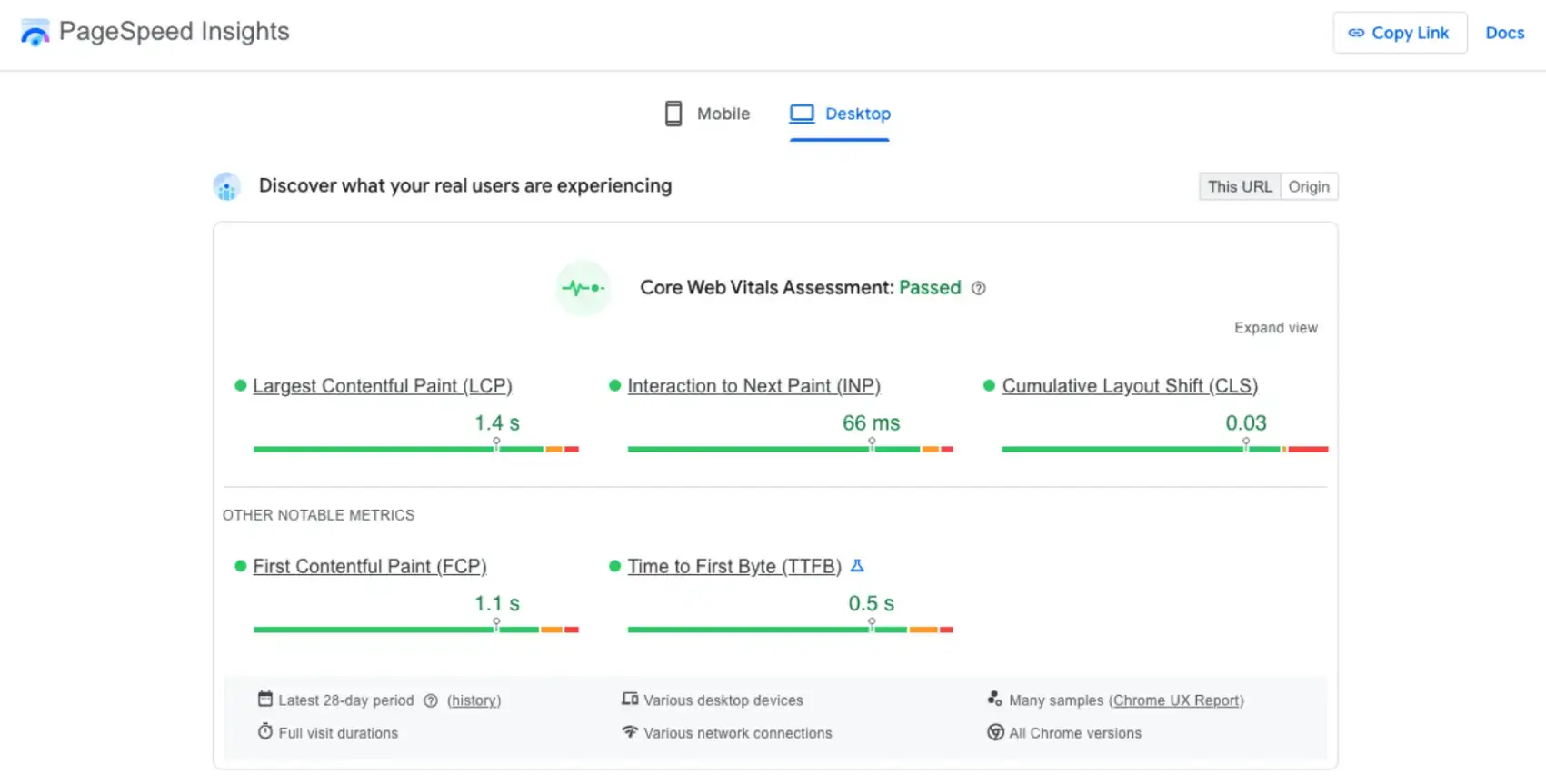
Source: PageSpeed Insights
Another popular solution is WebPage Test from Catchpoint. This tool is great for quickly checking whether your website is fast, usable, and error-free.
However, if you’re after a more insightful solution (although it does require you to create a free account), GTmetrix is probably going to provide the biggest bang for your buck.
Other tactics and tools you can employ to improve technical performance (and provide your audience with a more enjoyable browsing experience) are content delivery networks like Cloudflare or Fastly. They store copies of your site’s content on multiple servers to improve load speed.
Image Optimization for Faster Load Times
Another thing to remember in terms of technical web performance is that visuals are crucial for creating a website with high engagement and conversion potential.
But let’s face it. Visuals can really slow down a website — unless they’re properly optimized.
In addition to choosing the right aesthetic direction for images and videos on your site, also pay attention to how you prepare these assets for publication.
Simple tools, such as the POWR Image Resizer, will be more than enough to ensure your visual content is both attractive and optimized for technical performance.
Code Optimization & Performance Plugins
Lastly, it’s worth noting that some website performance hiccups don’t stem from the sheer number of webpage elements.
Instead, they’re symptoms of complex or bloated code that’s slowing your website.
Whether your pages are running too many scripts, feature unused elements, or are blocking user browsers from drawing pages until specific lines of code load, it’s more than just a basis for poor performance.
Such carelessness could also lead to website errors that directly interfere with your audience’s buying journeys and prevent them from converting with speed and ease.
Fortunately, you can use software solutions like NitroPack or WP Rocket. These plugins are sure to boost your site’s speed and performance in just a few steps.
Best Software for UI/UX Design Improvements
Once you’ve tackled the basics of improving website performance, it’s time to focus specifically on user experience and user interface design.
Again, adhering to the basics of optimizing web UX design for customer satisfaction will deliver the most impressive and substantial results.
Nevertheless, if you don’t want to feel around in the dark and prefer to make your design decisions based on real-life data (or need some help automating the processes), the following software solutions could provide you with value.
Navigation, Layout & Behavioral Analytics
The ease with which your audience can find what they need when landing on your website directly determines their willingness to stick around.
But here’s the deal. Web user behavior research clearly shows that people aren’t that prepared to deeply engage with brands online.
According to the NN Group, most web users only skim content (instead of reading it word-for-word). Plus, most people focus only on specific areas of a homepage, most notably the first two screenfuls.
With this in mind, it’s worth investing in solutions that will help you optimize where you position core website copy (like headings and user benefits) as well as calls to action.
Both Hotjar and FullStory offer powerful visitor behavior analytics features. They include heatmaps, session recordings, funnel visualizations, and others, to help you understand how your audience behaves on your website and what you can do to move them closer to a conversion.
Customer Experience & On-Site Support Tools
Enjoyable web design is not sufficient for a truly stellar brand experience.
In fact, standing out from your competitors and genuinely wowing your prospects into converting requires next-level customer support during every single stage of the buyer’s journey.
If you look at the research on the impact of CX, you’ll find that, on average, 72% of consumers would pay more for a premium experience when doing business with a company.
Moreover, in 2026, buyers are even more likely to prioritize convenience when choosing which brands to shop with, underscoring how essential it is for your website to address this aspect of CX.
What’s great is that there are several UX-enhancing software solutions that can help you provide your audience with better support.
Self-service resources and support bots — like the one used on Bella Sante —can both significantly elevate user experience.
However, keep in mind that many consumers still prefer a more direct way of communicating with brands — particularly when dealing with small service businesses.
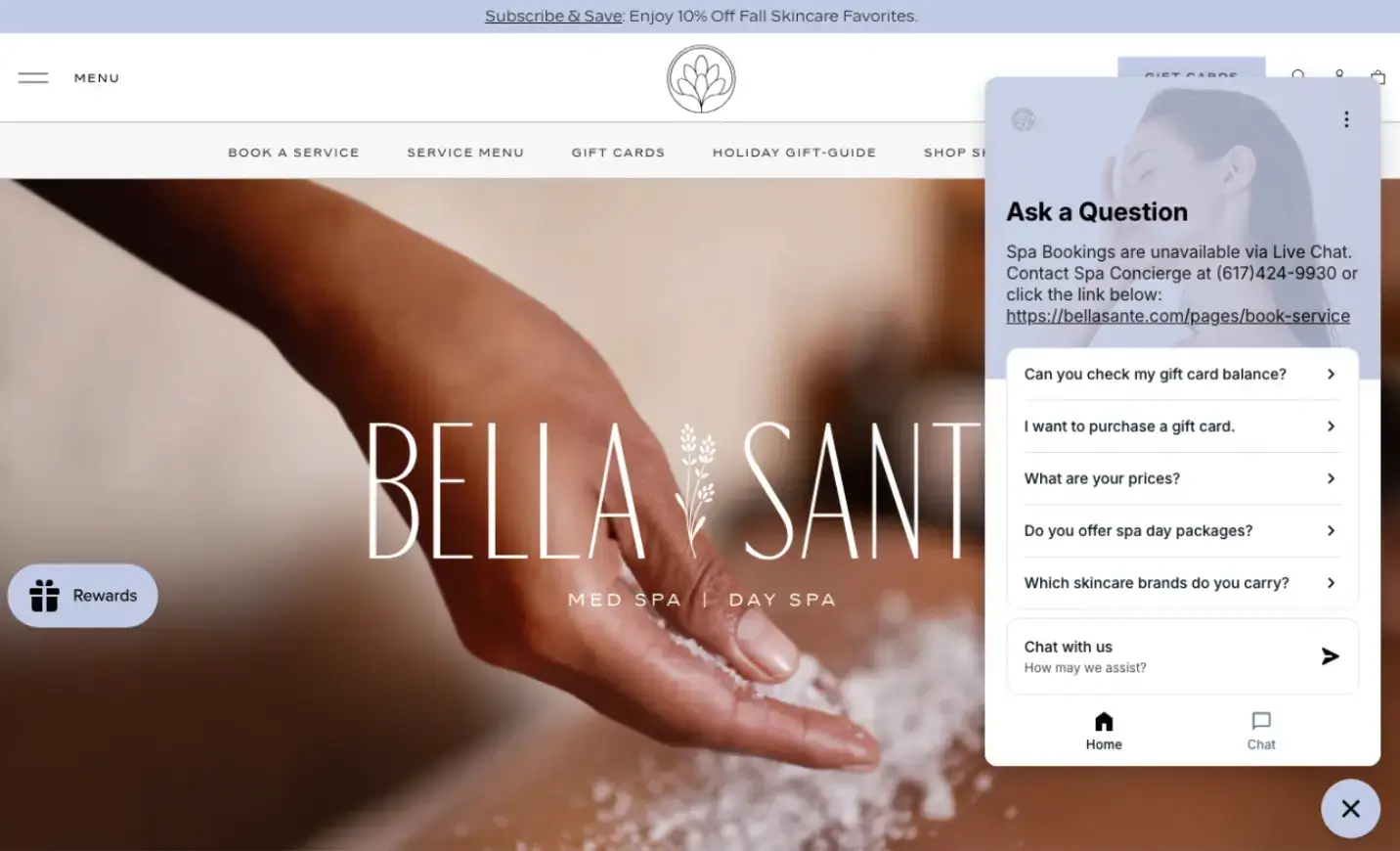
Source: Bella Sante
An AI-powered answering service like Rosie can help you handle incoming calls, while still retaining the power to escalate to real-live employees when necessary (so that you don’t miss any business opportunities or risk losing prospects over inefficient support calls).
Website Accessibility & Inclusive UX
Lastly, when optimizing your web visitors’ browsing experience, it’s crucial that your site allows them to interact with the content easily.
What’s worrying is that most businesses fail to consider accessibility's role in shaping CX and driving conversions.
If you want to take your prospects’ UX to the next level, giving them control over how your site appears with tools like UserWay — similar to Brain Ritual — can be a great strategy.

Source: Brain Ritual
Tools to Boost Sales, Conversions & Revenue
Last but not least, if you want to improve website performance and boost conversions, you have to comprehend what it takes to get web visitors to click that “Buy” button.
If you’ve followed the tips and tricks covered so far, you’re well on your way toward maximizing sales. However, there are a few remaining tactics and tools that could help you reach the next level of success.
Message Optimization & A/B Testing
Today’s consumers practically ignore irrelevant sales pitches.
According to a recent study, 81% won’t pay attention to a branded message that doesn’t relate to their unique wants and needs. On the other hand, 96% of people are likely to shop with brands that personalize their messaging.
However, while you can leverage AI to deliver personalized shopping experiences in your ecommerce store, simpler design tools can be just as effective for optimizing your web copy or calls to action.
Specifically, A/B testing software like VWO and Optimizely can work well to create relatable, relevant, and conversion-inspiring webpages and to improve the performance of your existing website.
Lead Generation Tools for Small Businesses
In some cases, you don’t need elaborate software for UI/UX design to elevate your site’s appearance or conversion potential.
Instead, you need to identify the best tools that can help you attract leads into your funnel, then gently nurture them into customers.
With this in mind, creating and positioning high-value lead-generation elements that appeal to your ideal customers is key to boosting website performance.
Forms and pop-ups — like the one Uproas uses to draw consumers into the funnel — are a great option.

Source: Uproas
But the best part about these solutions isn’t how well they work. But the fact that they’re easy to incorporate into your design, especially if you use the POWR free Popup Maker.
Attracting High-Quality Traffic That Converts
Last but not least, when exploring opportunities to improve website performance — and especially to boost sales — remember that your capacity to drive conversions directly depends on the quality of traffic on your site.
If you’ve managed to engage and impress the right audience off-site, your visitors are likely to enjoy their browsing experience and may even turn into customers.
However, if you missed the mark, you’ve wasted valuable resources trying to convert the wrong people.
Fortunately, there are effective tools that can help you avoid the latter of those scenarios. For instance, the Socialplug marketplace is a great solution for getting the most out of off-site engagement, so you can attract high-quality leads and stop wasting your time (and money) on people who are unlikely to convert.
Final Thoughts
Improving website performance, boosting sales, and boosting user experience in 2026 doesn’t have to be difficult. Especially not if you use the right tools.
As you can see, your success will primarily depend on your strategy.
However, by also incorporating the best software for UI/UX design into your workflow, you can ensure optimal results with minimal spend so that the majority of your energy (and budget) can go toward creating value.
Frequently Asked Questions
How much does technical website performance impact conversions?
The simple answer is: a lot. Even though strong and resilient brands can get away with poorly designed websites, breaking into competitive markets necessitates an aesthetically pleasing online presence that makes it easy for prospects to understand your offer and convert into customers.
What’s the most effective way to increase website conversions?
Focus on customer experience as a whole. Support your leads, present them with value, and make it seamless for them to remove their pain points by becoming your customers.
Do I need all these tools to improve UX and CRO?
Absolutely not. For the most part, your ability to delight and convert your audience depends on how well you align your offer with their wants and needs. That said, using at least some of the tools from this list — particularly the POWR Popup Maker and Image Optimizer — won’t cost a thing yet can deliver excellent results.
Can I improve website UX myself or should I hire a professional?
As a small business owner, you may have to adopt a DIY approach to website UX optimization. And that’s perfectly fine. Just use the analytics tools mentioned above to identify the most pressing performance obstacles on your website, then slowly move towards investing in UX and conversion optimization.

Author Bio
Natasha Lane is a writer with more than a decade of experience in design, branding, digital marketing, and business growth. Outside of work, she enjoys art in all its forms and the occasional grilled tofu.