

When you are designing a website, you have to plan the entire layout, ensuring that every element of the site goes to the right place.
Every website consists of several pages that carry important details about the owner.
Among these pages is the “Contact Us” page, which showcases the owner's contact details, including email, telephone, and postal addresses. But what should a contact page look like?
This article offers you some useful contact page ideas for a website that you can use to design your site.
Importance of a Contact Page
A website offers you a platform to interact with your customers.
But unlike a sit-down with potential customers to discuss the benefits of your business and learn about their interests, online interactions take only a few seconds.
For this reason, you have to provide potential customers with the most essential information about your business in the easiest and most effective ways possible.
Since the Yellow Pages have become redundant for locating businesses and finding business contacts, instant gratification has become crucial.
Anyone who visits your website wants to find what they are looking for instantly, or else they will move on to the next available option.
Research has shown that most website visitors will leave the site within the first 10 seconds if they don’t find what they’re looking for.
For example, if someone visits your site looking for your phone number or email and encounters even the slightest difficulty finding it, they’ll leave the site almost immediately.
So, when you are designing your site, make sure your contact page is clearly visible and easily accessible. Fortunately, you can now use an online form builder to help you edit and customize your contact page.
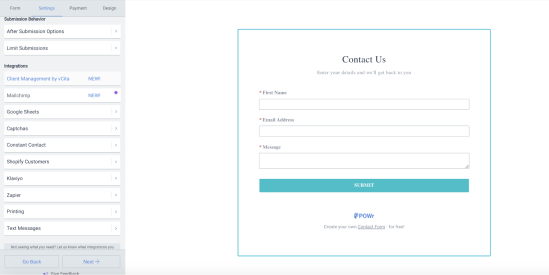
Source: POWR
How to Design a Contact Us Page
A good contact page should be easy to find, allowing visitors to get in touch with you quickly.
Don’t hide your contact page at the bottom of your website, because very few visitors have the time to scroll down to find it.
If possible, put it at the top of the home page so that it’s among the first things a visitor sees when they open your website.
Additionally, make sure your contact page includes all necessary contact details, including your business’s phone numbers, emails, physical addresses, and social media links.
Include all your active social media pages and make them clickable so visitors can be taken to them with a click. These details should be arranged neatly for quick scanning.
You should also include a short, simple form where visitors can enter their details to help you know who’s contacting you.
In summary, a contact page is a simple form of communication that helps improve your relationship with visitors to your website.
Therefore, it should be clearly visible and accessible to save your visitors' time. When designing your contact page, don’t clutter it with unnecessary details.
Just include all the important contact details through which your customers can get in touch with you quickly.
FAQ
1. What information should a contact page include?
A contact page should include the most important ways customers can reach you, such as your business phone number, email address, physical location (if applicable), and links to your social media profiles. Many websites also include a contact form so visitors can quickly send a message without leaving the page.
2. Where should the contact page be placed on a website?
Your contact page should be easy to find and accessible from anywhere on your site. Most websites place a “Contact” link in the main navigation menu or header so visitors can reach it immediately without scrolling.
3. Why is a contact page important for a website?
A contact page helps visitors quickly connect with your business, ask questions, request support, or learn more about your services. Making it clear and accessible improves user experience and can increase trust, engagement, and potential conversions.
