

Email remains a very powerful tool, even in an omnichannel era that uses many different ways to engage with people.
More than 333 billion emails were sent daily in 2022, which is expected to reach more than 376 billion by 2025. With such significant numbers and attractive ROIs, it’s little wonder many businesses still see it as one of their primary digital marketing tools.
One thing increasing in popularity is interactive emails. Let’s look at what interactive emails are and the different types you can use.
In this article:
- What are Interactive Emails?
- Different Types of Interactive Emails
- Image rollovers
- Hover effects
- Gamification
- Buttons
- Polls & surveys
- Videos
- GIFs
- Adding items
People want to see new things and innovative ways to address their needs, and that can include personalization.
What are Interactive Emails?
Interactive emails are a marketing tool in which the customer (or potential customer) is encouraged to interact with you using elements within the email itself, rather than clicking links that take them to a landing page or something similar.
For example, if an email asked you to leave comments on the effectiveness of a .ca domain, you could do that within the email without going to a separate link.
You can encourage customers to take a wide range of actions, from completing a survey to adding items to a cart or wishlist, or taking a quiz straight from the email.
Because people do not have to click a link, they may be more likely to engage with you.
In addition to these interactive features, you can also enhance the visual appeal of your emails by taking the time to create infographics that convey information effectively and creatively.
By making elements of these infographics interactive, you ensure your emails are more memorable and impactful.
Different Types of Interactive Emails
As you would expect, interactive emails can come in different formats depending on the actions you are hoping to encourage.
You can code many other elements in the email's body, but these are some of the most popular.
Image rollovers
People like to see different views of a product. Using an interactive image rollover lets them see different views when they hover their mouse pointer over the image.
Of course, you need to provide any images used at the highest possible resolution, which will require good graphic design skills and relevant software.
You can also add details to the images. For example, as well as views of a car from different angles, you could also add various technical specifications of the car.
Image rollovers are about giving your customer control without them having to leave the comfort of their armchair. It can be a handy tool for moving a customer to a possible purchase.
Hover effects
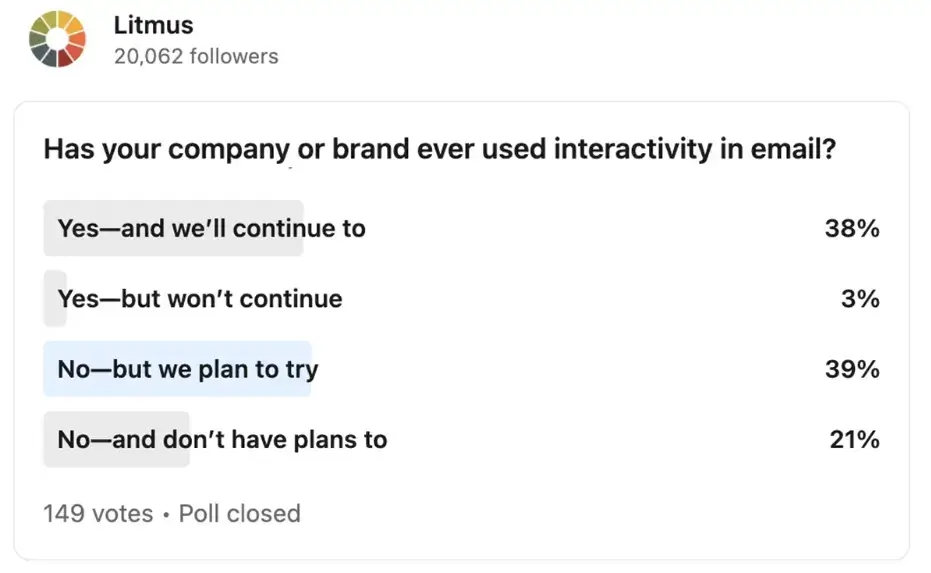
Image rollovers and hover effects are the two mainstays of a successful interactive email strategy. You can utilize hover effects to highlight particular elements in your email.
It could be as simple as a line of text, such as creating urgency by informing the customer of a time-limited offer or a stock shortage.
However, you can also use it to highlight other images, such as CTAs (calls to action) or images.
Combined with image rollovers, it can be a great - and informative - way of encouraging customers to interact with your marketing emails.
Gamification
You may already be using some form of gamification on your website. After all, everyone loves to play games, right?
Interactive games create excitement and curiosity and are ideal for engaging customers with you.
Gamification, especially when it includes elements such as quizzes, can also be a great way of collecting customer data, which in turn can improve future marketing efforts.
Quiz Maker WordPress enables businesses to create personalized quizzes that encourage participation and gather meaningful data on user preferences and behaviors.
It can help you segment your email list into categories beyond the standard demographic ones.
Plus, adding an element of fun can be a great way of encouraging brand loyalty. You could use gamification to test out any new web application deployment you have planned.
Buttons
One of the most common elements in interactive emails, ones that initially seem minor in terms of engagement but can be crucial to the success of your marketing campaigns.
If you think about the actions you want your customers to take, you can see how functional interactive buttons can be.
- Encourage a particular action. For example, you may urge customers to add Gmail extensions to their accounts.
- Redirect to particular links. While the main point of such emails is to encourage interaction within the email, there is a time when you want customers to visit your site or blog.
- Choosing categories. Enabling customers to select a category via a button in their email can save them from browsing your site and, combined with other elements and information, can help pique their interest.
Polls and surveys
Polls and surveys can serve many purposes.
They can let you know how customers view different aspects of your business, from how satisfied they are with your customer service to how good they think your products are.
Polls and surveys can be especially useful when you are managing multiple sites.
However, people may only sometimes see polls and surveys on your websites or when you post them on your social media platforms. To increase visibility and engagement, consider using online poll makers to create interactive, visually appealing polls that are easy to integrate across various channels.
By having polls or surveys within your interactive emails, you encourage them to engage with you without visiting your site or other platforms.
Insights into what customers think of you mean you can tweak and improve things in the future.
It also provides valuable insights into what customers want, so you can consider offering those products or services in the future.
Videos
Videos can be an excellent tool for engaging with your customer base. You can use them to give detailed guides on using a product or launching new products.
UGC (user-generated content) videos can be beneficial, as people often like content from other customers. Video can also be a great way to capture customers’ attention.
As with polls and surveys, people may only sometimes see these videos when posted on social media. That means interactive emails let you share videos directly in the customer’s inbox.
You can combine this with personalization: if a customer has shown interest in a particular product or service, you can send relevant videos to that person.
GIFs
People tend to think of GIFs as flippant and amusing.
The reality is that, used properly, they can also be a helpful marketing tool. The issue with videos is that they can sometimes be too long or the files may be too large to send by email.
A GIF can offer a snapshot of a new product, prompting the customer to want to know more about it.
Another advantage of GIFs is that they usually autoplay. That means the customer, assuming they have opened the email, can’t avoid seeing the GIF.
You could use a GIF to announce anything from a new product launch to a particular sale you are having. It could be a tease that makes the customer curious and want more information, and can help grow your business.
Adding items
By enabling customers to purchase products or services directly from their email, you simplify the shopping process.
Offering shortcuts that streamline checkout could lead to higher conversion rates and better sales figures. It can be helpful for many customers, especially those who buy regularly from you.
Another area where this function can be helpful is with customers who have abandoned their cart for whatever reason.
While this may only be successful with some customers who have left your site before making a purchase, you should still see some customers using the opportunity to change their minds.
Takeaways
You are likely already using email in various ways within your digital marketing strategies. You will be targeting multiple groups, from people who have abandoned carts to loyal and long-term customers.
But have you yet added interactive emails to your arsenal? Offering customers the ability to interact with you directly from within an email could be a game-changer.
No matter your needs and goals, interactive emails can help you achieve them. They also recognize your customers' ever-changing tastes and enable them to engage without visiting your website or social media platforms.
FAQ
1. What are interactive emails?
Interactive emails are marketing emails that let recipients take actions inside the email itself—like answering a poll, exploring content, or engaging with a quiz—rather than clicking out to a landing page.
2. What types of interactive elements can I add to emails?
Common options include image rollovers, hover effects, gamification (like quizzes), interactive buttons, polls and surveys, videos, and GIFs. Some brands also experiment with “add items” style interactions to shorten the path to purchase.
3. Why do interactive emails improve engagement?
They reduce friction by keeping the user in the inbox and making the experience more visually engaging. When people can interact immediately—without extra clicks—they’re often more likely to participate and remember the message.
4. When should I use interactive emails in my marketing strategy?
Use them when you want to boost engagement, collect feedback/data (surveys, quizzes), re-engage segments (abandoned cart, product interest), or make campaigns more memorable—especially if your audience responds well to visual and hands-on experiences.
