

Email is the highest-return channel most Shopify stores have, and the only one where you own the audience outright. No algorithm decides who sees your message, and you don't bid against other brands to reach your own customers.
This guide covers everything you need to run email marketing on Shopify, from your first list to the automated flows that quietly drive revenue in the background.
Why Email Matters for Shopify Stores
Paid ads get more expensive every year, and social reach is rented, not owned. Email is different. When someone subscribes, you can reach them directly, as often as it makes sense, for free.
That's why email consistently returns more per dollar than almost any other channel, with commonly cited estimates around $36 back for every $1 spent.
For a store, email does three jobs: it turns first-time buyers into repeat customers, it recovers sales you'd otherwise lose, and it gives you a reliable way to announce products and promotions to people who already want to hear from you.
Getting Set Up
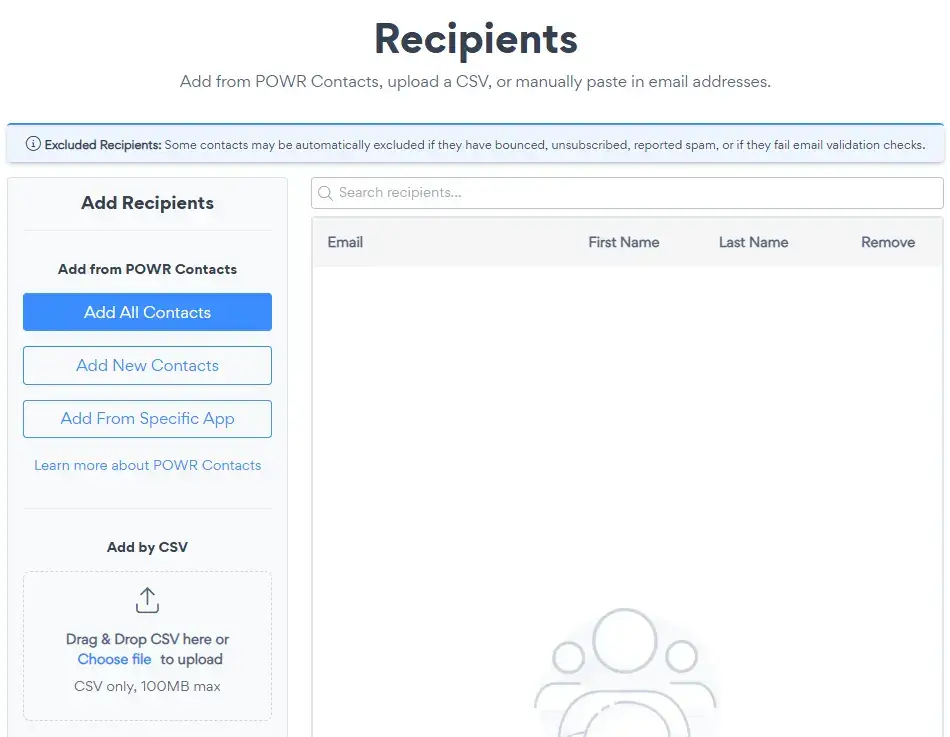
Before you send anything, get the basics right.
Pick a tool that fits your stage. Enterprise platforms are powerful but often priced by contact count, so your bill climbs as your list grows. If you're a small or growing store, look for something simple that charges for what you send, not for storing contacts. POWR Email, for example, is built into Shopify and starts free.
Set your sender details. Choose a sender name your customers will recognize, a reply-to address you actually monitor, and add your mailing address (required by law on every marketing email).
Confirm your list is permission-based. Only email people who opted in. It protects your deliverability and keeps you compliant.
Building Your List
You can't email customers you don't have. The main ways Shopify stores grow a list:
- Checkout opt-in. Shopify lets customers subscribe to marketing during checkout. Turn it on.
- Popups and forms. A well-timed popup offering a discount or useful content is the fastest way to convert browsers into subscribers.
- Post-purchase. Invite buyers to stay in touch after they order.
Focus on quality over volume. A smaller list of people who genuinely want your emails outperforms a big list of strangers every time.
The Emails Every Store Should Send
Source: Magnific
Email marketing on Shopify breaks into two buckets: one-off campaigns and automated flows.
Campaigns (Broadcasts)
These are one-time sends to your list or a segment of it:
- Promotions and sales. Discounts, seasonal offers, flash sales.
- New product launches. Tell your audience first.
- Newsletters. Content, stories, and updates that keep your brand top of mind.
Automated Flows
These run on their own once set up, triggered by customer behavior. They're where most of the recurring revenue comes from:
- Welcome flow. Greet new subscribers and earn the first purchase.
- Abandoned cart. Remind shoppers who left without checking out. This alone recovers sales that would otherwise vanish.
- Post-purchase. Thank buyers, set expectations, and tee up the next order.
- Win-back. Re-engage customers who haven't bought in a while.
If you only build one flow first, make it the abandoned cart. It targets people with the clearest buying intent.
Designing Emails that Convert
A few principles hold up across every store:
- One goal per email. Decide the single action you want (buy, read, click) and make it obvious.
- Lead with the value. Put the offer or the point up top. Most people skim.
- A clear call to action. One primary button, easy to find.
- Mobile first. Most emails are opened on phones. Check how yours looks on a small screen before sending.
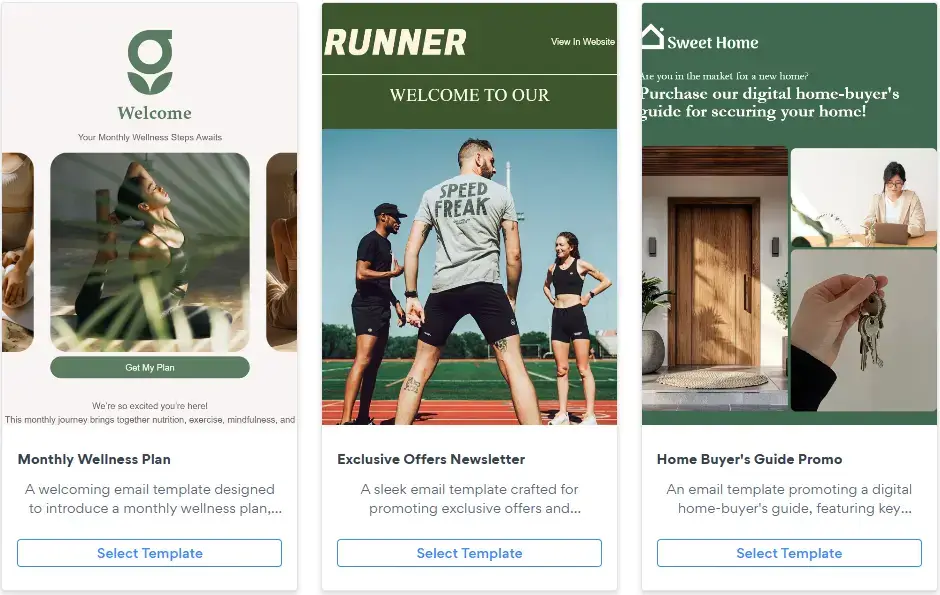
- On-brand and simple. A drag-and-drop builder with templates lets you stay consistent without design skills. Set your brand colors once and apply them everywhere.
Segmentation: Send the Right Email to the Right People
Blasting everyone the same message leaves money on the table. Segmentation means splitting your list so each group gets what's relevant. Common Shopify segments:
- New subscribers who haven't purchased.
- One-time buyers: you want to convert them into repeat customers.
- Repeat customers and VIPs.
- Lapsed customers who need winning back.
Even basic segmentation lifts your results, because relevance drives opens, clicks, and sales.
Deliverability: Getting into the Inbox
The best email does nothing if it lands in spam. To protect deliverability:
- Only email people who opted in.
- Remove contacts who bounce, unsubscribe, or report spam. Good tools do this automatically.
- Keep a consistent sending rhythm rather than long silences followed by a blast.
- Make unsubscribing easy. It's better to lose a subscriber than to earn a spam complaint.
Measuring What Works
Track a handful of metrics and let them guide you:
- Open rate. How compelling your subject lines and sender name are.
- Click rate. How relevant your content and offer are.
- Conversion and revenue. The number that actually matters. Use UTM parameters on your links so your analytics tool can attribute sales back to each email.
- Unsubscribe and spam rates. Rising numbers mean you're sending too often or to the wrong people.
Test one thing at a time (a subject line, a send time, an offer) and keep what wins.
Getting Started with POWR Email
POWR Email is built into Shopify, so your contacts come straight from Shopify Customers with nothing to migrate.
You get a drag-and-drop builder, ready-made templates, segmented broadcasts, and analytics, starting free. You pay for the emails you send, not for the size of your list.
Get POWR Email on the Shopify App Store and send your first campaign today.