


Say you run a wellness studio on Wix. A potential client fills out your inquiry form, you confirm the booking, and then you have to chase payment separately.
That gap between booking and payment is where clients go quiet, commitments fall through, and your calendar fills up with maybes instead of confirmed appointments.
Wix Payments is the obvious answer, except it doesn't work for everyone. It's not available in every country, and plenty of merchants are already on Stripe or PayPal and don't want to switch.
If all you need is to collect a deposit at the point of inquiry, building a full e-commerce setup is a bigger project than the problem requires.
POWR Forms & Payments is the shorter path: a no-code payment form that connects directly to Stripe and PayPal and collects money right on your page, no developer or Wix Payments account required.
This guide walks through the whole setup, from installing a form on your Wix site to taking your first payment.
What a Payment Form Unlocks on Your Wix Site
A payment form isn't a storefront or a shopping cart. It's a form you can add to any page on your Wix site and connect to your existing Stripe or PayPal account.
Set it up as a Stripe Wix form, a PayPal payment form on Wix, or both at once. Nothing more complicated than that.
What it changes is the moment money gets collected. Instead of sending a follow-up email and hoping the client follows through, the deposit is collected at the time of booking. Both sides move forward with certainty. For the wellness studio above, that means a confirmed appointment instead of a maybe.
It works the same way across service fees, event registrations, pre-orders, and donations: any scenario where collecting money upfront changes the outcome. It's also the most practical way to collect payments on Wix without Wix Payments.
Install POWR Form Builder from the Wix App Market
Open your Wix editor and go to the App Market. Search for POWR, select POWR Forms & Payments, and click Add to Site. You'll be prompted to confirm a couple of permissions, so click Agree & Add.
Once that's done, Wix will redirect you to a new tab to complete the initial setup before you can start building your form.

Add the Form to Your Wix Page
From your Wix Editor, use the Page dropdown to navigate to the page where you want the form to live. Open the Add Apps panel in the left sidebar, search for POWR, and click Add again. Your form is now on the page and ready to customize.
Before moving on, head back to your homepage and delete the form that was added there during installation. It's a duplicate you won't need.
Enable the Payment Field
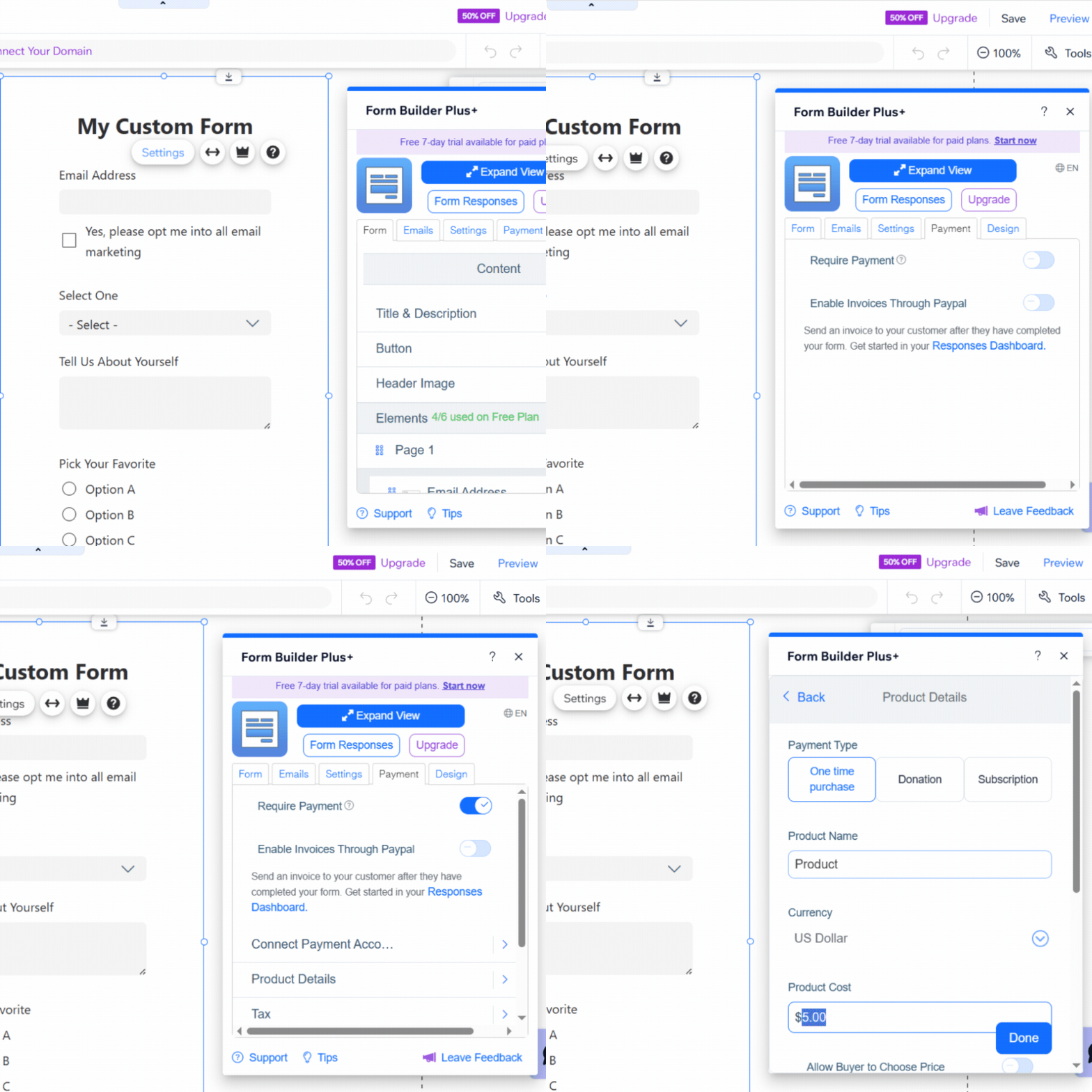
Click the Settings button, open the Payment tab, and toggle on Require Payment.
Then head to Product Details to set a fixed price or allow buyers to enter their own amount, depending on your use case, and click Done to return to the main Payment tab.
Connect Stripe or PayPal
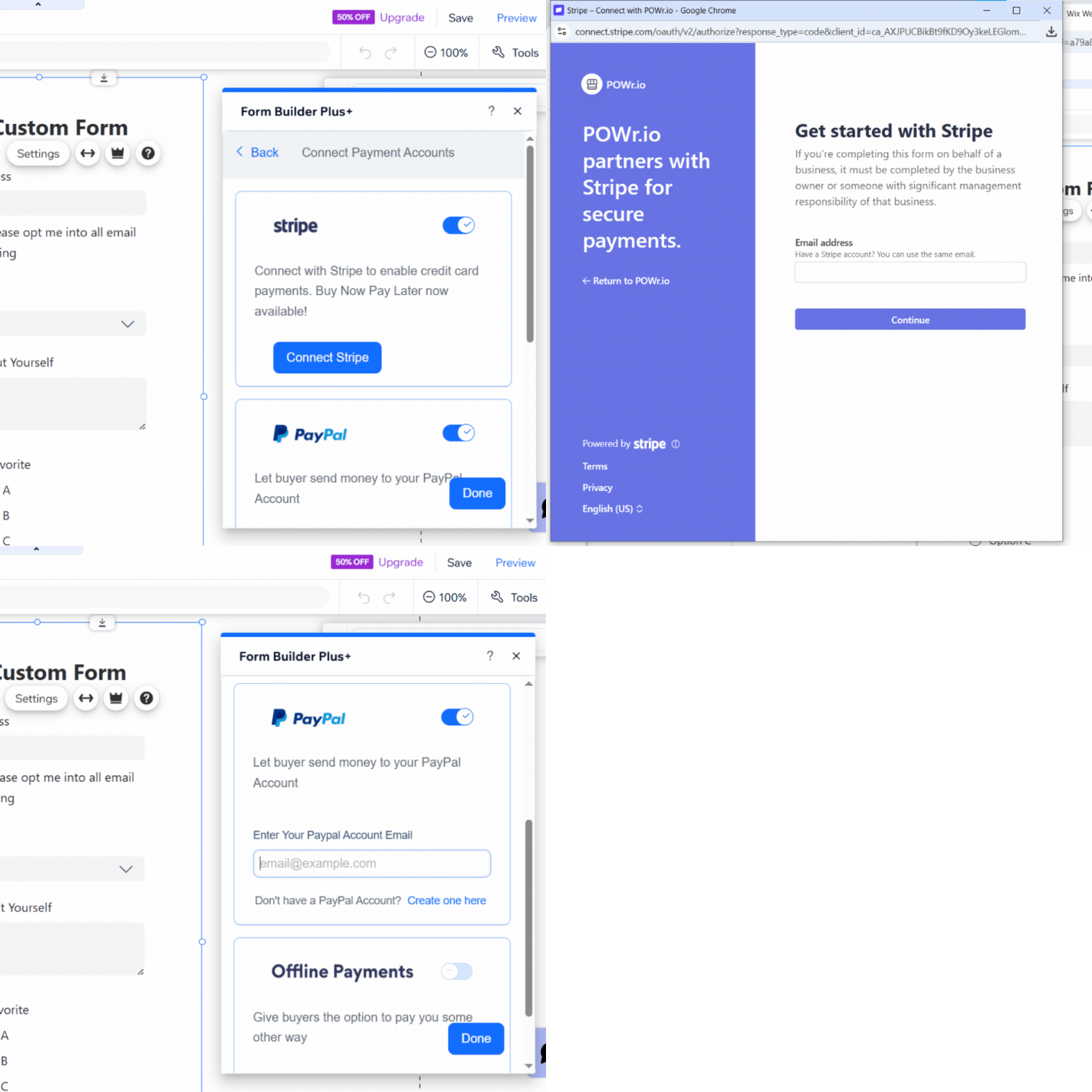
Go to Connect Payment Accounts and toggle on both Stripe and PayPal.
Click Connect Stripe and follow the on-screen OAuth flow to link your account. It's a straightforward process that doesn't involve any API keys or code.
For PayPal, just enter your PayPal email address in the field on the PayPal tile.
Once both are connected, customers can choose their preferred payment method at checkout.
Configure Your Product Details
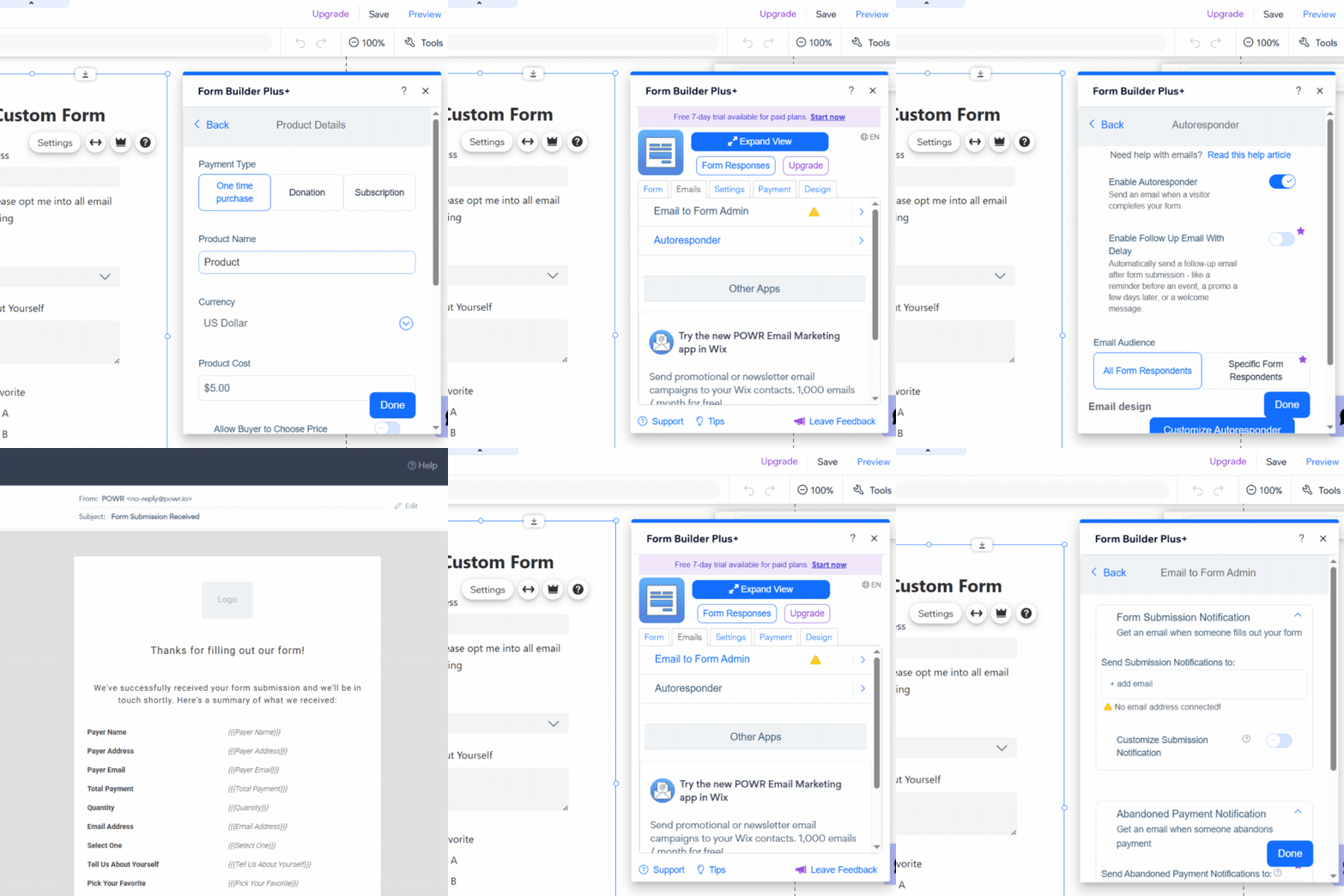
Go back to Product Details and set your payment type, product name, currency, and any other details to match your use case.
To make sure customers receive a confirmation after paying, open the Emails tab, select Autoresponder, and toggle Enable Autoresponder on.
Click Customize Autoresponder to open the POWR Mail Editor in a new tab, make your edits, and hit Save when you're done.
While you're in the Emails tab, it's also worth turning on admin notifications. Select Email to Form Admin and enter the address where you'd like to receive payment alerts so you can keep track of every transaction.
Publish and Start Collecting
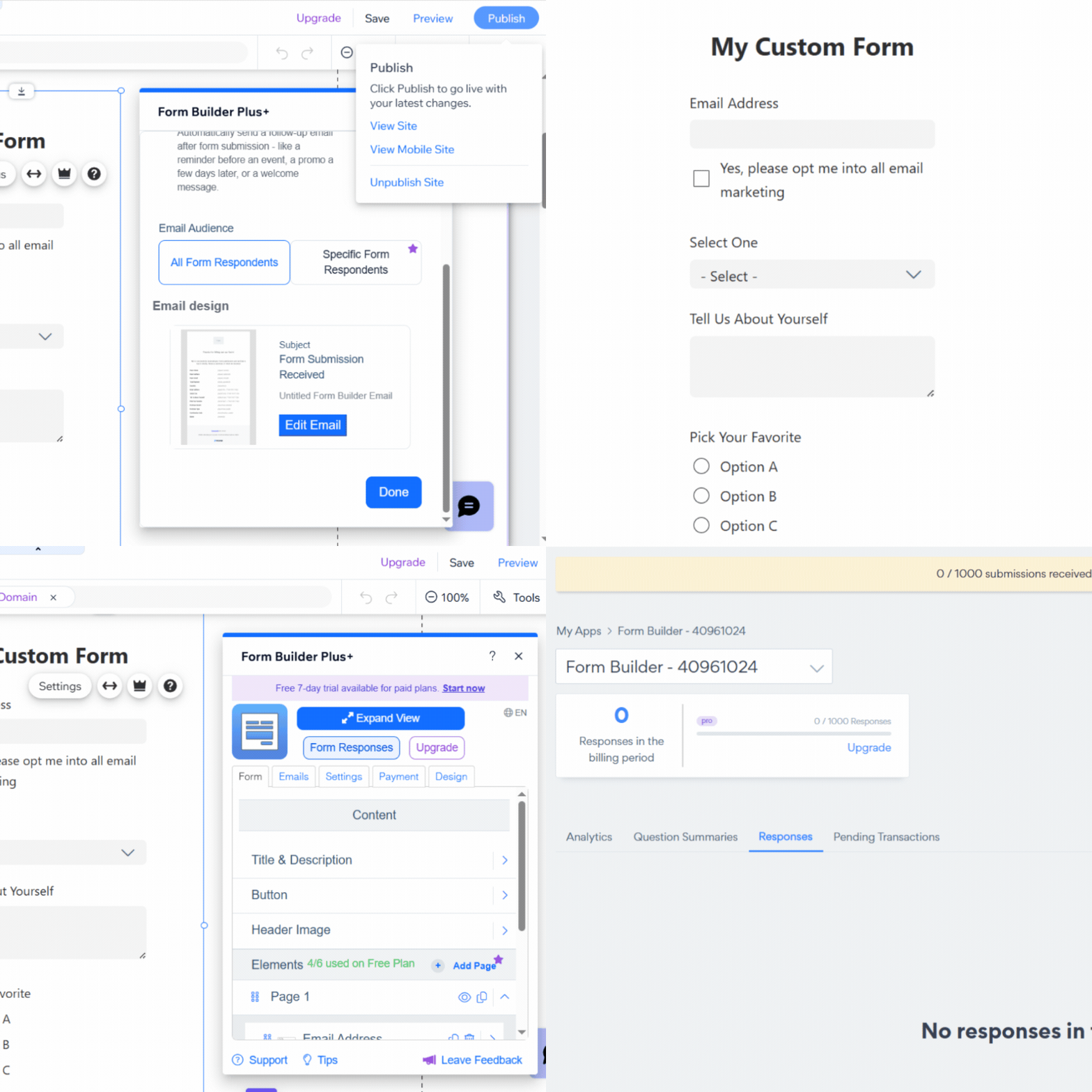
Once your form is fully configured, click Publish in the Wix Editor. When the pop-up appears, click Visit Site and navigate to the page where your form lives to see it in action.
From here, payments go straight to your Stripe dashboard or PayPal account, based on whichever method the customer chooses.
You can also track transactions directly in POWR by clicking Form Responses in the app settings to open your Sales Dashboard.
Be Your Own First Customer
The best way to feel confident about your form is to be your own first customer.
Submit a test payment using a real card or PayPal account and walk through the full experience: the payment confirmation, the autoresponder email, and the transaction in your Sales Dashboard. When everything checks out on your end, you can share the form knowing it works.
Who This Works Best For (Real Use Cases)
Payment forms aren't just for one type of business.
Whether you're selling a product, booking a service, or securing a deposit for an event, the underlying problem is the same: you need to collect money at the right moment, without losing the customer in the process.
Here's how two businesses in different categories are doing exactly that with POWR Forms & Payments on Wix.
Food and specialty desserts
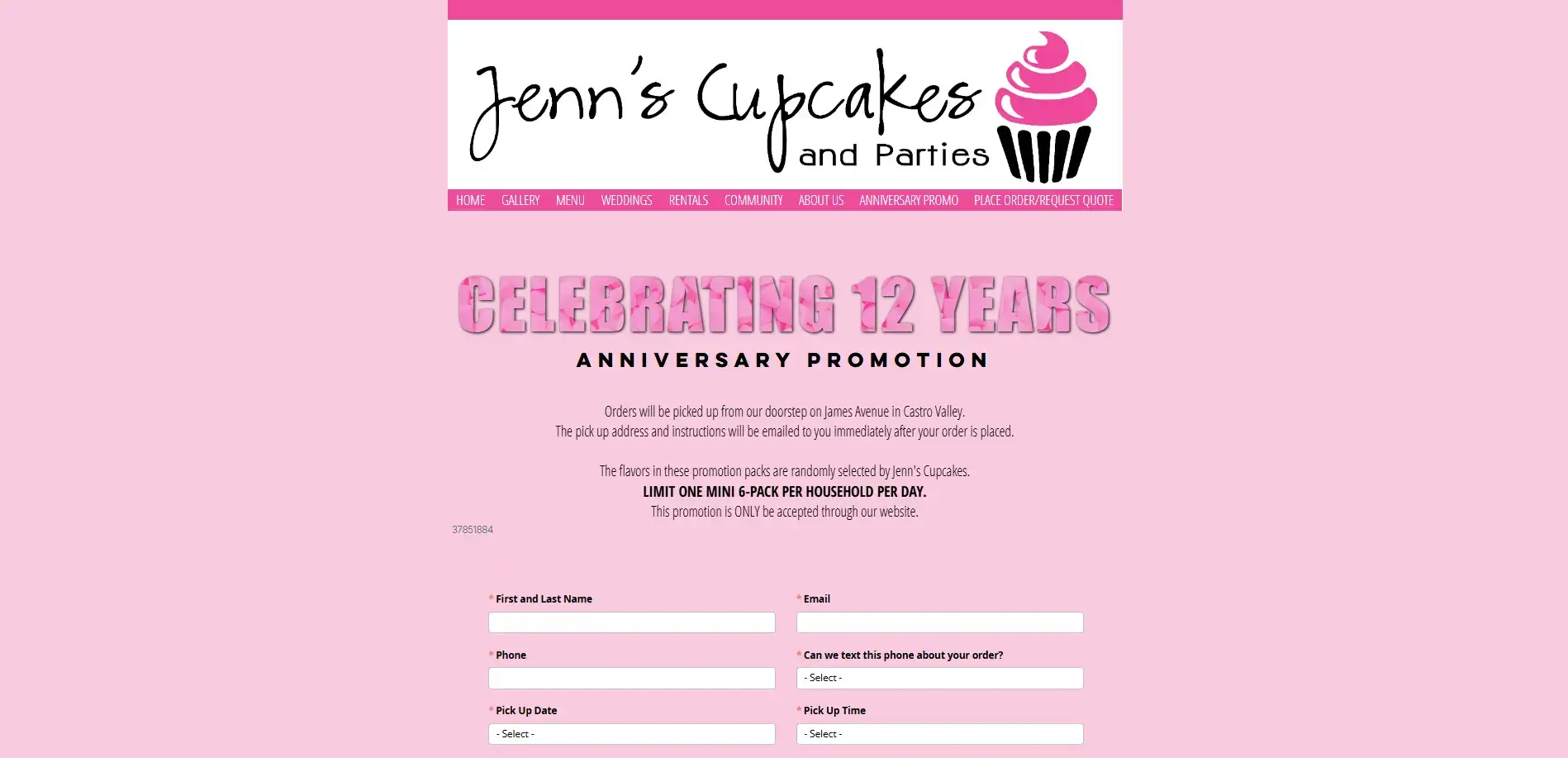
Jenn's Cupcakes and Parties, a woman-owned custom cake and dessert business based in Castro Valley, uses a POWR payment form to take orders for their 12th anniversary promo pack — an assortment of six mini cupcakes drawn from their 40-flavor lineup, processed through Stripe.
For small food businesses running limited-time offers or seasonal promotions, it's a simple way to collect payment upfront without setting up a full online store around a single product.
Wellness and retreats
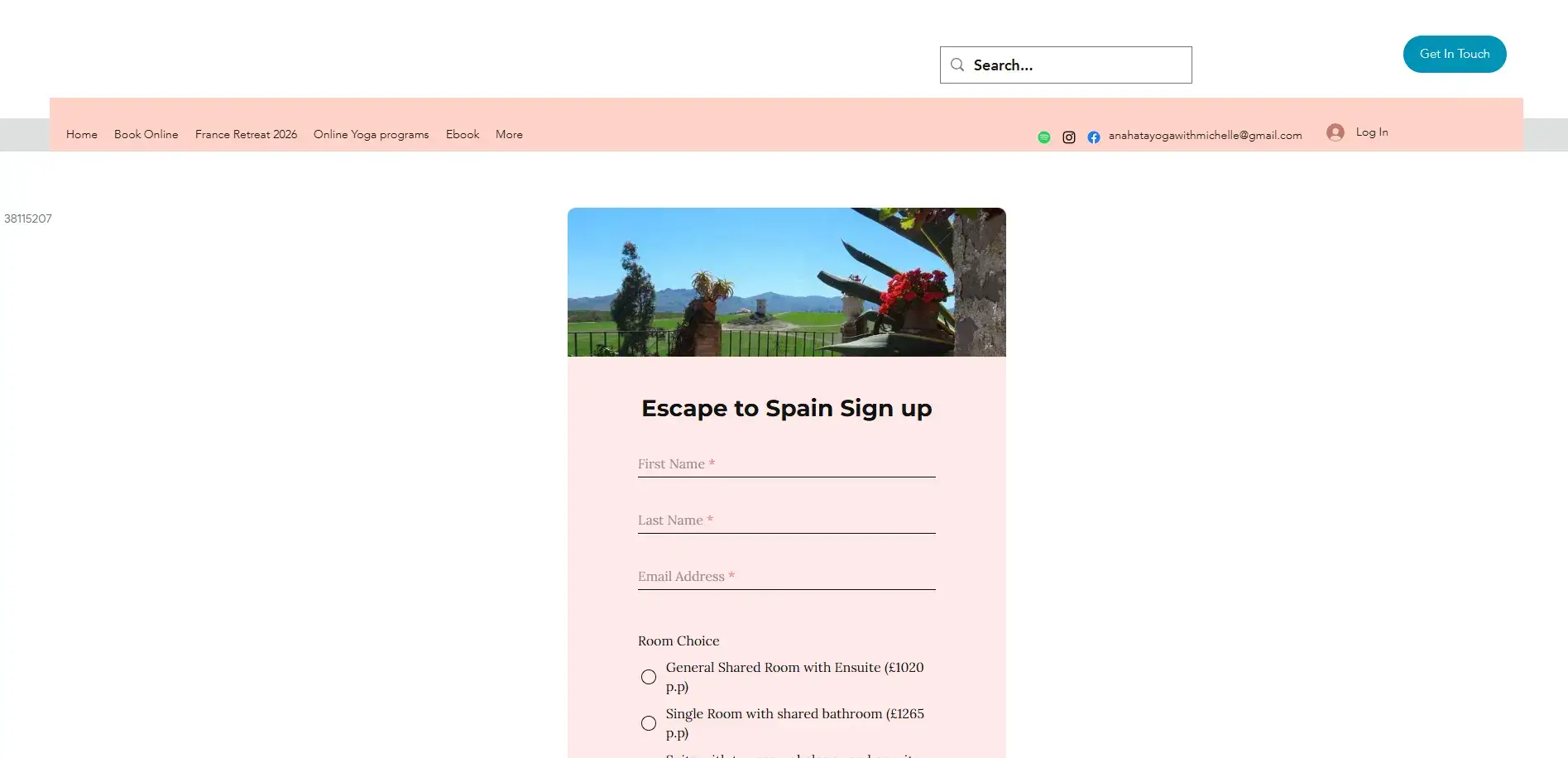
Anahata Yoga with Michelle, a UK-based yoga studio offering gentle classes for people in their midlife, uses a POWR payment form to collect deposits for their Escape to Spain yoga retreat.
Participants pay a non-refundable £250 deposit via PayPal to secure their spot, right on the page, before any back-and-forth over email.
For wellness businesses running retreats or multi-session programs, it's a straightforward way to confirm commitment and protect against last-minute cancellations.
Turn Maybes into Paying Customers
Every confirmed booking, paid order, and secured deposit starts with collecting payment at the right moment.
The gap between a customer showing interest and actually paying is where businesses lose them, and a payment form on your Wix site is how you close it.
POWR Forms & Payments connects to Stripe or PayPal and takes minutes to set up.
