
Picture the sale email your store sent last Friday. The subject line says 20% off. The hero image says today only. The fine print, in grey, says orders over $75. The landing page, for reasons nobody remembers, says the sale ends Sunday.
A human reader squints past these contradictions all the time. Software reading on their behalf doesn't squint; it picks something, and the version of your offer that reaches the customer may be the one you least intended.
That's the real reason Gmail's AI features deserve your attention this year. But before you spend a sprint optimizing promotions "for the AI inbox," here's the awkward correction most of the advice skips: Google's current AI Inbox documentation says the feature only surfaces information from the Primary tab. Not Social. Not Promotions, which is where your sale email almost certainly lives.
So the game is not tricking a summary engine into loving your discount. It's understanding which Gmail surface can actually touch each message you send, and writing so that no surface, human eyes included, has to guess your terms.
This article maps those surfaces, walks through a six-message audit you can run yourself, and ends with a writing checklist that works whether or not anyone's inbox is being summarized.
What Does Gmail's AI Inbox Actually Read?
AI Inbox currently reads Primary-tab messages to surface suggested to-dos and catch-up topics; it is not a universal summary feed for marketing email.
Per Google's documentation, it pulls high-priority items, a bill due date, say, into a to-do list, and gathers scattered updates like travel plans or purchase confirmations into topics. It filters out spam and anything you archive, delete, mute, or snooze, and it doesn't handle attachments, delegated inboxes, or encrypted mail. Your abandoned-cart reminder is not what it was built for.
The eligibility wall matters just as much. The feature is a US-only, English-only beta. Personal accounts need a paid Google AI plan; work accounts need Workspace Enterprise Plus with Gemini Beta enabled by an admin, plus smart features switched on. In other words, the audience seeing AI Inbox today is a slice of a slice.
It's also only one of four AI-adjacent surfaces Gmail now runs, and they don't share rules. AI Overview conversation summaries condense long opened threads, with Google's own warning that output can be inaccurate.
AI Overview in Gmail search synthesizes messages after a natural-language search, with its own rollout limits. And Promotions annotations are the old-timer: optional structured deal cards, codes, and expiry dates in the Promotions tab, displayed at Gmail's discretion. Four surfaces, four sets of rules, and most advice you'll read this year collapses them into one imaginary feature.
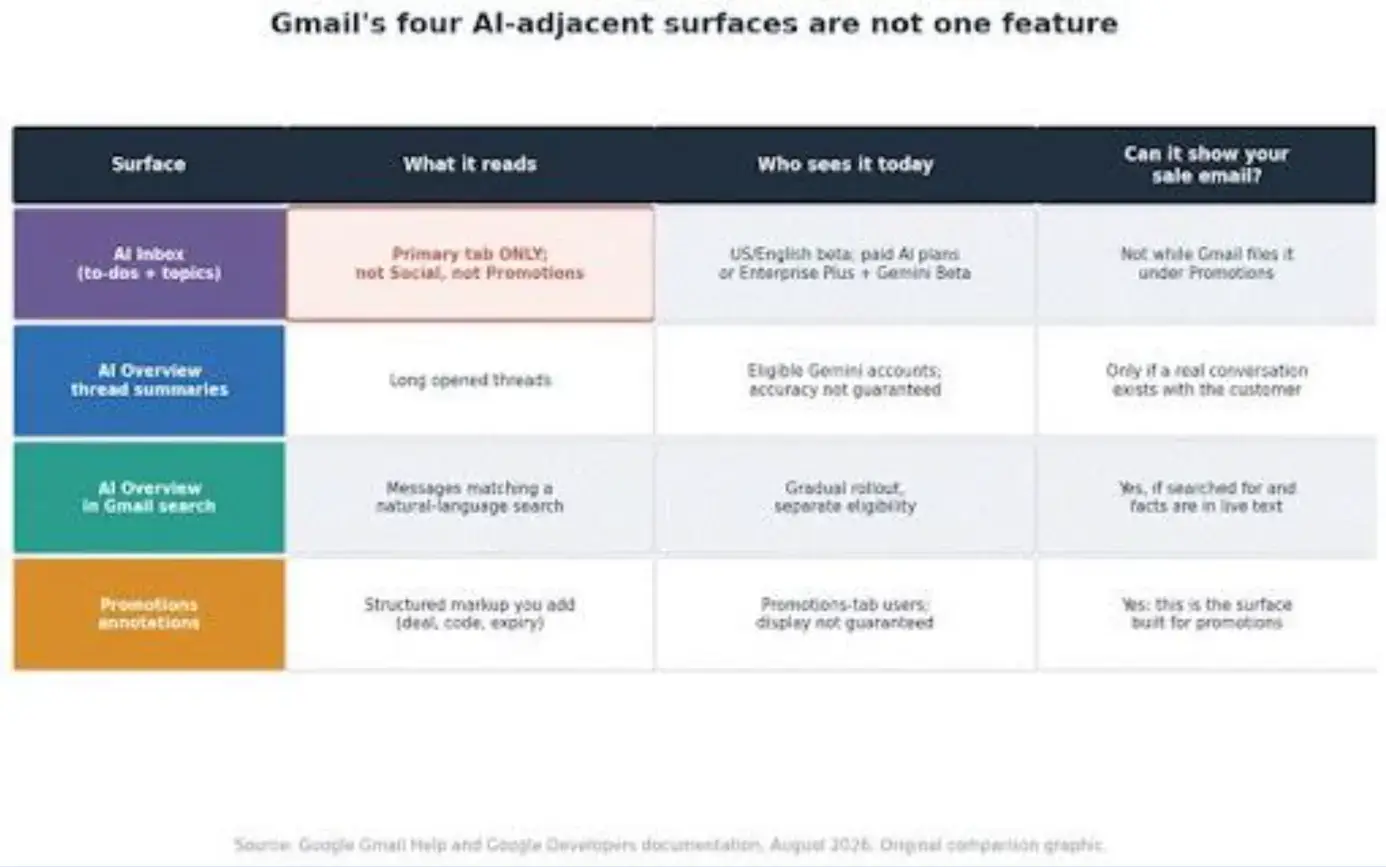
The four Gmail surfaces compared: what each one reads, who can see it, and which of your messages it can plausibly represent, with the Primary-only boundary marked on AI Inbox.
Will a Promotional Email Appear in AI Inbox?
Not while Gmail categorizes it as a promotion, because AI Inbox currently draws from Primary only. A bulk sale campaign landing in the Promotions tab is outside the feature's stated scope, full stop. That covers most of what a Shopify store sends on purpose: the launch announcement, the seasonal sale, the win-back.
Resist the obvious wrong conclusion. Primary placement is not the goal, and disguising a promotion as personal correspondence is a trick with a short shelf life and a long memory.
What the shift really demands, she argues, is framing your language so "an agent understands what is high vs. low priority for the email's reader."
The realistic picture for a Shopify store: the transactional mail Shopify itself sends- order confirmations, shipping notices, account messages, plus replies from actual customer conversations- can plausibly end up on a summary surface, while your bulk promotions have Promotions annotations available instead.
Both paths reward the same discipline. And underneath all of it sit Google's sender guidelines: authentication, clean formatting, low spam rates, one-click unsubscribe. Meeting them affects whether you get delivered and trusted at all; it guarantees nothing about AI visibility or summary fidelity.
Which Offer Details Should Gmail Never Have to Guess?
The offer, the product scope, the exact deadline with its time zone, the eligibility condition, any material exclusion, and the one action you want, all in live text. Everything else is decoration.
Same offer, but every commercial fact now exists as text a screen reader, a summary feature, a search index, or a hurried human can extract without interpretation.
Keep the hierarchy boring: recognizable sender, offer on the first screen, exact terms next to the offer rather than in the footer, one clearly labeled call to action, and a Shopify product or collection page that repeats the same price, date, and exclusions instead of freelancing new ones.
Countdown timers deserve one honest sentence: they're effective urgency for human readers, and they're pixels. Our Email Countdown can do the persuading, but the exact cutoff and time zone still belong in live text beside it, because a timer that expired in someone's inbox says nothing to anyone who reads the text.
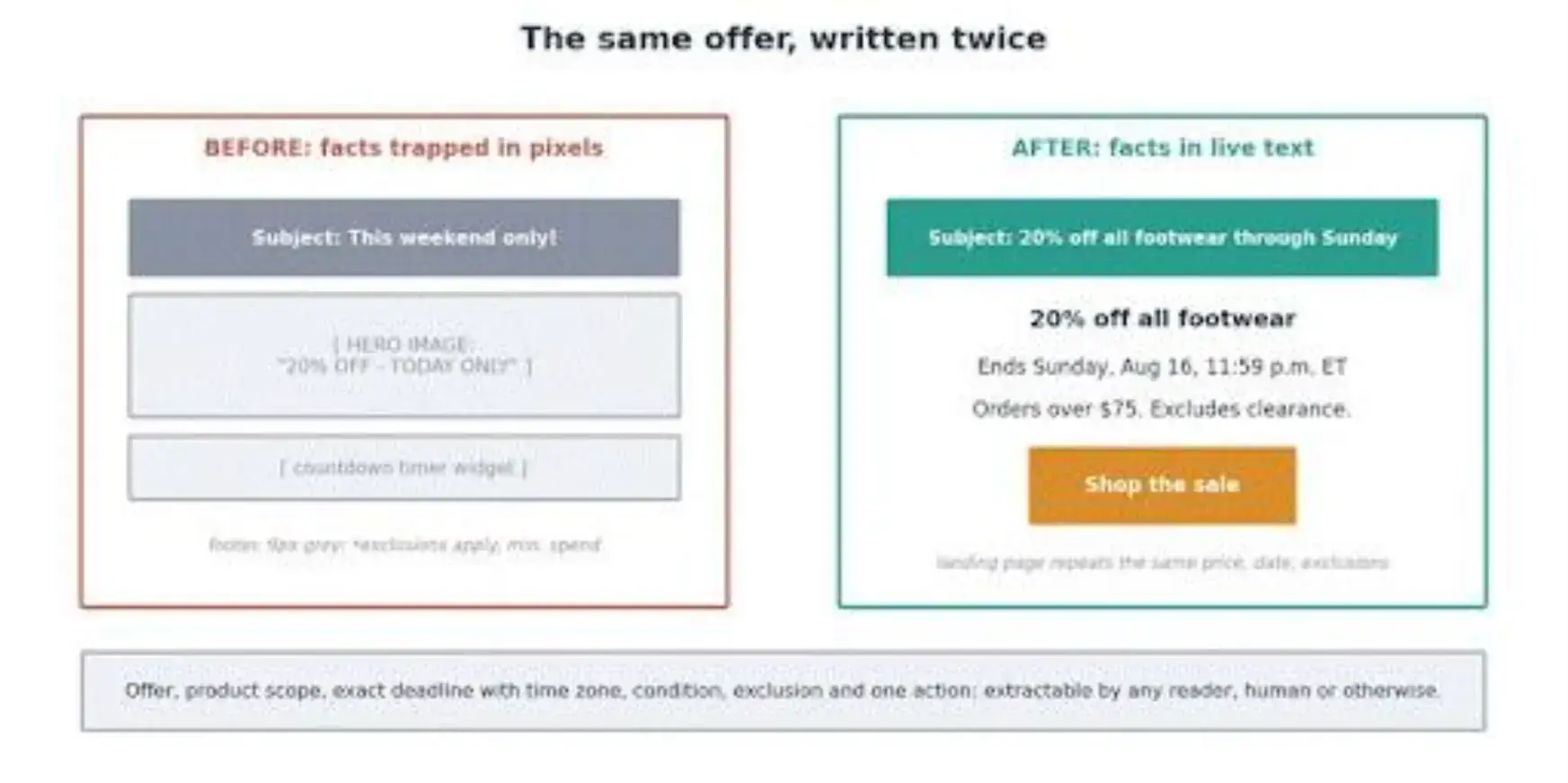
The same sale email before and after: vague urgency with buried terms versus explicit offer, deadline, condition, and a single action in live text.
Run This Six-Message Gmail Surface Audit
Send a small controlled set to an eligible test account and record what each available surface preserves, omits, or changes. You need three pairs, six messages total:
● Pair 1: the offer and deadline in live text, versus the same facts locked in an image and a countdown only.
● Pair 2: exact date, time zone, minimum spend, and exclusion beside the offer, versus vague urgency up top and fine print in the footer.
● Pair 3: one product with one primary call to action, versus a grab bag of products, offers, and competing buttons.
For each send, log the subject, preheader, from name, the facts in the body, which tab Gmail chose, which AI surfaces were available on the account, what each surface displayed, which facts survived, which vanished, any outright errors, and whether a second run behaved the same.
Use synthetic content or a permission-cleared segment, never your live Shopify customer list or an unannounced campaign.
Then label the result what it is: a dated interface audit of one account, in one region, on one day of a beta. That's not a weakness to apologize for; it's the correct claim.
Personalized beta behavior can show you a failure mode, the deadline that vanished from a summary, the exclusion that never surfaced, without telling you how often it happens to anyone else. You're hunting for what can go wrong, not measuring how often it does.
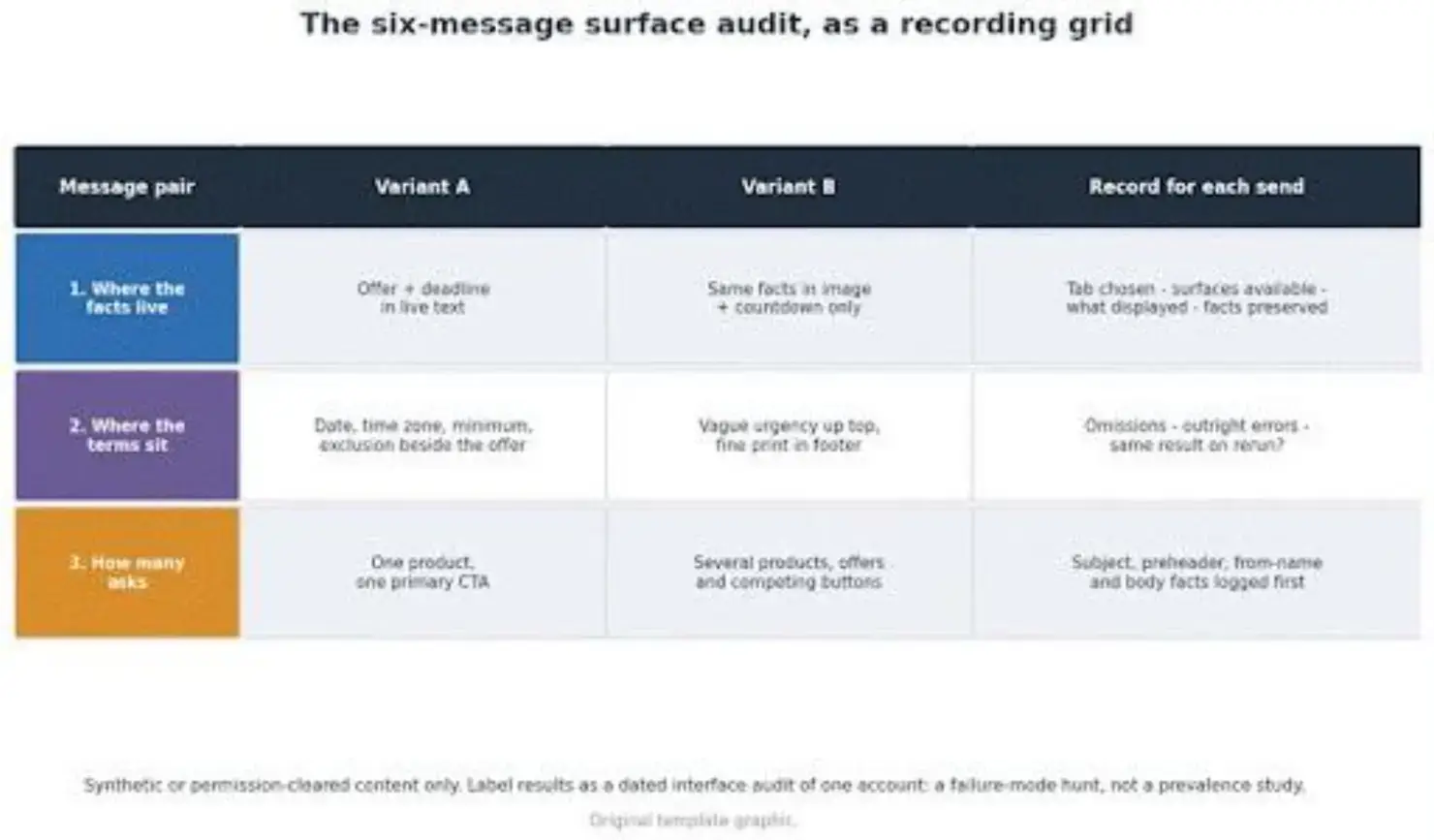
The audit grid: three message pairs against the recording fields, from category and surface availability through preserved facts, omissions, and errors.
How Do You Write an Email That Survives Every Surface?
Make the commercial facts explicit, keep them close together, and keep them consistent across subject, body, annotation, and landing page. That's the entire trick, and it was good practice before anyone summarized anything.
Name the offer and product in text. Put the cutoff and time zone beside the offer. State the material condition before the button, not after the unsubscribe link.
What you should not do is write for a hypothetical robot: no keyword stuffing, no repeating the deadline five times, no prose so mechanical it costs you the human reader you definitely still have.
If you're already using AI tools in your own campaign workflow, point them at this exact job, checking your draft for facts that exist only in pixels. And if one person owns the email while someone else owns the discount code and the storefront copy, consistency is an organizational problem before it's a copy problem; that's the case for centralizing email marketing rather than proofreading harder.
What Should Marketers Test Beyond the Open Rate?
Whether Gmail represented the message accurately, and whether the recipient did the thing, because an open was always a proxy and it's getting blurrier.
Track three layers. Delivery and trust: delivered, bounced, authenticated, spam complaints, unsubscribes. Inbox representation: which tab the message landed in, whether an annotation displayed, what any AI summary said, and specifically whether dates, conditions, and codes came through intact.
Business response: clicks, discount-code redemptions, add-to-carts, completed orders, or whatever micro-conversion your campaign actually exists for.
Tooling covers the first and third layers. Our Email Marketing will preview and test-send, then track deliveries, opens, clicks, and bounces; Shopify's own reports track discount usage and the orders behind it.
The middle layer is the one no dashboard judges for you: add a manual column to your campaign log for the Gmail-surface check, filled in by a human looking at a real test account. Ten minutes per campaign, and it's the only row that tells you what your email turned into on arrival.
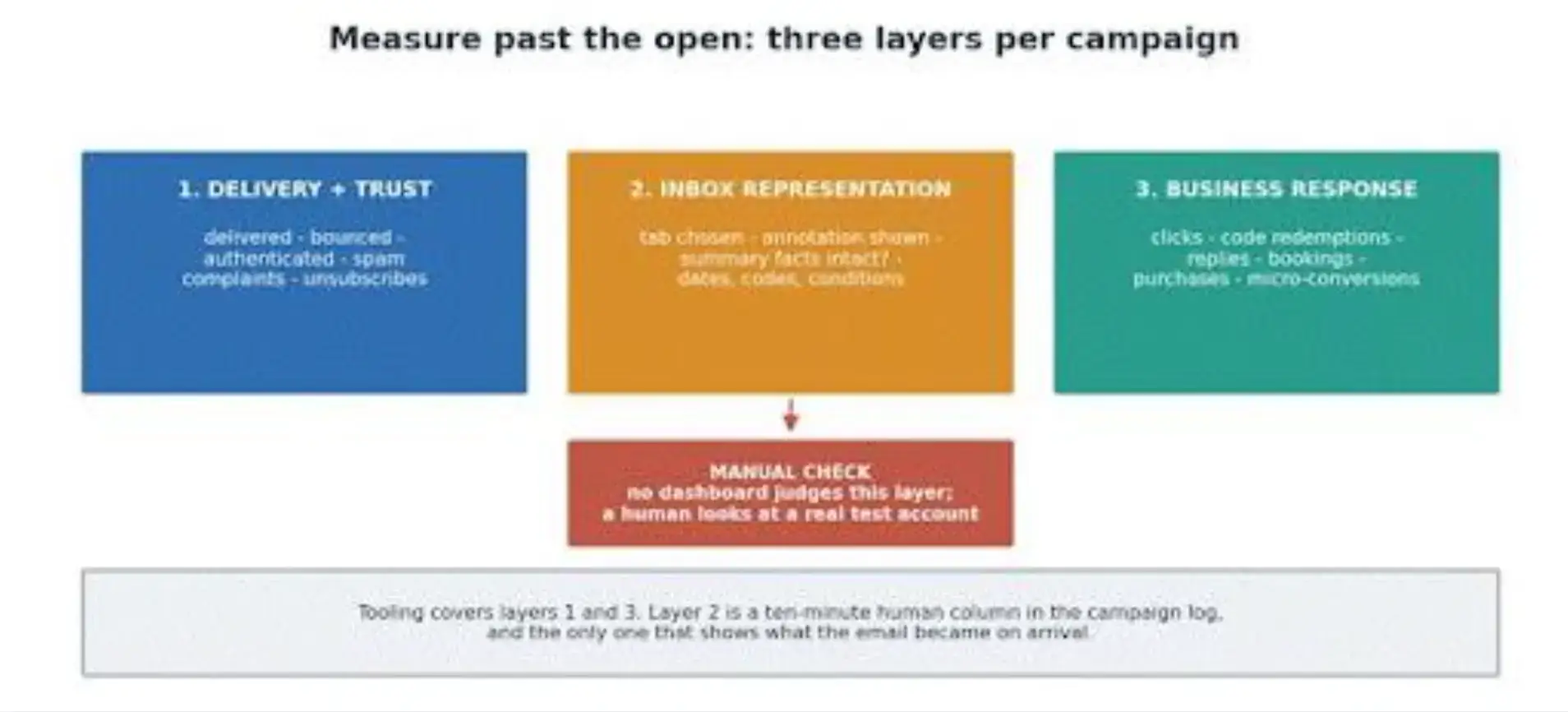
Three measurement layers for the AI-inbox era: delivery and trust, inbox representation, and business response, with the manual surface check flagged in the middle.
Should You Add Gmail Promotions Annotations?
For a genuine promotion, yes, if your sending setup supports markup, as long as you treat annotations as an optional display format rather than a guaranteed placement or an instruction to any AI.
The annotation fields cover the useful facts: description, discount code, availability start and end, product image, headline, price, destination. Filling them is mostly the same discipline this article has been preaching, expressed as structured data.
Two cautions keep it honest. Google's own documentation says display depends on quality filters and frequency limits, so the email body must remain self-sufficient with every material fact in text; an annotation that doesn't render should cost you nothing. And markup is not a control channel: it won't steer categorization or an AI summary, and it buys no place in any queue.
If you want to implement it, start with Google's markup getting-started guide rather than a JSON-LD tutorial someone reverse-engineered in 2019.
Write the Email So Nothing Important Needs Reconstructing
The pre-send card, then: know which surface can actually display this message. Offer, product, exact deadline with time zone, condition, and exclusion in live text. One labeled action.
A landing page that tells the same story. A test send to an eligible account, a manual look at what Gmail did with it, and a business outcome you'll check after.
None of it depends on guessing what Gemini wants, and all of it survives Google changing its mind next quarter, which it will.
Here's the standard worth adopting: a strong marketing email should survive being summarized, shown as a promotion card, searched for next month, or opened normally, and say the same thing in all four cases.
Build the test version in POWR Email Marketing, send it to your test account, and look at what the inbox made of it before your customers do.

Author Bio
Magnus Eriksen is a copywriter and ecommerce SEO specialist with a degree in Marketing and Brand Management. Before embarking on his copywriting career, he was a content writer for digital marketing agencies such as Synlighet AS and Omega Media, where he mastered on-page and technical SEO.