

She is, by every number you track, your best customer. Signed in, saved details, third order this quarter. Never a support ticket.
Since August 21, the checkout has been finishing one of her decisions for her. It remembers the card she used last time and preselects it before she reaches the payment step.
Most of the time that's exactly what she wanted. The rest of the time your best customer is pre-approved for the wrong card, because last time and this time weren't the same purchase.
A default is a helpful thing when it saves a step without hiding the choice, and that's the standard this article tests against. What follows is the scope of the change, why a default and a choice aren't the same thing, and a fifteen-minute test of whether your checkout keeps the choice visible, changeable, and confirmed. Where it passes, keep the default, which is the answer for most stores.
What Shopify Changed on August 21, 2026
Enterprise stores with saved payment methods
On August 21, 2026, Shopify's changelog announced that Checkout now remembers a signed-in customer's last-used payment method and preselects it on future purchases.
Those two setups cover fewer stores than the headline suggests. D2C saved payment methods are an Enterprise feature, including commerce components, and the Help Center's customer accounts page says the setting is off until the merchant turns it on under Settings > Customer accounts. Customers add, edit, and delete their own methods from their account.
B2B stores with vaulted cards
On the B2B side, the vaulted cards page says vaulting needs Shopify Payments and is done by the customer, at checkout or from their account. A card vaulted to a company location is available to every buyer with permissions for that location.
On an order with payment terms, the card is labelled "selected at checkout" and charged later, when the merchant confirms the order.
Every other store: Shop Pay still remembers
If your store is on neither, the August change doesn't reach it. Your returning customers still meet a remembered method, though, through Shop Pay.
The Shop Pay page describes it as saving a customer's email, payment method, and addresses across every Shopify store, with one-tap checkout once Sign in with Shop is on.
So the test below applies to any checkout that remembers how a customer paid, whichever flow produced the memory.
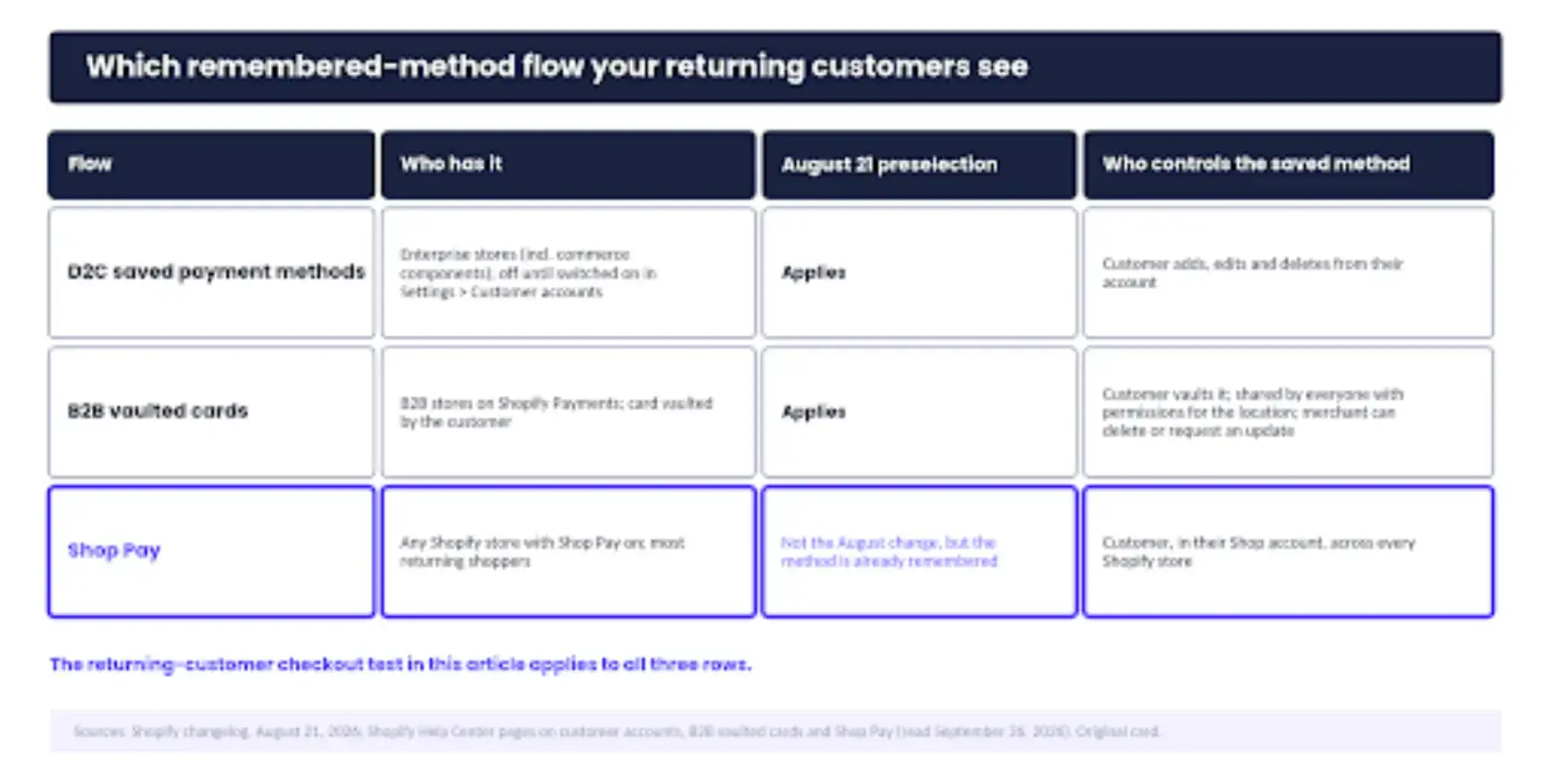
Which remembered-method flow your returning customers actually see. The August 21 preselection applies to the first two rows; the test in this article applies to all three.
Why a Default Isn’t the Same as a Choice
The standard: visible, changeable, confirmed
A default decides for the customer who doesn't look. A choice only exists for the customer who can see it.
In the same Nielsen Norman Group article, he adds the caution that matters here: consistently make the most expensive option the default and you lose credibility.
A checkout that keeps picking the card the customer used last time is one bad match away from the same loss. A remembered payment method is a helpful default in Nielsen's sense when it matches the purchase. When it doesn't, it's a decision the customer has to notice and undo.
That gives the standard three parts: the customer can see what will be charged before confirming, can change it without hunting, and can confirm afterwards what was charged, on the confirmation page and in the email. Visible, changeable, confirmed. A checkout that meets all three can preselect whatever it likes; the shortcut never becomes a trap.
Our guide to streamlining payments with a dedicated button says the same thing about one-click purchases from the other direction: the customer should know the shortcut is on.
Baymard's cart abandonment statistics put weight on both failure shapes. Among US shoppers who abandoned an order during checkout, 10% cited a declined card and 9% too few payment methods.
Neither figure says preselection causes abandonment, but together they say a preselected expired card, or an alternative the customer can't find, deserves ten minutes of your attention.
Three Returning Customers Who Aren’t Making the Same Purchase
The scenarios below are illustrative, written to show the shape of the problem rather than any store's data.
The personal card on a work order
The first customer bought a monitor for home in June on a personal card. In September, she's ordering two for the office, and the checkout has preselected the personal card. If the preselection is visible, she switches to the company card in a tap, and the receipt goes where it should. If it isn't, she pays anyway.
The receipt lands in her personal inbox, and on Monday your support team gets a refund-and-recharge request with an expense report attached.
The expired card
The second customer's card expired in August. The bank sent a replacement; the saved method didn't update. The checkout preselects the old card, and the payment fails. What happens next depends on the decline screen.
Offer the other saved method and a new-card option right there, and he's done in a minute. Send him back to re-enter everything, and he joins Baymard's 10%.
The instalment plan on a pay-in-full order
The third customer paid in four instalments last time, a gift in a tight month. This time it's a replacement she needs today, and she'd rather pay in full. The checkout remembers the instalment plan.
Whether she notices before confirming depends on how plainly the payment step names what's selected, and whether the card option is one tap away or three.
Two B2B variations: shared cards and payment terms
B2B adds two shapes of its own. A card vaulted to a shared location can be preselected for a colleague who has never seen it, since every buyer with permissions for that location can use it.
And on an order with payment terms, the card chosen on the day is charged weeks later, when the merchant confirms the order.
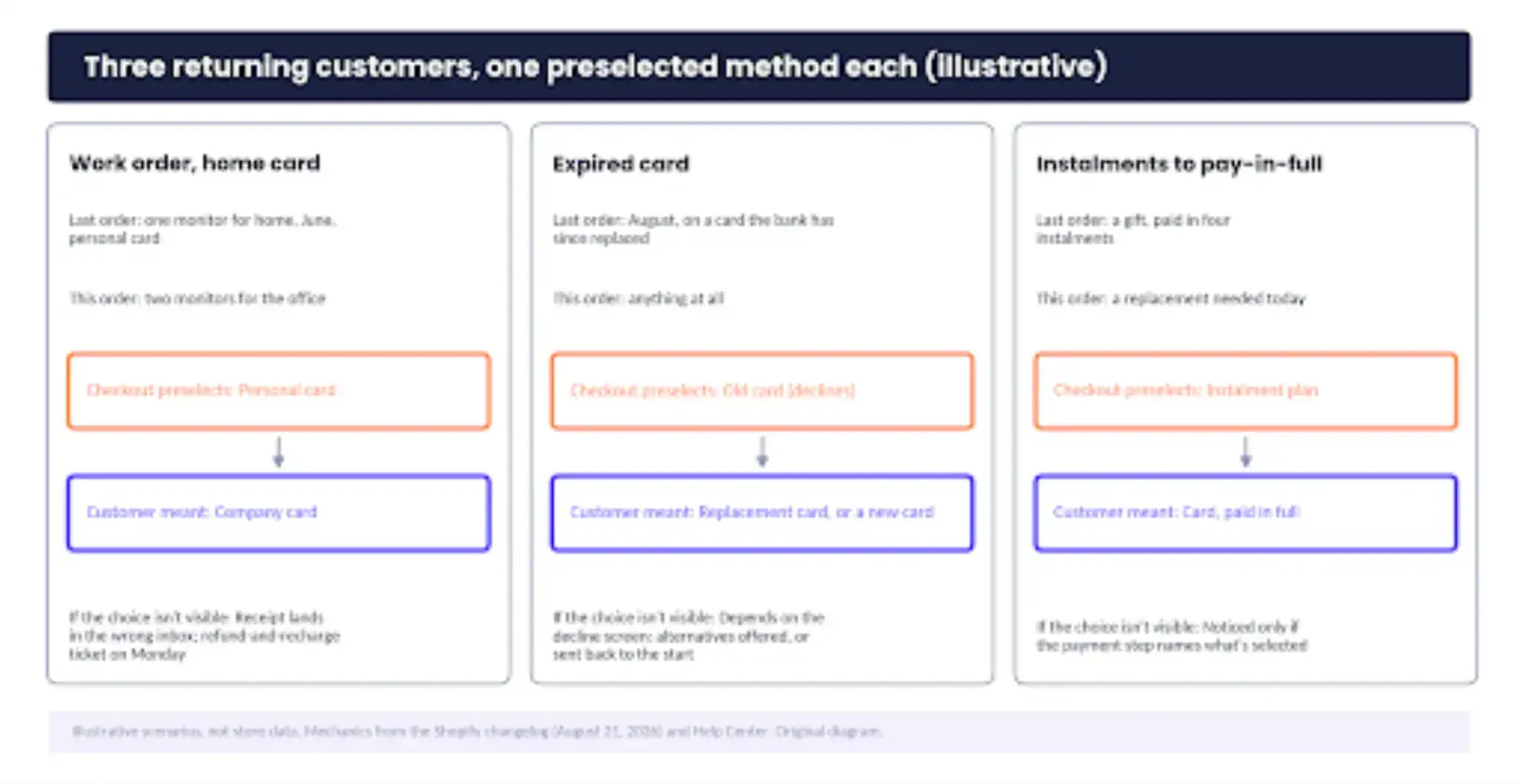
Three returning customers, three preselected methods that don't match this order. Illustrative.
How to Run the Returning-Customer Checkout Test
Set up the test account
Set up the account first. Create a customer with two saved payment methods, or use a Shop Pay account with two cards on it. If you sell B2B, add two buyers at one company location with a vaulted card.
Place the test orders on a phone. A preselection that's obvious on a monitor can sit below the fold on the screen most returning customers actually use.
Run the five checks
Check visibility: the preselected method should be named, marked as selected, and on screen without scrolling.
Check switching: count the taps to change the method, then change the shipping address, go back, and see whether the change held or the checkout quietly reselected the remembered method.
Check the confirmation: the confirmation page and the email should both name the method charged.
Check the decline path: make the preselected method a test card that fails, and record what the customer sees. The other saved methods and a new-card option should be offered on that screen, not after a trip back to the start.
For B2B, sign in as the second buyer at the shared location and note whose card is preselected. Then place an order with payment terms. Read the label on the card.
Record your results
Write the results in five rows, one per check, with a pass or a fail and one line on what you saw. The sheet below is what a mostly passing store looks like, and the fail is the row most stores find.
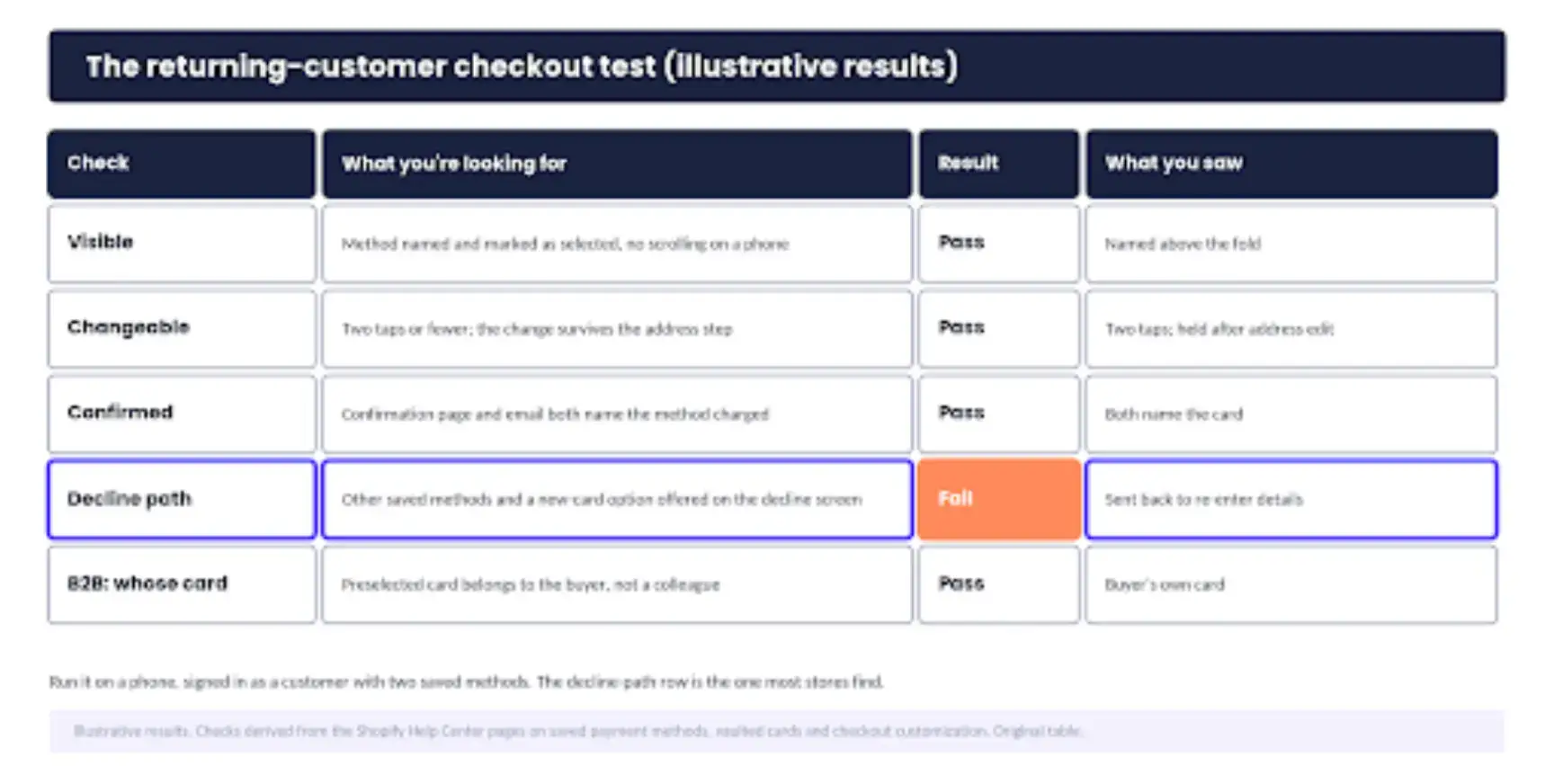
The test sheet with illustrative results. Copy the rows; replace the results with your own.
5 Signals the Default Is Costing You Orders
- Support tickets that mention the wrong card, or a receipt that went to the wrong inbox. The support queue is where the earliest signal shows up.
- Refund-and-recharge requests within a day of the order. The orders list shows them as a refund followed by a new order for the same items.
- Declines on saved cards rising against declines on newly entered cards. Your payments reporting should let you compare the two.
- Instalment cancellations from customers who paid by card before, or the reverse. Look for the payment method changing between one customer's orders.
- B2B locations asking which card was charged, or one card appearing on orders from several buyers. Both trace back to the location's vaulted cards and who has permissions on them.
Five minutes a month on those. The test only needs rerunning when one of them moves.
Should You Turn the Default Off?
Not on the strength of one bad ticket, and not at all if the test passed. Keep the remembered method where the choice is visible, easy to change, and clearly confirmed, and change something only when your own test or your own tickets show one of those three failing.
When the standard fails, Shopify gives you three levers, in order of how easily each is reversed. The first is payment customization.
Lever 1: Payment customization
Through a payment-customization app, the Help Center's checkout customization page says you can sort, reorder, hide, and rename payment methods, which is usually enough to make an alternative visible without removing the default.
The limit is plan-based. In the US and Canada, customizing the credit-card fields themselves needs Shopify Plus.
Lever 2: B2B card management
The second lever is B2B card management. From a company location, you can delete a vaulted card or email the customer asking them to update it, which fixes the colleague's-card and expired-card shapes without changing anything about checkout.
Lever 3: The saved-payment-methods toggle
The third is the saved-payment-methods toggle itself, on Enterprise stores. It's the bluntest lever and the last to reach for. It removes the shortcut for every customer to fix a problem a few of them have.
The same Help Center page notes that Shopify's checkout shows no preselected payment method to customers in Finland, to comply with regulations there, so a checkout without a default is a configuration Shopify already supports.
That cuts both ways. Neither keeping the default nor removing it is a radical position, and the evidence from your own checkout should decide between them.
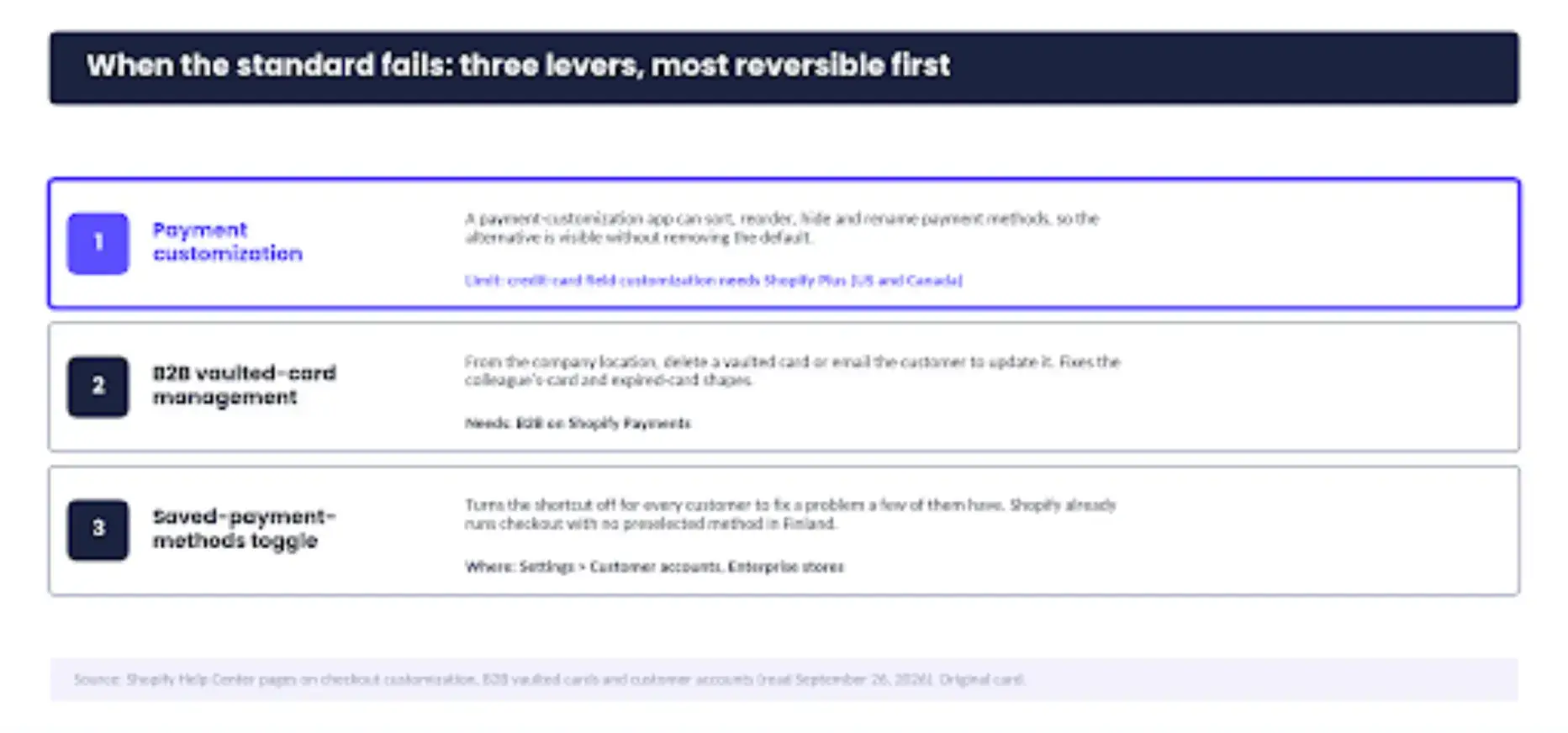
The three levers, most reversible first.
Let the Default Save Time, Not Make Decisions
A remembered payment method should save your best customer a step. It should never make the decision for her, and a checkout passes when the choice stays visible, changeable, and confirmed at the moment she pays.
Rerun the test after any change to checkout or payments; the setting that passed in September can fail after an app install in November.
Then ask her. The test tells you what the checkout does; only she can tell you whether it chose right, which is why our cart-abandonment guide keeps surveys next to funnel analysis and heatmaps.
One question after purchase, whether the right payment method was selected, asked with POWR Survey for Shopify on the thank-you page or in the follow-up email, gives you a month of answers to set beside the test sheet.
If the answers and the sheet agree, keep the default and stop worrying about it. If they don't, the customers have found the row you missed.
Your best customer earned the shortcut. She didn't sign away the choice.