


Open the days-of-inventory-remaining report for your best seller this week, and it may look like someone restocked it over the weekend. Nobody did. The units on the shelf are the same units that were there in August, and the delivery you're waiting on is still in transit.
What changed on September 1 is the quantity that Shopify's inventory reports count. They used to measure available quantity, which is the stock you can sell. They now measure on-hand quantity, which is everything physically in the building, including units already promised to open orders and units you've set aside as unsellable. A phantom restock is a cheaper problem than a real stockout, but it can still write a purchase order if nobody questions it.
The rest of this piece follows one hoodie SKU across that line, ending in a three-number check you can run on any variant and a rule for which number belongs in which decision. The same habit that keeps a conversion rate from being read as a grade applies here: ask what the number is measuring before you act on it.
What Changed in Shopify's Inventory Reports on September 1?
Shopify's inventory analytics models now measure stock by on-hand quantity instead of available quantity. The change took effect on September 1, 2026, and Shopify announced it in an August 14 changelog post.
On-hand quantity includes every unit physically at a location, including units committed to open orders and units currently marked unavailable. Available quantity includes only the units that can be sold.
ShopifyQL queries that read FROM inventory or FROM inventory_by_location return on-hand figures for the same dates.
Historical data did not change. Reporting dated before September 1 still shows available quantity, so past numbers and trends stay as they were, and only September 1 and later use on-hand.
The stock counts on your Inventory page did not change either. No units were added or removed. The reports began reading a different column.
Why Does One SKU Show Two Different Numbers?
Take one variant and give it made-up numbers, because the arithmetic is the point and no merchant's real figures are needed to show it.
Call it a black hoodie in medium. On the Inventory page, it shows 40 on hand, 28 available, 9 committed, 3 unavailable, and 24 incoming.
All five of those figures are true at the same time, and Shopify's inventory states page defines how they fit together.
On hand is the total physically at the location, and Shopify defines it as the sum of committed, unavailable, and available. For the hoodie, that's 9 plus 3 plus 28, which is 40.
Committed covers units set aside that can't be sold: items in unfulfilled orders, units reserved for draft orders, and stock in a transfer marked ready to ship. Nine hoodies belong to customers who have paid and are waiting for a box.
Unavailable covers units held back by an app or by you, for reasons such as damage, quality control, or safety stock. Three hoodies came back with a snagged cuff and are sitting on the returns shelf. Available is what remains once those two are subtracted, and it's the only one of the three a shopper can buy right now.
Incoming is the fifth state, and it belongs in neither total. The 24 hoodies on the purchase order aren't on hand because they aren't in the building, and they aren't available because nobody can sell what hasn't arrived. When the carton is received, Shopify moves those units to available, and on hand rises by the same 24.
Now run the same hoodie through the reports. In August, the sell-through and days-remaining reports read the available column, so the hoodie's ending quantity was 28. In September, the same reports read on hand, so it's 40.
Nothing shipped in, and nothing was counted twice. The report stopped subtracting the 12 units that are in the building but spoken for, and that's the whole jump.
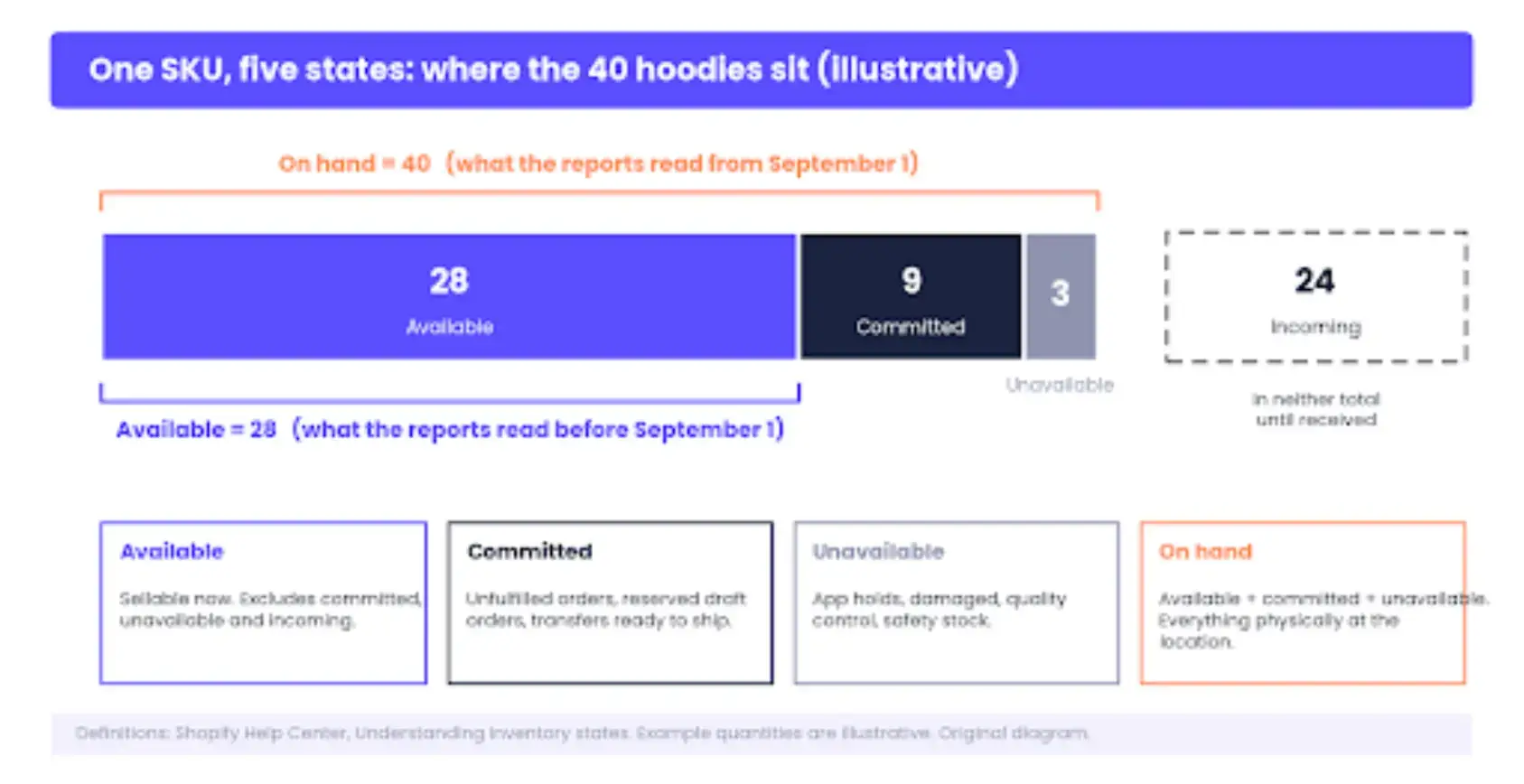
Where every unit of the example hoodie sits. On hand is the sum of available, committed, and unavailable; incoming is counted in neither figure until it is received. The numbers are illustrative.
Which Reports Moved to On Hand?
The changelog lists eight reports as reading on-hand quantity from September 1. The four a small store leans on most are products by sell-through rate, products by days of inventory remaining, inventory adjustment changes, and ABC product analysis.
Shopify's inventory reports documentation shows what each one does with the quantity, and the definitions explain the jump differently for each.
Days of inventory remaining divides ending quantity by average daily sales over the last 28 days, so the same divisor into a bigger numerator gives more days. Inventory adjustment changes records move between states rather than a single balance.
A new order for three units shows as available minus three and committed plus three, which makes it the clearest place in the admin to watch committed stock accumulate.
The month-end inventory snapshot and month-end inventory value are the awkward pair. The changelog names both among the reports that now use on hand.
As of mid-September, the Help Center definition for each still describes ending quantity as the available figure, excluding committed and incoming. Rather than guess which page wins, test it.
Open the snapshot for August 31 and for September 30 once it is published, pick one variant with a known committed backlog, and compare the ending quantity with the on hand and available columns on the Inventory page.
Whichever column it matches is the one the report is reading. The sell-through report also runs two to three days behind, so the boundary shows up in it late.
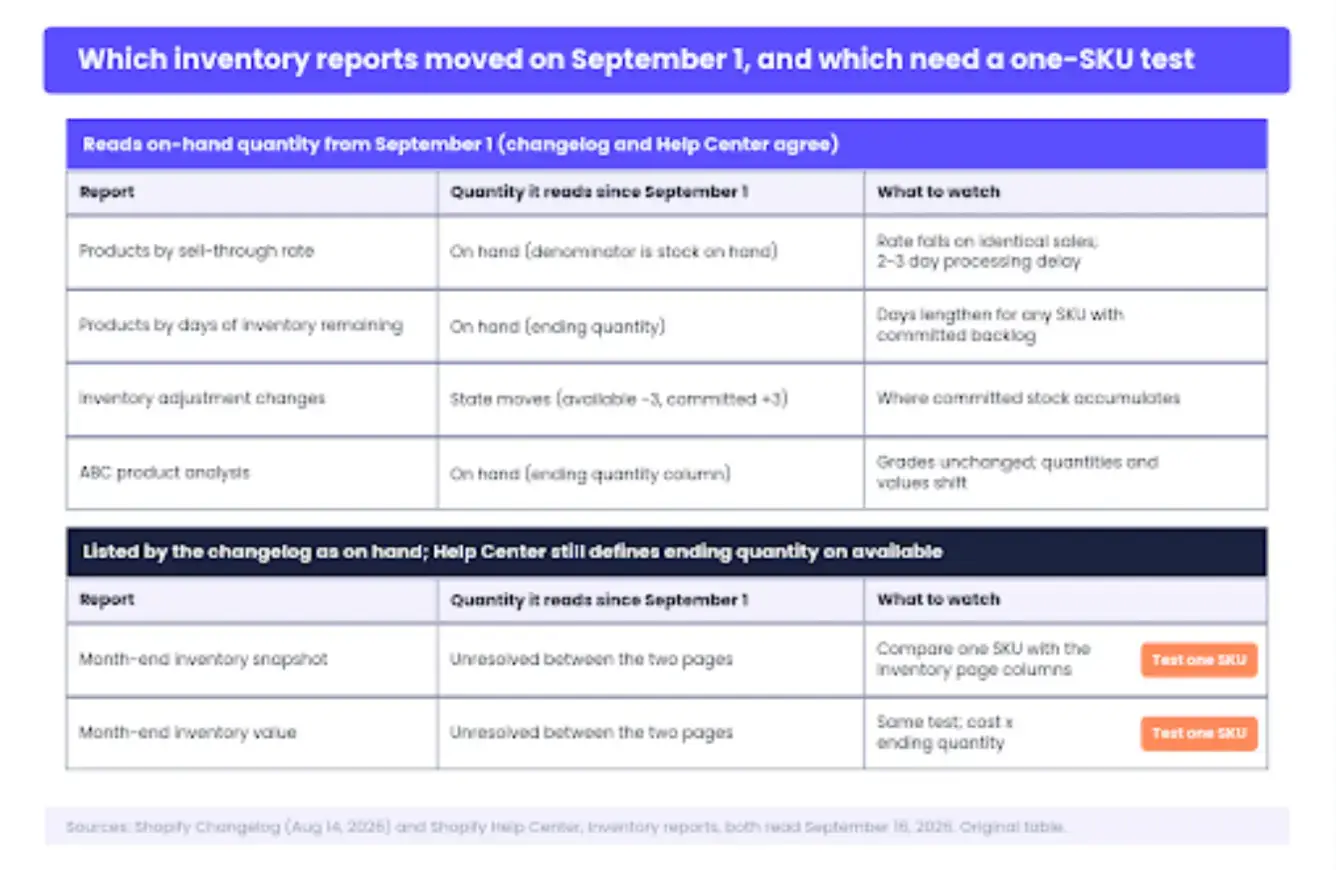
Which reports moved. The four core reports read on hand from September 1; the two month-end reports are listed in the changelog but still documented as available, so they get a one-SKU test rather than an assumption.
Use On Hand to Reorder, Available to Promise
Each inventory decision asks a different question, and each question has a column.
Reorder from on hand plus incoming. The question is how many units you'll hold once everything ordered has arrived. The answer has to include the committed units, because they'll leave the building without a new sale, and the unavailable units, because they might return to stock or might be written off. Cash tied up in stock is an on-hand number as well, and counting only available understates what you already own.
Promise from available. The product page, the cart, and the marketplace feed should all read the available quantity, because that's the number of units a shopper can receive. Customer-facing surfaces, including the agentic ones, read your available quantity, which is why the promise column and the reorder column can't be the same number. Overselling and over-ordering are the two failures inventory tooling exists to prevent, and each one comes from reading the wrong column.
Plan with the boundary marked. Sell-through and days remaining are planning signals, and since September 1, they answer "how long will what I hold last" rather than "how long can I keep selling." Both readings are useful. Only one of them is the reading you had in August.
Then look at the two leaks that pull the columns apart. Committed units that never fulfil are the first. Unfulfilled and abandoned-then-completed orders sit in committed until someone ships or cancels them, which is the same order backlog that drives recovery work, and a forgotten draft order with reserved stock holds units indefinitely. Unavailable buckets that never clear are the second.
Shopify's adjusting inventory guidance lets you move units between available and unavailable with a reason such as damaged, quality control, safety stock, or other, and an app can do the same on your behalf.
A safety-stock hold that was set once and never revisited is inventory you're paying to keep without selling. I'd check the app-driven buckets first, because nobody on the team remembers setting them.
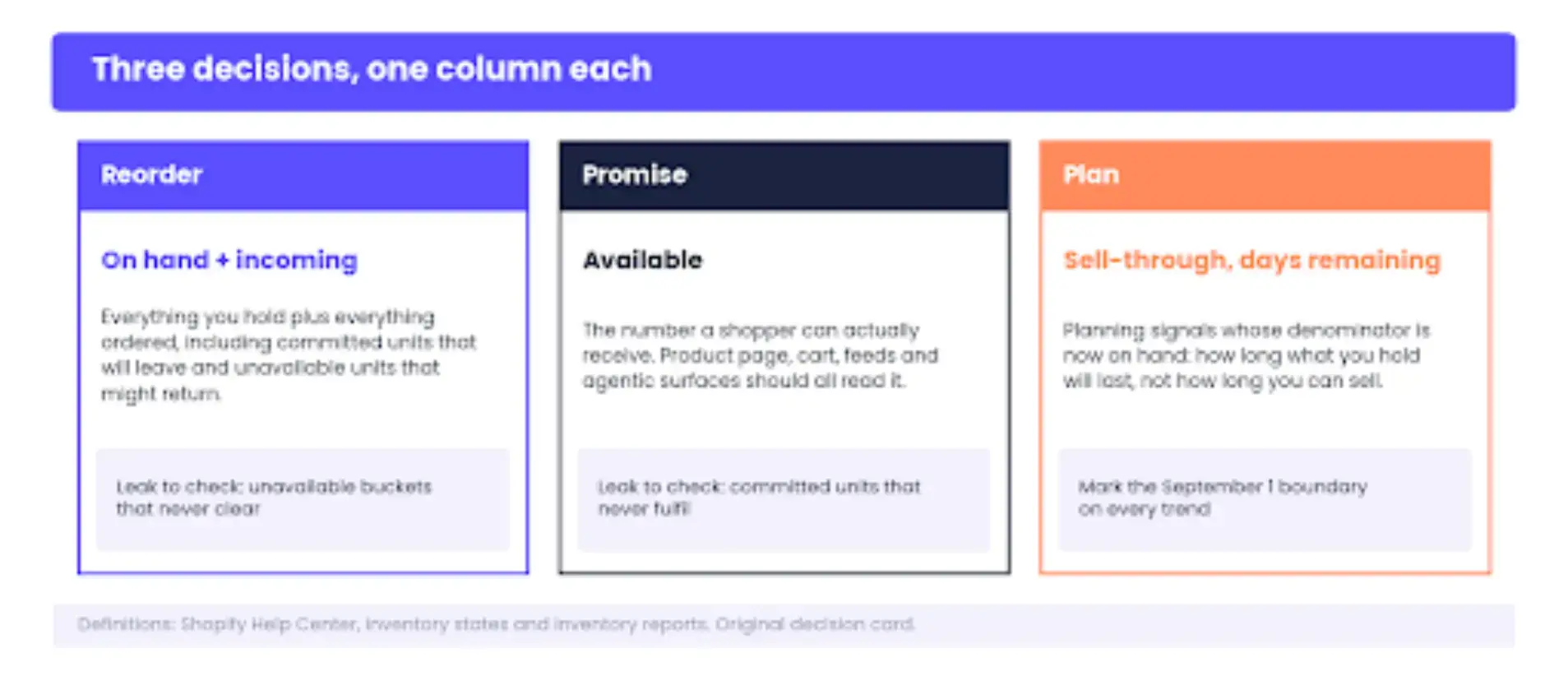
The decision card: reorder from on hand plus incoming, promise from available, plan from sell-through and days remaining with the September 1 boundary marked.
How Do You Read a Trend That Crosses September 1?
A line chart of ending quantity from July to October is now two series wearing one label. Before the boundary, it's available, and after the boundary, it's on hand.
The step up on September 1 is the committed and unavailable backlog becoming visible, and for a store with a pre-order queue, it can be larger than a month's sales.
Is this the same number you compared last month? For any inventory report dated across the boundary, no, and the chart won't say so on its own.
Three moves keep the splice from driving a purchase order.
First, rebuild a comparable figure. On hand minus committed minus unavailable equals available, so subtract those two from the September figure to get the number the August series was tracking, or read available straight off the Inventory page and set it beside the old series.
Second, start a new baseline dated September 1 and label it on the dashboard, because in six months nobody will remember why the line jumped.
Third, expect days of inventory remaining to lengthen for any SKU with a committed backlog, which is the question landing in most merchants' inboxes this month.
The number looks longer than it did in August because the ending quantity now includes the units already spoken for, and the same daily sales rate divides into a larger numerator.
The hoodie went from 28 to 40 against two sales a day, which is 14 days of cover in August and 20 in September, with the same nine customers still waiting.
The old series showed what you could sell and hid what you were holding, and the new one does the reverse. Neither line is lying, and a merchant who knows which is which loses nothing in the swap.
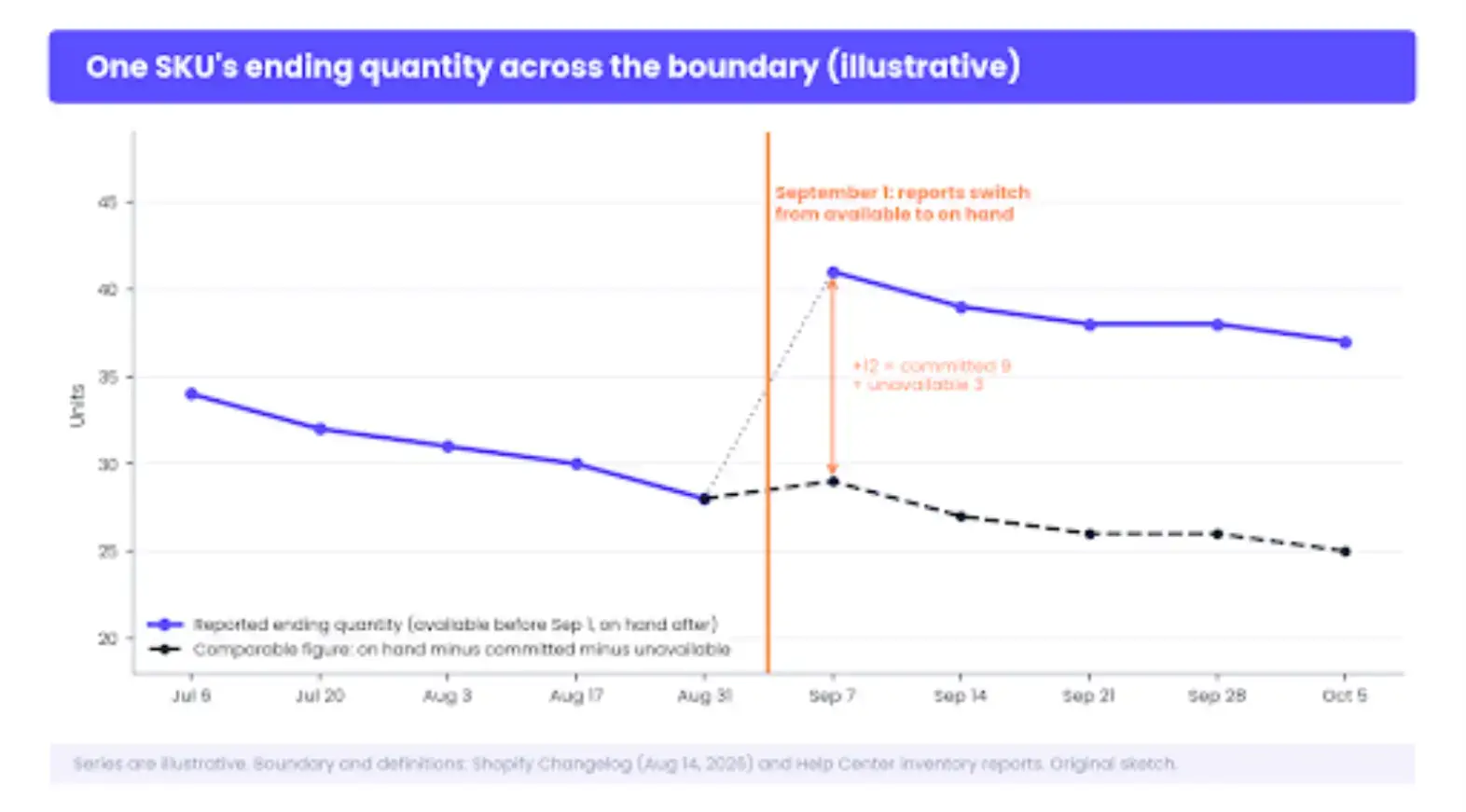
One SKU's ending quantity across the boundary. The August series is available, the September series is on hand, and the dashed line is the comparable figure rebuilt by subtracting committed and unavailable. The values are illustrative.
Run the Three-Number Check on Your Best Sellers
The check takes about ten minutes for the variants that matter, and it survives the next reporting change, whatever that turns out to be.
- Pick the A-grade SKUs from the ABC product analysis report. Those are the variants producing 80% of revenue over the last 28 days, and they're the ones where a misread costs real money.
- Open each one on the Inventory page and write down all five figures: on hand, committed, unavailable, available, and incoming.
- Open the sell-through or days-remaining report for the same variant and confirm which figure it's using. Since September 1, the ending quantity should match on hand.
- Reconcile. On hand minus committed minus unavailable should equal available. If it doesn't, something is holding units, and it's almost always an app-driven unavailable bucket or a stale draft order with reserved stock.
- Write the reorder decision from on hand plus incoming, and the customer promise from available. Put both numbers in the purchase order notes with the column each came from.
The cost of skipping the check shows up in benchmarks that have nothing to do with Shopify's reports. Netstock's 2026 supply chain planning benchmark, drawn from more than 2,500 customers, puts top-quartile SMBs at 25% relative overstocking with lost sales at 2.7% of inventory value, while the bottom quartile carries 49% overstocking and loses 15% to understocking.
Reading on hand as available pushes a store toward the first failure, and reading available as on hand pushes it toward the second.
On the customer side, DHL Supply Chain and Retail Economics found that 44% of UK shoppers switched or added a store in the past year over stock availability, and 59% said availability is a key reason they shop across multiple stores. The study covers UK grocery, but the direction of the loyalty effect doesn't need translating.
Trust the Number You Can Explain
On hand is what you hold. Available is what you can promise. A report is only as trustworthy as your ability to say which of the two it's showing, and after September 1, that sentence is worth saying out loud every time a reorder is drafted from a chart.
He was talking about supermarket shelves and said the point holds from fashion to beauty. For a Shopify store, the shelf is the available quantity, and it's the number your shoppers are reading, whether you've reconciled it or not.
Once available is the figure customers see; connect it to what they're told. When a variant's available quantity reaches zero, the demand keeps arriving and stops being recorded.
Build a restock-notification form with POWR Form Builder for Shopify so the demand that arrives while available sits at zero is captured instead of lost, and you'll have a list of waiting buyers next to the incoming count when the carton arrives. That's a better reorder signal than any report.
The shelf didn't change on September 1. The question did.