

A chat widget is a small, interactive messaging box that appears on a website, allowing visitors to communicate with a business instantly.
Whether customers need help choosing a product, tracking an order, booking a service, or getting answers to common questions, a chat widget provides a fast and convenient way to connect without leaving the page.
Modern chat widgets have evolved far beyond simple live messaging. Today, they can be powered by live agents, AI chatbots, or a combination of both, enabling businesses to provide 24/7 customer support, qualify leads, schedule appointments, collect customer information, and deliver personalized assistance in real time.
Many chat widgets also integrate with CRM systems, help desks, and marketing tools, creating a seamless customer experience while helping businesses improve response times and increase conversions.
In this guide, you'll learn what a chat widget is, how it works, its key features and benefits, the different types available, and best practices for choosing the right chat widget for your website.
What is a Chat Widget?
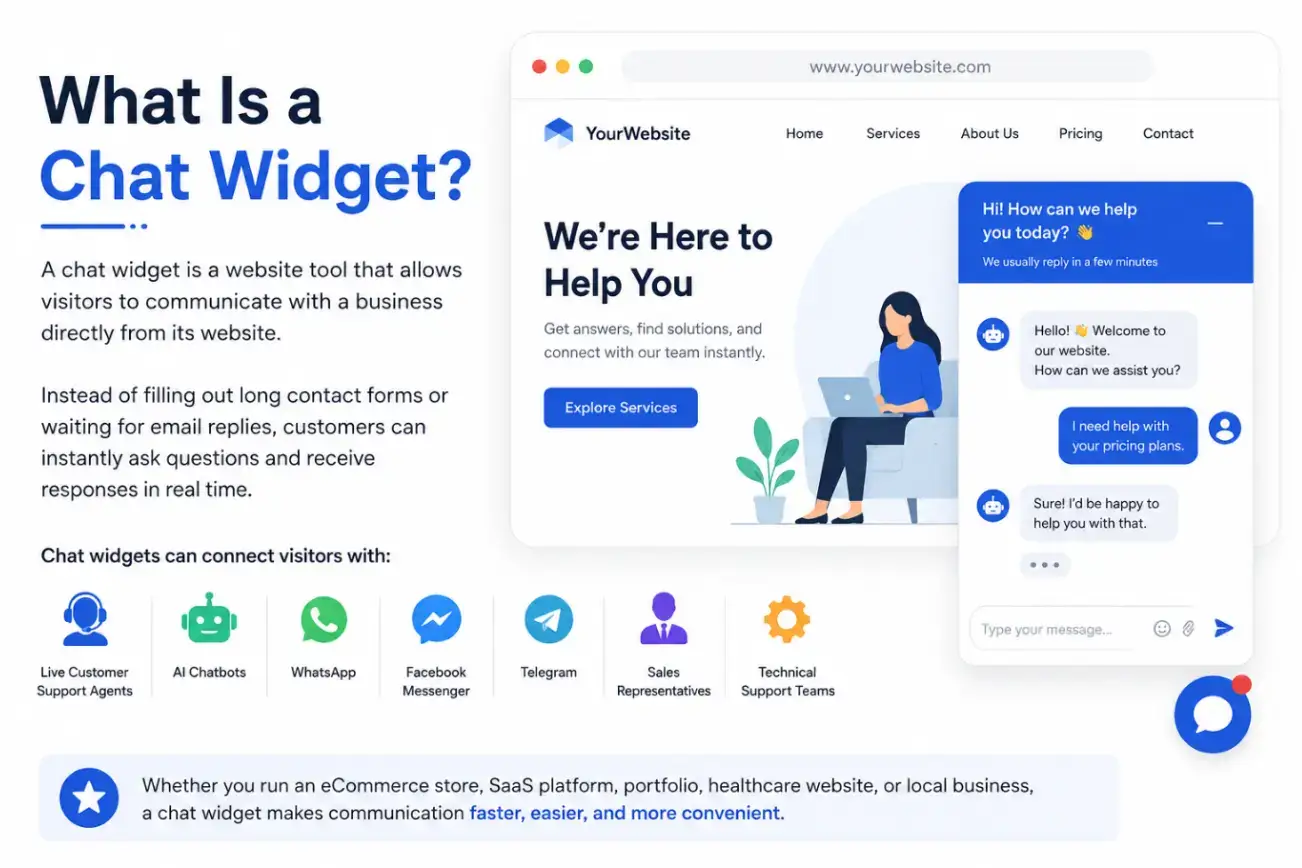
Have you ever visited a website and noticed a small chat bubble in the bottom corner asking, "Hi! How can we help you today?"
That little messaging box is called a chat widget.
A chat widget is a website tool that allows visitors to communicate with a business directly on the business's website.
Instead of filling out long contact forms or waiting for email replies, customers can instantly ask questions and receive responses in real time.
Modern chat widgets can connect visitors with:
- Live customer support agents
- AI chatbots
- Messaging apps like WhatsApp, Facebook Messenger, and Telegram
- Sales representatives
- Technical support teams
Whether you run an eCommerce store, SaaS platform, portfolio, healthcare website, or local business, a chat widget makes communication faster, easier, and more convenient.
Zendesk's 2025 Customer Experience Trends Report found that businesses are increasingly adopting AI copilots to automate routine support, allowing agents to focus on higher-value customer interactions. The report also notes that consumers prefer AI experiences that feel more human and personalized.
Why Chat Widgets Have Become Essential
Customer expectations have changed dramatically.
People no longer want to wait hours, or even days, for a reply. They expect instant support whenever they visit a website.
A chat widget bridges this gap by providing immediate assistance exactly when customers need it.
Businesses that respond quickly often experience:
- Higher customer satisfaction
- Increased trust
- Better lead generation
- More completed purchases
- Lower support costs
Instead of searching through FAQs or sending emails, visitors start a conversation.
How Does a Chat Widget Work?
Although chat widgets look simple, they perform several tasks behind the scenes.
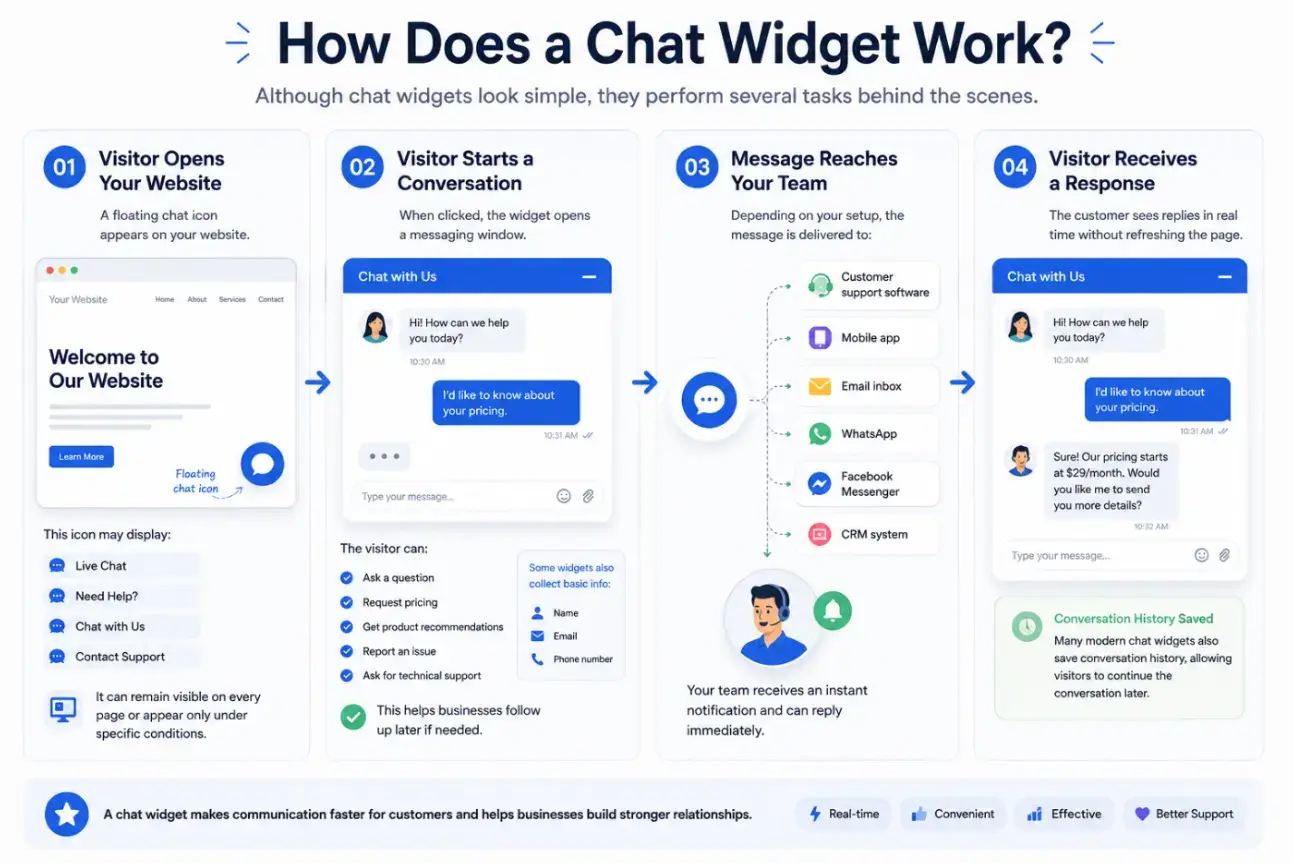
Step 1: Visitor Opens Your Website
A floating chat icon appears on your website.
This icon may display:
- Live Chat
- Need Help?
- Chat with Us
- Contact Support
It can remain visible on every page or appear only under specific conditions.
Step 2: Visitor Starts a Conversation
When clicked, the widget opens a messaging window.
The visitor can:
- Ask a question
- Request pricing
- Get product recommendations
- Report an issue
- Ask for technical support
Some widgets also collect basic information like:
- Name
- Phone number
This helps businesses follow up later if needed.
Step 3: Message Reaches Your Team
Depending on your setup, the message is delivered to:
- Customer support software
- Mobile app
- Email inbox
- Facebook Messenger
- CRM system
Your team receives an instant notification and can reply immediately.
Step 4: Visitor Receives a Response
The customer sees replies in real time without refreshing the page.
Many modern chat widgets also save conversation history, allowing visitors to continue the conversation later.
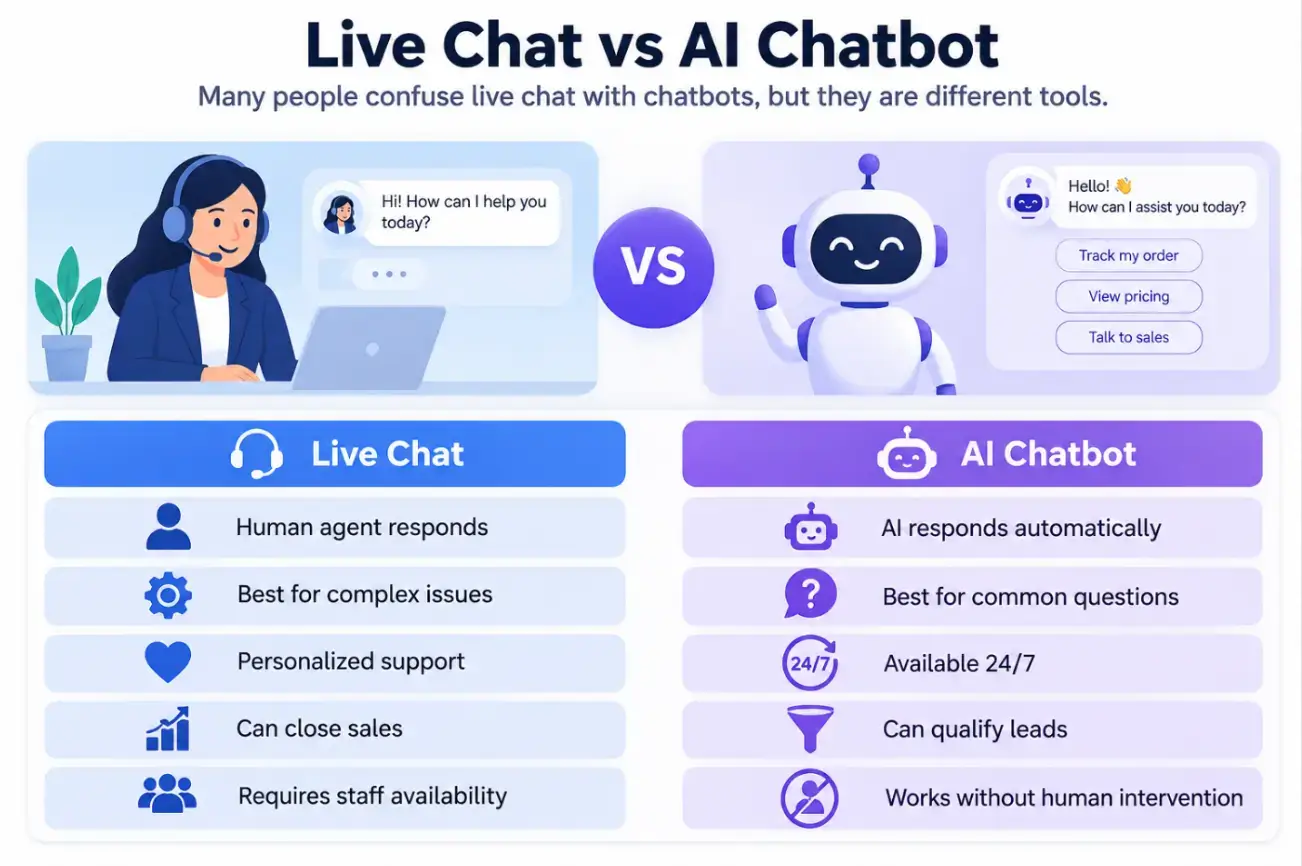
Live Chat vs AI Chatbot
Many people confuse live chat with chatbots, but they are different tools.
Best Practice for using AI Chatbot and Chat widget
Many businesses combine both:
- AI chatbot answers common questions.
- Human agents handle complex conversations.
This hybrid approach delivers fast responses while maintaining a personal touch.
Benefits of Adding a Chat Widget to Your Website
1. Instant Customer Support
- Customers no longer have to wait for email replies.
- Quick responses improve satisfaction and reduce frustration.
2. Higher Conversion Rates
- Visitors often abandon websites because they have unanswered questions.
- A chat widget helps remove buying hesitation by answering questions immediately.
Examples include:
- Shipping costs
- Product availability
- Payment methods
- Return policy
- Pricing
When doubts disappear, customers are more likely to purchase.
Ready to connect with your website visitors instantly?
3. Generate More Leads
Even if visitors don't buy immediately, chat widgets can collect:
- Email addresses
- Phone numbers
- Company names
- Project requirements
These leads can later be nurtured through email marketing or sales outreach.
4. Reduce Support Costs
AI-powered chat widgets can automatically answer frequently asked questions such as:
- Business hours
- Shipping information
- Refund policy
- Account setup
- Password reset
This allows support agents to focus on more complex customer issues.
5. Improve Customer Experience
Customers appreciate immediate assistance. Instead of navigating multiple pages, they can simply ask:
"Do you have this product in blue?"
The answer arrives within seconds.
6. Increase Customer Trust
A visible chat widget reassures visitors that real help is available if needed.
This is especially valuable for:
- New businesses
- Online stores
- Service providers
- SaaS companies
7. Support Customers 24/7
Even when your team is offline, AI chatbots can:
- Welcome visitors
- Answer FAQs
- Collect contact details
- Schedule appointments
- Create support tickets
Customers receive assistance at any time of day.
Essential Features of a Modern Chat Widget
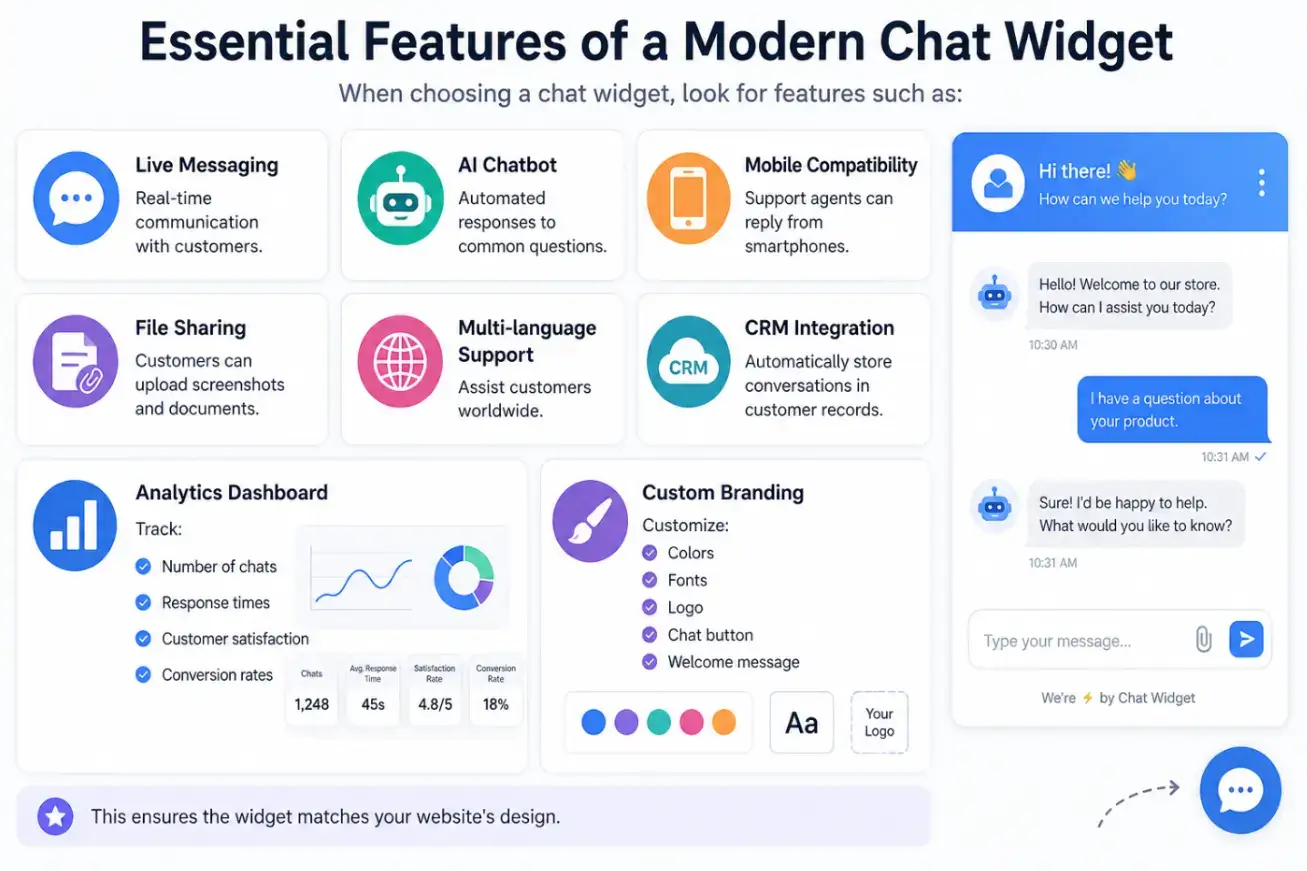
When choosing a chat widget, look for features such as:
Live Messaging
Real-time communication with customers.
AI Chatbot
Automated responses to common questions.
Mobile Compatibility
Support agents can reply from smartphones.
File Sharing
Customers can upload screenshots and documents.
Multi-language Support
Assist customers worldwide.
CRM Integration
Automatically store conversations in customer records.
Analytics Dashboard
Track:
- Number of chats
- Response times
- Customer satisfaction
- Conversion rates
Custom Branding
Customize:
- Colors
- Fonts
- Logo
- Chat button
- Welcome message
This ensures the widget matches your website's design.
Industries That Benefit from Chat Widgets
Almost every industry can benefit from a chat widget, including:
eCommerce Stores
Help customers choose products, answer shipping questions, and recover abandoned carts.
SaaS Companies
Guide users through onboarding, pricing, and technical support.
Healthcare
Allow patients to book appointments and ask general questions.
Education
Assist students with admissions, courses, and enrollment.
Real Estate
Capture buyer inquiries and schedule property visits.
Agencies
Collect project requirements and qualify leads instantly.
Tips for Using a Chat Widget Effectively
To maximize results:
- Respond quickly during business hours.
- Use automated greetings without being intrusive.
- Keep welcome messages short and friendly.
- Offer human support when AI cannot resolve an issue.
- Monitor chat analytics to improve service.
- Avoid showing the chat window immediately on page load.
- Customize the widget to match your brand identity.
Common Mistakes to Avoid
Many businesses install a chat widget but fail to use it effectively.
Avoid these mistakes:
- Ignoring incoming messages
- Using generic automated replies
- Asking for too much information before chatting
- Making the chat window difficult to close
- Failing to optimize for mobile devices
- Not training AI with accurate business information
How to Choose the Right Chat Widget
Before selecting a solution, consider:
- Ease of installation
- AI capabilities
- Live chat support
- Integrations (CRM, email, messaging apps)
- Mobile support
- Customization options
- Pricing
- Analytics and reporting
- Security and privacy features
The best chat widget should enhance, not complicate, the customer experience.
Future of Chat Widgets
Chat widgets are evolving rapidly.
Modern solutions now offer:
- AI-powered conversations
- Voice support
- Personalized recommendations
- Multilingual assistance
- Smart lead qualification
- CRM automation
- Predictive customer support
As AI continues to improve, chat widgets will become even more proactive, helping businesses engage visitors before they ask for help.
Final Thoughts
A chat widget is far more than a simple messaging box; it’s a powerful customer engagement tool that helps businesses provide faster support, generate more leads, improve conversions, and build stronger relationships with visitors.
Whether you're running a small business, an online store, or a growing SaaS company, adding a chat widget can transform how customers interact with your website.
By combining live support with AI automation, businesses can deliver quick, personalized assistance while reducing support workload and improving overall user satisfaction.
If your goal is to create a more responsive, customer-friendly website, implementing a modern chat widget is one of the smartest investments you can make.
FAQs
1. What is a chat widget used for?
A chat widget is used to enable real-time communication between website visitors and businesses. It helps answer customer questions, provide product recommendations, resolve support issues, collect leads, and improve the overall user experience without requiring visitors to leave the website.
2. What's the difference between a chat widget and a chatbot?
A chat widget is the interface that appears on a website for messaging, while a chatbot is an automated program that operates within the widget. A chat widget can connect visitors to live agents, AI chatbots, or both, depending on how it's configured.
3. Can a chat widget help generate leads?
Yes. Modern chat widgets can capture visitor information such as names, email addresses, phone numbers, and customer inquiries. They can also qualify leads, schedule meetings, recommend products, and integrate with CRM systems, making them an effective lead generation tool.
4. Is a chat widget suitable for small businesses?
Absolutely. Chat widgets are beneficial for businesses of all sizes, including startups and small businesses. They provide instant customer support, improve engagement, reduce response times, and help convert more website visitors into customers without requiring a large support team.

Author Bio
Anisha is a Digital Marketing enthusiast who loves creating content and exploring SEO trends. She also writes about sales, marketing, and CX.