
An AI website builder can get a polished-looking site online in under thirty minutes. No code, no agency, no waiting. That convenience is real — and for some businesses, it's genuinely enough.
But there's a costly confusion baked into the pitch: the speed at which you build a website has absolutely nothing to do with how fast that website actually loads, how well it converts, or whether it can grow with you.
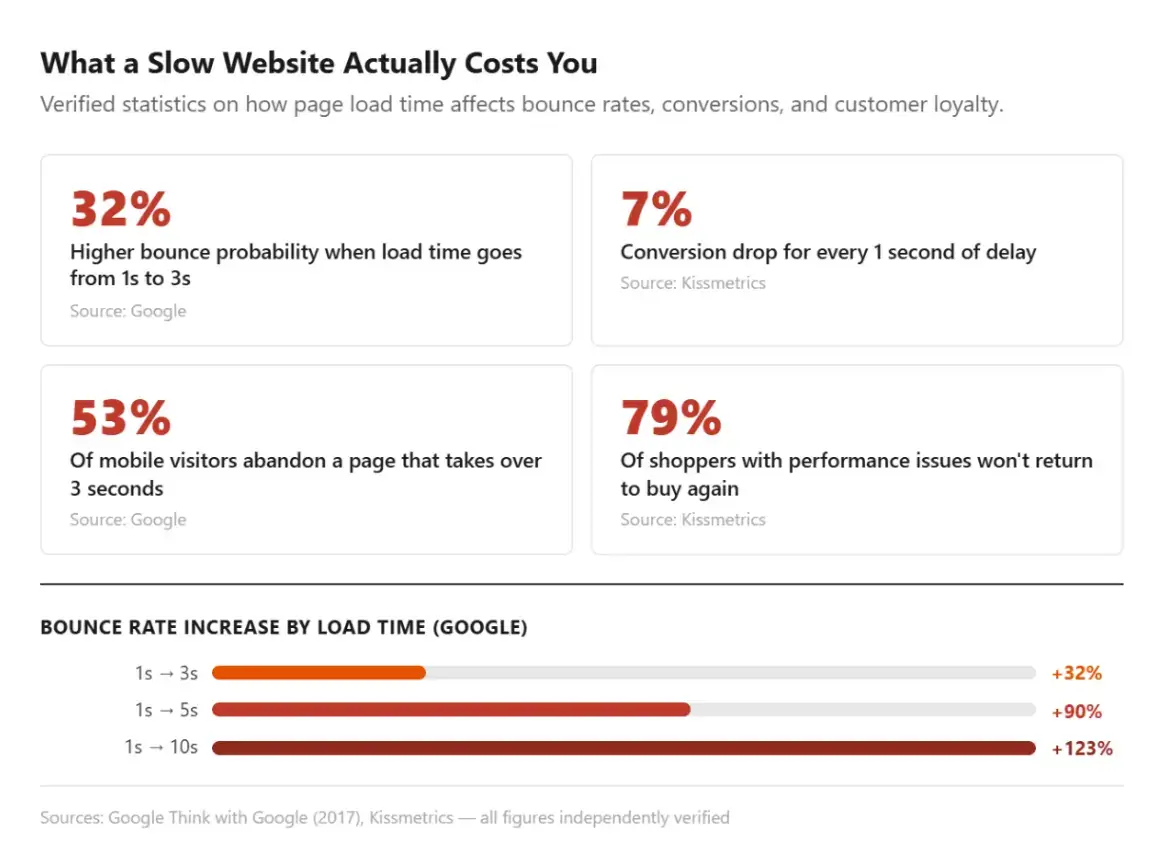
AI-generated websites that took twenty minutes to create can quietly bleed customers every single day. According to Google, the probability of a visitor bouncing rises 32% as load time goes from one to three seconds.
Conversions fall roughly 7% for every additional second of delay. The build is the cheap part. Performance is where revenue is won or lost.
In this article:
- Where AI-Generated Websites and Template Websites Fall Short
- Signs Your Website Is Working Against Your Business
- What Actually Makes a Website Perform Well
- How to Diagnose Website Problems Before Redesigning
- The Website Redesign Process AI Builders Skip
- Website Redesign Checklist Before Relaunch
- When an AI Website Builder Is Actually the Right Choice
Why Website Speed Is a Revenue Problem, Not a Technical Problem
The Hidden Cost of Slow Websites
Portent's analysis of millions of pageviews found that B2B sites loading in one second convert at three times the rate of sites that take five seconds.
On mobile, more than half of users abandon a page that takes longer than three seconds. And 79% of shoppers who hit performance problems say they won't return to buy again.
In plain terms: a slow website doesn't just frustrate visitors — it sends them straight to a competitor.
Core Web Vitals and Why They Matter
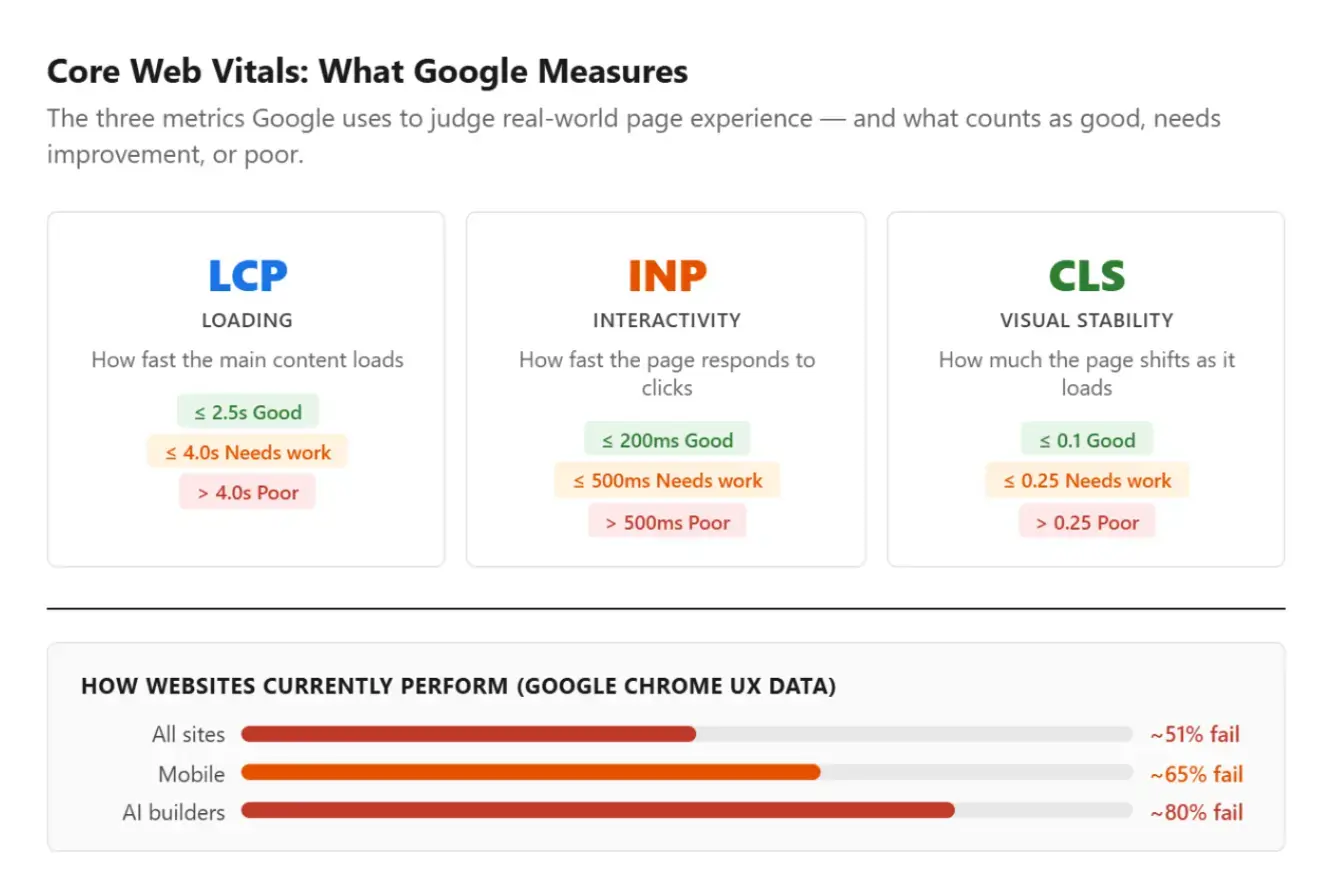
Google's Chrome UX data shows roughly half of all websites fail Core Web Vitals — the set of speed and usability benchmarks Google uses to measure real-world experience. Mobile pass rates are lower still.
If your site is in the slow half, you're paying for it in lost enquiries and sales, whether or not it shows up clearly in your analytics.
His research established that even a one-second delay disrupts a user's sense of seamless navigation — a principle that has only grown more relevant as mobile traffic has increased.
How Website Performance Impacts Revenue
These numbers aren't abstract. For a small business doing $20,000 a month in online revenue, a 7% conversion drop from a single extra second of load time is $1,400 gone every month. That's not a technical problem — it's a revenue leak that shows up in your bank account long before it shows up anywhere else.
Multiply it across a year, and you're looking at a significant cost hiding in plain sight, one that rarely shows up as a line item but consistently drains the business.
Where AI-Generated Websites and Template Websites Fall Short
Performance Limitations of AI Website Builders
AI and template websites work by assembling pre-built component libraries.
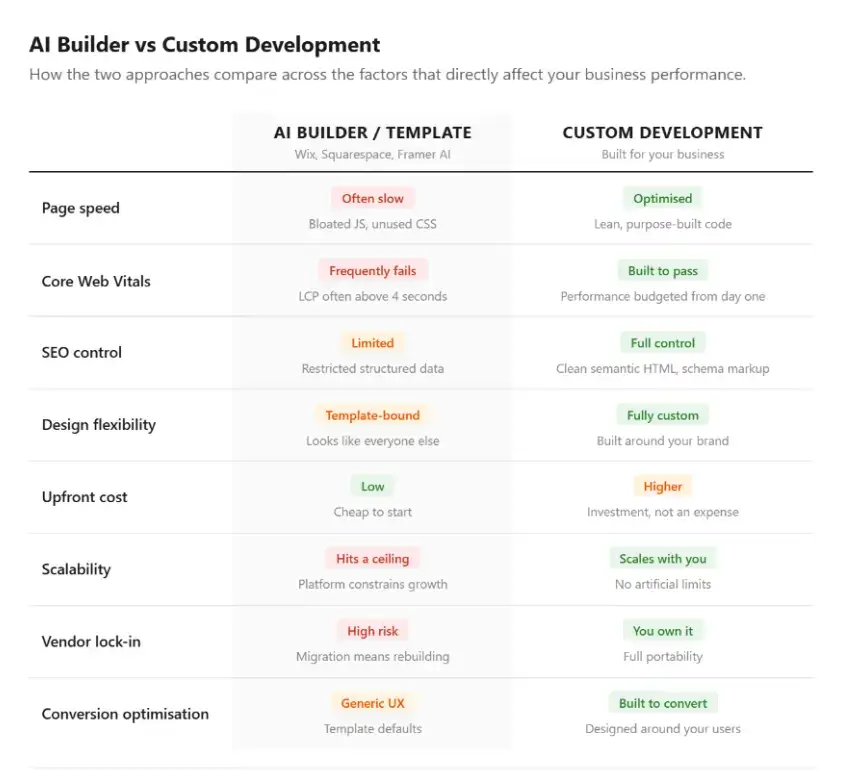
That convenience carries a performance cost: the output is frequently bloated with heavy JavaScript, unused CSS from features you never asked for, and markup that's difficult to optimize.
Largest Contentful Paint well above four seconds is common. That's a direct drag on both conversions and Google rankings.
The SEO Impact of Bloated Code
It's worth understanding how this affects SEO specifically. As explored in this guide on whether website widgets hurt SEO, excess render-blocking code doesn't just slow a page down — it can interfere with how search engines crawl and index your content.
Why Template Websites Struggle to Differentiate Brands
There's a second, quieter problem: sameness. As more businesses pull from the same handful of AI platforms, their sites increasingly look and behave alike. That erodes exactly the kind of differentiation a growing brand needs.
Visitors can't articulate why two template websites feel identical — they just don't remember either of them.
The Long-Term Cost of Vendor Lock-In
User experience issues go far beyond aesthetics.
Research from the Baymard Institute consistently shows that usability friction remains a major contributor to abandoned purchases and lost conversions, reinforcing the importance of designing around user needs rather than template defaults.
And because your site lives on the platform's infrastructure, you inherit vendor lock-in. Migrating away later often means rebuilding from scratch. What felt like a low-cost starting point becomes an expensive ceiling.
Signs Your Website Is Working Against Your Business
Most small business owners don't realise their website is underperforming until they start looking at the numbers — or until a customer mentions they couldn't find something, or gave up trying to book.
Here are the most common signs your website may be holding your business back:
- You're getting traffic but not enquiries or sales — people are finding you but leaving without doing anything
- Customers tell you they "couldn't find" your contact details, pricing, or how to buy
- Your site looks similar to competitors — nothing distinctive stands out
- You haven't updated it in over a year, and it doesn't reflect where your business is now
- It doesn't work well on mobile — and most of your customers are on their phones
- You ran a free speed test (like Google PageSpeed Insights) and scored below 50 on mobile
None of these individually means you need a full redesign. But if several apply at once, your website is likely costing you more than you think — in lost leads, lost sales, and lost trust from first-time visitors.
What Actually Makes a Website Perform Well
Performance Is Designed, Not Generated
Performance is engineered. It doesn't come out of a generator.
Technical Foundations of High-Performing Websites
The sites that load fast and convert well share a few things: lean, purpose-built code instead of a platform's one-size-fits-all output; a performance budget baked in from the first design decision; clean semantic HTML and structured data that search engines can actually read; and an interface designed around how real users decide and convert — not around a template's defaults. Search visibility also depends on ongoing SEO improvements, not just technical performance.
Achieving this level of performance often requires a more tailored approach than many out-of-the-box platforms can provide, particularly when working with solutions such as those offered by Blue Archer.
Why Custom Development Creates More Flexibility
This is where custom web design and development can offer advantages, allowing businesses to optimize their website around specific goals, user journeys, and technical requirements rather than relying entirely on pre-built templates.
How to Diagnose Website Problems Before Redesigning
Not every website problem requires a full redesign. Before committing to anything, it helps to know which issues are actually costing you the most.
Before committing to anything, it helps to know which issues are actually costing you the most, and in niche industries like car sales or repair, a quick audit from a team offering automotive web design services can pinpoint what's actually driving the drop-off.
Start here:
- Run a free speed test. Go to PageSpeed Insights (pagespeed.web.dev) and test your site on mobile. A score below 50 means your site is likely losing visitors before they even see your offer.
- Check your bounce rate. If more than 70% of visitors leave without clicking anything, the problem is usually speed, design clarity, or a mismatch between what they expected and what they found.
- Look at your contact or checkout page. If people are reaching these pages but not completing, the friction is in the final step — and that's often the easiest fix with the biggest return.
- Ask a real customer. Have someone unfamiliar with your business try to find your key information or make a purchase. What they struggle with is your real problem, not what your analytics report.
These four steps cost nothing and will tell you more about what to prioritise than any audit. From there, you can make a more informed decision about whether you need targeted improvements, a platform migration, or a full redesign.
The Website Redesign Process AI Builders Skip
When businesses outgrow template websites, they often discover that the real cost wasn't the monthly subscription — it was never going through a proper website redesign process in the first place.
The same principle applies when organizations rely on outdated systems instead of investing in specialized tools such as procurement analytics software, which provides greater visibility into spending and supports more informed business decisions.
A thorough website redesign process looks like this:
- Audit your current performance — Core Web Vitals, bounce rates, conversion paths, and pages that are actively losing you traffic
- Define business and website goals — Is this a rebrand, a performance fix, a structural overhaul, or all three?
- Map user journeys — Understand how your actual customers navigate and where they drop off
- Create a website redesign strategy — Which pages need to be rebuilt, which content needs refreshing, and what technical debt must be resolved
- Design and prototype — Test with real users before committing to full development
- Build for performance — Set hard targets for load time and Core Web Vitals before writing a line of code
- Test across devices — Especially mobile, where more than half of all web traffic now originates
- Launch, monitor, and optimize — Track rankings, conversions, and speed weekly in the first month
AI-generated websites skip nearly all of these steps. That's not a knock on the tools — it's simply what they're designed to do. The trade-off is that businesses using them inherit a site shaped by defaults rather than decisions.
Website Redesign Checklist Before Relaunch
Use this website redesign checklist to confirm your new site is ready before going live:
- Core Web Vitals pass on both desktop and mobile (target LCP under 2.5 seconds)
- All redirects from old URLs to new URLs are mapped and implemented
- Meta titles and descriptions are written for every key page — no auto-generated defaults
- Structured data (schema markup) is present on product, service, and contact pages
- Internal linking structure is intentional, not inherited from your old layout
- Google Analytics and Search Console are verified and tracking correctly
- Site is submitted to Google Search Console for re-crawling post-launch
- All images are compressed and served in next-gen formats (WebP or AVIF)
- Mobile navigation and tap targets meet accessibility standards
- SSL certificate is active, and all pages load over HTTPS
This website redesign checklist applies whether you're migrating from a template website, refreshing an existing custom site, or rebuilding from scratch.
For e-commerce businesses, it's also worth reviewing your checkout experience post-launch to reduce cart abandonment through design and trust signals
When an AI Website Builder Is Actually the Right Choice
None of this means AI builders are bad. Using the right tool for the stage of your business matters.
If you need a simple landing page to validate an idea, capture emails, or run a short campaign — fast, cheap, and done is entirely appropriate.
The line to watch is the moment your website stops being a placeholder and starts being the thing that has to perform, scale, and set you apart.
At that point, the limitations that didn't matter at launch — speed ceilings, rigid layouts, weak SEO control, and platform lock-in — start showing up in your results. The mistake is rarely starting with a builder. It's staying on long after your business has outgrown it.
That connection between speed, engagement, and business outcomes helps explain why website performance should be treated as a strategic consideration rather than a purely technical one.
Key Takeaways for Your Website Redesign Strategy
Launching a website has never been easier. And that's precisely why it's never been a weaker competitive advantage on its own.
When anyone can generate a site in an afternoon, the edge belongs to businesses whose sites are faster, clearer, and built to convert.
The build is no longer the hard part. Having the right website redesign strategy — one that goes beyond aesthetics and takes performance, SEO, and user experience seriously from the start — is what separates a site that costs money from one that makes it.
One more thing worth saying: building the site is not the finish line. A custom website nobody knows about is just expensive code.
If you're not putting real effort into promoting it — search visibility, paid acquisition, content strategy, re-engagement — you're leaving most of the value on the table. The website redesign process doesn't end at launch. That's actually when the real work starts.
Frequently Asked Questions
Are AI Generated Websites Bad for SEO?
Not inherently, but they make strong SEO harder. AI-generated websites often ship bloated code, slower load times, and limited control over how search engines read your pages — all of which constrain how well you rank. Businesses that prioritise search visibility tend to need more technical control than most AI builders allow.
Is Webflow the Same as Custom Development?
No. Webflow is the most capable of the visual builders and comes closest to custom output for marketing sites. But it still carries platform limits around complex functionality, integrations, and performance optimization. It's a strong middle ground for many businesses — though not a replacement for fully custom code when those capabilities become critical.
How Fast Should My Website Load?
Aim for your main content to appear within 2.5 seconds — the threshold Google considers good. Sites loading in one to two seconds consistently see the highest conversion rates. Every second beyond that measurably increases the number of visitors who leave before they've seen your offer.
How Do I Know if My Website Is Hurting My Business?
Run it through Google PageSpeed Insights — it's free and gives you a real-world performance score along with specific issues to fix. If your mobile score is below 50, or if visitors are consistently leaving without contacting you or buying, those are clear signals worth acting on.
What Is the Typical Website Redesign Process Timeline?
A professional rebuild typically takes 8 to 16 weeks, depending on the scope. Simpler sites with clear content can move faster. The biggest cause of delays is an unclear brief — the more precisely you can describe what you need and who you're building it for, the smoother and faster the process runs.
What's the Difference Between Template Websites and Custom Development?
Template websites use pre-built layouts shared across thousands of sites — fast and cheap to launch, but shaped by the platform's defaults rather than your business. A purpose-built site starts from your specific goals, meaning the design, speed, and experience are built around what your customers actually need. For businesses that have outgrown their starting point, that difference tends to show up directly in leads and sales.
