Getting traffic to your website is one thing. Turning that traffic into real leads is the harder part.
That is where the debate starts. Should you use lead capture forms, or should you use chatbots?
Some marketers still trust forms because they are direct, familiar, and easy to measure. Others prefer chatbots because they feel more conversational and can guide visitors through questions in real time.
Both can work. Both can also flop if they are placed badly, ask too much, or interrupt people at the wrong moment.
The real question is not “which tool is better?” The better question is this:
A visitor on a pricing page may want a fast answer. A visitor on a contact page may just want to send a request and move on. A visitor reading a long service page may need a little guidance before deciding what to do next.
Different intent needs a different path.
Source: ChatGPT
What Are Lead Capture Forms?
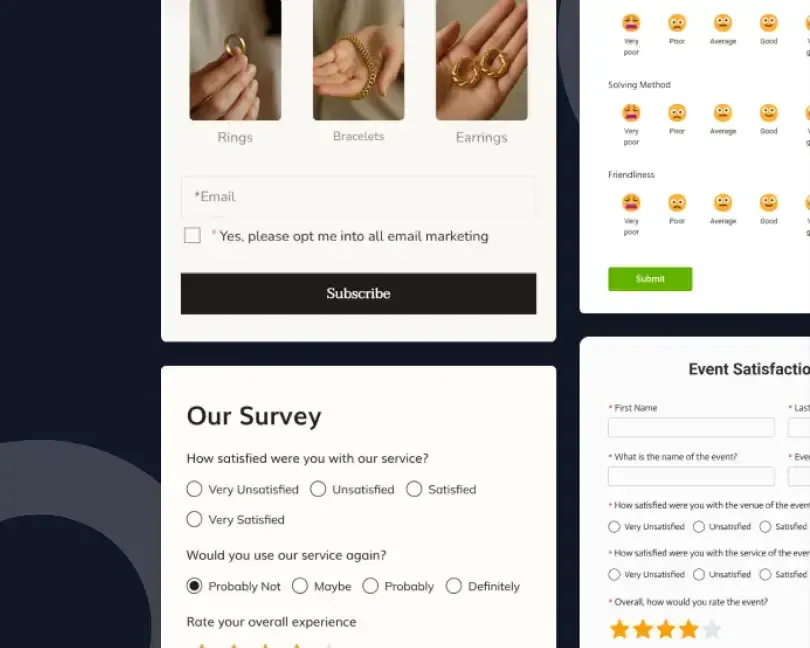
Lead capture forms are website forms that collect visitor details such as name, email, phone number, company name, project needs, budget range, or message.
Common Types of Lead Capture Forms
They are common on:
- Contact pages
- Landing pages
- Quote request pages
- Demo request pages
- Newsletter signup sections
- Event registration pages
- Download pages
- Consultation pages
A form is simple. The visitor enters details, clicks the button, and the business receives the inquiry.
Where Lead Capture Forms Work Best
Web forms help websites collect user information through fields and submit buttons. That is the basic job, but the impact can be much bigger when the form is tied to a clear follow-up process.
Advantages of Lead Capture Forms
Good forms remove guesswork. They tell visitors what to share, what happens next, and why the form is worth filling out.
Common Form Conversion Mistakes
Bad forms feel like homework. Too many required fields. Vague labels. A cold “Submit” button. No clue when someone will reply.
That is where people drop off.
What Are Chatbots?
Chatbots are website tools that communicate with visitors through short message flows. Some answer simple questions. Some qualify leads. Some route visitors to support, sales, or a booking link.
IBM describes a chatbot as software that simulates human conversation with users through text or voice.
How Chatbots Generate Leads
On a website, a chatbot can ask things like:
- What are you looking for today?
- Do you want pricing?
- Are you a new or existing customer?
- Do you want to book a demo?
- What service are you interested in?
- Would you like to speak with someone?
That back-and-forth can be useful when a visitor is unsure.
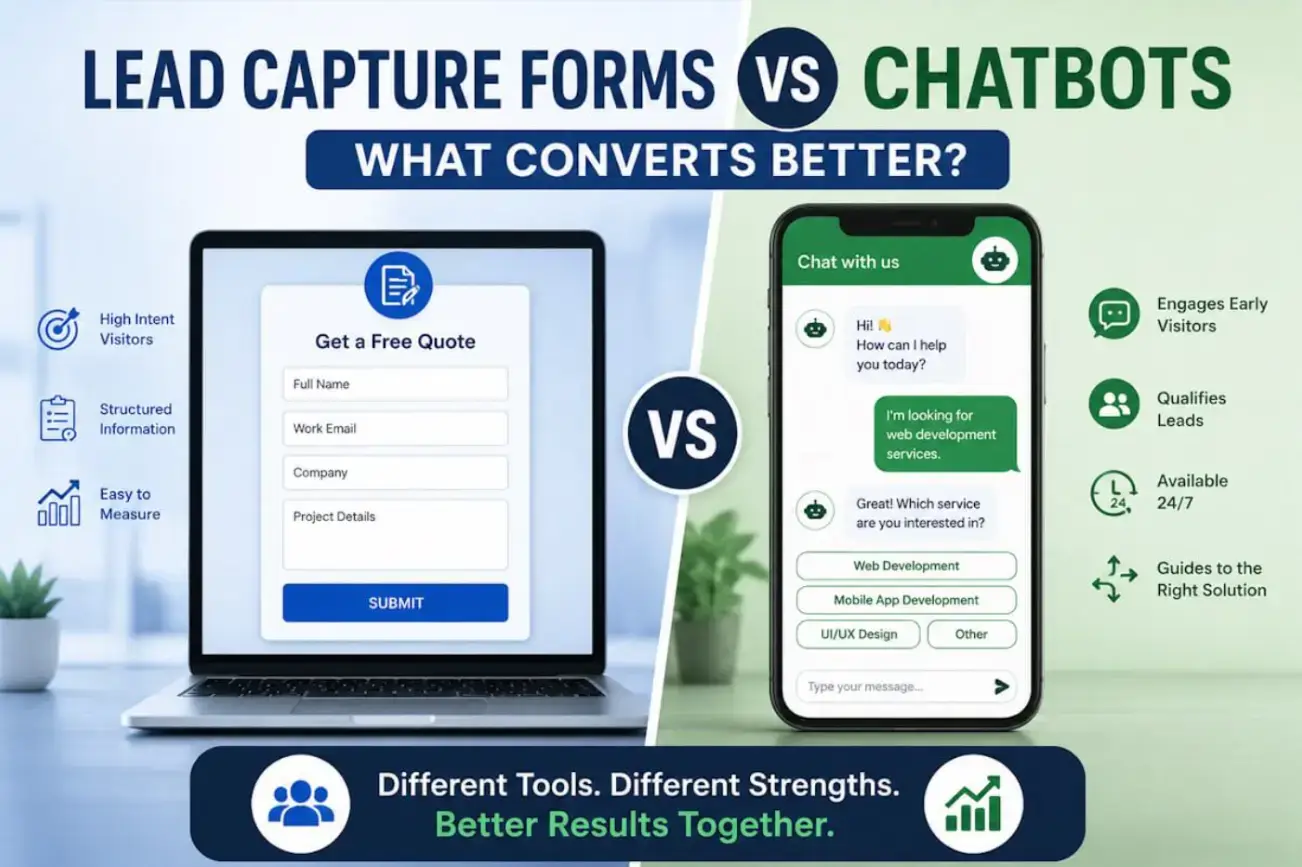
A form waits. A chatbot asks.
That is the big difference.

Source: Unsplash
Our guide on customer support tools also points out how chatbots can support faster responses for common questions. For small teams, this can reduce pressure and keep visitors from leaving when no one is available.
Which Converts Better?
Lead capture forms usually convert better when the visitor has a clear intent.
Chatbots can convert better when the visitor has questions or needs direction.
Simple as that.
A visitor who clicks “Request a Quote” does not need a chatbot asking six questions before showing a form. They are already moving. Give them a clean form and get out of the way.
A visitor reading your service page at night may not be ready to fill out a full request form. A chatbot can help them choose a service, answer one quick question, and then ask for an email.
That is where chatbots earn their keep.
The winner depends on the moment.
When Lead Capture Forms Outperform Chatbots
Lead capture forms work best when the user is ready to act. They are especially useful when the action is clear, and the visitor expects to share details.
Forms often perform well on:
- Contact pages
- Get a quote page
- Book a demo page
- Free trial pages
- Webinar registration pages
- Ebook download pages
- Newsletter signup sections
- Consultation request pages
Forms also work well when your sales team needs structured data.
For example, a software development company may need project type, timeline, budget range, and preferred contact method. A form can collect that information in clean fields that are easy to sort, send to a CRM, or assign to a team member.
A chatbot can collect similar details, but answers may come in different formats. One person may type “soon.” Another may write three paragraphs. Someone else may skip the question.
Forms keep things tighter.
When Chatbots Outperform Forms
Chatbots work best when visitors are interested but not fully ready. They can help when the buying path has a few turns.
Chatbots are useful on:
- Pricing pages
- Product comparison pages
- Service pages
- Help center pages
- SaaS product pages
- E-commerce product pages
- Checkout support pages
- Long landing pages
A visitor may have a small question that blocks the next step.
Something like:
- Do you work with my platform?
- How long does setup take?
- Can I talk to someone today?
- Is there a free plan?
- Do you offer custom development?
- What happens after I request pricing?
A form cannot answer those questions.
A chatbot can.
That small answer may be enough to move the visitor forward.
Lead Quality vs Lead Volume
More submissions do not always mean better results.
That part gets ignored a lot.
A form might bring in 300 leads, but many of them may be weak. A chatbot might bring in 80 leads, but those leads may be more qualified because the bot asked a few intent-based questions first.
Metrics That Actually Matter
So what should you track?
Look at:
- How many leads become sales-qualified
- How many leads reply after the first follow-up
- How many leads book calls
- How many leads match your target customer
- How many leads turn into paying customers
- Which pages produce the best leads
- Which traffic source brings serious buyers
A lead is not valuable just because someone typed an email address.
The real value starts when that person has a need, fits your offer, and is willing to continue the conversation.
The User Experience Difference
Forms feel quicker when they are short. Chatbots feel more natural when the user needs help. That sounds obvious, but it matters.
A short form with three fields can be completed in seconds. Name, email, message. Done.
A chatbot may take longer because it asks one thing at a time. That can feel friendly or slow depending on the visitor’s mood.
For direct intent, forms win. For guided intent, chatbots win.
The mistake is forcing every visitor onto the same path.
Your website should give people choices without cluttering the screen.
Mobile Can Change the Result
Mobile visitors behave differently.
They tap quickly. They scroll fast. They leave fast, too.
Google has linked mobile page speed with user behavior and conversion performance. If a page is slow or awkward, people are less likely to stick around.
That affects both forms and chatbots.
A long form on mobile can feel painful. Small fields, dropdowns, keyboard switching, and error messages can make users quit.
A chatbot may feel easier because it asks one question at a time.
But chatbots can also annoy mobile users if they:
- Cover too much of the screen
- Pop-up too early
- Block page content
- Make the close button hard to find
- Ask for contact details before helping
Mobile needs restraint.
Do less. Make it clear. Let people choose.
Form Length Matters More Than You Think
A form should only ask for what is needed to start the next step.
Not everything your team might want someday.
Baymard Institute’s form field usability research shows that the number and type of form fields can affect how people complete forms.
That lines up with what most users already feel.
Long forms create resistance.
For a newsletter signup, email is enough.
For a quote request, you may need:
- Name
- Company
- Service needed
- Project timeline
- Short message
For a detailed software project, asking for a bit more can make sense. But every field needs to earn its place.
Ask yourself:
Do you need the phone number right now?
Do you need the company size before the first reply?
Do you need a full address for an ebook?
Probably not.
Cut the extra stuff.
Chatbot Flow Matters Too
A chatbot should not feel like a maze.
Start with a simple question.
For example:
“Need help finding the right option?”
Then give buttons.
Buttons are easier than typing, especially on mobile.
A good chatbot flow might look like this:
- Visitor chooses Sales
- Bot asks what they need
- Visitor chooses Website or App Development
- Bot asks for email
- Bot offers a booking link
- Sales team receives the inquiry
That is enough.
Do not make the bot act like a person if it is not one. People notice that. A clear, helpful bot is better than a fake personality.
Also, let people reach a human.
Some visitors do not want to chat with a bot. Fair enough. Give them a path to a person, a form, or an email.
Lead Capture Forms vs Chatbots for B2B Websites
Source: ChatGPT
B2B buying takes time.
People compare vendors. They read service pages. They share links with team members. They come back later. They check pricing. Then they ask questions.
That means B2B websites often need both tools.
Best Uses for Forms in B2B
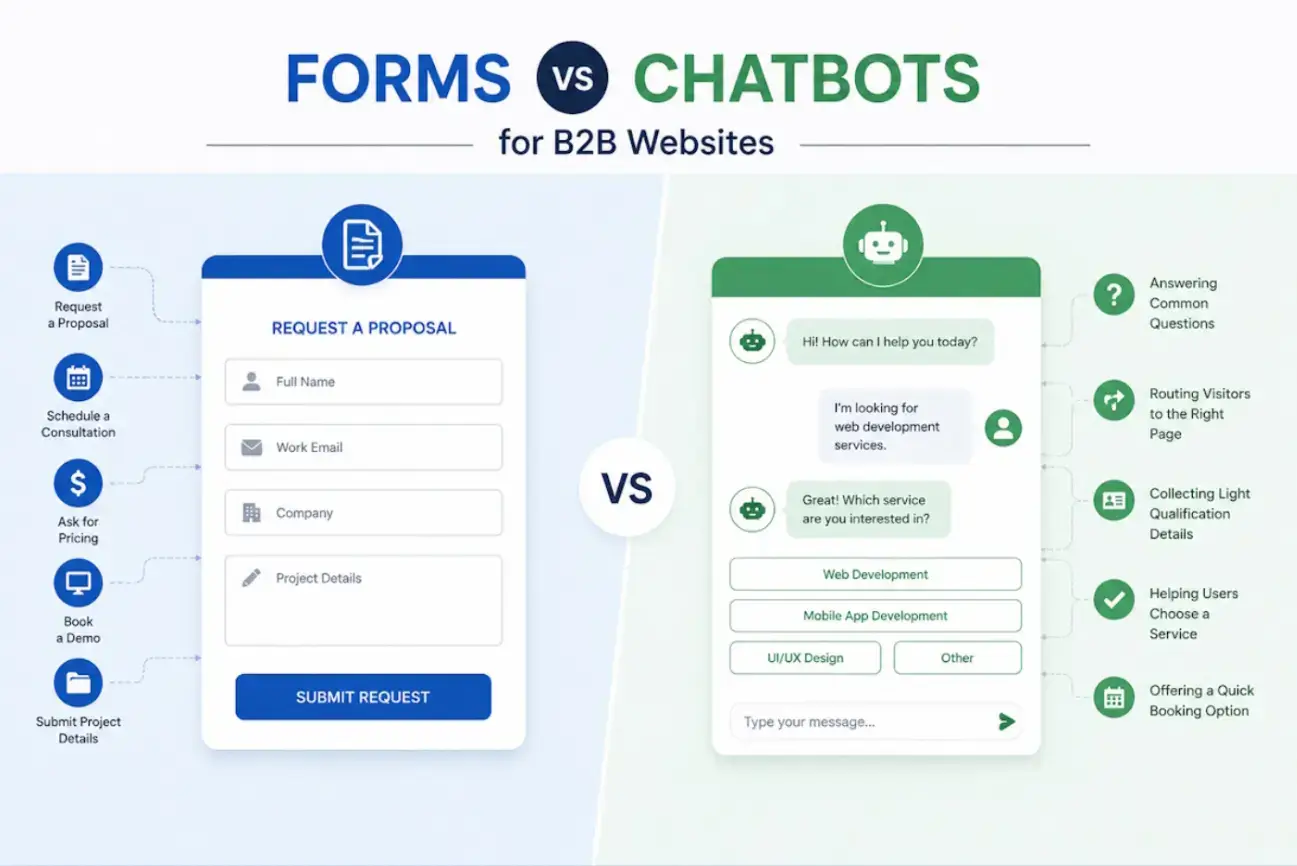
Use forms for high-intent actions like:
- Request a proposal
- Schedule a consultation
- Ask for pricing
- Book a demo
- Submit project details
Best Uses for Chatbots in B2B
Use chatbots for early-stage actions like:
- Answering common questions
- Routing visitors to the right page
- Collecting light qualification details
- Helping users choose a service
- Offering a quick booking option
For businesses planning stronger digital lead journeys, custom website design and development services can help connect forms, chat flows, CRM tools, and landing pages into one cleaner user path.
That matters because leads can get lost when tools are not connected.
A visitor should not have to explain the same thing twice.
Lead Capture Forms vs Chatbots for E-commerce
E-commerce is different. Most shoppers are not trying to book a sales call. They want help making a purchase.
When Forms Work Best in E-commerce
Forms work better for:
- Email signup
- Back-in-stock alerts
- Wholesale inquiries
- Product feedback
- Warranty registration
- Custom order requests
When Chatbots Work Best in E-commerce
Chatbots work well for:
- Shipping questions
- Return policy questions
- Product recommendations
- Discount code help
- Order updates
- Size or product fit questions
A form can help grow your email list or collect a specific request. A chatbot can save a sale when a buyer is stuck. Use each one where it feels natural.
Where to Place Forms and Chatbots on Your Website
Placement can make or break conversions.
A great form in the wrong spot may get ignored. A chatbot that opens too soon may irritate people before they even read the page.
Best Locations for Lead Capture Forms
Good places for forms:
- Above the fold on focused landing pages
- Near the end of the service pages
- On contact pages
- After pricing details
- Inside blog posts with a related offer
- On demo and quote request pages
Best Locations for Chatbots
Good places for chatbots:
- Pricing pages
- Feature pages
- Comparison pages
- Help center pages
- Product pages
- Long service pages
- Checkout pages
The rule is simple.
Put forms where action is expected. Put chatbots where help may be needed.
How to Improve Lead Capture Form Conversions
A form does not need to be fancy. It needs to be clear.
Start with the promise. What does the visitor get after filling it out?
Weak CTA:
“Submit”
Better CTA:
“Get My Quote”
Weak heading:
“Contact Us”
Better heading:
“Tell Us What You Need”
A strong form should:
- Use clear field labels
- Keep required fields low
- Show a helpful confirmation message
- Explain what happens next
- Work well on mobile
- Avoid asking for sensitive details too early
- Use a button that matches the offer
Our guide on how to create a web form that emails is useful for businesses that want form submissions sent directly to the right inbox without extra manual steps.
That small setup can prevent missed inquiries. And missed inquiries are expensive.
How to Improve Chatbot Conversions
A chatbot should help before it asks.
That is the key.
If the first message is “Enter your email,” many users will close it.
A better opening is:
“Need help choosing the right option?”
Then offer a few choices.
Good chatbot practices include:
- Start with one simple question
- Use buttons for common choices
- Keep the flow short
- Ask for contact details after giving value
- Route users based on intent
- Give users a way to speak with a human
- Track where people drop off
Chatbots should reduce effort. Not create a new task.
What Metrics Should You Track?

Source: Pexels
Do not compare forms and chatbots by raw conversion rate only.
That can be misleading.
Track these numbers instead:
- Page view to form start
- Form start to submit
- Chat open to first response
- Chat start to email capture
- Lead-to-call rate
- Call-to-sale rate
- Qualified lead rate
- Average response time
- Cost per qualified lead
- Revenue by lead source
For forms, check the field-level drop-off. If people quit at the phone number field, make it optional or explain why you need it.
For chatbots, check message-level drop-off. If people leave after the third question, the bot may be asking too much too early.
The data will usually show the weak spot.
Common Mistakes to Avoid
A few mistakes hurt both forms and chatbots.
Watch out for these:
- Showing a chatbot and a pop-up form at the same time
- Asking for too much information too early
- Using vague button text
- Hiding the close button on chat widgets
- Making forms hard to complete on mobile
- Sending every lead to the same inbox
- Failing to assign leads to the right person
- Not telling visitors what happens after submission
- Measuring submissions but ignoring lead quality
That last one is big.
A busy inbox can look like progress. It may just be noise.
When You Should Use Forms
Choose lead capture forms when the user already knows what they want.
Forms are usually better when:
- The offer is clear
- The visitor is ready to act
- You need structured data
- The page has a strong intent
- Sales needs specific fields
- The action is simple
- The visitor expects a form
This is why contact pages, demo pages, and quote pages still rely on forms.
They work because they match user intent. No drama. No detour.
When You Should Use Chatbots
Choose chatbots when the visitor may need help before converting.
Chatbots are usually better when:
- The offer is complex
- Visitors often ask repeat questions
- Users need routing
- The page has mixed intent
- Support requests are common
- The buyer journey is not linear
- You want a light qualification before a form
A chatbot is not always there to close the lead.
Sometimes it is there to keep the visitor from leaving. That is still valuable.
When You Should Use Both
Many websites get the best results by using both, but not in a messy way.
A smart setup could look like this:
- A short form on the contact page
- A quote form on service pages
- A chatbot on pricing pages
- A chatbot on support pages
- A newsletter form inside blog posts
- A chatbot prompt for visitors who stay longer than expected
The form captures clear intent. The chatbot helps uncertain visitors find their way. Together, they cover more behavior than either tool can handle alone.
How to Choose the Right Tool for Your Website
Start with your visitor’s mindset.
Ask:
- Why did they land on this page?
- What question might stop them?
- Are they ready to act?
- Do they need help choosing?
- How much information do we need right now?
- What happens after they convert?
Then match the tool to the moment.
If the page has one clear action, use a form. If the page has several possible paths, use a chatbot. If the page gets both ready buyers and early researchers, use both carefully.
Conclusion: The Best Conversion Tool Depends on Intent
Lead capture forms and chatbots are not enemies. They solve different problems.
Forms are great when visitors are ready. Chatbots are useful when visitors need a nudge, an answer, or a route to the right place.
The smartest websites do not force one tool into every situation.
They watch intent.
They reduce friction.
They collect the right details.
They follow up fast.
That is where better conversions come from. Not from the tool alone, but from the way the whole path works after someone shows interest.
So, what should you use?
Use the thing that helps your visitor take the next step with less effort.
That might be a form. That might be a chatbot.
Most of the time, it is both, placed with care.
Frequently Asked Questions
Are lead capture forms better than chatbots?
Lead capture forms are usually better for visitors who already know what they want and are ready to submit details. Chatbots are better when visitors need help before they convert.
Do chatbots get more leads than forms?
Sometimes they do, especially on pages where visitors have questions. But more leads do not always mean better leads. Lead quality matters more than volume.
Should I use a chatbot on my contact page?
A contact page usually works best with a clear form. You can still use a chatbot for quick questions, but it should not block the form.
How many fields should a lead form have?
Use only the fields needed to start the conversation. For simple offers, one or two fields may work. For quote requests, ask for enough detail to reply properly.
Can forms and chatbots work together?
Yes. A chatbot can qualify or guide visitors, then send serious leads to a form or booking page. This setup works well for B2B, SaaS, service businesses, and e-commerce support.
What should I test first?
Test form length, CTA text, chatbot timing, mobile behavior, and follow-up speed. Those changes often reveal where leads are getting stuck.

Author Bio
Arjun S is a business growth strategist at a software development company. Apart from building long-term relationships with customers and boosting business revenue, I am also interested in sharing my knowledge of various technologies through successful blog posts and articles.