
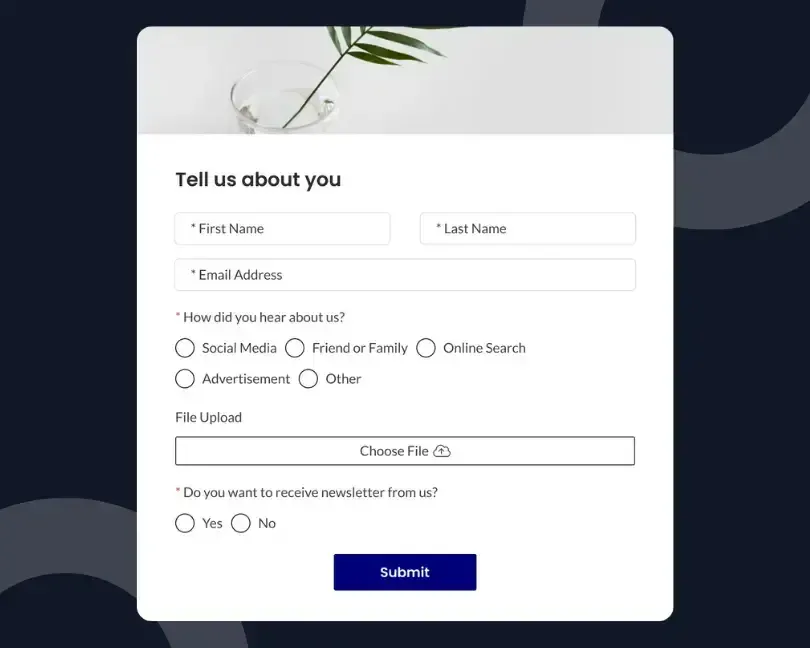
A Wix site owner notices that inquiries have slowed down. Traffic still arrives, visitors still browse service pages, and the contact form still works. The first reaction is often to add another form.
A newsletter box appears in the footer. A quote form is placed on the homepage. A popup asks for an email address. Before long, the site has several ways to submit information, yet the number of useful leads barely changes.
The problem is rarely the number of forms.
Most sites already give visitors enough places to make contact. What they lack is a clear reason to do it.
The form asks too much, appears before the visitor has enough context, uses vague copy, or sends every submission into the same follow-up process.
Better Wix lead capture starts by improving the path around the form rather than adding another box to the page.
A form is only one step in that path. The visitor must first understand the offer, trust the business, feel ready to respond, and know what will happen after submitting. Fix those parts, and one well-placed form can do more work than several competing forms.
Source: Pexels
More Forms Can Create More Decisions
Adding a form creates another decision for the visitor.
Should they join the mailing list, request a quote, book a call, download a guide, or send a general message? Each option may sound reasonable on its own. Together, they can make the next step less clear.
This is especially common on small business websites where one person manages the site, marketing, sales, and customer communication. New campaigns get added over time, but older calls to action remain.
The result is not a lead-capture system. It is a collection of unrelated requests.
If two forms ask the same visitor for the same information in exchange for no clear benefit, one of them is probably unnecessary.
Before adding anything, list every form on the site and answer three questions:
- Who is this form meant for?
- What does the visitor receive or achieve by completing it?
- What happens after the submission?
A form without clear answers to those questions is not helping the visitor make a decision.
Give the Existing Form One Specific Job
Many Wix contact forms are expected to handle every possible inquiry.
The same form may be used by prospective clients, current customers, job applicants, suppliers, and people asking general questions. To accommodate all of them, the form grows longer, and its heading becomes less specific.
“Contact us” tells visitors where they are, but not why completing the form is worth their time.
A stronger form begins with one clear task. For example:
- Request a project estimate
- Ask about product availability
- Book an introductory call
- Get a catering quote
- Check whether a date is available
- Request a service recommendation
The narrower purpose makes the surrounding copy easier to write. It also helps the business ask only for information needed at that stage.
A service business may need a name, email address, service type, and short project summary. It probably does not need a full address, company size, annual budget, phone number, preferred meeting time, and detailed brief before the first reply.
HubSpot recommends asking only for the information needed at the current stage of the buyer journey because every additional field increases the effort required to complete a form.
Instead of collecting every possible detail upfront, businesses should gather enough information to begin a meaningful conversation and request additional details later when they become relevant.
The lesson for Wix site owners is practical. Before seeking more form views, make the current form easier to understand and complete.
Ask for What the Business Can Use Right Now
Every field creates work for the visitor. It also creates an implied question: why does this business need this information?
Some fields are necessary. Others exist because the information might be useful later.
That distinction matters.
A visitor asking whether a photographer is available on a certain date understands why the form asks for the date. Asking for a complete event budget, guest count, venue address, preferred package, phone number, and referral source before confirming availability creates work without giving immediate value.
Use the first form to begin the conversation, not to complete the entire sales process.
Review each field and place it into one of three groups:
- Needed to provide the first useful response
- Helpful later in the conversation
- Collected out of habit
Keep the first group. Move the second group to the follow-up. Remove the third.
Google recommends minimizing the effort required to complete forms, especially on mobile devices, where long or complicated forms can create unnecessary friction. Keeping forms concise and asking only for essential information helps visitors complete tasks more easily.
This does not mean every Wix lead-capture form should contain only an email field. It means every field should earn its place.
Strengthen the Page Before Changing the Form
Visitors rarely complete a form because the form itself is persuasive. They complete it because the page has given them enough confidence to take the next step.
Before editing the form, review the content immediately above it. The visitor should be able to answer:
- What is being offered?
- Who is it for?
- What problem does it address?
- What happens after I submit?
- How soon should I expect a response?
A short expectation statement can remove more uncertainty than another design change.
For example:
Tell us what you are planning. We will review the details and reply within one business day with the next steps.
That sentence explains the task, response time, and outcome. Compare it with “Fill out the form below,” which only describes the action.
Proof also belongs near the decision point. A relevant testimonial, example project, customer count, professional credential, or short privacy note can help visitors feel comfortable sharing their details.
Place proof close enough to support the form, but do not crowd the page with every trust signal the business owns.

Source: Unsplash
Match the Call to Action to the Page
A single form can serve several pages without using the same introduction everywhere.
A visitor on a pricing page is considering cost and fit. A visitor reading a case study is looking for proof. Someone on a service page wants to know whether the business can solve a particular problem.
Sending each person to the same generic contact page loses that context.
Instead, change the call-to-action copy based on the page while keeping the same underlying form.
A web designer might use:
- Service page: Discuss your website project
- Pricing page: Ask which package fits your needs
- Portfolio page: Request a similar project estimate
- About page: Tell us what you are building
The form does not need to multiply. The path into it becomes more relevant.
Wix also allows site owners to create forms, manage submissions, and connect customer information with its business tools. That makes it possible to keep one main capture process while changing how visitors are invited into it.
Use Progressive Questions Instead of One Long Interview
Some businesses need more detail before they can qualify a lead. The mistake is trying to collect all of it at once.
A better sequence collects information in stages.
The first form can ask for the details needed to start:
- Name
- Type of help needed
- Short message
The confirmation page or first email can ask the next set of questions:
- Timeline
- Budget range
- Technical requirements
- Preferred appointment time
This approach respects the level of commitment the visitor has already shown.
That principle applies beyond downloadable content. A visitor making first contact should not be treated like a customer already deep in a sales discussion.
Treat the Confirmation Message as Part of Lead Capture
Many forms end with a generic “Thank you” message.
That confirms the submission, but it wastes a valuable moment. The visitor has just completed an action and is paying attention. They want to know what happens next.
A useful confirmation should answer three points:
- Was the submission received?
- When will someone respond?
- What can the visitor do while waiting?
For a consultant, the next step might be reading a short case study. For a local service provider, it may be reviewing service areas or preparing a few project details. For a course creator, it may be checking the visitor’s inbox for access instructions.
Keep the next action optional. The visitor has already completed the main task.
POWR’s article on turning form leads into sales conversations is useful here because lead capture does not end when a record enters a database. The quality and speed of the response shape whether that record becomes a conversation.
Route Leads by Intent, Not Just Submission Time
A form may be performing well while the follow-up process loses the opportunity.
This often happens when all submissions enter the same inbox with the same subject line. A quote request, customer support issue, partnership inquiry, and general question become indistinguishable until someone opens each message.
Use form fields and notification rules to make the first response easier.
For example, the service selected in a dropdown can appear in the notification subject line. High-intent requests can be routed to the person responsible for sales. Support questions can go to a separate queue. Newsletter signups can enter an email sequence without requiring manual handling.
A fast response with the right context often matters more than adding another lead source.
Measure the Whole Path, Not Only Form Submissions
Counting submissions tells you how many people completed the form. It does not tell you why others stopped or whether the leads were useful.
According to the Baymard Institute, the average documented cart abandonment rate across ecommerce websites remains close to 70%.
While not every abandoned cart results from a lead-capture issue, unnecessary friction during the customer journey can discourage visitors from taking the next step, whether that's submitting a form or completing a purchase.
Review the path in stages:
- Visitors who reached the page
- Visitors who viewed the form
- Visitors who started completing it
- Visitors who submitted it
- Leads who received a response
- Leads who became qualified conversations
- Leads who became customers
A drop between page visits and form views may point to placement or weak page copy. A drop after visitors start the form may suggest too many fields, unclear questions, or a mobile layout problem.
A high number of submissions followed by very few qualified conversations may mean the offer is attracting the wrong people.
POWR’s guide to building a lead-generation funnel without coding explains how the page, offer, form, and follow-up work as one path.
Looking at each stage helps Wix site owners find the real constraint instead of responding to every slowdown by adding another form.

Source: Pexels
One Form, One Path: Where POWR Form Builder Fits
POWR Form Builder can help Wix site owners create and manage a focused capture process without rebuilding the site.
A business can use conditional fields to show follow-up questions only when they are relevant. This keeps the first view shorter while still collecting details needed for certain requests.
Submission notifications can help route inquiries to the right person. Confirmation messages and redirects can give visitors a clear next step after they submit.
Connections with email and business tools can move the lead into the correct follow-up process without relying on manual copying.
The form can also be styled to match the surrounding Wix page, helping it feel like part of the customer journey rather than a separate widget.
The tool is not the strategy. The useful work comes from deciding what the form should do, which information belongs in the first interaction, and how the business will respond.
Fix the Path, Not the Form Count
When lead numbers fall, another form feels like visible progress. It creates a new asset, a new placement, and another item to test.
That does not mean it addresses the real problem.
The better question is not, “Where can we add another form?” It is, “Where does the current lead path lose people?”
The answer may be an unclear offer, an unnecessary field, a generic call to action, a weak confirmation message, or slow follow-up. Each of those can be improved without adding another form to the site.
Start with one page and one lead action. Make the value clear. Remove questions the business does not need yet. Explain the next step. Check that the form works well on mobile. Then follow the lead through the response process.
A Wix site does not capture more leads by asking more often. It captures more leads by making the existing request easier to understand, easier to complete, and more useful after the visitor responds.

Author Bio
Arjun is a business growth strategist at WeblineIndia, a software development company. Apart from building long-term relationships with customers and boosting business revenue, he is also interested in sharing his knowledge of various technologies through successful blog posts and articles.