


The Marketing tab in your Shopify admin is now called Growth, and inside it there is a card offering to plan and run your marketing for you.
Campaign Autopilot will read your catalog, pick the products, write the emails, build the ads, and shift the budget between Meta, Microsoft, and Shop Campaigns as results come in.
Shopify's launch post describes it as a virtual marketing agency working inside guardrails you set. The plain translation is that you've just hired someone capable and handed them the company card.
That is not an argument against hiring. A good new hire with a card is how small stores grow. It is an argument for writing the limit on the card before the first purchase.
Two facts about Autopilot make that limit worth thinking through. It allocates budget across channels on its own once tactics are approved. And the Microsoft side is still labelled early access, so the controls can change under you.
This piece is the setup routine. It covers what the switches do, what to review before the first campaign, which rules to set first, how to read the Microsoft channel, how to compare channels afterwards, and a five-check habit for the approve button.
What Can Autopilot Do Without Asking You?
Nothing that spends money, unless you tell it to. The Help Center's setup page puts the permission choice plainly: you decide whether Autopilot can create email and ad campaigns on its own, or needs your approval first. With approval on, every tactic lands in Pending actions, and you approve or dismiss it there.
The connected channels are Shopify Messaging, Shop Campaigns, Meta Ads for Advantage+ campaigns, and Microsoft Advertising for Performance Max, and Autopilot allocates budget across the connected channels based on performance.
The guardrails are a monthly budget, a target return on ad spend, target regions, and target languages. Two of those are softer than the labels suggest.
The remedy is to contact Shopify Support and request a credit for the difference. The second soft spot is timing: changes to guardrails take effect on future recommendations and don't affect tactics that are already running.
Once a tactic exists, the management page sets out what you can touch. The customer segment a tactic targets can't be changed.
Subject lines and product selections can be regenerated but not written by hand. Email body content, colors, and branding can be customized.
Stopping a tactic pauses the ad campaign on its platform or deactivates the email automation without touching your other tactics.
Pausing Autopilot itself stops all running tactics immediately, pauses active ad campaigns, and cancels scheduled email automations.
And on the requirements page, Shopify lists what Autopilot doesn't change at all: your product prices, descriptions, store settings, and any manual campaigns or one-off emails you built outside it.
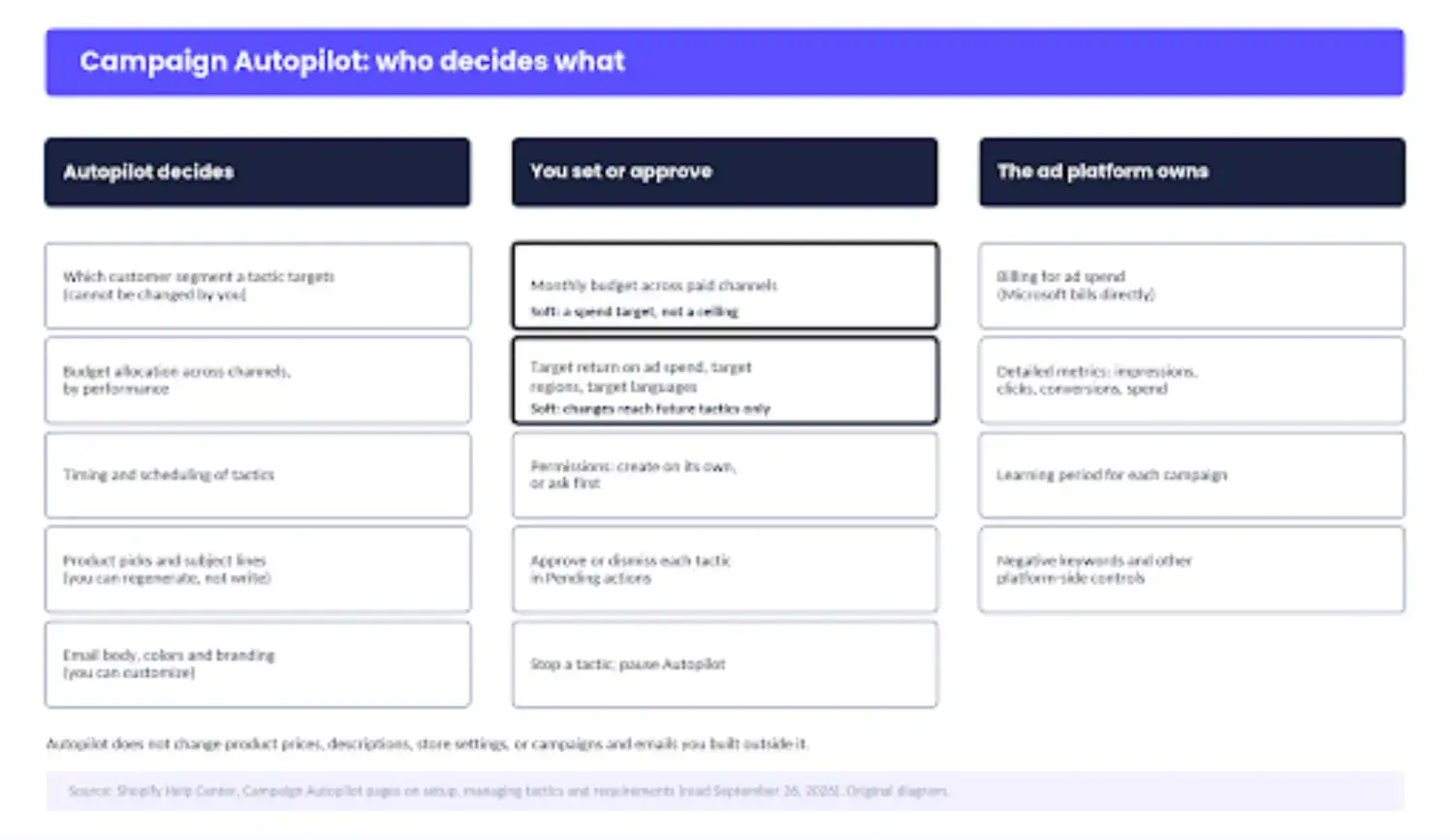
Where the authority sits, from Shopify's Help Center. The two marked cells are the controls that read firmer than they are.
Review the Product Data Before Autopilot Does
The campaigns are built from what your catalog already says. The launch post is specific that Autopilot uses your existing product images and catalog and is not generating AI creative on your behalf.
The requirements page lists the data it reads: active product titles, descriptions, images, prices and inventory status, plus customer segments, order history and your existing campaigns. On the Microsoft side, Performance Max assembles ads from assets and audience signals rather than keywords.
Microsoft's own product page says advertisers should still review assets for accuracy, brand fit, compliance, and landing-page relevance. So the first guardrail isn't a setting. It's a fifteen-minute pass over the products Autopilot is most likely to pick.
The checks are the ones an AI shopping agent needs from a product page: a title that says what the thing is, a price and availability that agree everywhere, images that survive being cropped, variants named so a shopper and a model both understand them.
Take an illustrative example: a canvas tote listed as "The Weekender". The description mentions the 15-litre capacity in the third paragraph, the primary image is a lifestyle photo, and the variants are named "Option A" and "Option B" for navy and sand. Autopilot will happily build a Microsoft ad from that listing.
The headline will be "The Weekender" and the image will crop to a beach.
A shopper who clicks spends a moment working out whether they bought a bag or a holiday. Rename the product to what it is, move the capacity into the first line, set a product-on-white image as primary, and name the variants by color.
That's the whole audit. Repeat it for the ten products that carry your revenue, and it's cheaper than paying for a click that lands on a riddle.
Set the Spend Rules Before the First Tactic
Set the budget first, and set it at the number the store can lose in a bad month rather than the number you hope to spend.
Set target return on ad spend next, and expect to miss it early. The setup page says that as ad platforms learn how to find customers for your business, actual values can align more closely with your targets, which is a polite way of saying the first weeks may not.
Restrict regions and languages to where you ship and the languages your store speaks. Targeting a country you don't deliver to is wasted spend that also generates support tickets.
Leave permissions on approval-first. Two clean review cycles are the earliest I'd consider letting Autopilot create campaigns on its own, and a store that's never run Performance Max should wait longer.
Edit guardrails before you approve, not after. Because changes apply only to future recommendations, a tactic approved under the old settings keeps running under them.
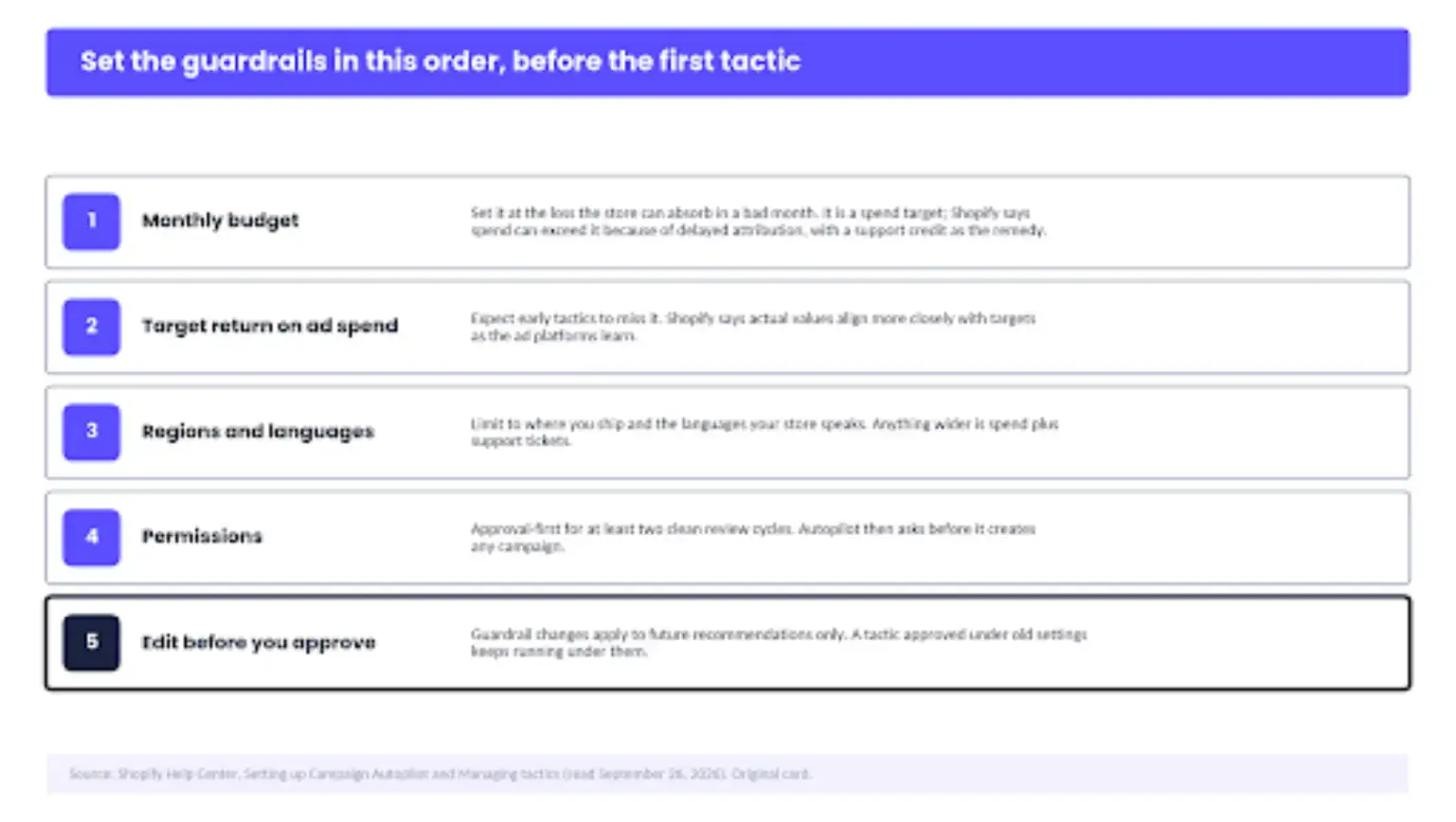
The settings in the order to make them, with the reason beside each.
Review Microsoft Like Any Other Channel
Microsoft Advertising was added to Autopilot on August 4, and it is the channel most merchants will be running for the first time.
Shopify's Microsoft page is worth reading before the first tactic is approved, because the mechanics differ from Meta in four ways that matter to your receipts.
Autopilot provides recommendations for Performance Max campaigns and manages them separately from any other marketing you run on Microsoft. Microsoft bills the ad spend directly, so it doesn't appear on your Shopify bill.
Detailed metrics such as impressions, clicks, conversions, and spend live in Microsoft Advertising reporting, not in Shopify. And if you edit an Autopilot campaign directly in Microsoft Advertising, Autopilot might overwrite your changes on the next update.
Turning Autopilot off pauses those campaigns, and you resume them in Microsoft Advertising if you want them back.
Performance Max is also a different kind of campaign. Microsoft's page says it can reach audiences across Microsoft properties, including Copilot, and that it doesn't use keywords the way search campaigns do; negative keywords are the control you have over where ads shouldn't appear.
So one of the surfaces your ad can land on is an AI assistant's answer. How that placement is documented to work is worth knowing.
In August, eyeo ran a small number of test sessions on Copilot and published the observations, with the caveat that they are qualitative and not a representative sample.
The unit was labelled "Microsoft Advertising" with a "sponsored" box, the ad was matched to the prompt context rather than to the answer, and the answer sometimes recommended a competitor of the sponsored brand.
That's a description of how the ad product places ads, not a claim about anyone's intent, and it's the reason a Copilot impression deserves the same look as a Meta impression before you decide what it was worth.
Shoppers are already alert to the surface: Adblock Plus research puts the share of US adults concerned about AI assistants using their conversation data to target ads at 72%, with 44% very concerned.
Does that make Microsoft a bad channel? No. It makes Microsoft a channel you review instead of trusting the summary. In practice, that means four checks. The spend is billed by Microsoft, and the conversion detail sits in Microsoft's reports.
Negative keywords are yours to decide, and pausing Autopilot pauses the campaign. Autopilot also won't change the Meta or Microsoft campaigns you already run. Its campaigns are separate, and it doesn't modify your own, but an edit you make inside an Autopilot campaign on the platform may not survive.
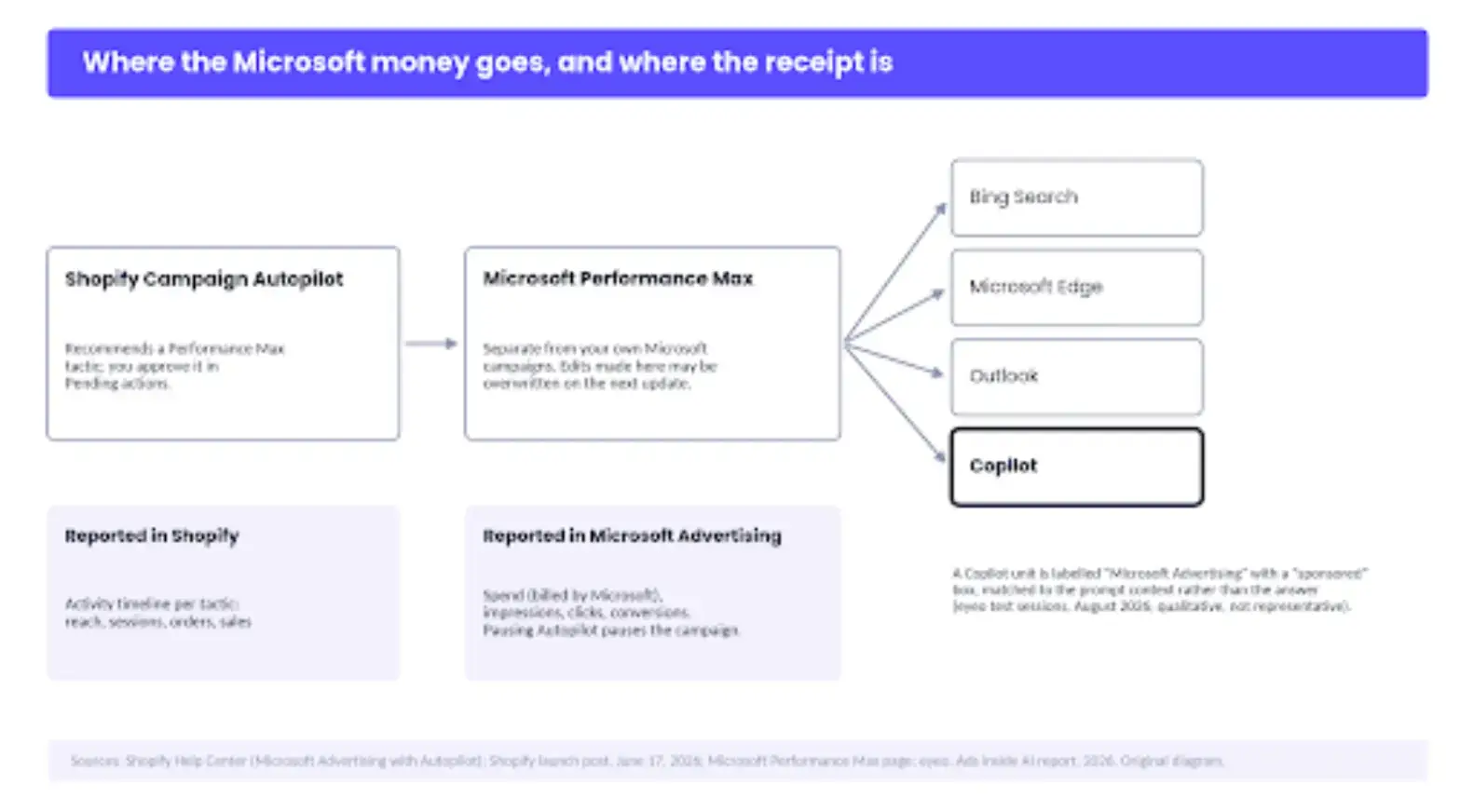
Where the money goes and where the receipt is.
Compare Channels on the Same Receipt
Autopilot will tell you how it's doing. The Activity timeline shows reach, sessions, orders, and sales per tactic, and that summary is useful for spotting a tactic that did nothing.
The summary is not the receipt, because the spend isn't on it. Meta's spend is on Meta, Microsoft's is on Microsoft, and the orders are in Shopify, so the comparison that decides where budget should go has to be assembled by you, on one page, on the same terms for every channel.
Either way, the reallocation is a judgment about relative performance, and the merchant should be able to make the same judgment from the same numbers. The method is dull, and that is the point.
Fix one date window. Use one conversion definition, and make it Shopify's order count, because every channel's own dashboard will claim more. Put platform spend beside Shopify orders and sales for each channel, work out cost per order, and write the next review date on the same line.
The numbers are made up to show the shape. What they show is why the window matters: both Shopify and Microsoft say campaigns need a learning period, and Microsoft's page adds that frequent budget, bid, goal, or asset changes can reset learning or make performance harder to evaluate.
A channel judged on its first good week will be moved into and out of favor on noise. Judge on the review date, and only then decide whether Autopilot's allocation matches your own.
Include the email tactics in the same table even though they cost nothing to send.
Autopilot recommends abandoned-cart and abandoned-browse automations, and the thing to review before approval is the default the tactic ships with, starting with whether the abandoned-cart sequence should open with a discount at all.
An email that recovers twelve orders is a good tactic. An email that gives twelve customers ten percent off orders they would have completed anyway is a cost that never appears on any receipt.
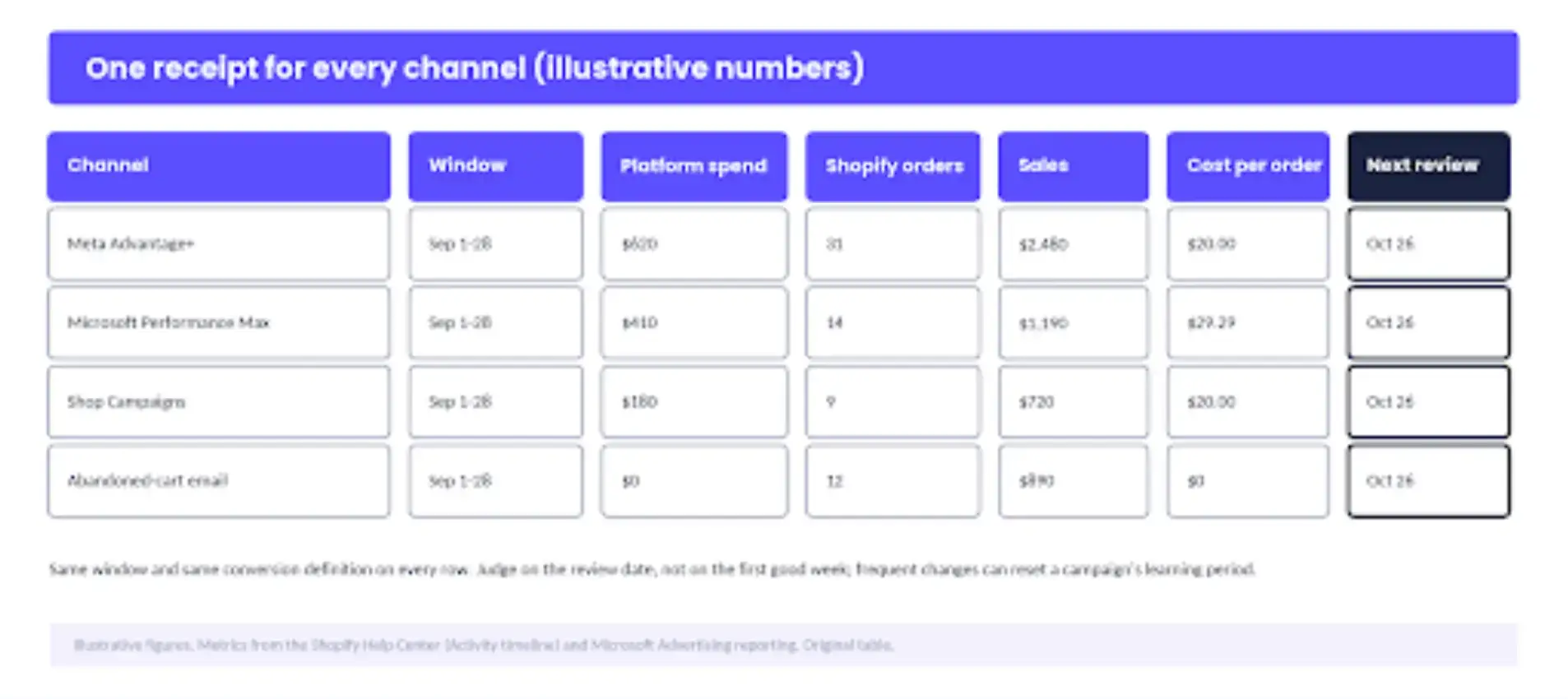
One receipt for every channel. The figures are illustrative; the columns are the point.
Five Checks to Run Before You Approve a Tactic
- Open the tactic and read what Shopify shows: the channel, the audience segment, the budget, and the schedule. The segment can't be changed later, so if it's wrong, dismiss the tactic rather than approve and hope.
- Check the products it selected against your catalog review. If it picked the wrong ones, regenerate; you can't hand-pick them, so say so to whoever asks why the bestseller isn't in the ad.
- Confirm the region, language, and ROAS guardrails were set before this tactic was generated. If you changed them afterwards, the tactic in front of you was built under the old rules.
- For a Microsoft or Meta tactic, confirm the platform account has a payment method and that you know where its detailed report lives, because that's where the spend will be.
- Write the review date and the stop condition on the calendar before you click Approve. A tactic with no review date runs until someone notices.
Amazon's Sponsored Products Prompts spend before a seller reviews them, which is why POWR's July piece found that control there is reactive, not preventive.
Autopilot's Pending actions list is the preventive version of the same job, and it only works if the five minutes above happen before the click.
Give Autopilot the Card, Keep the Statement
Give the new hire the card, then keep two things for yourself: the guardrails you set before the first tactic and the receipt you read after it. Everything in between is the automation's job. It's welcome to it.
Sachin Malhotra, Shopify's director of product for merchant marketing, put it this way to Modern Retail in June: "We are explaining to the merchant what actions we are taking and why." He added that transparency is one of the fundamental things Shopify believes in.
That's a fair standard, and it's the one this piece has applied: the explanations are there, on the tactic card and in the Help Center, and they are enough to act on if you've read them before the money moves.
So keep permissions on approval-first until two review cycles have passed with nothing to dismiss, then decide. And handle the part of paid traffic Autopilot can't control. It decides who arrives; your store decides what happens next, and most paid visitors leave without buying.
Give the visitor Autopilot paid for a reason to leave an address before they go, with POWR Email Subscription Popup for Shopify, so the second visit doesn't cost a second click.
Let Autopilot carry the card. The bill still comes to you, so read it before you raise the limit.